1. Product Overview
The Smart Aquarium PH Meter YY-W9909 is a professional water quality tester designed for various aquatic environments such as fish ponds, aquariums, hydroponics, and marine aquaculture. It provides accurate and reliable measurements for pH, TDS, EC, Salinity, SG, and Temperature. Featuring Bluetooth and Wi-Fi connectivity, it allows for real-time data monitoring, historical data analysis, and customizable alarm settings via a dedicated mobile application.

Figure 1: Smart Aquarium PH Meter YY-W9909 with mobile app display.
2. Key Features
- Accurate Water Quality Testing: Measures pH, TDS, EC, Salinity, SG, and Temperature with high precision.
- Wireless Monitoring: Built-in Bluetooth and Wi-Fi for real-time data viewing, saving, downloading, and sharing via a mobile app (Tuya APP).
- User-Friendly Design: Wall-mountable with a suction cup for convenient placement.
- High-Precision Probe: Corrosion-resistant, long-lasting, and provides stable data.
- Customizable Settings: Set alarm values and recording frequency.
- Wide Application: Suitable for aquariums, fish tanks, pools, drinking water, laboratories, and fish ponds.
3. Package Contents
Upon opening the package, please verify that all the following items are included:
- 1 x YY-W9909 Smart PH Meter
- 1 x English Instruction Manual
- 1 x Power Adapter
- 1 x Fixed Product Accessory Kit (for wall mounting)
4. Specifications
| Parameter | Measurement Range |
|---|---|
| pH | 0.00 - 14.00 pH |
| TDS | 0 - 19990 ppm; 0 - 199.0 ppt |
| EC | 0 - 19000 us/cm; 0 - 199.0 ms/cm |
| SALT | 0 - 199.9 ppt; 0% - 20% |
| SG | 0.990 - 1.400 |
| Temperature | 0°C - 50.0°C (32°F - 122°F) |
| Connectivity | Wi-Fi, Bluetooth |
| Power Source | AC |
| Dimensions | 2.54 x 2.54 x 2.54 cm |
| Weight | 600 g |

Figure 2: Detailed measuring ranges for each parameter.
5. Setup Guide
- Unpack the Device: Carefully remove all components from the packaging.
- Connect Probes: Connect the pH and other sensor probes to their respective ports on the main unit. Ensure connections are secure.
- Power Connection: Connect the provided power adapter to the device and then to a suitable AC power outlet.
- Mounting (Optional): Use the accessory kit and suction cup to mount the main unit on a wall or side of an aquarium, ensuring it is kept dry. The main unit is not waterproof.
- Probe Placement: Submerge the sensor probes into the water you wish to monitor. Ensure the probes are fully immersed but the main unit remains dry.
- App Installation: Download the Tuya Smart app from your mobile device's app store (available for iOS and Android).
- Device Pairing: Open the Tuya app, register or log in, and follow the in-app instructions to add the YY-W9909 device. This typically involves enabling Bluetooth and Wi-Fi on your phone and following the device's pairing mode instructions.
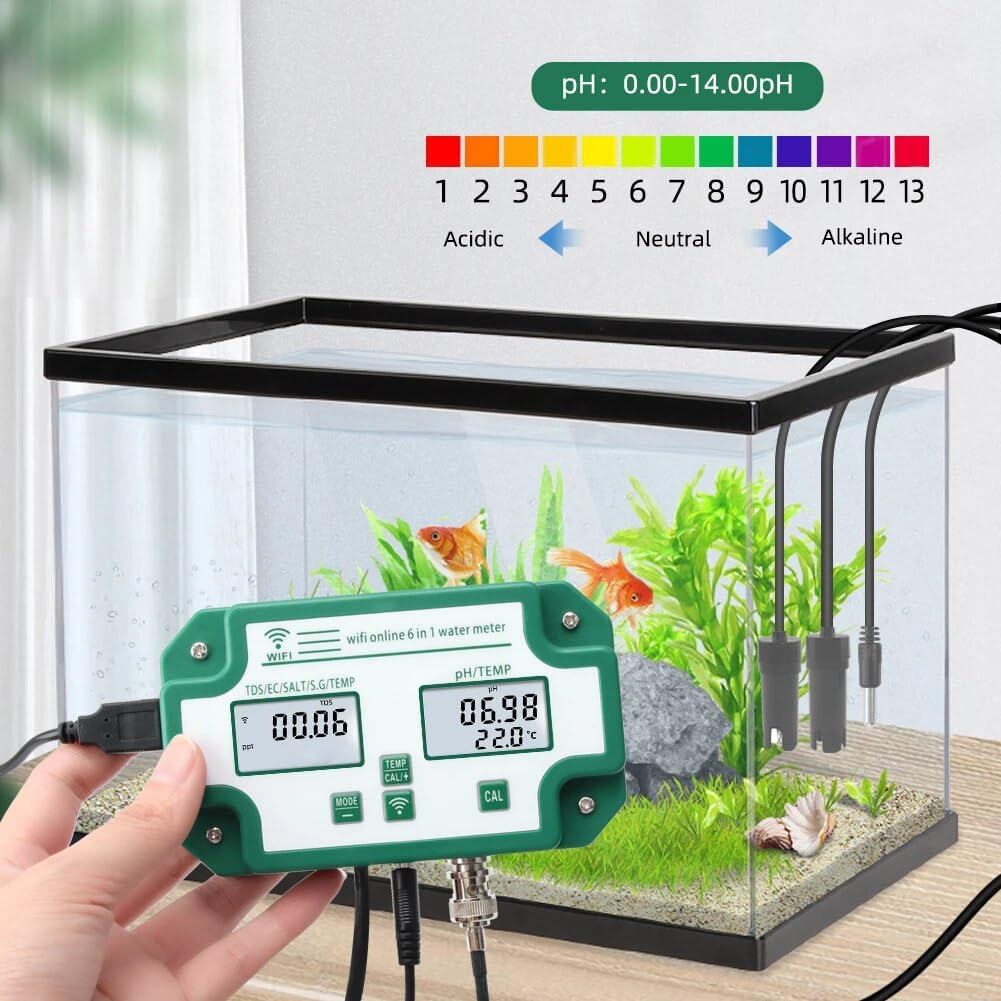
Figure 3: Proper setup of the PH meter with probes in water.

Figure 4: Important reminder: The main unit is not waterproof and must be kept dry.
6. Operating Instructions
6.1. Real-time Monitoring
Once the device is set up and connected to the Tuya app, you can view real-time water quality data directly on the device's display and within the app. The app provides a comprehensive overview of all measured parameters.

Figure 5: Real-time data display and historical data access via the mobile app.
6.2. Data Logging and Analysis
The app automatically records data over time, allowing you to view daily, weekly, and monthly trends. This historical data is crucial for understanding water quality changes and formulating appropriate solutions for your aquatic environment.
6.3. Alarm Settings
You can set custom alarm thresholds for each parameter within the Tuya app. If a measurement falls outside your defined safe range, the app will send a notification reminder to your mobile device.

Figure 6: Configuring alarm settings in the Tuya app.
6.4. Calibration
Regular calibration of the pH and other probes is essential for maintaining accuracy. Refer to the detailed calibration instructions within the Tuya app or the included English instruction manual for specific steps using calibration solutions (not included).
7. Maintenance
- Probe Cleaning: Regularly clean the sensor probes to prevent buildup that can affect accuracy. Use distilled water or a mild cleaning solution recommended for pH probes.
- Storage: When not in use for extended periods, store the probes in a suitable storage solution (e.g., KCL solution for pH probes) to keep them hydrated and extend their lifespan.
- Main Unit Care: Keep the main unit dry at all times. Avoid exposing it to water or high humidity. Clean the exterior with a soft, dry cloth.
- Calibration: Perform calibration regularly as per the operating instructions to ensure accurate readings.
8. Troubleshooting
| Problem | Possible Cause | Solution |
|---|---|---|
| Inaccurate readings | Probes are dirty or need calibration. | Clean probes and perform calibration. |
| Device not connecting to Wi-Fi/Bluetooth | Incorrect pairing procedure, Wi-Fi signal weak, or app issue. | Ensure Wi-Fi is 2.4GHz, restart device and router, re-attempt pairing in app. |
| No display on main unit | No power or faulty power adapter. | Check power connection, try a different outlet, ensure adapter is working. |
| App not receiving data | Device not connected, app permissions, or internet connectivity issue. | Verify device connection in app, check app permissions for network access, ensure stable internet connection. |
9. Warranty and Support
For warranty information and technical support, please refer to the contact details provided in the original product packaging or contact the seller directly. Keep your purchase receipt as proof of purchase for any warranty claims.
Manufacturer: JOJIDE
Model Number: 1005006352233531