1. Introduction
This manual provides instructions for the operation and maintenance of your RUIZU X02 Ultra Slim MP3 Music Player. Please read this manual thoroughly before using the device to ensure proper functionality and to maximize your user experience. The RUIZU X02 is a portable digital music player designed for audio playback, FM radio, voice recording, video viewing, and text reading.
2. Package Contents
Verify that all items listed below are present in your package:
- RUIZU X02 MP3 Player
- User Manual
- Earphones
- USB Charging/Data Cable
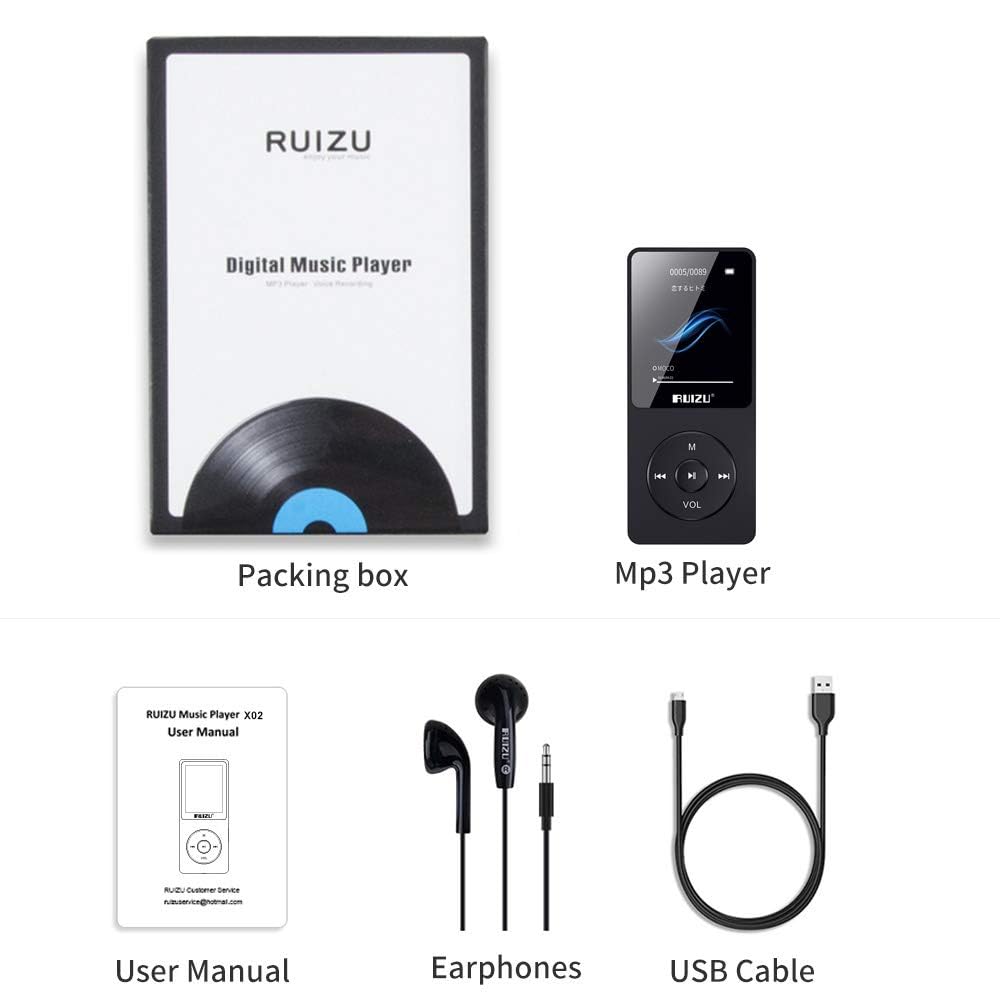
Image: Contents of the RUIZU X02 MP3 Player package, showing the player, user manual, earphones, and a USB cable.
3. Product Overview
The RUIZU X02 is an ultra-slim and lightweight device, weighing approximately 30g, designed for portability.

Image: The RUIZU X02 MP3 Player held in a hand, illustrating its compact and lightweight design.
Device Layout
Familiarize yourself with the buttons and ports on your device:
- Display Screen: Shows menus, playback information, and other content.
- M Button: Menu/Return button.
- Play/Pause Button: Center button for playback control and selection.
- Previous/Rewind Button: Navigate backward or rewind during playback.
- Next/Fast Forward Button: Navigate forward or fast forward during playback.
- VOL Button: Volume control.
- Headphone Jack: 3.5mm port for earphones.
- USB Port: For charging and data transfer.
- Power Switch: ON/OFF slider.
- Micro SD Card Slot: For expandable storage.
4. Setup
4.1 Charging the Device
Before first use, fully charge the MP3 player. A full charge typically takes 2-3 hours.
- Connect the small end of the USB cable to the player's USB port.
- Connect the large end of the USB cable to a USB power adapter (not included) or a computer's USB port.
- The battery indicator on the screen will show charging status.
- Once fully charged, disconnect the USB cable.
The device offers up to 80 hours of playback on a single charge.

Image: The RUIZU X02 MP3 Player screen indicating extended battery life of up to 80 hours.
4.2 Power On/Off
- To power on, slide the power switch to the "ON" position.
- To power off, slide the power switch to the "OFF" position.
4.3 Inserting a Micro SD Card
The RUIZU X02 has 8GB of built-in memory and supports expandable storage up to 128GB via a Micro SD card.
- Locate the Micro SD card slot on the side of the player.
- Gently insert the Micro SD card into the slot until it clicks into place. Ensure the card is oriented correctly.
- To remove, gently push the card inward until it springs out.

Image: The RUIZU X02 MP3 Player shown with a Micro SD card, indicating its expandable storage capability.
5. Basic Operation
5.1 Navigation
- Use the Previous and Next buttons to scroll through menu options.
- Press the Play/Pause button (center) to select an option or confirm an action.
- Press the M button to go back to the previous menu or to access context-sensitive options during playback.
5.2 Music Playback
- From the main menu, select "Music".
- Browse your music by Artist, Album, Songs, or Playlists.
- Select a song and press the Play/Pause button to begin playback.
- During playback:
- Press Play/Pause to pause or resume.
- Press Previous or Next to skip tracks.
- Long press Previous or Next to rewind or fast forward.
The RUIZU X02 supports multiple audio formats including MP3, WMA, APE, WAV, and FLAC.
5.3 Volume Adjustment
To adjust the volume:
- Long press the VOL button to activate volume adjustment mode.
- While in volume adjustment mode, press the Previous button to decrease volume or the Next button to increase volume.
5.4 Screen Lock/Unlock
To prevent accidental button presses:
- Long press the M button to lock or unlock the screen.
5.5 Resume Playback
The player is designed to resume music playback from where it was last stopped, even after being turned off and on again.

Image: Visual guide for screen lock/unlock (long press M), resuming playback (automatic), and volume adjustment (long press VOL then use Previous/Next).
6. Advanced Features
6.1 FM Radio
The RUIZU X02 includes a built-in FM radio tuner.
- Ensure earphones are connected, as they act as the antenna.
- From the main menu, select "FM Radio".
- Use the menu options to auto-scan for stations or manually tune.
- Press Previous or Next to switch between saved stations or adjust frequency.

Image: The RUIZU X02 MP3 Player screen showing the FM Radio interface with frequency indicators.
6.2 Voice Recorder
Record audio using the built-in microphone.
- From the main menu, select "Recorder".
- Choose "Start Voice Recording" to begin.
- Press Play/Pause to pause/resume recording.
- Press M to save the recording and exit.
6.3 Video Playback
The device supports video playback. Ensure video files are in a compatible format (e.g., AMV) and resolution for the 1.8-inch LCD screen.
- From the main menu, select "Video".
- Browse and select your video file.
- Press Play/Pause to start playback.
6.4 Text Reading
View text files (e.g., TXT format) on the device.
- From the main menu, select "E-book" or "Text".
- Browse and select your text file.
- Use the navigation buttons to scroll through the text.
7. Connecting to a Computer
To transfer music, videos, text files, or other data to your RUIZU X02:
- Ensure the player is powered on.
- Connect the player to your computer using the provided USB cable.
- The player will appear as a removable disk drive on your computer.
- Drag and drop files into the appropriate folders on the player (e.g., "Music" for audio files).
- Once file transfer is complete, safely eject the removable disk from your computer before disconnecting the USB cable.
8. Maintenance
- Cleaning: Use a soft, dry cloth to clean the device. Avoid liquid cleaners or abrasive materials.
- Storage: Store the player in a cool, dry place away from direct sunlight and extreme temperatures.
- Battery Care: To prolong battery life, avoid fully discharging the battery frequently. Charge the device regularly, even if not in use for extended periods.
- Water Exposure: This device is not waterproof. Avoid exposure to water or high humidity.
9. Troubleshooting
| Problem | Solution |
|---|---|
| Device does not power on. | Ensure the battery is charged. Connect to a power source and try again. Check the power switch is in the "ON" position. |
| Cannot transfer files to the player. | Ensure the USB cable is securely connected to both the player and the computer. Try a different USB port or cable. Ensure the player is recognized as a removable disk. |
| No sound from earphones. | Check if earphones are properly plugged in. Ensure volume is not set to zero or muted. Try a different pair of earphones to rule out faulty earphones. |
| Screen is unresponsive or frozen. | Try turning the device off and then on again using the power switch. If unresponsive, allow the battery to fully discharge and then recharge. |
| FM Radio not working. | Ensure earphones are plugged in, as they serve as the antenna. Try auto-scanning for stations again. |
10. Specifications
- Model: X02
- Manufacturer: RUIZU
- Dimensions: 0.79 x 3.71 x 8.99 cm
- Weight: Approximately 30 g
- Display: 1.8-inch LCD
- Internal Storage: 8 GB
- Expandable Storage: Up to 128 GB via Micro SD card
- Battery: 420mAh Lithium Polymer
- Playback Time: Up to 80 hours (audio)
- Charging Time: 2-3 hours
- Supported Audio Formats: MP3, WMA, APE, WAV, FLAC, M4A, DRM, ACELP, OGG
- Special Features: FM Radio, Voice Recorder, Video Playback, Text Reading
- Connectivity: USB (Note: Does not support Bluetooth function)
11. Warranty and Support
This product comes with a 7-day warranty from the date of purchase. Please retain your proof of purchase for warranty claims.
For technical support or warranty inquiries, please refer to the contact information provided with your purchase documentation or visit the official RUIZU support website.


