1. Product Overview
The Piluyaa 4K Camera Glasses XV16-128G are advanced smart sunglasses designed for capturing high-quality video and photos during outdoor activities, travel, and daily life. These glasses integrate a camera, audio recording capabilities, and Bluetooth connectivity for a versatile user experience. They feature UV protection and are built for durability and performance.

Figure 1: Piluyaa 4K Camera Glasses XV16-128G, showcasing the sleek design with pink and transparent lenses.
2. Package Contents
Please verify that all items listed below are included in your package:
- Piluyaa 4K Camera Glasses (XV16-128G)
- Charging Cable (USB-C)
- User Manual
- Eyeglasses Cleaning Cloth
- Packaging Box
- 128GB Memory Card (pre-installed or included separately)
3. Key Features
- Multi-functional Smart Camera Glasses: Combines fashion with technology, offering strong camera functions for both men and women. Provides 2K HD video and 4K photo capabilities for an immersive shooting experience.
- High-definition Image Quality and Diverse Modes: Supports shooting in 1080P and 4K effects, with both photo and video modes. Ensures clear and detailed image quality for static scenery or dynamic activities.
- Convenient Bluetooth Connection and Multi-functional Experience: Connects via Bluetooth, allowing users to listen to music and answer calls. Offers wireless freedom for various activities like driving, hiking, or watching videos.
- Excellent Battery Life and Expandability: Built-in battery supports 90 minutes of continuous recording. Can be connected to an external power bank for extended recording time. Facilitates file transfer and playback when connected to a computer.
- Humanized Design and High-quality Assurance: Features high-definition polarized lenses for enhanced driving safety and UV protection. Waterproof and sweat-proof design for use in various environments. Equipped with high-quality speakers and a semi-open cavity design for superior audio.
4. Setup Guide
4.1 Charging the Glasses
- Locate the USB-C charging port on the glasses.
- Connect the provided USB-C charging cable to the glasses and the other end to a compatible USB power adapter (not included) or a computer's USB port.
- The charging indicator light will illuminate. A full charge typically takes approximately 2 hours.
- Once fully charged, the indicator light will change or turn off. Disconnect the charging cable.
Note: A full charge provides approximately 90 minutes of continuous recording. For extended use, the glasses can be connected to an external power bank during operation.

Figure 2: The glasses can be connected to an external charging bank for extended recording time.
4.2 Memory Card Installation (if not pre-installed)
The XV16-128G model comes with a 128GB memory card. If it's not pre-installed, follow these steps:
- Locate the memory card slot on the glasses (refer to the diagram in the physical manual if available).
- Gently insert the 128GB memory card into the slot until it clicks into place. Ensure the card is oriented correctly.
- To remove, gently push the card inward until it springs out.
4.3 Bluetooth Pairing
- Ensure the glasses are powered on.
- On your smartphone or other Bluetooth-enabled device, navigate to the Bluetooth settings.
- Search for available devices. The glasses should appear as "XV16" or similar.
- Select the glasses from the list to pair. A confirmation sound or indicator light on the glasses may signal successful pairing.

Figure 3: The smart glasses offer audio recording and Bluetooth connectivity for music and calls.
5. Operating Instructions
5.1 Power On/Off
- To power on: Press and hold the power button (location specified in physical manual) for a few seconds until the indicator light illuminates.
- To power off: Press and hold the power button again until the indicator light turns off.
5.2 Video Recording (4K/1080P)
- Ensure the glasses are powered on.
- Press the video recording button (location specified in physical manual) once to start recording. The indicator light will typically blink to show recording is in progress.
- Press the video recording button again to stop recording. The video file will be saved to the memory card.
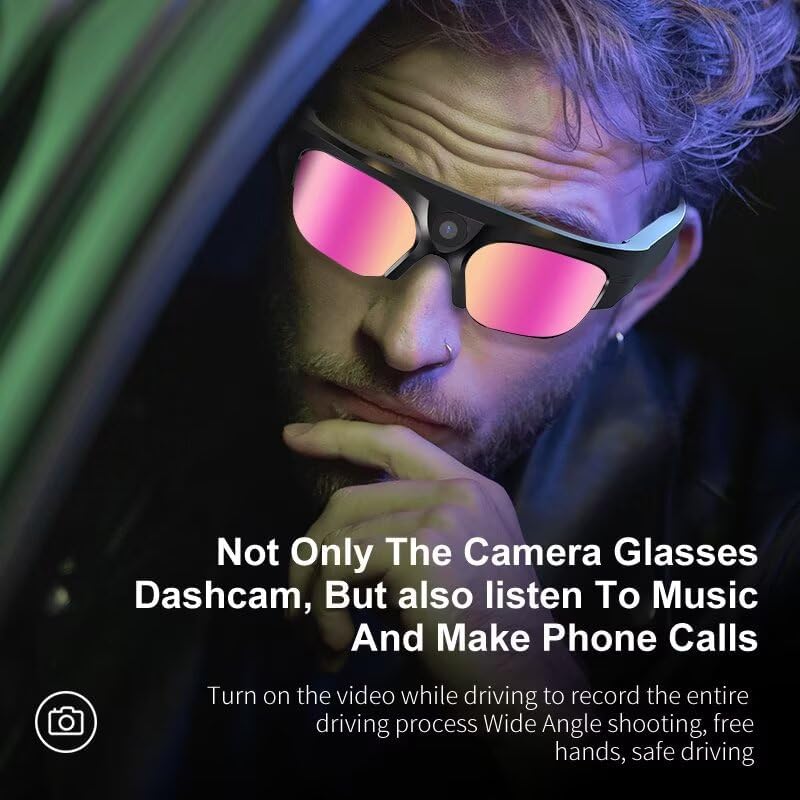
Figure 4: The camera glasses can function as a dashcam, recording the driving process hands-free.
5.3 Photo Capture (4K)
- Ensure the glasses are powered on.
- Press the photo capture button (location specified in physical manual) once to take a photo. A brief flash or sound may indicate a successful capture.
- The photo file will be saved to the memory card.

Figure 5: The glasses feature a 2K Ultra HD camera for high-quality video and photo capture.
5.4 Audio Functions (Music & Calls)
- Listening to Music: Once paired via Bluetooth, play music from your connected device. Audio will be streamed through the glasses' semi-open cavity speakers.
- Answering Calls: When a call comes in, press the multi-function button (refer to physical manual) to answer. Press again to end the call.
- Voice Assistant: Long-press the multi-function button to activate your smartphone's voice assistant (e.g., Alexa, Google Assistant) for hands-free control.

Figure 6: The glasses are equipped with high-quality loudspeakers and a semi-open voice cavity for clear audio.
5.5 Connecting to a Computer
To transfer or view recorded files:
- Option 1 (Direct Connection): Connect the glasses to your computer using the provided USB-C cable. The glasses should appear as a removable disk drive.
- Option 2 (Memory Card Reader): Remove the memory card from the glasses and insert it into a compatible memory card reader connected to your computer.
- Access the files (videos and photos) from the removable disk or memory card.

Figure 7: The glasses can be connected to a computer for convenient file transfer and playback.
6. Maintenance and Care
- Cleaning Lenses: Use the provided eyeglasses cleaning cloth to gently wipe the polarized lenses. Avoid using abrasive materials or harsh chemicals that could damage the lens coating.
- Cleaning Frame: Wipe the frame with a soft, damp cloth. Do not submerge the glasses in water, despite their waterproof and sweat-proof design, to prevent damage to electronic components.
- Storage: Store the glasses in the provided carrying case when not in use to protect them from scratches, dust, and impacts. Store in a cool, dry place away from direct sunlight and extreme temperatures.
- Battery Care: To prolong battery life, avoid fully discharging the battery frequently. Charge the glasses regularly, even if not in use for extended periods.
7. Troubleshooting
| Problem | Possible Cause | Solution |
|---|---|---|
| Glasses do not power on. | Low battery; power button not pressed correctly. | Charge the glasses fully. Press and hold the power button for a few seconds. |
| Cannot connect via Bluetooth. | Glasses not in pairing mode; device Bluetooth off; interference. | Ensure glasses are on and in pairing mode. Turn Bluetooth off/on on your device. Move closer to the glasses. |
| Video/Photo recording fails. | Memory card full or corrupted; low battery. | Check memory card storage and format if necessary (backup data first). Charge the glasses. |
| Poor audio quality. | Bluetooth connection unstable; environmental noise. | Ensure stable Bluetooth connection. Reduce environmental noise. |
| Cannot connect to computer. | Faulty USB cable; driver issue; glasses not in data transfer mode. | Try a different USB-C cable. Restart computer. Ensure glasses are powered on when connecting. Try using a memory card reader. |
8. Product Specifications
| Feature | Detail |
|---|---|
| Model Number | ZFH-Camera-XV16-128G |
| Video Resolution | Supports 4K and 1080P |
| Photo Resolution | Supports 4K |
| Memory Card | 128GB (included) |
| Battery Capacity | 5000 mAh Lithium Ion |
| Continuous Recording Time | Up to 90 minutes |
| Connectivity | Bluetooth |
| Lenses | High-definition polarized lenses with UV protection |
| Water Resistance | Waterproof and sweat-proof |
| Audio | High-quality loudspeaker, semi-open cavity design |
| Item Weight | 3.52 ounces (0.1 Kilograms) |
| Dimensions | 1.57 x 0.39 x 0.39 inches (Package Dimensions) |
| Compatible Devices | Smartphone |
9. Warranty and Support
The Piluyaa 4K Camera Glasses XV16-128G are backed by a 2-year warranty, ensuring durability and performance. In case of any issues or inquiries, dedicated 24/7 customer support is available to assist you.
For further assistance, product registration, or to explore other Piluyaa products, please visit the official Piluyaa Store:


