1. Introduction
The YPMEW F08 6-in-1 Hidden Camera Detector is a versatile device designed to enhance personal privacy and security. It integrates multiple detection technologies to identify various hidden surveillance devices, including wireless cameras, listening bugs, and GPS trackers. Additionally, it features an anti-theft vibration alarm and an SOS emergency alert function, making it a comprehensive tool for personal safety in diverse environments such as hotels, Airbnbs, offices, and vehicles.
2. Product Overview
2.1 Included Components
- F08 Hidden Camera Detector Device
- Detector Lanyard
- Type-C Charging Cable
- User Manual
2.2 Key Features
- 6-in-1 Detection Modes: Combines WiFi/RF signal detection, infrared camera finding, magnetic field detection, anti-theft vibration alarm, and SOS emergency alert.
- Adjustable Sensitivity: Allows precise control with 6 levels of adjustable sensitivity for accurate detection in various ranges.
- Portable Design: Compact and lightweight (30g), designed for easy carrying in a pocket, purse, or travel case.
- Long Battery Life: Features Type-C fast charging, providing 20–45 hours of continuous operation after a 1-hour charge.
- User-Friendly: Intuitive two-button control for simple operation.

Figure 1: YPMEW F08 6-in-1 Hidden Camera Detector device.
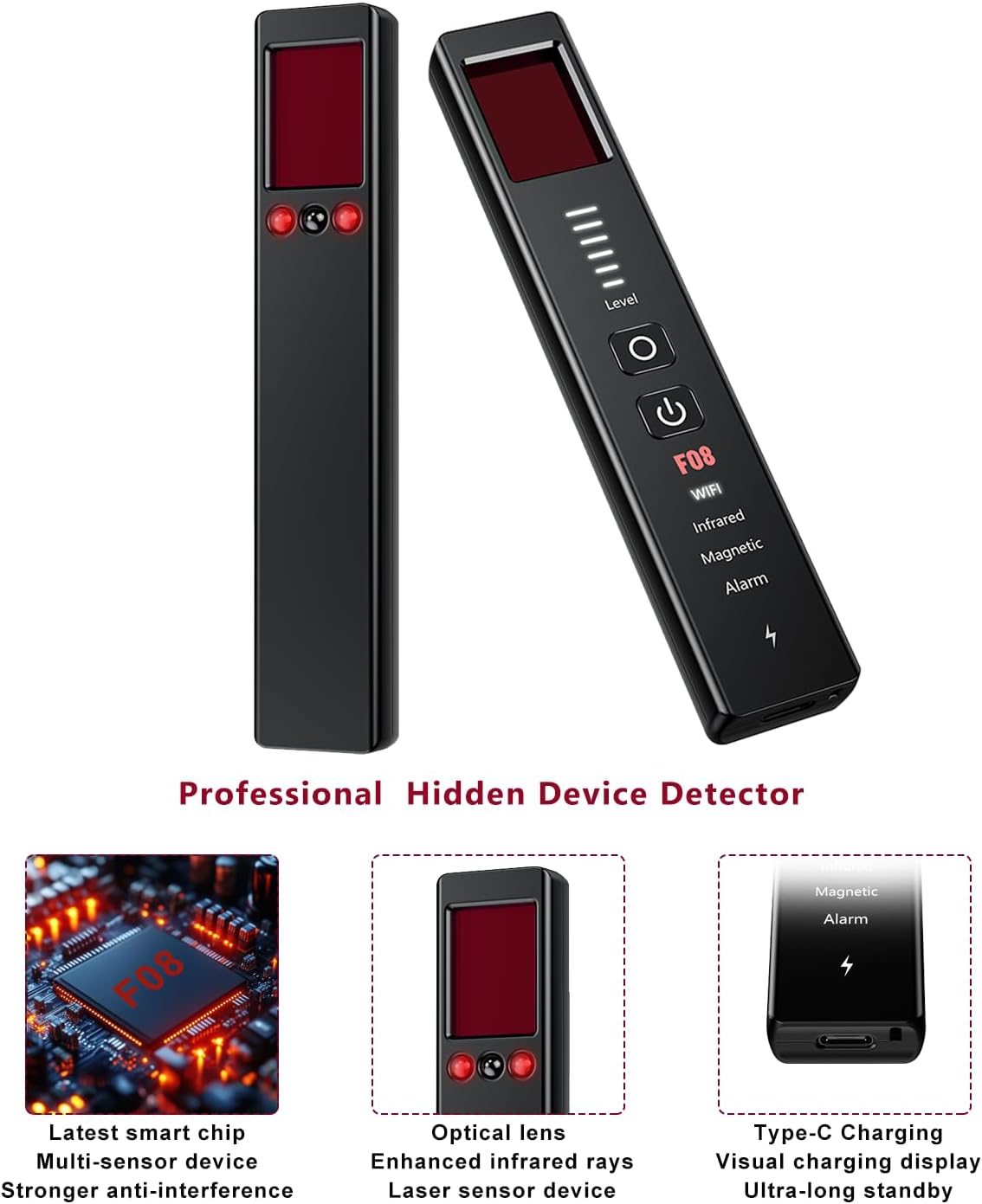
Figure 2: Internal components and charging port of the YPMEW F08 detector.
3. Setup
3.1 Charging the Device
Before first use, fully charge the device using the provided Type-C charging cable. Connect the Type-C end to the detector's charging port and the USB-A end to a standard USB power adapter (not included). A full charge typically takes 1 hour and provides 20-45 hours of continuous use.
3.2 Power On/Off
- To Power On: Press and hold the power button (usually marked with a circle and vertical line) for approximately 3 seconds until the indicator lights illuminate.
- To Power Off: Press and hold the power button again for approximately 3 seconds.
4. Operating Instructions
The YPMEW F08 detector features intuitive two-button control. The main power button also serves to cycle through detection modes, while a secondary button (often marked with a circle) adjusts sensitivity or activates specific functions.
4.1 WiFi/RF Signal Detection (Bug Sweeper)
This mode detects wireless signals emitted by hidden cameras, listening devices, and other RF-emitting bugs. It is the default mode upon powering on.
- Activation: The device typically starts in this mode. If not, press the power button until the 'WiFi' indicator is lit.
- Sensitivity Adjustment: Use the secondary button (often marked with a circle) to adjust the detection sensitivity. Higher sensitivity is for broader scans, lower sensitivity helps pinpoint the source.
- Detection: Move the device slowly around the area. The indicator lights will illuminate, and an audible alert will sound, increasing in intensity as you approach a signal source.

Figure 3: Using the detector for anti-eavesdropping in an office environment.
Video 1: Overview of YPMEW Hidden Camera Detector features, including WiFi/RF detection.
Video 2: Quick demonstration of the 6-in-1 Hidden Camera Detector's various functions.
4.2 Infrared Camera Finder
This mode uses a red light filter to visually identify hidden camera lenses, which reflect the red light.
- Activation: Press the power button until the 'Infrared' indicator is lit. The red LEDs on the device will activate.
- Scanning: Look through the red filter window on the device while slowly scanning the area. Hidden camera lenses will appear as bright red dots.
- Application: Effective for finding wired or wireless cameras, even if they are turned off.

Figure 4: Counter surveillance using enhanced infrared light and optical filters.
Video 3: A quick look at the camera detection function of the device.
4.3 Magnetic Field Detection (GPS Tracker Detector)
This mode is specifically designed to locate magnetic GPS trackers, which are often attached to vehicles or other metal surfaces.
- Activation: Press the power button until the 'Magnetic' indicator is lit.
- Scanning: Move the device along surfaces where a magnetic tracker might be hidden. The device will alert you when a magnetic field is detected.

Figure 5: Using the detector for anti-tracking and locating magnetic devices.
4.4 Vibration Anti-Theft Alarm
This feature provides a motion-activated alarm to protect personal belongings or secure entry points.
- Activation: Press and hold the secondary button (often marked with a circle) to enable the vibration alarm. The 'Alarm' indicator will light up.
- Placement: Attach the device to a door handle, luggage, or any item you wish to protect. If the item is moved or disturbed, the alarm will sound.

Figure 6: Anti-theft alarm function for securing doors and personal items.
4.5 SOS Emergency Alert
For emergency situations, the device can emit a loud alarm and flashing lights to attract attention.
- Activation: Press and hold both the power button and the secondary button simultaneously to activate the SOS distress mode.
- Function: The device will emit flashing lights and a sharp beeping alarm in Morse code, signaling for help.

Figure 7: SOS emergency alert for dangerous situations.
Video 4: Demonstration of the YPMEW Hidden Camera Detector's anti-theft alarm and SOS emergency alert functions.
5. Maintenance
- Cleaning: Use a soft, dry cloth to clean the device. Avoid using harsh chemicals or abrasive materials.
- Storage: Store the device in a cool, dry place away from direct sunlight and extreme temperatures.
- Battery Care: To prolong battery life, avoid fully discharging the device frequently. Charge it regularly, even if not in active use.
6. Troubleshooting
- Device not powering on: Ensure the device is fully charged. If the issue persists, try a different Type-C charging cable.
- False alarms in WiFi/RF mode: Adjust the sensitivity level. High sensitivity can pick up common household WiFi signals. Lower the sensitivity to pinpoint stronger, closer signals.
- Infrared detection not working: Ensure the room is sufficiently dark for optimal visibility of reflections.
- Charging port intermittent: If the charging port is loose or inconsistent, contact customer support for assistance.
7. Specifications
| Feature | Specification |
|---|---|
| Model Name | F08 |
| Dimensions (L x W x H) | 1 x 1 x 1 inches |
| Item Weight | 4.2 ounces |
| Material | Acrylonitrile Butadiene Styrene (ABS) |
| Power Source | Battery Powered (1 Lithium Ion battery required) |
| Connectivity Protocol | Type-C Charging |
| Control Method | Push Button, Touch |
| Special Features | Adjustable Sensitivity Levels, Compact and Travel-Friendly Design, Rechargeable via Type-C, Long Battery Life, Easy Two-Button Operation |
| Compatible Devices | Detects hidden cameras, bug listening devices, GPS trackers/locators, recording devices, hidden microphones, etc. |
8. Warranty and Support
The YPMEW F08 Hidden Camera Detector comes with a standard manufacturer's warranty. For warranty claims, technical support, or any inquiries regarding the product, please refer to the contact information provided in the packaging or on the official YPMEW website. Always retain your proof of purchase for warranty validation.


