
1. Introduction
Thank you for choosing the THERUN Treadmill with Incline. This manual provides essential information for the safe and effective use, assembly, operation, and maintenance of your new fitness equipment. Please read this manual thoroughly before operating the treadmill and retain it for future reference. This treadmill features a powerful 3.0 HP brushless motor, 12 levels of automatic incline, and a foldable design for convenient home use, supporting users up to 300 LBS.

Image: The THERUN Treadmill in use, highlighting its compact design and auto-incline feature.
2. Safety Information
To ensure your safety and prolong the life of your treadmill, please adhere to the following safety guidelines:
- Always consult with a physician before starting any new exercise program.
- Place the treadmill on a flat, stable surface with at least 2 feet of clear space around it.
- Keep children and pets away from the treadmill during operation.
- Ensure the safety key is properly attached to your clothing before beginning your workout.
- Do not operate the treadmill if it is damaged or malfunctioning.
- The maximum user weight capacity for this treadmill is 300 LBS. Do not exceed this limit.
- Wear appropriate athletic footwear and clothing.
- Do not step on or off the treadmill while the belt is moving.
- Unplug the treadmill from the power outlet when not in use or before cleaning/maintenance.
- Keep hands and feet clear of all moving parts.
3. Package Contents
Upon unpacking, please verify that all components listed below are present and undamaged.
- Entire Machine (Treadmill Unit) x1
- Electronic Watch Holder x1
- Left Bottom Cover x1
- Right Bottom Cover x1
- Safety Lock x1
- Power Cable x1
- User Manual x1

Image: Visual representation of the treadmill and its included accessories for easy identification.
4. Setup & Assembly
The THERUN Treadmill is designed for quick and easy setup, arriving 90% pre-assembled. Follow these steps to complete the assembly:
- Unpacking: Carefully remove the treadmill and all components from the packaging.
- Unfolding: The hydraulic system allows for smooth, hands-free unfolding in approximately 5 seconds. Gently release the locking mechanism and allow the running deck to lower to the floor.
- Handlebar/Console Setup: Lift the handlebar and console into the upright position. Secure any pre-attached screws or locking pins as indicated in the quick start guide (if provided separately).
- Attach Covers: Install the Left and Right Bottom Covers if they are not already attached.
- Power Connection: Plug the power cable into the treadmill and then into a grounded electrical outlet.
- Safety Key: Ensure the safety lock is placed in its designated slot on the console.
When not in use, the treadmill can be easily folded to a compact size of 26.3" x 36.7" x 48.6", saving significant space.

Image: The treadmill's hydraulic folding system for easy storage.
5. Operating Instructions
5.1 Console Overview
The large, adjustable LED console provides real-time feedback on your workout.
- Calories: Displays estimated calories burned.
- Distance: Shows the distance covered during your workout.
- Pulse: Displays your heart rate (requires grip sensors).
- Speed: Indicates current belt speed (MPH).
- Time: Tracks the duration of your workout.

Image: The treadmill's console and integrated features for user convenience.
5.2 Starting a Workout
- Step onto the treadmill belt, ensuring your feet are on the side rails.
- Attach the safety key clip to your clothing.
- Press the "START" button on the console. The belt will begin to move at a low speed.
5.3 Adjusting Speed and Incline
Use the control buttons on the console to adjust your workout intensity.
- Speed: Adjust speed from 0.5 MPH to 8.7 MPH using the speed +/- buttons.
- Incline: The treadmill features 12 levels of automatic incline. Use the incline +/- buttons to simulate uphill running and increase calorie burn.
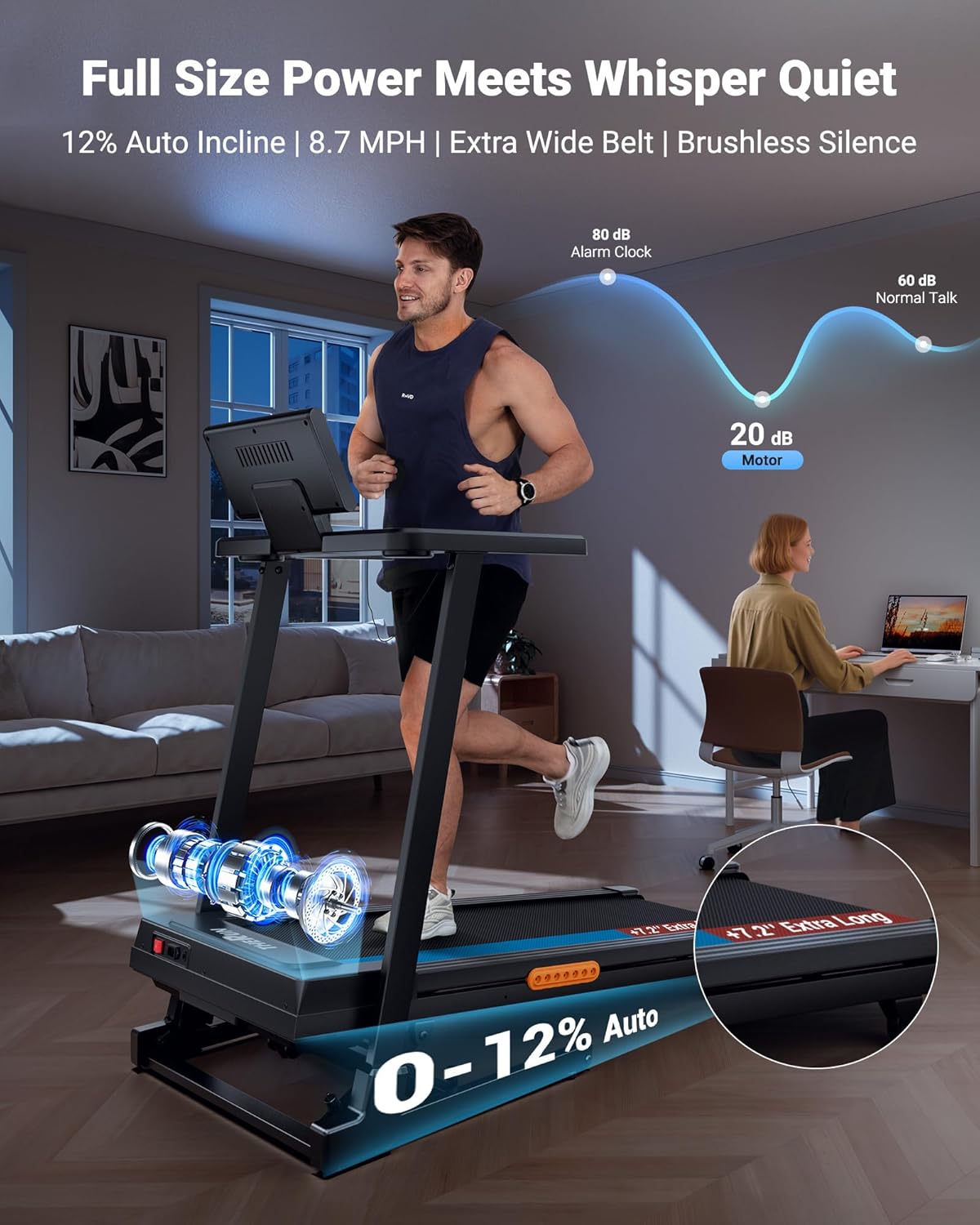
Image: The treadmill's quiet operation, with motor noise at less than 20dB, allowing for undisturbed workouts.

Image: Demonstrates how different incline levels can target specific fitness goals, from fat burning to muscle endurance.
5.4 Heart Rate Monitoring
Grip the sensors on the handlebars to track your heart rate in real-time. Ensure both hands are firmly on the sensors for an accurate reading.
5.5 Using the FlexScreen (Tablet/Laptop Holder)
The treadmill features a versatile FlexScreen holder that can be adjusted for tablets/phones (Raised Mode, 90°) or laptops (Flat Mode, 180°), allowing you to multitask during your workout without straining your neck.

Image: The adjustable FlexScreen feature, designed to hold various devices for comfortable viewing during exercise.
5.6 Stopping a Workout
To stop your workout, press the "STOP" button on the console. The belt will gradually slow down and come to a complete stop. You can also pull the safety key to immediately stop the treadmill in an emergency.
6. Maintenance
Regular maintenance ensures optimal performance and extends the lifespan of your treadmill. Always unplug the treadmill before performing any maintenance.
- Cleaning: Wipe down the console and exterior surfaces with a damp cloth after each use. Avoid using abrasive cleaners or solvents.
- Belt Lubrication: The running belt requires periodic lubrication to reduce friction and wear. Refer to the specific lubrication instructions provided with your treadmill's maintenance kit or contact customer support for guidance.
- Belt Adjustment: If the running belt becomes off-center or slips, it may need adjustment. Consult the troubleshooting section or contact customer support for detailed instructions.
- Motor Area: Periodically vacuum the area around the motor to prevent dust and debris buildup, which can affect performance.
7. Troubleshooting
If you encounter any issues with your treadmill, refer to the table below for common problems and their solutions.
| Problem | Possible Cause | Solution |
|---|---|---|
| Treadmill does not power on. | Power cable not plugged in; Safety key not in place; Circuit breaker tripped. | Ensure power cable is securely plugged into treadmill and outlet. Insert safety key fully. Check household circuit breaker. |
| Running belt slips or hesitates. | Belt too loose; Belt needs lubrication. | Adjust belt tension (refer to specific instructions in full manual or contact support). Lubricate the running belt. |
| Unusual noise during operation. | Loose parts; Motor issue; Belt friction. | Check for any loose screws or components and tighten them. If noise persists, contact customer support. |
| Incline not adjusting. | Incline motor issue; Console malfunction. | Ensure no obstructions under the treadmill. Try restarting the machine. If issue persists, contact customer support. |
| Heart rate monitor not reading. | Hands not properly placed; Sensors dirty. | Ensure both hands are firmly gripping the sensors. Clean the sensors with a dry cloth. |
For issues not listed here or if solutions do not resolve the problem, please contact THERUN Customer Service.
8. Specifications
| Feature | Detail |
|---|---|
| Brand | THERUN |
| Model Name | TB1543B |
| Color | Light-Orange |
| Product Dimensions (LxWxH) | 54.72"D x 26.34"W x 48.82"H |
| Folded Size (LxWxH) | 26.3" x 36.7" x 48.6" |
| Item Weight | 126.8 Pounds |
| Material | Alloy Steel |
| Motor Horsepower | 3.0 HP (Brushless) |
| Speed Range | 0.5 - 8.7 Miles per Hour |
| Maximum Incline Percentage | 12% (Auto Incline) |
| Running Area | 47.2" x 17" |
| Maximum Weight Recommendation | 300 Pounds |
| Display Type | LED |
| Assembly Required | No (90% pre-assembled) |

Image: The spacious running area of the treadmill, designed for comfortable use.
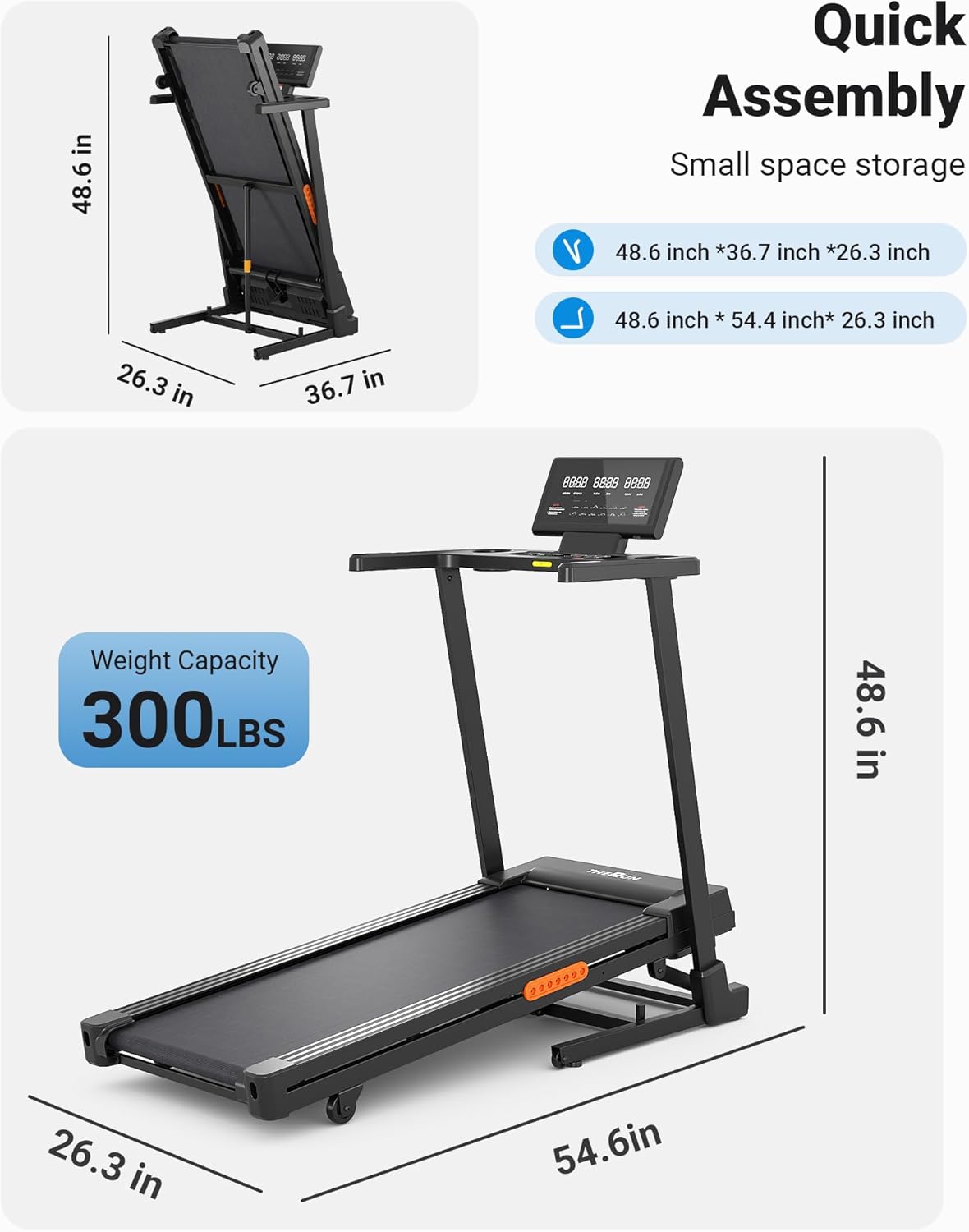
Image: Detailed dimensions and weight capacity of the treadmill.
9. Warranty & Support
The THERUN Treadmill comes with a 1-Year Warranty from the date of purchase, covering manufacturing defects and major component failures under normal use.
For any questions, technical support, or warranty claims, please contact our Professional Customer Service team. We are always on standby to assist you with any issues you may have with your incline treadmill, offering easy operation video guides and one-to-one customer service.
You can also visit the official THERUN store on Amazon for more information and resources: THERUN Store.

Image: Information on THERUN's after-sales support and additional resources.