
1. Introduction
This manual provides detailed instructions for the setup, operation, maintenance, and troubleshooting of your Yeabomy Smart Bluetooth Glasses E13C. Please read this manual thoroughly before using the product to ensure proper function and longevity.

A pair of black smart Bluetooth sunglasses, viewed from an angle, showcasing the integrated technology in the temples.
2. Product Overview
2.1 Package Contents
Verify that all items are present in the package:
- Smart Bluetooth Glasses (E13C)
- Magnetic Charging Cable
- Cleaning Cloth
- Eyeglasses Storage Bag
- Glasses Case
- User Manual (this document)
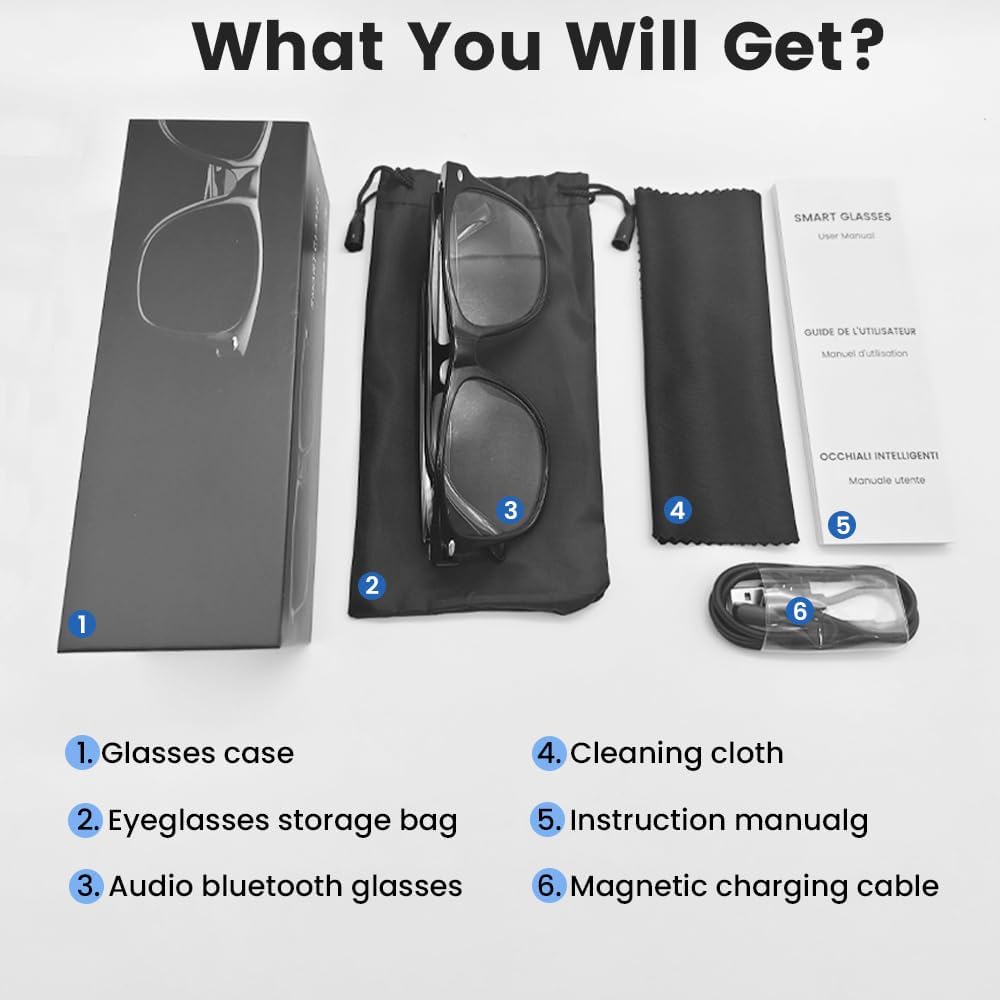
An image displaying the package contents: a glasses case, an eyeglasses storage bag, the audio Bluetooth glasses, a cleaning cloth, an instruction manual, and a magnetic charging cable.
2.2 Key Features
- Intelligent Voice Control: Operate functions using voice commands.
- Polarized Lenses: Effective blue light filtering and 100% UV protection. Lenses are replaceable with prescription lenses.
- Wide Compatibility: Connects with various devices including smartphones (Android, iOS) and computers via Bluetooth 5.4.
- One-Step Pairing: Automatic reconnection to the last paired device.
- Waterproof (IPX5): Resistant to sweat and rain.
- Lightweight Design: Weighs approximately 27g for comfortable extended wear.
- Dual Magnetic Charging: Efficient and secure charging.
- Intuitive Touch Controls: For media playback, calls, and voice assistant activation.
3. Setup
3.1 Charging the Glasses
Before first use, fully charge the smart glasses. Use the provided magnetic charging cable.
- Connect the magnetic charging cable to the charging contacts on the temple of the glasses.
- Connect the USB end of the cable to a standard USB power adapter (not included) or a computer's USB port.
- The indicator light will show yellow during charging.
- Charging is complete when the indicator light turns green. A full charge takes approximately 1.5 hours.
The glasses provide approximately 4-6 hours of media playback and over 300 hours of standby time on a full charge.

An illustration showing the magnetic charging cable connecting to the glasses' temple, with indicators for charging (yellow light) and fully charged (green light). Battery capacity, charging time, playback time, and calling time are also displayed.
3.2 Bluetooth Pairing
To connect your smart glasses to a device:
- Ensure the glasses are charged and powered on.
- Enable Bluetooth on your smartphone or other device.
- Search for available Bluetooth devices. The glasses will appear as "E13".
- Select "E13" to pair. Once paired, the glasses will automatically reconnect to this device when powered on and within range (up to 33 feet).

A person wearing the smart glasses while running, with a smartphone screen showing Bluetooth settings and the glasses (E13) connected. The image highlights the 33ft Bluetooth 5.4 transmission range and voice control functionality.
4. Operating Instructions
4.1 Power On/Off
- Power On: Long touch the control area for 5 seconds.
- Power Off: Long touch the control area for 5 seconds.
4.2 Touch Controls
The smart glasses feature intuitive touch controls located on the temples:
- Play/Pause Music: Once-Tap
- Next Track: Twice-Tap
- Previous Track: Twice-Tap
- Answer Call: Once-Tap
- Hang Up Call: Once-Tap
- Activate Voice Assistant: Long Touch for 2 seconds
- Remote Photography: Double click to control your smartphone's camera.

A diagram illustrating the touch control gestures on the smart glasses for various functions: pick up calls, turn on music, open navigation, take photos, previous/next track, play/pause, voice assistant, answer/hang up calls, and power on/off.
4.3 Voice Control
After activating the voice assistant (Long Touch for 2 seconds), you can use voice commands for various functions, such as:
- Making calls (e.g., "Call [Contact Name]")
- Playing music (e.g., "Play [Song Title]")
- Sending messages
- Opening navigation
5. Maintenance
- Cleaning: Use the provided cleaning cloth to gently wipe the lenses and frame. Avoid harsh chemicals or abrasive materials.
- Water Resistance: The glasses are IPX5 water-resistant, meaning they can withstand sweat and light rain. Do not submerge them in water or expose them to strong jets of water.
- Storage: When not in use, store the glasses in the provided eyeglasses storage bag or glasses case to protect them from scratches and dust.
- Temperature: Avoid exposing the glasses to extreme temperatures (hot or cold) as this can affect battery life and electronic components.

A pair of smart glasses resting on a surface, emphasizing their lightweight design (27g) and comfort for extended wear. A magnified inset shows the dual magnetic charging contacts.
6. Troubleshooting
- Cannot Power On: Ensure the glasses are fully charged. Connect to the magnetic charging cable and check the indicator light.
- Cannot Pair with Device:
- Ensure Bluetooth is enabled on your device.
- Make sure the glasses are within the 33-foot Bluetooth range.
- Turn the glasses off and on again, then try pairing.
- Forget the device from your phone's Bluetooth settings and try pairing again.
- No Sound/Low Volume:
- Check the volume settings on both the glasses (if applicable via touch control) and your connected device.
- Ensure the glasses are properly connected via Bluetooth.
- Confirm that the audio output on your device is set to the smart glasses.
- Touch Controls Not Responding: Ensure the glasses are powered on and connected. Try restarting the glasses.
7. Specifications
| Model | E13C |
| Brand | Yeabomy |
| Connectivity Technology | Bluetooth 5.4 |
| Operating System Compatibility | Android, iOS Devices |
| Special Features | Music Player, Phone Call, Voice Control, UV Protection, Polarized Lenses, Remote Photography |
| Battery Capacity | 1 Amp Hours (80mAh per temple) |
| Charging Time | Approx. 1.5 hours |
| Continuous Playback Time (Music) | Approx. 5 hours |
| Continuous Calling Time | Approx. 4 hours |
| Standby Time | Over 300 hours |
| Item Weight | 0.07 pounds (approx. 27g) |
| Water Resistance | IPX5 |
| Package Dimensions | 6.65 x 2.4 x 2.24 inches |
| Screen Size | 1.96 Inches (Visible screen diagonal) |
| Memory Storage Capacity | 128 MB |
| GPS | No GPS |

An image detailing the physical dimensions of the smart glasses, including lens width, frame width, and temple length. It also shows various face shapes (oval, triangle, round, square, diamond) indicating suitability.
8. Warranty and Support
For warranty information or technical support, please refer to the contact details provided with your purchase documentation or visit the official Yeabomy website. Keep your proof of purchase for any warranty claims.