
Introduction
This manual provides comprehensive instructions for the safe and efficient operation, maintenance, and troubleshooting of your ARCCAPTAIN TIG200P MultiProcess TIG Welding Machine. Please read this manual thoroughly before operation to ensure proper use and to maximize the lifespan of your equipment.
Product Overview
The ARCCAPTAIN TIG200P is a versatile 5-in-1 DC multi-function welding machine, designed for a wide range of welding tasks. It integrates LIFT TIG, HF TIG, PULSE TIG, SPOT TIG, and STICK (MMA) welding capabilities, making it suitable for various metals including stainless steel, mild steel, and copper.
Equipped with advanced MCU and IGBT Inverter Technology, the TIG200P delivers precise digital control, ensuring a high arc start success rate, stable arc, minimal spatter, and clean welds. Its large LED display and upgraded controls allow for fine-tuned parameter adjustments, catering to both experienced users and DIY enthusiasts.

Figure 1: ARCCAPTAIN TIG200P MultiProcess TIG Welding Machine with included accessories.
Key Features:
- 5-in-1 DC Multi-Function: LIFT TIG, HF TIG, PULSE TIG, SPOT TIG, and STICK (with Hot Start & Arc Force) for diverse applications.
- Advanced MCU & IGBT Inverter Technology: Ensures precise digital control, smooth arc initiation, stable arc, and minimal spatter.
- Large LED Display & Upgraded Control: Provides clear real-time data and fine-tuned parameter adjustments for TIG (pulse frequency, currents, post gas, down-slope, duty cycle) and MMA (Hot Start, Arc Force).
- 2T/4T Modes: Offers manual control (2T) and continuous welding (4T) options.
- Safety-Focused & Smart Cooling System: Features VRD, over-current, over-voltage, overload, and overheat protection, with an on-demand cooling fan.
- Dual Voltage Capability: Supports both 110V and 220V input for maximum flexibility.
- Portable Design: Weighs 10.25 lbs with a carrying handle and shoulder strap for easy transport.

Figure 2: The TIG200P features smart fans, alarm functions, VRD, and an improved heat dissipation system for enhanced safety and longevity.
Important Safety Precautions
Always prioritize safety when operating welding equipment. Failure to follow safety guidelines can result in serious injury or death. Ensure you wear appropriate Personal Protective Equipment (PPE) including a welding helmet, gloves, protective clothing, and safety shoes. Work in a well-ventilated area to avoid inhaling fumes.
- Electrical Safety: Always connect the machine to a properly grounded power source. Do not operate in wet conditions.
- Fume Hazards: Welding fumes can be hazardous. Use local exhaust ventilation or respirators.
- Arc Rays: Arc rays can burn eyes and skin. Use proper eye and face protection.
- Fire and Explosion: Keep flammable materials away from the welding area. Have a fire extinguisher readily available.
- Hot Parts: Welding equipment and welded materials can be hot. Allow them to cool before handling.
The TIG200P includes built-in safety features such as VRD (Voltage Reduction Device), over-current, over-voltage, overload, and overheat protection. These systems automatically shut down the machine to prevent damage and ensure user safety.
Setup Guide
1. Unpacking and Inspection
Carefully unpack the welding machine and all accessories. Inspect for any shipping damage. Ensure all components listed in the packing list are present. The package typically includes the TIG200P welder, 13ft TIG torch, 10ft ground clamp, 10ft electrode holder, conversion adapter, 8ft Argon gas hose (with connector), brush & hammer, tungsten electrode, and a shoulder strap.

Figure 3: Standard accessories included with the ARCCAPTAIN TIG200P.
2. Power Connection
The TIG200P supports dual voltage input (110V/220V). Ensure the correct power plug is used for your power supply. Before switching between voltages, ensure the machine is turned off and the cooling fan has stopped operating.

Figure 4: The TIG200P is lightweight at 10.25 lbs and supports dual voltage operation.
3. Connecting Welding Accessories
Connect the TIG torch and ground clamp to the appropriate terminals on the front panel. For Stick welding, connect the electrode holder and ground clamp.
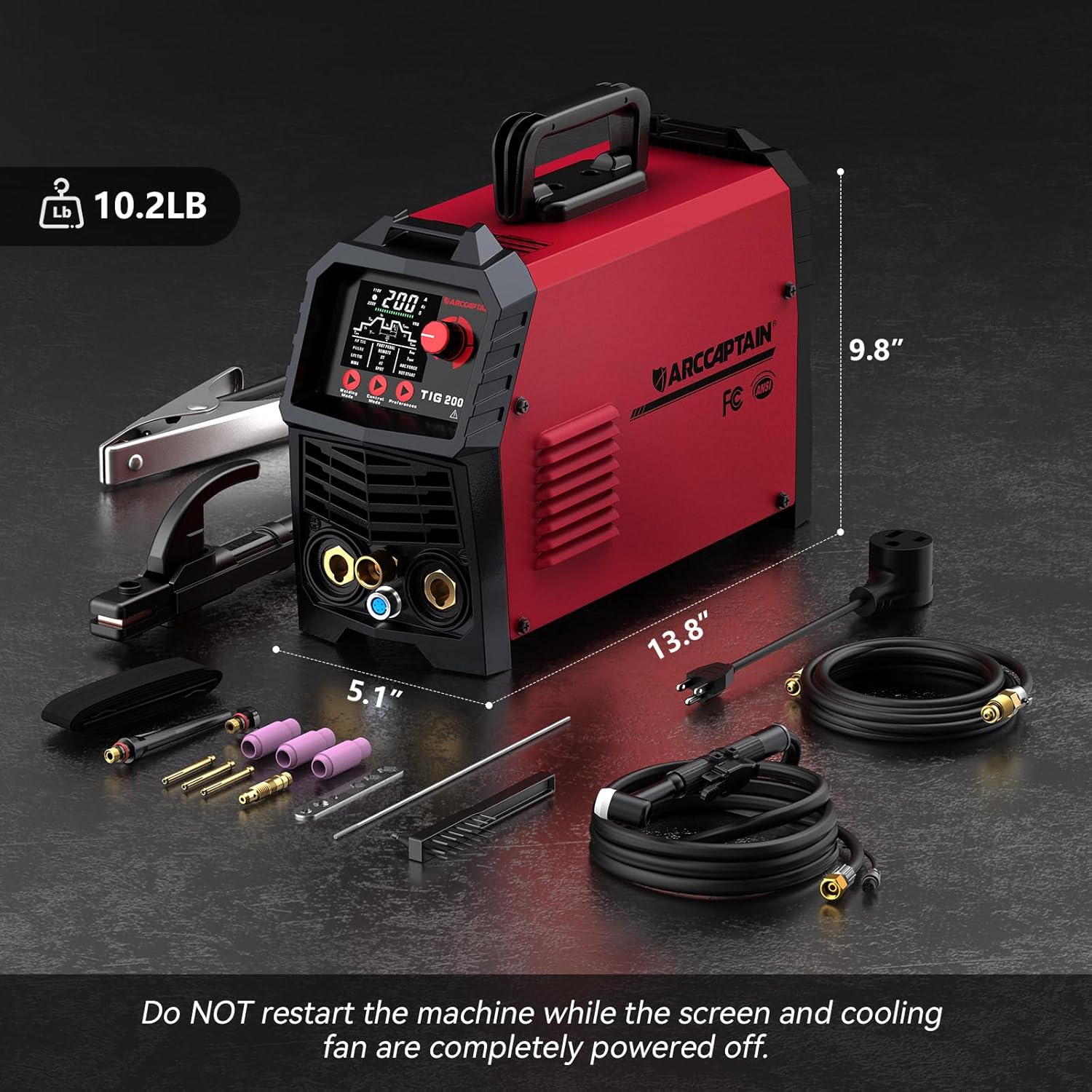
Figure 5: Proper connection of TIG torch and ground clamp for TIG welding, and electrode holder for Stick welding.
4. Gas Connection (for TIG)
For TIG welding, connect the Argon gas hose from your gas cylinder regulator to the gas inlet on the rear of the machine. Ensure all connections are secure to prevent gas leaks.
Operating Modes
The TIG200P offers five distinct welding modes, each optimized for specific applications. The large LED display provides intuitive control over various parameters.

Figure 6: The intuitive large LED digital display for setting welding parameters.
Video 1: Overview of the 5-in-1 Multi-Process TIG Welder, demonstrating Pulse TIG, HF TIG, Lift TIG, Spot TIG, and Stick welding applications.
1. Pulse TIG Welding
Pulse TIG mode allows for precise heat control, ideal for welding thin materials or when minimal heat input is desired. Adjustable parameters include Pre-flow time, Initial current, Up-Slope time, Peak current, Base current, Down-Slope time, Finish current, Post-flow time, Pulse frequency, and Duty cycle.

Figure 7: Demonstrating Pulse TIG welding, which offers enhanced control over heat input.
2. HF TIG Welding
High-Frequency (HF) TIG provides a non-contact arc start, preventing tungsten contamination and ensuring a clean, precise weld. This mode is excellent for sensitive materials and applications requiring high-quality finishes.

Figure 8: HF TIG welding in progress, showing the clean arc start and precise control.
3. Lift TIG Welding
Lift TIG offers an alternative arc starting method where the tungsten electrode is touched to the workpiece and then lifted to initiate the arc. This mode is useful in environments where HF interference is a concern.
4. Spot TIG Welding
Spot TIG delivers instant high-current joins for rapid production, ideal for tack welding or joining thin sheets. This function is available in HF TIG and LIFT TIG modes.

Figure 9: Spot welding application, providing quick and precise joins.
5. Stick (MMA) Welding
The TIG200P also functions as a powerful Stick (MMA) welder, suitable for various electrode types. It features Hot Start for easy arc ignition and Arc Force to prevent electrode sticking, ensuring stable performance.

Figure 10: Stick welding in action, highlighting the machine's versatility.
6. 2T/4T Function
The 2T (Two-Touch) mode requires the trigger to be held down during welding, providing direct control. The 4T (Four-Touch) mode allows for continuous welding without holding the trigger, ideal for long weld passes, reducing operator fatigue.

Figure 11: Diagram illustrating the control flow for 2T and 4T welding functions.
7. Foot Pedal Compatibility
The TIG200P supports foot pedal control in LIFT TIG and HF TIG modes when operating in 2T mode. This allows for dynamic control of the welding current by varying foot pressure. Note: The foot pedal is not compatible with PULSE TIG, SPOT TIG, or MMA modes, and is sold separately.

Figure 12: The TIG200P connected to an optional foot pedal for dynamic current control.
Welding Guidelines
TIG200P Set-Up Guide (Recommended Parameters)
The following table provides general guidelines for TIG welding with the TIG200P. These are starting points and may need adjustment based on specific material, joint configuration, and operator skill.
| Material | Thickness | Amperage | Tungsten Dia. | Tungsten Color | Filler Metal | Filler Metal Dia. | Pre Flow (sec) | Post Flow (sec) | Gas Flowrate (scfh) | |||
|---|---|---|---|---|---|---|---|---|---|---|---|---|
| Steel | 1/16 inch | 1.6 mm | 45-100 | 1/16 inch | 1.6 mm | Gray | ER70S-2 | 1/16 inch | 1.6 mm | 0.4 | 5 | 12 |
| 3/32 inch | 2.4 mm | 70-110 | 1/16 inch | 1.6 mm | Red | 1/6 inch | 1.6 mm | 5 | 12 | |||
| 1/8 inch | 3.2 mm | 75-125 | 1/8 inch | 3.2 mm | White | 3/32 inch | 2.4 mm | 6 | 12 | |||
| 3/16 inch | 4.8 mm | 110-200 | 1/32 inch | 2.4 mm | Purple | 1/8 inch | 3.2 mm | 6 | 14 | |||
| Stainless Steel | 1/16 inch | 1.6 mm | 50-90 | 1/6 inch | 1.6 mm | Gray | ER308/308L | 1/6 inch | 1.6 mm | 0.4 | 5 | 12 |
| 3/32 inch | 2.4 mm | 80-120 | 1/6 inch | 1.6 mm | Red | 1/6 inch | 1.6 mm | 5 | 12 | |||
| 1/8 inch | 3.2 mm | 85-140 | 1/8 inch | 3.2 mm | White | 3/32 inch | 2.4 mm | 6 | 12 | |||
| 3/16 inch | 4.8 mm | 125-200 | 1/32 inch | 2.4 mm | Purple | 1/8 inch | 3.2 mm | 6 | 14 | |||
Note: This set-up information is intended to act as a guide only. Please refer to the operating manual for further information.
Compatible Metals
The ARCCAPTAIN TIG200P is designed to weld a variety of metals, including but not limited to:
- Carbon Steel
- Stainless Steel
- Copper
- Sheet Metal
- Square Pipe
- Round Tube

Figure 13: Examples of metal types suitable for welding with the TIG200P.
Maintenance
Regular maintenance ensures the longevity and optimal performance of your welding machine. Always disconnect the power supply before performing any maintenance.
- Cleaning: Periodically clean the internal components using compressed air to remove dust and debris. Ensure cooling vents are clear.
- Cable Inspection: Regularly inspect all cables, connections, and the TIG torch for wear, damage, or loose connections. Replace damaged parts immediately.
- Storage: Store the machine in a clean, dry environment, protected from extreme temperatures and humidity.
- Consumables: Check and replace TIG torch consumables (collets, collet bodies, nozzles, tungsten electrodes) as needed to maintain weld quality.
Troubleshooting
If you encounter issues with your TIG200P, refer to the following common problems and solutions. For complex issues, contact ARCCAPTAIN technical support.
| Problem | Possible Cause | Solution |
|---|---|---|
| No power/Machine does not turn on | Loose power connection, tripped circuit breaker, faulty power switch. | Check power cord, reset breaker, ensure switch is ON. |
| No arc/Weak arc | Improper ground connection, incorrect welding parameters, contaminated tungsten, gas flow issues (TIG). | Secure ground clamp, adjust amperage/voltage, replace tungsten, check gas supply/flow. |
| Overheat protection activated | Exceeded duty cycle, blocked cooling vents, high ambient temperature. | Allow machine to cool down, clear vents, operate in cooler environment. |
| Poor weld quality (porosity, spatter) | Improper gas shielding, contaminated base metal, incorrect travel speed/technique. | Check gas flow/purity, clean workpiece, adjust technique. |
Technical Specifications
| Specification | Detail |
|---|---|
| Manufacturer | ARCCAPTAIN |
| Model Number | TIG200P |
| Item Weight | 20.8 pounds |
| Package Dimensions | 16.81 x 16.65 x 7.17 inches |
| Power Source | DC |
| Input Voltage | 110V/220V Dual Voltage |
| Welding Modes | LIFT TIG, HF TIG, PULSE TIG, SPOT TIG, STICK (MMA) |
| Insulation Class | H |
| Protection Class | IP21S |
| Date First Available | June 18, 2025 |
Warranty and Support
The ARCCAPTAIN TIG200P MultiProcess TIG Welding Machine is backed by a 2-year quality guarantee. Every machine undergoes strict laboratory testing under simulated extreme conditions before shipping to ensure reliability and performance.
For technical assistance, warranty claims, or any product-related inquiries, please contact the ARCCAPTAIN technical support team. You can typically find contact information on the official ARCCAPTAIN website or through your purchase platform.


