
Introduction
This user manual provides essential information for the proper use and maintenance of your mohomo Nova V5 Cordless Vacuum Cleaner Cyclone Filter. Please read these instructions carefully before installation and operation to ensure optimal performance and product longevity. This filter is designed to capture fine dust and debris, maintaining the vacuum's suction power and air quality.
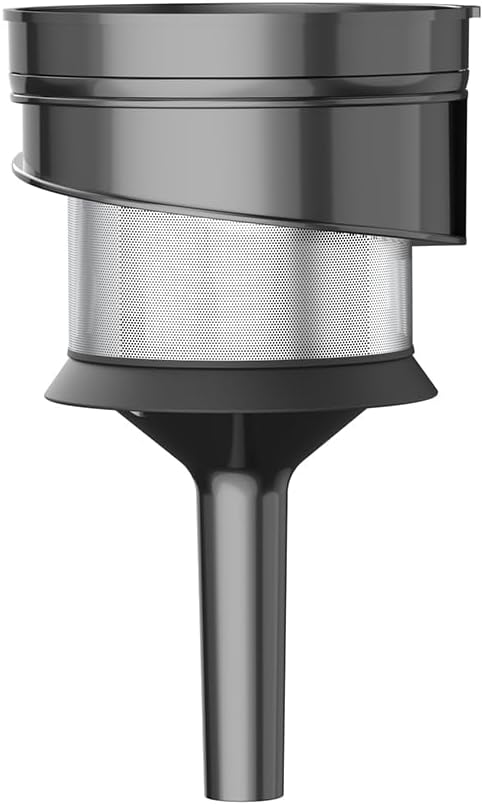
Image: The mohomo Nova V5 Cordless Vacuum Cleaner Cyclone Filter, shown in its complete form.
Product Overview
The Nova V5 Cyclone Filter is a critical component of your cordless vacuum cleaner, designed to separate dust and debris from the airflow before it reaches the main motor. This multi-stage filtration system helps maintain strong suction and extends the life of your vacuum.
Key Features:
- High-Efficiency Filtration: Captures fine particles and allergens.
- Durable Construction: Made from robust materials for long-term use.
- Easy to Clean: Designed for simple removal and maintenance.
- Reusable: Can be washed and reused, reducing waste.

Image: An exploded view showing the various components of the mohomo Nova V5 Cordless Vacuum Cleaner, including the cyclone filter, dust cup, and main body.
Setup and Installation
This section details the steps for installing the cyclone filter into your mohomo Nova V5 Cordless Vacuum Cleaner.
- Ensure Power Off: Before handling any components, ensure the vacuum cleaner is turned off and disconnected from any power source.
- Locate Dust Cup: Identify the dust cup assembly on your Nova V5 vacuum cleaner.
- Remove Dust Cup: Press the dust cup release button (if applicable) and carefully detach the dust cup from the main body of the vacuum.
- Access Filter Compartment: Twist or unlatch the dust cup cover to expose the internal filter components.
- Insert Cyclone Filter: Place the new cyclone filter into the designated slot within the dust cup. Ensure it is seated firmly and correctly aligned. The filter should fit snugly without excessive force.
- Reassemble Dust Cup: Close the dust cup cover, ensuring it clicks securely into place. Reattach the dust cup to the main vacuum body until it locks.

Image: A visual guide illustrating the assembly process of the mohomo Nova V5 Cordless Vacuum Cleaner, including how the filter integrates.
Operating Instructions (Filter-Related)
While the cyclone filter itself does not have operational controls, its proper function is integral to the vacuum cleaner's performance. Ensure the filter is clean and correctly installed before each use.
- Regular Checks: Periodically check the filter for visible dirt or blockages, especially if suction power decreases.
- Optimal Performance: A clean filter ensures maximum airflow and suction efficiency.

Image: The mohomo Nova V5 Cordless Vacuum Cleaner in operation, demonstrating its cleaning capability, which relies on a functional filter.
Maintenance
Regular cleaning of the cyclone filter is crucial for maintaining the vacuum cleaner's performance and extending its lifespan. The filter is reusable and washable.
Cleaning the Cyclone Filter:
- Remove Filter: Follow steps 1-4 from the "Setup and Installation" section to remove the cyclone filter from the dust cup.
- Tap Out Debris: Gently tap the filter over a waste bin to dislodge any loose dust and debris.
- Rinse with Water: Rinse the filter under cool, running water until the water runs clear. Do not use hot water or detergents, as this can damage the filter material.
- Dry Thoroughly: Allow the filter to air dry completely for at least 24 hours before reinstallation. Do not use a dryer or direct heat, as this can deform the filter. Ensure it is completely dry to prevent mold growth and damage to the vacuum motor.
- Reinstall: Once completely dry, reinstall the filter into the dust cup and reattach the dust cup to the vacuum cleaner as described in the "Setup and Installation" section.
Frequency: It is recommended to clean the cyclone filter every 2-4 weeks, depending on usage. Replace the filter every 3-6 months or if it shows signs of damage or reduced effectiveness, even after cleaning.

Image: A visual representation of the filter cleaning process, emphasizing rinsing and drying.
Troubleshooting
If you experience issues with your mohomo Nova V5 Cordless Vacuum Cleaner, check the following common problems related to the cyclone filter:
| Problem | Possible Cause | Solution |
|---|---|---|
| Reduced Suction Power | Clogged or dirty cyclone filter. | Clean the cyclone filter as per the maintenance instructions. Ensure it is completely dry before reinstallation. |
| Dust Escaping Vacuum | Filter not installed correctly or damaged. | Check that the filter is securely seated. Inspect for any tears or damage; replace if necessary. |
| Unusual Odor from Vacuum | Wet or improperly dried filter. | Remove and thoroughly dry the filter for at least 24 hours. If odor persists, replace the filter. |
Specifications
The following are the general specifications for the mohomo Nova V5 Cordless Vacuum Cleaner Cyclone Filter:
- Model Compatibility: mohomo Nova V5 Cordless Vacuum Cleaner
- Filter Type: Cyclone Filter
- Reusability: Reusable, Washable
- Material: High-efficiency filtration media
- Dimensions: Approximately 4 x 4 x 4 inches (L x W x H)
- Weight: Approximately 5.6 ounces
Warranty and Support
mohomo is committed to providing high-quality products and customer satisfaction.
Warranty Information:
This product is covered by a 2-year warranty from the date of purchase, as per the manufacturer's terms. Please retain your proof of purchase for warranty claims. The warranty covers manufacturing defects but does not cover damage resulting from misuse, neglect, or failure to follow maintenance instructions.
Customer Support:
For technical assistance, troubleshooting, or warranty inquiries, please contact mohomo customer support. You can typically find contact information on the official mohomo website or through your purchase platform.
- Online Support: Visit the mohomo product page for additional resources.
- Email Support: Refer to your product packaging or the official mohomo website for the customer service email address.

Image: An illustration representing customer support services, including warranty and return information.
