
1. Introduction
Thank you for choosing the OffiGo Motorized Rolling TV Stand. This manual provides essential information for the safe assembly, operation, and maintenance of your new TV stand. Please read these instructions thoroughly before installation and retain them for future reference. This stand is designed to accommodate televisions ranging from 32 to 70 inches and supports a maximum weight of 110 lbs (50 kg).
2. Safety Information
- Weight Capacity: Do not exceed the maximum weight capacity of 110 lbs (50 kg) for the TV mount and 22 lbs (10 kg) for the middle shelf. Overloading can cause instability and potential injury.
- TV Size: This stand is compatible with TVs from 32 to 70 inches. Ensure your TV's VESA pattern is within the supported range (Min: 200x100mm, Max: 600x400mm).
- Stability: Always ensure the TV stand is on a level surface. Lock the casters when the stand is in a stationary position to prevent accidental movement.
- Electrical Safety: The motorized height adjustment requires power. Ensure the power cord is not pinched or damaged. Do not operate with wet hands. Disconnect power before cleaning or maintenance.
- Assembly: Follow all assembly steps carefully. Incorrect assembly can lead to product failure or injury. It is recommended to have two people for assembly and TV mounting.
- Children and Pets: Keep children and pets away from the stand during operation and ensure they do not climb on or play with the stand.
3. Package Contents
Please verify that all components listed below are present and undamaged. If any parts are missing or damaged, contact customer support immediately.
- Base Frame with Casters
- Vertical Support Columns
- TV Mounting Bracket
- Middle Shelf
- Motorized Control Box and Handset
- Power Adapter
- Hardware Kit (screws, washers, spacers, tools)
- Instruction Manual
4. Assembly Instructions
Before beginning, ensure you have enough space and the necessary tools (usually included in the hardware kit). It is recommended to assemble the stand on a soft, clean surface to prevent scratches.
- Attach Casters to Base: Secure the four silent-roll casters to the base frame. Ensure two of the casters are lockable and positioned as indicated in the diagram.
- Assemble Vertical Columns: Connect the vertical support columns to the base frame using the provided screws. Ensure they are securely fastened and aligned.
- Install Middle Shelf: Attach the middle shelf to the vertical columns at the desired height. This shelf provides storage for AV equipment.
- Mount TV Bracket: Secure the TV mounting bracket to the top of the vertical columns. This bracket will hold your television.
- Attach TV Rails to Television: Attach the vertical TV rails to the back of your television using the appropriate screws and spacers from the hardware kit. Ensure the VESA pattern matches.
- Hang Television: Carefully lift your television and hook the TV rails onto the TV mounting bracket. Secure the TV in place with the safety screws or clips provided.
- Connect Motorized System: Connect the motorized control box and power adapter according to the wiring diagram. Ensure all cables are neatly managed to prevent tripping hazards.

Figure 1: Key structural components including the thickened hanger, sturdy center shelf, and stable steel base.
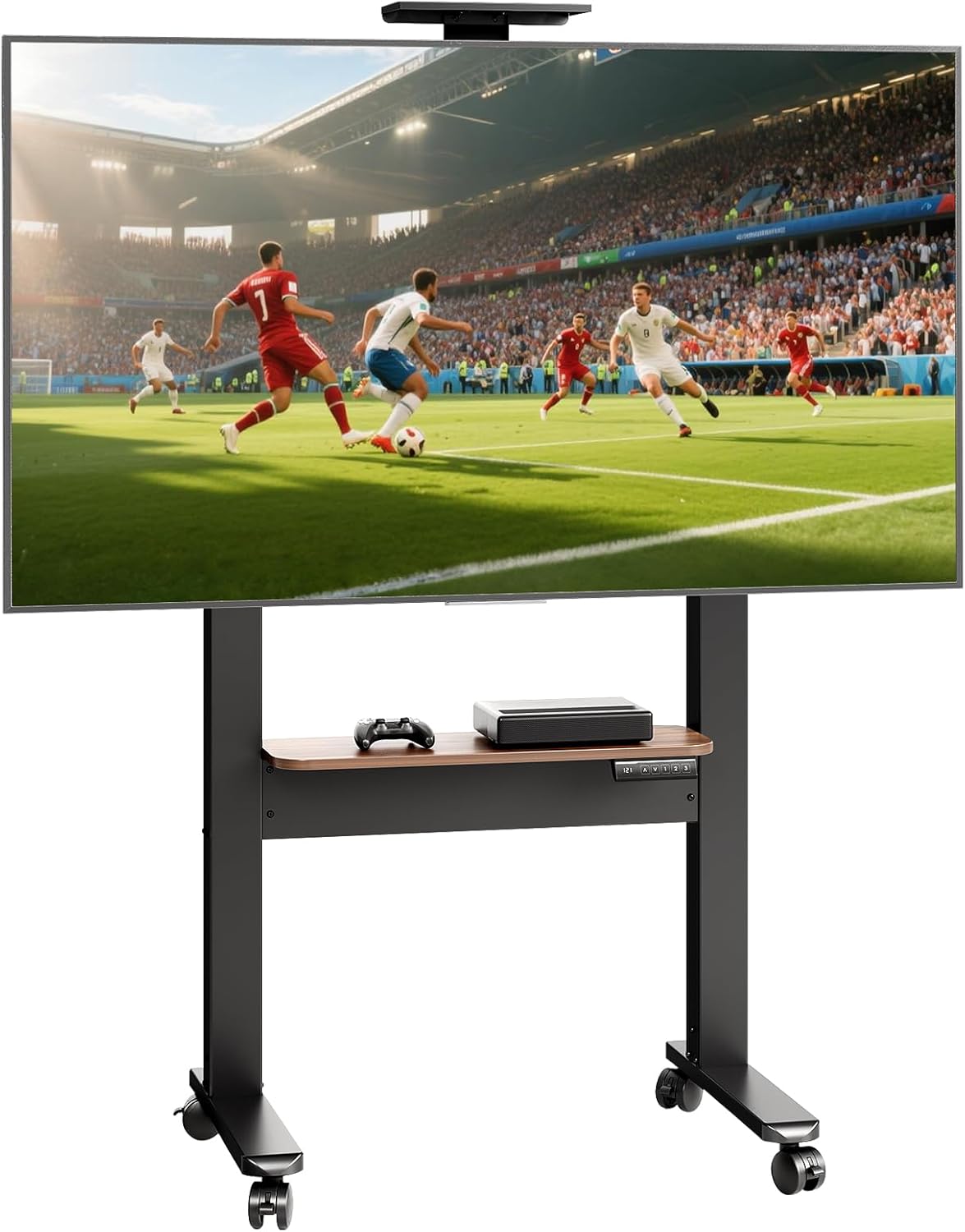
Figure 2: The OffiGo Motorized Rolling TV Stand fully assembled with a television.
5. Operating Instructions
5.1. Height Adjustment
The OffiGo TV stand features an electric height adjustment system. Use the control panel located on the middle shelf to adjust the TV height.
- Up/Down Buttons (↑/↓): Press and hold the up or down arrow buttons to raise or lower the TV stand to your desired viewing height. The height range is from 47.2 inches to 63 inches.
- Memory Presets (1, 2, 3): The stand has three programmable memory height settings. To save a height: adjust the stand to the desired height, then press and hold one of the number buttons (1, 2, or 3) until the LED display confirms the setting is saved. To recall a saved height, simply press the corresponding number button.
- LED Display: The LED display shows the current height setting.

Figure 3: Control panel for motorized height adjustment.

Figure 4: Visual representation of the TV stand's adjustable height range.
5.2. Mobility
The stand is equipped with four silent-roll casters for easy movement between rooms.
- Moving the Stand: Unlock the two lockable casters by flipping their levers. Gently push the stand to its new location.
- Securing the Stand: Once the stand is in the desired position, engage the locks on the two lockable casters to prevent unintended movement.

Figure 5: Detail of the 360-degree lockable casters for mobility.
5.3. Middle Shelf Usage
The integrated middle shelf can hold up to 22 lbs (10 kg) and is suitable for placing media devices such as game consoles, DVD players, soundbars, or remote controls.

Figure 6: The spacious middle shelf for media devices and accessories.
6. Maintenance
- Cleaning: Wipe the stand with a soft, damp cloth. Avoid harsh chemicals or abrasive cleaners. Ensure the stand is unplugged before cleaning.
- Hardware Check: Periodically check all screws and connections to ensure they remain tight. Retighten if necessary.
- Caster Care: Keep casters free of debris (hair, dust) to ensure smooth rolling.
- Cable Management: Regularly inspect power cords and other cables for wear or damage. Replace if necessary.
7. Troubleshooting
| Problem | Possible Cause | Solution |
|---|---|---|
| Stand does not move up or down. | Power cord disconnected; Motor overload; Control panel malfunction. | Check power connection; Unplug for 10 minutes and retry; Contact customer support. |
| Stand is unstable. | Casters unlocked; Uneven surface; Loose hardware; Exceeded weight limit. | Lock casters; Move to a level surface; Tighten all screws; Reduce weight on stand/shelf. |
| Casters do not roll smoothly. | Debris in casters; Damaged casters. | Clean casters; Replace damaged casters. |
| Memory presets not working. | Presets not saved correctly. | Re-save presets by adjusting to desired height and holding the number button until confirmed. |
8. Specifications
- Brand: OffiGo
- Model: B0F28ZZ2BP
- Compatible TV Sizes: 32 - 70 inches
- Maximum TV Weight Capacity: 110 lbs (50 kg)
- Middle Shelf Weight Capacity: 22 lbs (10 kg)
- Height Adjustment Range: 47.2 inches to 63.0 inches
- VESA Compatibility: Min 200x100mm, Max 600x400mm
- Material: Metal (frame), Wood (shelf)
- Product Dimensions: 25.6 x 19.5 x 62.2 inches (L x W x H, at max height)
- Item Weight: 40.3 lbs
- Special Features: Adjustable Height, Movable Casters, Memory Presets

Figure 7: TV compatibility and VESA mounting specifications.

Figure 8: Detailed product dimensions.
9. Warranty and Support
OffiGo products are designed for quality and durability. For warranty information, please refer to the terms provided at the time of purchase or contact your retailer. If you encounter any issues or have questions regarding your OffiGo Motorized Rolling TV Stand, please contact OffiGo customer support for assistance. Provide your model number (B0F28ZZ2BP) and a detailed description of the issue when contacting support.