
1. Product Overview
The Orayafid Solar Panel is a high-efficiency power solution designed for outdoor devices such as trail cameras, game cameras, and security cameras. It features a robust design with a built-in rechargeable lithium-ion battery, ensuring continuous power supply even in challenging weather conditions. Its versatile output options make it compatible with a wide range of electronic devices.
Key Features:
- Premium Solar Panel with Lithium Battery: 15W solar panel with 22-24% conversion efficiency, featuring 9pcs 2500mAh 18650 batteries (7500mAh capacity, 80WH energy) for extended use.
- Cutting-Edge Battery Technology: Rechargeable lithium-ion cells tested for up to 300 charging cycles, with overvoltage, overcharge, and short circuit protection.
- Versatile Output Compatibility: Includes USB, Mini USB, Type-C USB, Micro USB, DC 4.0x17mm, and DC 3.5x1.35mm adapters for various devices like animal cams, routers, cell phones, and pumps.
- 360° Adjustable Bracket: Allows for optimal positioning to capture maximum sunlight, ensuring consistent power generation.
- Durable and Weatherproof: IP65 waterproof rating, designed for continuous operation in harsh weather, with an operating temperature range of -20°C to 50°C.
2. Package Contents
Please verify that all items listed below are included in your package:
- Orayafid Solar Panel Charger (with built-in 20000mAh Lithium Battery)
- Adjustable Mounting Bracket
- Adapter Cable with Multiple Connectors (USB, Mini USB, Type-C USB, Micro USB, DC 4.0x17mm, DC 3.5x1.35mm)
- Screw Package (for mounting)

Image: The Orayafid Solar Panel, mounting bracket, adapter cable with various connectors, and screw package.
3. Setup and Installation
Follow these steps to properly set up and install your Orayafid Solar Panel:
- Unboxing: Carefully remove all components from the packaging. Ensure no parts are missing or damaged.
- Attach Bracket to Solar Panel: Secure the adjustable mounting bracket to the back of the solar panel using the provided screws. Ensure it is firmly attached.
- Select Mounting Location: Choose a location that receives maximum direct sunlight throughout the day. Avoid shaded areas from trees, buildings, or other obstructions. The panel is IP65 waterproof, suitable for outdoor exposure.
- Mount the Bracket: Using the screw package, securely mount the bracket base to a wall, pole, or other stable surface. Ensure the mounting surface is strong enough to support the panel.
- Adjust Panel Angle: Once mounted, adjust the solar panel's angle using the 360° adjustable bracket to face the sun directly for optimal charging efficiency.
- Connect to Device: Select the appropriate adapter from the provided multi-interface cable and connect it to your device (e.g., trail camera, security camera). Then, connect the other end of the cable to the solar panel's output port.
Video: This video demonstrates the unboxing and installation process of the Orayafid Solar Panel, including attaching the bracket and connecting the cables. It shows how to set up the panel for optimal sunlight exposure.

Image: The Orayafid Solar Panel mounted on a wall, connected to a security camera, illustrating a typical installation scenario.
4. Operation
The Orayafid Solar Panel operates automatically once installed and connected to a device. It converts sunlight into electrical energy, which is then used to power your connected device and recharge the internal lithium-ion battery.
- Automatic Charging: The panel will automatically begin charging the internal battery when exposed to sufficient sunlight.
- Power Output: The panel provides a stable 12V DC output (or 5V DC depending on the adapter used) to your connected device.
- Battery Backup: The built-in 18650 lithium-ion battery ensures continuous power supply to your device during periods of low light or no sunlight (e.g., at night or on cloudy days).
- Indicator Lights: Refer to the product's back panel for any indicator lights that may show charging status or battery level.
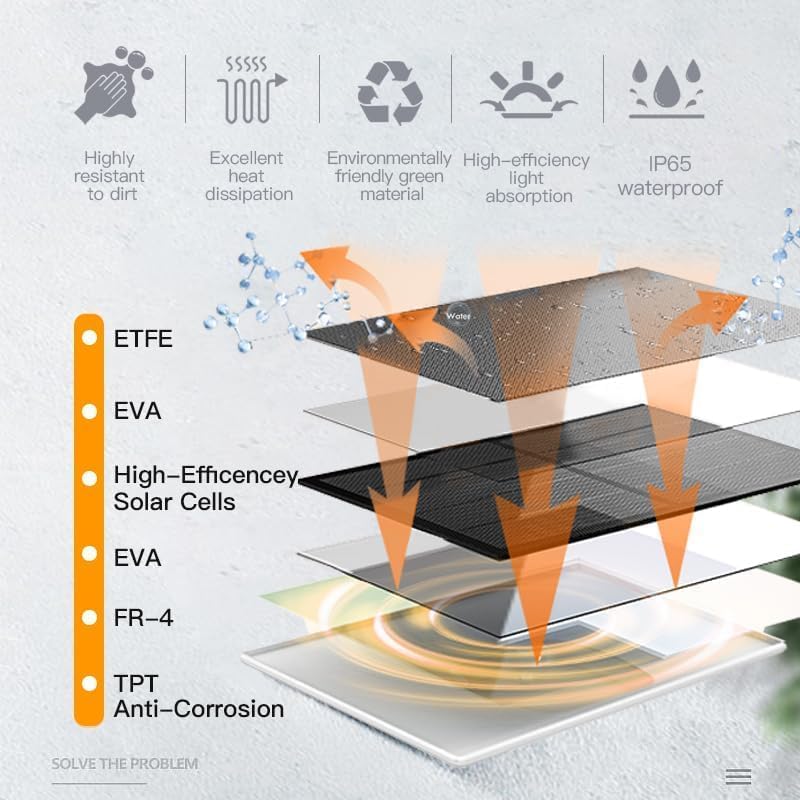
Image: The back of the solar panel, highlighting the various output ports and the "QC" (Quality Control) label, indicating connection points for devices.
5. Maintenance
To ensure optimal performance and longevity of your solar panel, follow these maintenance guidelines:
- Regular Cleaning: Periodically wipe the surface of the solar panel with a soft, damp cloth to remove dust, dirt, leaves, or other debris that may reduce efficiency. Do not use abrasive cleaners.
- Inspect Connections: Regularly check all cable connections to ensure they are secure and free from corrosion.
- Clear Obstructions: Ensure no new obstructions (e.g., growing vegetation, new structures) are shading the panel, which would reduce its charging capability.
- Battery Care: While the battery has built-in protection, avoid prolonged storage in extreme temperatures. If storing for an extended period, ensure the battery is partially charged (around 50%) to preserve its lifespan.

Image: A diagram illustrating the IP65 waterproof rating and the operating temperature range of the solar panel, emphasizing its durability in various weather conditions.
6. Troubleshooting
If you encounter issues with your Orayafid Solar Panel, refer to the following common problems and solutions:
| Problem | Possible Cause | Solution |
|---|---|---|
| Device not receiving power. | Insufficient sunlight; loose connection; incorrect adapter; depleted battery. | Ensure panel is in direct sunlight. Check all cable connections. Verify correct adapter is used. Allow panel to charge in sunlight for several hours. |
| Battery not charging. | Panel is shaded; dirty panel surface; faulty panel/battery. | Relocate panel to a sunnier spot. Clean the panel surface. If problem persists, contact customer support. |
| Intermittent power supply. | Unstable connection; partial shading; device power requirements exceed panel output. | Secure all connections. Ensure panel is not partially shaded. Check if your device's power needs are within the panel's specifications. |
7. Specifications
| Brand | Orayafid |
| Model Number | D-1510-12 |
| Material | Monocrystalline Silicon |
| Product Dimensions | 12.6"L x 9.1"W x 7"H |
| Item Weight | 4 Pounds |
| Efficiency | High Efficiency (22-24% conversion) |
| Connector Types | DC 4.0x17mm, DC 3.5x1.35mm, DC 5.5x2.1mm, Mini USB, USB-C (Type-C), Micro USB |
| Included Components | Adapter, Solar panel |
| Maximum Voltage | 12 Volts |
| Maximum Power | 15 Watts |
| Output Voltage | 12 Volts |
| Battery Type | Lithium Ion (9 x 2000mAh 18650 cells, 7500mAh total capacity) |
| IP Rating | IP65 Waterproof |
| Operating Temperature | -20°C to 50°C |
8. Warranty and Support
For warranty information, technical support, or any inquiries regarding your Orayafid Solar Panel, please refer to the contact details provided with your purchase or visit the official Orayafid website.
Keep your purchase receipt or order number handy when contacting support for faster service.