
CYCPLUS M3
CYCPLUS M3 GPS Bike Computer
User Manual

Product Overview
The CYCPLUS M3 GPS Bike Computer is a wireless cycling computer designed to provide comprehensive ride data. It features a large 2.8-inch LCD screen with auto backlight, 100 hours of battery endurance, and accurate GPS positioning. It supports ANT+ sensors for expanded data tracking and can sync with the CYCPLUS FIT APP for custom display and data analysis.

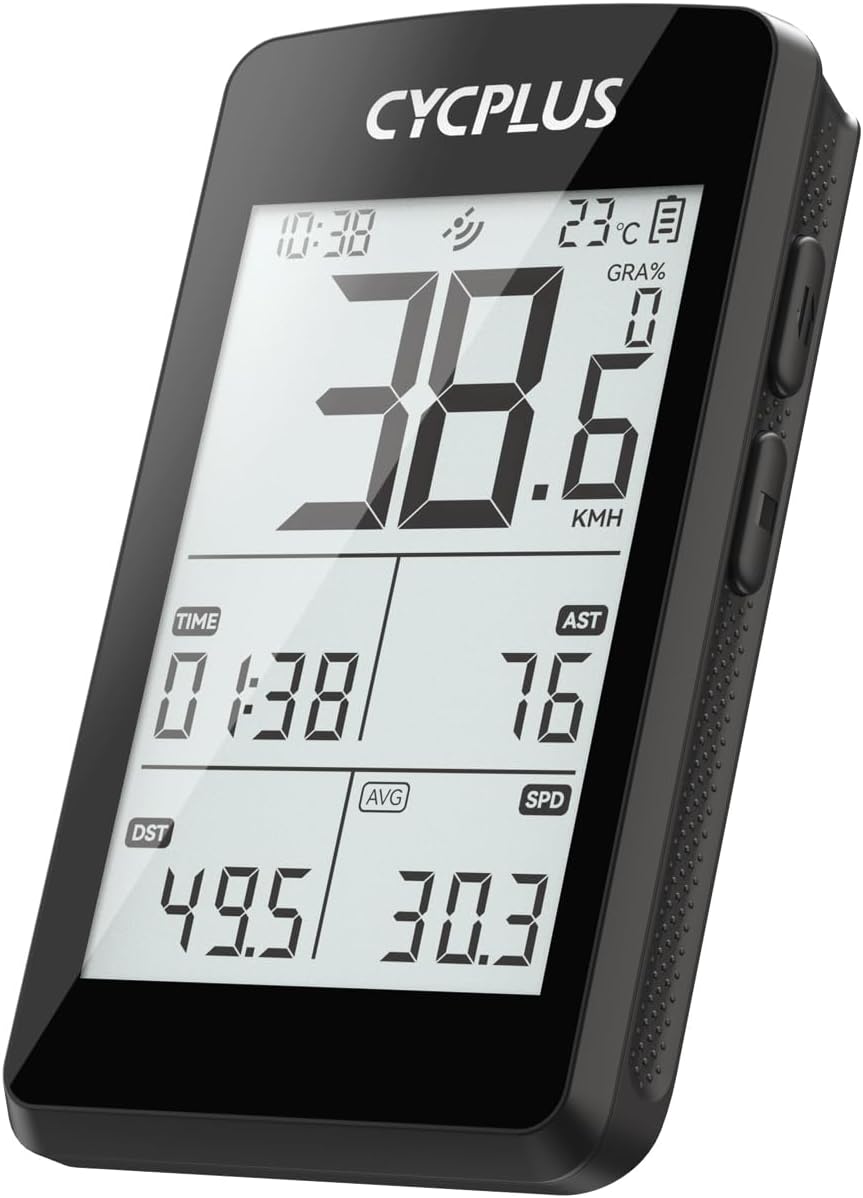
The CYCPLUS M3 GPS Bike Computer, displaying current speed, time, ascent, distance, and average speed.
Package Contents
Ensure all items are present in the package:
- CYCPLUS M3 Cycling Computer
- User Manual
- Small Bike Mount
- USB-C Charging Cable

The CYCPLUS M3 GPS Bike Computer and its accompanying accessories.
Setup
Mounting the Device
The M3 comes with a small bike mount for handlebar installation. Secure the mount firmly to your bike's handlebar using the provided rubber bands. The device features a standard twist-lock mechanism for easy attachment and removal from the mount.

The CYCPLUS M3 mounted on a bike, highlighting its large screen and slim design.
Initial Power On and Charging
Before first use, fully charge the device using the supplied USB-C cable. The built-in 1500mAh rechargeable lithium battery provides up to 100 hours of runtime on a single charge, reaching full power in approximately 2.5 hours.

The USB-C charging port on the CYCPLUS M3.
GPS Positioning
The M3 utilizes 5 major satellite systems for fast and accurate GPS positioning. For the first-time positioning, it may take 3-5 minutes outdoors. You can download offline ephemeris via the CYCPLUS FIT APP to minimize waiting time for subsequent uses.
The M3's 10-second accurate GPS positioning, supported by multiple satellite systems.
Product Introduction Video
An official video introducing the features and design of the CYCPLUS M3 Cycling Computer.
Operating Instructions
Button Functions
The device features intuitive button controls for various functions:
- Left Button (L): Long press for Power On/Off. Short press for Start/Pause Recording.
- Right Button 1 (R1): Long press to Enter/Quit Settings. Short press to Go to Next Page.
- Right Button 2 (R2): Long press to Save Record. Short press for other functions depending on context.
The CYCPLUS M3 with its side buttons visible.
Display Customization
Customize the data displayed on the screen via the CYCPLUS FIT APP. You can prioritize up to 8 key metrics per page (4 regular data, 4 customizable data) to suit your preferences.

Customizable data fields on the M3 via the CYCPLUS FIT APP.
ANT+ Sensor Connection
The M3 supports simultaneous recording of various data by connecting to ANT+ sensors such as speed, cadence, heart rate, and power meters. Press the L button to start searching for ANT+ sensors. If a sensor is detected, its data will be displayed. If no sensor is found, a horizontal line will appear in its place.

ANT+ sensor compatibility for comprehensive data tracking.
Auto Backlight and Auto Awakening
The device automatically senses the environment to turn on the backlight, especially useful during night rides (18:00 - 09:00). It also features auto awakening from hibernation after 10 minutes of no displacement or vibration.

Auto Backlight and Auto Awakening features for enhanced visibility and convenience.
Usage Guidance Video
An official video demonstrating the usage and various functions of the CYCPLUS M3 Cycling Computer.
App Integration
The CYCPLUS FIT APP (available on Google Play Store and Apple App Store) enhances your cycling experience by allowing you to customize data display, download offline ephemeris, analyze data, and synchronize with Strava.

The CYCPLUS Fit App makes cycling smarter with customizable data fields and Strava sync.
Strava Synchronization
You can add your Strava account via the CYCPLUS FIT APP to synchronize your cycling data, helping you monitor workout data and gain scientific training experience.
Specifications
| Feature | Detail |
|---|---|
| Brand | CYCPLUS |
| Model Name | M3 |
| Screen Size | 2.8 Inches |
| Display Type | FSTN LCD |
| Battery Life | 100 Hours |
| Battery Capacity | 1500mAh |
| Charging Time | 2.5 Hours (USB-C) |
| Connectivity | Bluetooth, ANT+ |
| Sensor Compatibility | Speed Sensor, Cadence Sensor, Heart Rate Sensor, Power Meter, GPS Sensor, Barometric Altimeter |
| Waterproof Rating | IP67 |
| Mounting Type | Handlebar Mount |
Troubleshooting
If you encounter any issues with your CYCPLUS M3 GPS Bike Computer, please consider the following general troubleshooting steps:
- Device Not Powering On: Ensure the device is fully charged. Connect it to a power source using the USB-C cable.
- GPS Signal Issues: Ensure you are in an open outdoor area. For faster positioning, try downloading offline ephemeris via the CYCPLUS FIT APP.
- Sensor Connection Problems: Make sure your ANT+ sensors are powered on and within range. Try re-pairing the sensors through the device settings or the CYCPLUS FIT APP.
- Display Issues: Check if the auto backlight is functioning correctly in low light conditions.
- Data Sync Issues: Ensure your device is connected to the CYCPLUS FIT APP via Bluetooth. Check your internet connection for Strava synchronization.
- Factory Reset: If persistent issues occur, you may perform a factory reset. Refer to the device's settings menu for this option.
For more detailed troubleshooting or specific error codes, please refer to the comprehensive user manual included with your product or contact CYCPLUS customer support.
Warranty and Support
CYCPLUS stands behind its products with a two-year warranty. As a customer-first manufacturer, our professional technical support team is available to quickly and efficiently respond to your concerns. Enjoy 7/24 support.
For assistance, please visit the official CYCPLUS website or contact their customer service directly through the CYCPLUS FIT APP.
Related documentsM3


Ask a question about this manual
Ask about setup, troubleshooting, compatibility, parts, safety, or missing instructions. Manuals+ will review the question and use this page’s manual context to help answer it.