
Onforu BDS90G-4
Onforu 90W 10000LM LED Motion Sensor Outdoor Lights
Model: BDS90G-4 | Brand: Onforu
1. Introduction
Thank you for choosing the Onforu 90W 10000LM LED Motion Sensor Outdoor Lights. This high-performance floodlight is designed to provide powerful, energy-efficient illumination for various outdoor spaces, enhancing security and visibility. Featuring a super-bright 10,000 lumen output at 6500K daylight, IP66 weatherproof rating, and three versatile lighting modes, this fixture is built for durability and convenience.

Image: Front view of the Onforu 90W 10000LM LED Motion Sensor Outdoor Light, showcasing its four adjustable heads and motion sensor.
2. Safety Information
Please read all safety instructions carefully before installation and operation. Failure to follow these instructions may result in electric shock, fire, or other hazards.
- Always turn off the power at the circuit breaker before installing, servicing, or cleaning the fixture.
- This product is designed for 110V-120V AC power supply. Ensure your electrical system matches this requirement.
- All wiring connections must be made in accordance with local electrical codes and ordinances. If you are unsure about wiring, consult a qualified electrician.
- Do not install on surfaces that are not structurally sound or that cannot support the weight of the fixture.
- Avoid looking directly into the LED light source when illuminated, as it can cause eye strain or damage.
- Ensure all connections are secure and properly insulated to prevent short circuits.
3. Package Contents
Verify that all components are present and undamaged before beginning installation:
- 1 x LED Light Fixture
- 1 x Instruction Manual (this document)
- 1 x Mounting Hardware Kit (includes junction box, screws, wire nuts, gasket)
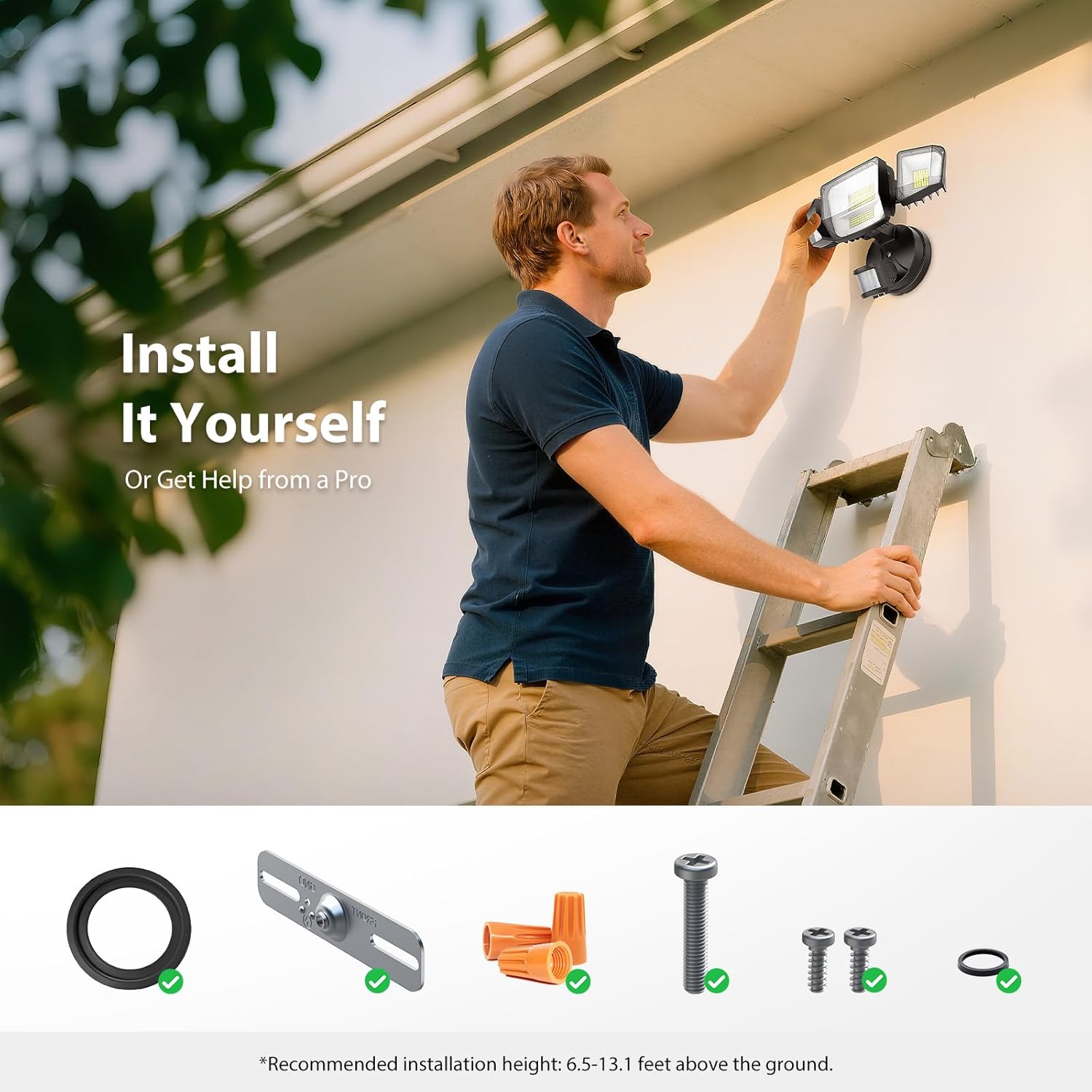
Image: A visual representation of the included components: LED light fixture, instruction manual, and mounting hardware.
4. Setup and Installation
This floodlight is designed for hardwired installation and can be mounted on a wall or soffit. The recommended installation height is 6.5-13.1 feet (2-4 meters) above the ground for optimal motion detection and light coverage.
4.1 Pre-Installation
- Turn off power at the circuit breaker before starting any electrical work.
- Choose a suitable mounting location that provides the desired illumination area and is within reach of existing electrical wiring.
- Unpack all components and ensure they are intact.
4.2 Mounting the Fixture
The fixture can be mounted directly to a standard junction box.
- Attach the mounting bracket to the junction box using the provided screws. Ensure it is securely fastened.
- For wet locations, ensure the gap between the fixture and the mounting surface is sealed with the provided EVA gasket or a suitable silicone sealant to maintain IP66 rating.
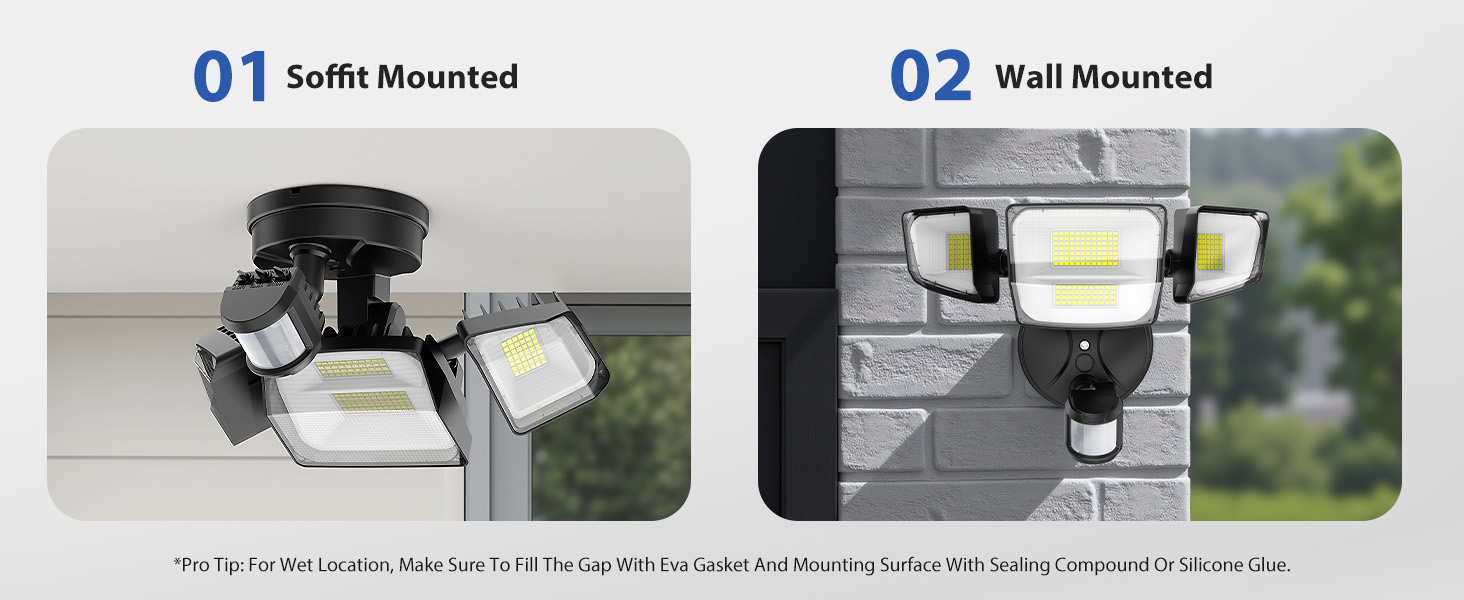
Image: Illustrates the two primary mounting options: soffit mounted (under an overhang) and wall mounted (on a vertical surface).
4.3 Wiring Connections
Connect the fixture's wires to your household wiring using the provided wire nuts:
- Connect the Black wire (Live) from the fixture to the Black wire (Live) from your household wiring.
- Connect the White wire (Neutral) from the fixture to the White wire (Neutral) from your household wiring.
- Connect the Green wire (Ground) from the fixture to the Green or bare copper wire (Ground) from your household wiring.
Ensure all connections are tight and secure. Carefully tuck the wires into the junction box and attach the fixture to the mounting bracket.
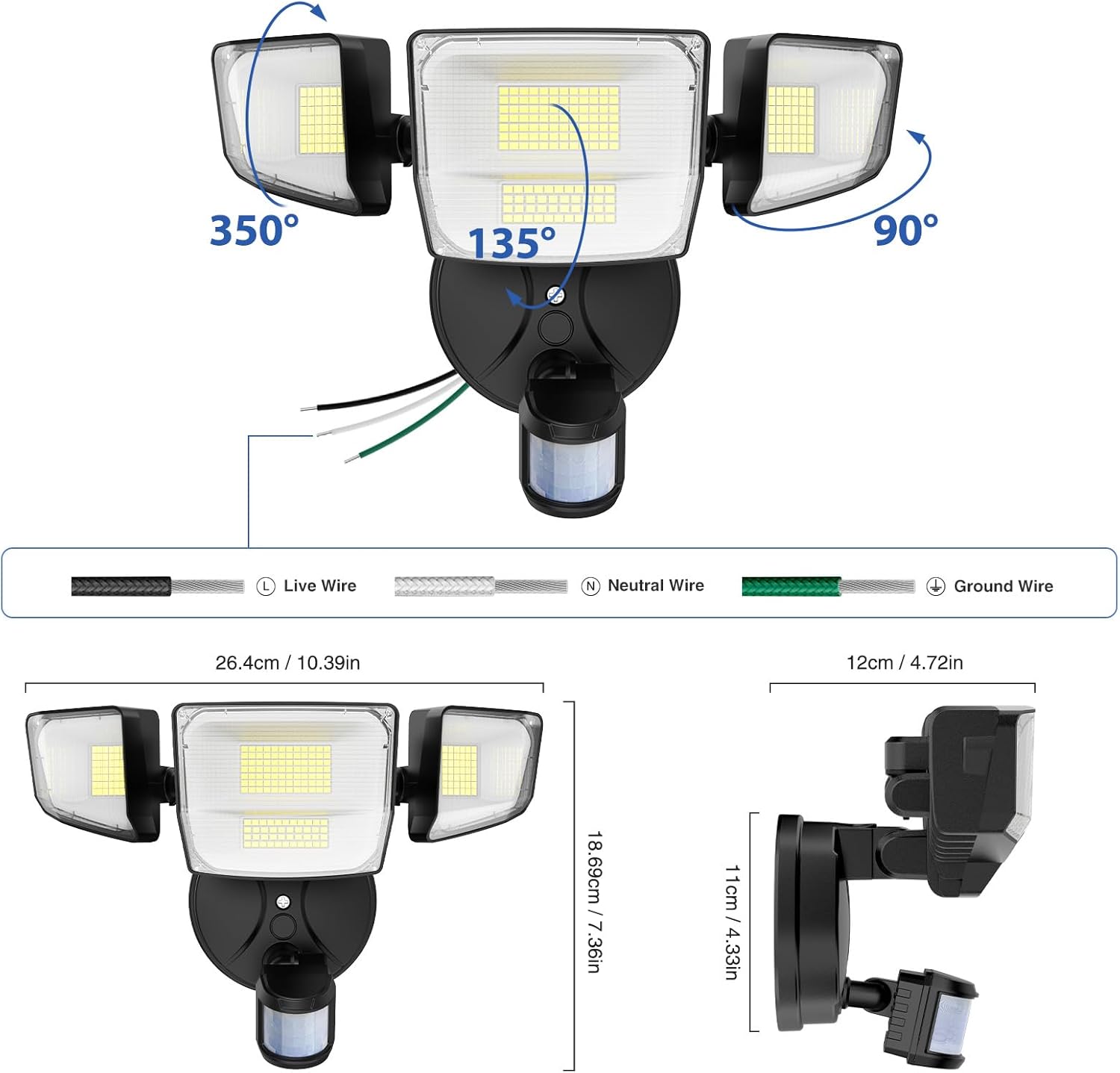
Image: Detailed diagram showing the Live, Neutral, and Ground wire connections, along with product dimensions.
4.4 Adjusting Light Heads
The four light heads are independently adjustable. You can rotate them horizontally up to 350 degrees and vertically up to 90 degrees to target illumination precisely where needed.
5. Operating Instructions
The Onforu floodlight features a motion sensor with adjustable settings and three distinct operating modes.
5.1 Sensor Controls
The motion sensor has three adjustable knobs located on its underside:
- MODE: Selects the operating mode (TEST, AUTO, D2D).
- TIME: Adjusts how long the light stays on after motion is detected (1, 3, or 10 minutes).
- DIST: Adjusts the motion detection distance (L: 19.7-26.2ft, M: 26.2-39.3ft, H: 39.3-72ft).
Image: Close-up view of the motion sensor with labels for Mode, Time, and Distance adjustment knobs.
5.2 Lighting Modes
Rotate the MODE knob to select one of the following operating modes:
- TEST Mode: The floodlight turns on for 5 seconds when it detects movement, regardless of day or night. This mode is used for initial setup and testing the sensor's angle and detection distance.
- Motion Sensor Mode (AUTO): The floodlight turns on at 100% brightness for the set duration (1, 3, or 10 minutes) when it detects movement at night. It turns off when no motion is detected. The detection angle is 180 degrees.
- Dusk-to-Dawn Mode (D2D): The floodlight automatically turns on at 30% brightness all night. It illuminates to 100% brightness when movement is detected, then returns to 30% after the set time if no further motion is detected. It turns off during the day.

Image: Visual examples of the light's behavior in Dusk-to-Dawn mode (dim at night, bright with motion), Motion Sensor mode (off, then bright with motion), and Test mode (brief activation for setup).
6. Maintenance
Regular maintenance ensures optimal performance and longevity of your floodlight.
- Cleaning: Periodically clean the light fixture and motion sensor lens with a soft, damp cloth. Do not use abrasive cleaners or solvents, as they may damage the finish or electronic components.
- Inspection: Annually inspect the wiring and mounting for any signs of wear, damage, or loose connections. Ensure the fixture is still securely mounted.
- Weather Protection: The IP66 rating ensures protection against dust and powerful water jets. However, avoid directing high-pressure water streams directly at the fixture.
7. Troubleshooting
If you encounter issues with your floodlight, refer to the following common problems and solutions:
| Problem | Possible Cause | Solution |
|---|---|---|
| Light does not turn on. | No power; loose wiring; sensor settings incorrect; faulty sensor/fixture. | Check circuit breaker. Verify wiring connections. Adjust MODE to TEST. Contact support if issue persists. |
| Light stays on continuously. | Continuous motion detected; sensor set to D2D mode; faulty sensor. | Ensure no constant motion in detection area. Check MODE setting. Reduce detection distance. |
| Motion sensor not detecting. | Sensor obstructed; detection distance too low; incorrect angle. | Clear obstructions. Increase DIST setting. Adjust sensor angle. |
| Light flickers or dims. | Unstable power supply; loose connection; extreme temperature. | Check power source. Secure all wiring. Ensure operating within specified temperature range. |
8. Specifications
| Brand | Onforu |
| Model Name | BDS90G-4 |
| Wattage | 90 Watts |
| Brightness | 10000 Lumens |
| Color Temperature | 6500 Kelvin (Daylight White) |
| Voltage | 120 Volts |
| Material | Aluminum, Plastic |
| Water Resistance Level | IP66 Waterproof |
| Special Features | Anti-Rust, Energy Efficient, Motion Sensor, Timer, Waterproof |
| Product Dimensions | 7.4"L x 4.7"W x 10.3"H |
| Item Weight | 1.9 pounds |
| Light Source Type | LED |
| Number of Light Sources | 4 |
| Mounting Type | Wall Mount & Soffit Mount |
9. Warranty Information
This Onforu product comes with a Limited Warranty. For detailed information regarding warranty coverage, terms, and conditions, please refer to the warranty card included with your product packaging or visit the official Onforu website. Keep your purchase receipt as proof of purchase for warranty claims.
10. Customer Support
For further assistance, technical support, or inquiries regarding your Onforu 90W 10000LM LED Motion Sensor Outdoor Lights, please contact Onforu customer service through the following channels:
- Visit the Onforu Store on Amazon.
- Refer to the contact information provided in your product packaging.
Ask a question about this manual
Ask about setup, troubleshooting, compatibility, parts, safety, or missing instructions. Manuals+ will review the question and use this page’s manual context to help answer it.