
1. Introduction
Thank you for choosing the Husky 2200 Lumens Hybrid Power Dimmable Lantern. This manual provides important information regarding the safe operation, setup, and maintenance of your lantern. Please read this manual thoroughly before using the product and retain it for future reference.
This lantern features a heavy-duty design and offers versatile power options, including an integrated rechargeable lithium-ion battery and the ability to use 6 AA alkaline batteries. It provides 7 light modes, including high, medium, low, eco, warm light, red, and red flashing, catering to various lighting needs.

Image 1.1: The Husky 2200 Lumens Hybrid Power Dimmable Lantern, showcasing its design and a table detailing lumen output and runtimes for different power sources and modes.
2. Safety Information
- Read all instructions: Before operating the lantern, read and understand all instructions and safety warnings in this manual.
- Battery Safety:
- Do not mix old and new batteries.
- Do not mix alkaline, standard (carbon-zinc), or rechargeable (nickel-cadmium) batteries.
- Ensure batteries are inserted with correct polarity (+ and -).
- Remove batteries if the lantern will not be used for an extended period.
- Dispose of batteries properly according to local regulations.
- Charging: Only use the provided USB charging cable or a certified equivalent. Do not attempt to charge non-rechargeable batteries.
- Eye Protection: Do not stare directly into the light source. The high lumen output can cause temporary vision impairment.
- Water Resistance: The lantern is water resistant, not waterproof. Do not submerge it in water. Protect the USB port cover when not in use to maintain water resistance.
- Children: Keep out of reach of children. This is not a toy.
- Heat: Do not expose the lantern to extreme temperatures or open flames.
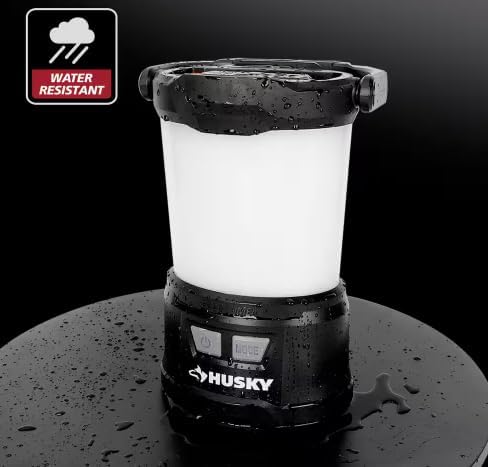
Image 2.1: The lantern demonstrating its water-resistant capabilities, with water droplets visible on its surface.
3. Package Contents
Ensure all items are present and in good condition upon opening the package. If any items are missing or damaged, please contact customer support.
- Husky 2200 Lumens Hybrid Power Dimmable Lantern
- USB Charging Cable
4. Product Features
- Hybrid Power: Operates with an integrated rechargeable lithium-ion battery or 6 AA alkaline batteries (not included).
- 7 Light Modes: High, Medium, Low, Eco, Warm Light, Red, and Red Flashing for diverse lighting needs.
- Dimmable Function: Adjust brightness by holding the Mode button.
- USB Output: Built-in USB port allows charging of other devices.
- Memory Function: Recalls the last used mode if left on for 10 seconds.
- Durable Design: Heavy-duty construction with an integrated carabiner and handle for easy transport and storage.
- Water Resistant: Designed to withstand splashes and light rain.
5. Setup
5.1. Battery Installation (AA Alkaline Batteries)
The lantern can be powered by 6 AA alkaline batteries (not included) in addition to its integrated rechargeable battery. To install AA batteries:
- Locate the battery compartment cover on the bottom of the lantern.
- Twist the cover counter-clockwise to unlock and remove it.
- Insert 6 AA alkaline batteries, ensuring correct polarity (+ and -) as indicated inside the compartment.
- Replace the cover and twist clockwise to lock it securely.

Image 5.1: View of the lantern's base with the battery compartment open, illustrating where to insert the 6 AA alkaline batteries.
5.2. Charging the Integrated Lithium-Ion Battery
The lantern features an integrated rechargeable lithium-ion battery. Before first use, fully charge the lantern.
- Locate the USB-C input/output port on the side of the lantern, usually protected by a rubber cover.
- Open the rubber cover.
- Connect the provided USB charging cable to the USB-C input port on the lantern.
- Connect the other end of the USB cable to a standard USB power source (e.g., wall adapter, computer USB port, power bank).
- The indicator light will show charging status (refer to Section 5.3 for indicator light details).
- Once fully charged, disconnect the cable and close the rubber cover to maintain water resistance.

Image 5.2: A detailed view of the USB-C port on the lantern, showing a charging cable connected.
5.3. Indicator Lights
The lantern has an indicator light near the power button to show battery status and charging status:
- Green: Fully charged or sufficient battery level.
- Orange: Medium battery level.
- Red: Low battery level.
- Red Flashing: Indicates the battery needs charging (when in use) or is currently charging (when connected to power).

Image 5.3: Visual representation of the indicator light colors and their corresponding battery and charging statuses.
6. Operating Instructions
6.1. Power On/Off
Press the Power button once to turn the lantern on. Press it again to turn the lantern off.
6.2. Selecting Light Modes
With the lantern on, press the Mode button repeatedly to cycle through the 7 available light modes:
- High Light (2200 Lumens)
- Medium Light (1000 Lumens)
- Low Light (500 Lumens)
- Eco Light (30 Lumens)
- Warm Light
- Red Light
- Red Flashing
The lantern features a memory function. If a mode is left on for 10 seconds, the lantern will remember this mode and turn on in the same mode the next time it is activated.

Image 6.1: Visual demonstration of the seven distinct light modes offered by the lantern, including their appearance and intensity.
6.3. Dimming Function
To dim the light in any of the white light modes (High, Medium, Low, Eco), press and hold the Mode button. The brightness will gradually decrease or increase. Release the button when the desired brightness is reached.
6.4. USB Output (Power Bank Function)
The lantern can be used as a power bank to charge other USB-powered devices.
- Open the rubber cover protecting the USB-C port.
- Connect your device's charging cable to the USB-C output port on the lantern.
- The lantern will begin charging your device.
- Once charging is complete, disconnect the cable and close the rubber cover.
Note: Using the USB output will consume the lantern's battery power and reduce its run time for illumination.
7. Maintenance
7.1. Cleaning
- Wipe the lantern with a soft, damp cloth.
- Do not use abrasive cleaners or solvents, as they may damage the surface.
- Ensure the USB port cover is closed before cleaning to prevent water ingress.
7.2. Storage
- Store the lantern in a cool, dry place away from direct sunlight and extreme temperatures.
- If storing for an extended period, remove any AA alkaline batteries to prevent leakage.
- For the integrated lithium-ion battery, it is recommended to charge it every 3-6 months to maintain battery health.
8. Troubleshooting
| Problem | Possible Cause | Solution |
|---|---|---|
| Lantern does not turn on. |
|
|
| Lantern does not charge. |
|
|
| USB output not charging other devices. |
|
|
9. Specifications
| Feature | Detail |
|---|---|
| Model Number | 91390 |
| Light Output (Max) | 2200 Lumens |
| Power Source | Integrated Rechargeable Lithium-Ion Battery, 6 AA Alkaline Batteries (not included) |
| Battery Description | Lithium-Ion, Alkaline |
| Run Time (High Mode) | 4 Hours (with Li-ion + AA batteries) |
| Product Dimensions | 5.9"L x 7.3"W x 10.5"H |
| Item Weight | 2.65 pounds |
| Mounting Type | Tabletop Mount |
| Water Resistance Level | Water Resistant |
| Light Source Type | Light Emitting Diode (LED) |
| Included Components | Charging Cable |
| Color | White/Black |
| Material | Plastic |
10. Warranty and Support
For warranty information, please refer to the documentation provided at the time of purchase or contact the retailer where the product was acquired. Husky products typically come with a manufacturer's warranty covering defects in materials and workmanship.
If you encounter any issues or have questions not covered in this manual, please contact Husky customer support or the retailer for assistance. Keep your purchase receipt as proof of purchase for warranty claims.
Manufacturer: Husky


