
Introduction
This manual provides instructions for the safe and efficient operation of your LoraTap Remote Control Timer Outlet. Please read this manual thoroughly before use and retain it for future reference.

Image: The LoraTap Remote Control Timer Outlet and its accompanying remote control, showcasing their compact design.
What's in the Box
- One Remote Control
- One Wall Plate (for remote mounting)
- One Timer Outlet
- One Hand Lanyard for Remote Control
Product Overview
The LoraTap Remote Control Timer Outlet consists of two main components: the timer outlet and the remote control. The outlet plugs into a standard wall socket, and the remote allows for wireless control of connected devices.
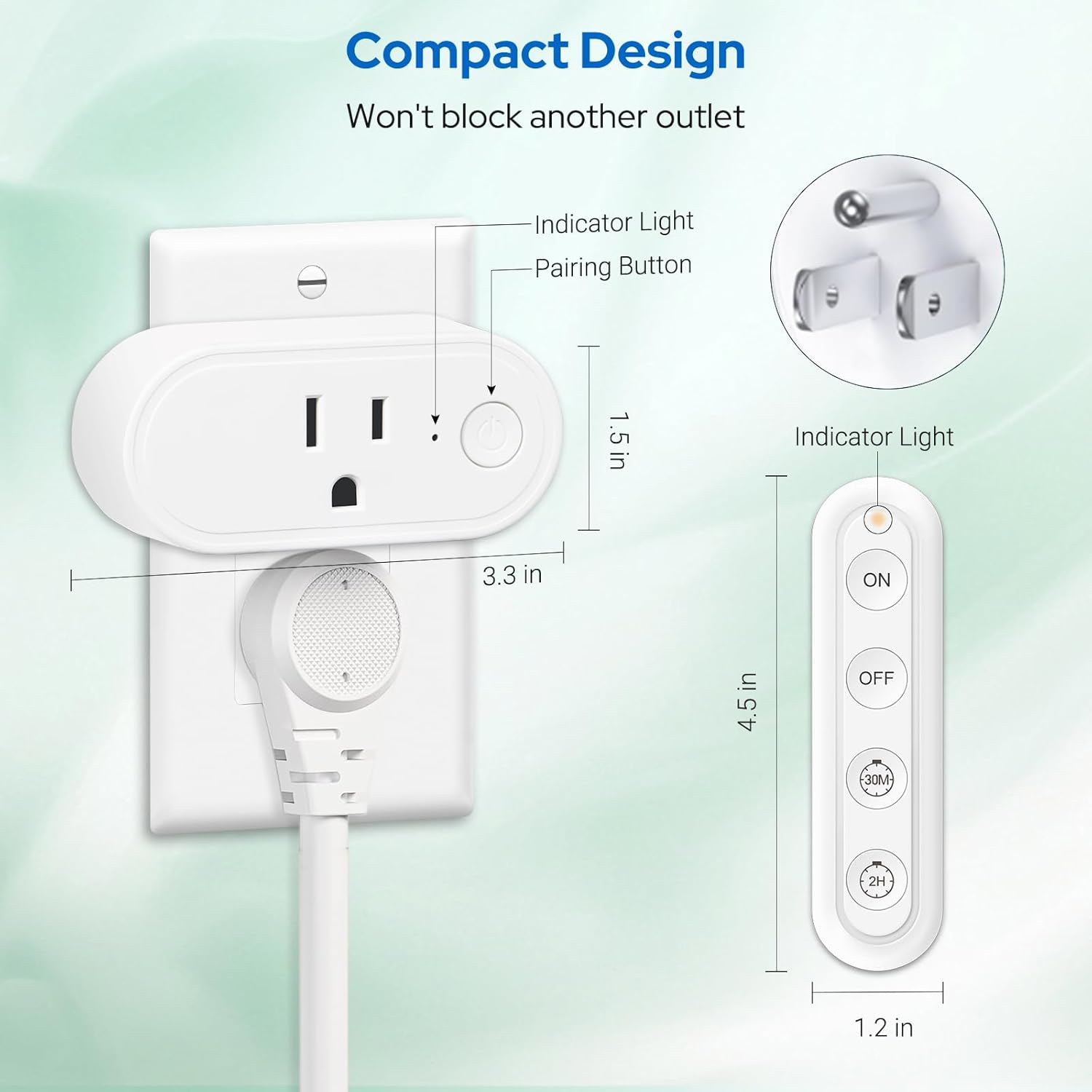
Image: A diagram illustrating the compact design and dimensions of the LoraTap Timer Outlet and its remote control, highlighting the indicator light and pairing button on the outlet.
Remote Control Buttons:

Image: An illustration detailing the functions of each button on the LoraTap remote control: ON, OFF, 30 Min Countdown, and 2H Countdown.
- ON Button: Powers on connected appliances. This function does not include a countdown timer.
- OFF Button: Powers off the outlet. Any active timer settings will be cleared.
- 30 Min Countdown Button: Initiates a 30-minute countdown. The appliance will automatically power off when the 30 minutes expire.
- 2H Countdown Button: Initiates a 2-hour countdown. The appliance will automatically power off when the 2 hours expire.
Setup
- Unpack: Carefully remove the timer outlet and remote control from the packaging.
- Insert Remote Battery: The remote control comes with a CR2032 battery pre-installed. If needed, remove the battery tab or replace the battery.
- Plug in the Outlet: Insert the LoraTap Timer Outlet into a standard 120V AC wall socket. Ensure it is securely plugged in. The compact design allows it to occupy only one jack position, leaving the other outlet free.
- Pairing (Pre-programmed): The timer outlet and remote control are pre-programmed for immediate use. No manual pairing is typically required for initial setup. If re-pairing is ever needed, refer to the troubleshooting section.
- Connect Appliance: Plug the appliance you wish to control into the LoraTap Timer Outlet.

Image: The LoraTap Timer Outlet plugged into a wall socket, controlling a television and a lamp, demonstrating its plug-and-play functionality.

Image: A person comfortably using the LoraTap remote control from a couch, illustrating the ease of use without wiring or Wi-Fi.
Operating Instructions
The LoraTap Remote Control Timer Outlet offers both instant ON/OFF control and timed countdown functions.
Instant ON/OFF Control:
- To turn on a connected appliance, press the ON button on the remote control.
- To turn off a connected appliance, press the OFF button on the remote control.
Countdown Timer Functions:
These functions automatically power off the connected appliance after a set duration, preventing overheating and saving energy.
- To set a 30-minute countdown, press the 30M button on the remote control. The appliance will operate for 30 minutes and then automatically power off.
- To set a 2-hour countdown, press the 2H button on the remote control. The appliance will operate for 2 hours and then automatically power off.
- To cancel an active countdown, press the OFF button.

Image: Visual representation of the 30-minute countdown for a baby's night light and the 2-hour countdown for a bedroom lamp, demonstrating the automatic shut-off feature.

Image: Various application scenarios for the LoraTap Timer Outlet, including daily ON/OFF mode for decorative lights and countdown mode for appliances like irons or hair curlers.
The remote control utilizes a strong RF signal, allowing control of the outlet up to 100 feet away, even through walls and floors.

Image: An illustration highlighting the 100-foot RF signal range of the LoraTap remote control, capable of penetrating walls and floors.
Maintenance
- Cleaning: Disconnect the outlet from the power source before cleaning. Wipe the surface with a soft, dry cloth. Do not use liquid cleaners or abrasive materials.
- Battery Replacement: The remote control uses one CR2032 battery. When the remote's range decreases or it becomes unresponsive, replace the battery. Ensure correct polarity when inserting the new battery.
- Storage: Store the device in a cool, dry place away from direct sunlight and extreme temperatures when not in use for extended periods.
Troubleshooting
| Problem | Possible Cause | Solution |
|---|---|---|
| Outlet does not respond to remote. | Remote battery is low or dead. | Replace the CR2032 battery in the remote control. |
| Outlet is unplugged or not receiving power. | Ensure the outlet is securely plugged into a live wall socket. Check the wall socket with another device. | |
| Remote and outlet are out of range or signal interference. | Move closer to the outlet. Ensure no large metal objects are blocking the signal path. | |
| Appliance connected to outlet does not turn on. | Appliance is not powered on or is faulty. | Ensure the appliance itself is switched on (if it has a physical switch) and functioning correctly when plugged directly into a wall socket. |
| Countdown function does not work. | Incorrect button pressed. | Ensure you are pressing the '30M' or '2H' button for countdown. Pressing 'ON' provides continuous power. |
| Previous timer was cancelled by 'OFF' button. | Re-initiate the desired countdown by pressing '30M' or '2H'. |
Specifications
| Feature | Detail |
|---|---|
| Product Dimensions | 3.27 x 1.1 x 1.5 inches |
| Weight | 4.66 ounces |
| Current Rating | 15 Amps |
| Operating Voltage | 120 Volts |
| Maximum Power | 1800 Watts |
| Operation Mode | ON-OFF, 30-min Countdown, 2-hour Countdown |
| Remote Control Range | Up to 100 feet (RF signal, works through walls) |
| Remote Battery Type | 1 x CR2032 (included) |
| Material | Copper (Contact Material) |
| Manufacturer | LoraTap |
| Model Number | B0F26RP4F8 |
Warranty and Support
For warranty information and customer support, please refer to the official LoraTap website or contact their customer service directly. Contact details are typically found on the product packaging or the manufacturer's website.
Manufacturer: LoraTap
ASIN: B0F26RP4F8
Date First Available: March 22, 2025