
TEXLIFT US-EPT-33K-FE
TEXLIFT Full Electric Power Pallet Jack US-EPT-33K-FE Instruction Manual
Model: US-EPT-33K-FE | Capacity: 3300 Lbs
1. Introduction
This instruction manual provides essential information for the safe and efficient operation, maintenance, and troubleshooting of your TEXLIFT Full Electric Power Pallet Jack, Model US-EPT-33K-FE. Please read this manual thoroughly before operating the equipment to ensure proper usage and to prevent injury or damage.
The TEXLIFT Full Electric Power Pallet Jack is designed for material handling tasks, offering a 3300 Lb load capacity with a 48-inch length and 27-inch width fork size. It features a plug-in 48V/15A lithium battery for reliable electric power.

Figure 1: TEXLIFT Full Electric Power Pallet Jack
2. Safety Information
Always prioritize safety when operating material handling equipment. Failure to follow safety instructions can result in serious injury or property damage.
2.1 General Safety Precautions
- Only trained and authorized personnel should operate this pallet jack.
- Wear appropriate personal protective equipment (PPE), including safety shoes and gloves.
- Inspect the pallet jack before each use for any signs of damage, loose parts, or malfunctions. Do not operate if damaged.
- Ensure the work area is clear of obstructions and has adequate lighting.
- Do not exceed the maximum load capacity of 3300 Lbs.
- Maintain a safe distance from other personnel and equipment during operation.
- Avoid sudden starts, stops, or turns, especially with a loaded pallet.
- Never operate the pallet jack on inclines or declines that exceed its rated capability.
- Keep hands and feet clear of moving parts, especially the forks and wheels.
2.2 Emergency Stop
The pallet jack is equipped with an emergency stop button. In case of an emergency or unexpected behavior, press the red emergency stop button immediately to cut power to the unit.
3. Product Overview and Key Components
Familiarize yourself with the main components of your TEXLIFT Electric Pallet Jack:

Figure 2: Key Features and Components
- Smart Handle: Ergonomically designed for comfortable grip and intuitive control of driving, lifting, and lowering functions.
- Plug-in Lithium Battery: Provides 48V/15AH power. Designed for easy removal and charging.
- Power Box: Houses the electrical components and battery connection.
- Emergency Stop Button: Red button for immediate power cut-off in emergencies.
- DC Drive System: Efficient motor for smooth and controlled movement.
- Premium Pump: Ensures reliable and consistent lifting and lowering operations.
- Reliable Wheels: Durable wheels designed for various industrial floor surfaces.
- Forks: 48 inches long by 27 inches wide, designed to accommodate standard pallets.
4. Setup
4.1 Initial Inspection
Upon receiving your pallet jack, carefully inspect the packaging and the unit for any visible damage that may have occurred during shipping. Report any damage to the carrier and supplier immediately.
4.2 Battery Installation and Initial Charge
- Ensure the emergency stop button is engaged (pushed in) before handling the battery.
- Locate the battery compartment, typically under the main housing.
- Carefully insert the 48V/15AH lithium battery into its designated slot. Ensure it is securely seated.
- Connect the battery cable to the pallet jack's power connector.
- Connect the charger to the battery and then plug the charger into a suitable power outlet.
- Allow the battery to charge for approximately 3 hours for a full charge before first use. The battery level indicator on the Smart Handle will show charging status.
5. Operation
This section details the basic operational procedures for the TEXLIFT Electric Pallet Jack.

Figure 3: Pallet Jack in various operational scenarios
5.1 Pre-Operation Checks
- Verify battery charge level on the indicator.
- Check for any visible damage or obstructions.
- Ensure all controls on the Smart Handle are functioning correctly.
- Release the emergency stop button (pull it out) to power on the unit.
5.2 Driving and Steering
- The Smart Handle controls direction and speed. Push the handle forward to move backward, and pull it back to move forward.
- Twist the handle grips to steer the pallet jack.
- The pallet jack features fast and slow mode switching. Use the appropriate speed setting for the load and environment. Maximum driving speed is 4-5 KM/H (approximately 2.5 mph).
- The electromagnetic brake engages when the handle is released or moved to its extreme upright or lowered positions.
5.3 Lifting and Lowering Loads
- Position the forks carefully under the pallet, ensuring they are fully inserted.
- Use the lift control on the Smart Handle to raise the forks. The maximum lift height is 7.8 inches.
- Once the load is lifted, ensure it is stable and centered on the forks before moving.
- To lower the load, use the lower control on the Smart Handle. The fork lowered height is 3.2 inches.
5.4 Upright Walking Mode
This mode allows for operation with the handle in an upright position, useful in confined spaces. Refer to the Smart Handle controls for engaging this mode.
6. Maintenance
Regular maintenance ensures the longevity and safe operation of your pallet jack.
6.1 Daily Checks
- Check battery charge and connections.
- Inspect wheels for wear or damage.
- Verify brake functionality.
- Ensure all controls on the Smart Handle operate smoothly.
6.2 Battery Care
- Charge the lithium battery fully after each shift or when the battery level is low.
- Avoid completely draining the battery, as this can reduce its lifespan.
- Store the battery in a cool, dry place if removed from the unit for extended periods.
- The battery is changeable, allowing for quick swaps if a spare is available for continuous operation.
6.3 General Cleaning
Keep the pallet jack clean from dust, dirt, and debris. Use a damp cloth for cleaning; avoid using high-pressure water or harsh chemicals.
7. Troubleshooting
This section addresses common issues you might encounter with your pallet jack.
- Pallet Jack does not power on:
- Check if the emergency stop button is engaged. Release it.
- Verify the battery is properly installed and charged.
- Ensure battery connections are secure.
- Forks do not lift or lower:
- Check battery charge level.
- Ensure no obstructions are preventing fork movement.
- Verify the lift/lower controls on the Smart Handle are functioning.
- Pallet Jack moves slowly or erratically:
- Check battery charge level.
- Ensure the correct speed mode (fast/slow) is selected.
- Inspect wheels for damage or debris.
- Brake not engaging/disengaging properly:
- Ensure the Smart Handle is in the correct position for brake engagement/disengagement.
- Check for any physical obstructions around the brake mechanism.
For issues not listed here or if troubleshooting steps do not resolve the problem, please contact customer support.
8. Specifications
Detailed technical specifications for the TEXLIFT Full Electric Power Pallet Jack US-EPT-33K-FE:
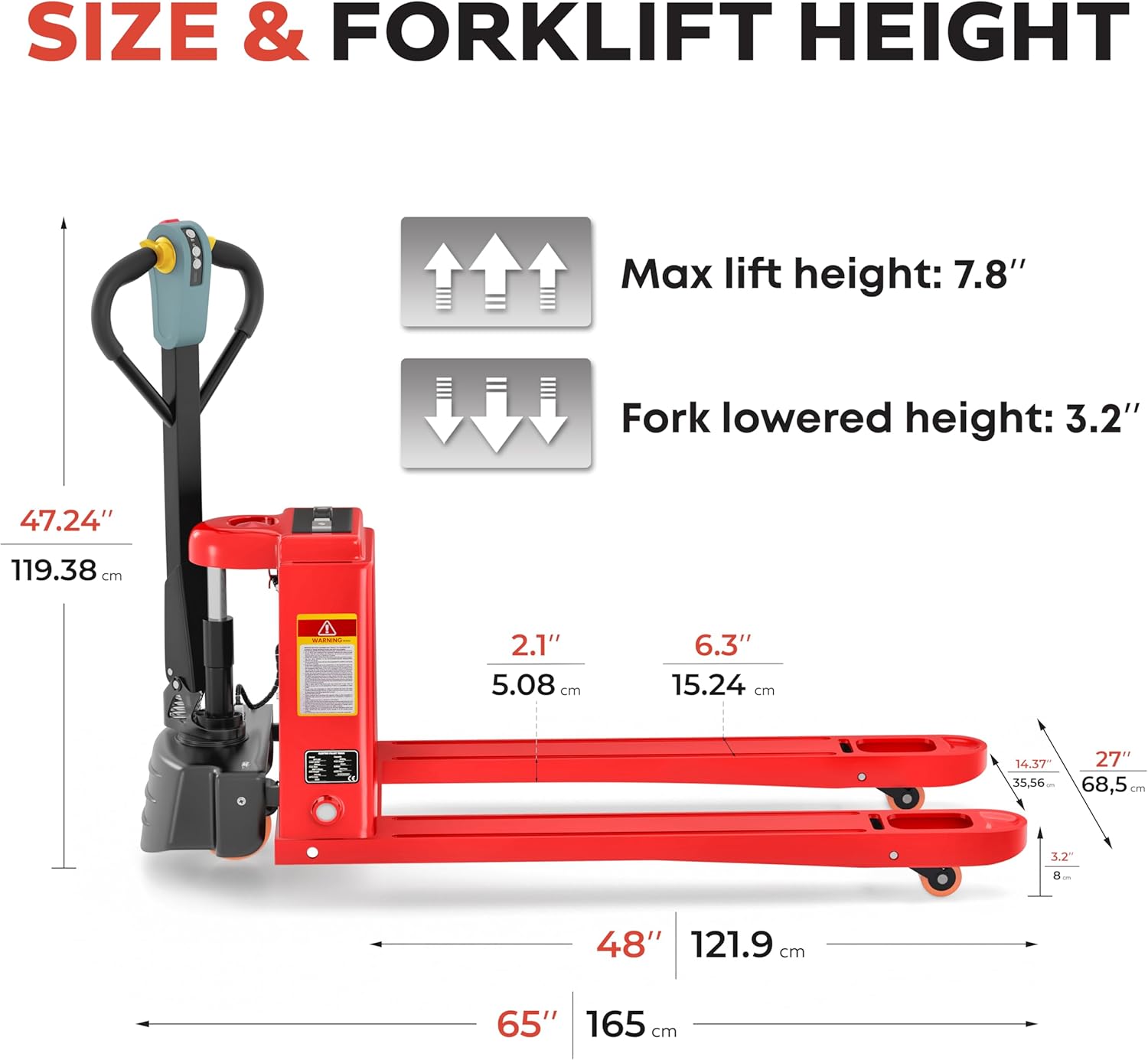
Figure 4: Dimensions and Lift Height

Figure 5: Performance Specifications
| Specification | Value |
|---|---|
| Model | US-EPT-33K-FE |
| Load Capacity | 3300 Lbs |
| Fork Length | 48 inches |
| Fork Width | 27 inches |
| Maximum Lift Height | 7.8 inches |
| Fork Lowered Height | 3.2 inches |
| Overall Length | 65 inches |
| Overall Width | 27 inches |
| Overall Height | 47.24 inches |
| Load Center Distance | 23.60 inches |
| Voltage | 48V |
| Battery Type | Lithium (15AH) |
| Max Driving Speed (Laden/Unladen) | 4-5 KM/H (approx. 2.5 mph) |
| Brake Type | Electromagnetic Brake |
| Charging Time | 3 Hours |
| Working Time (per charge) | 3 Hours |
| Item Weight | 309 pounds |
| Material | Metal |
| Color | Red |
9. Warranty Information
The TEXLIFT Full Electric Power Pallet Jack comes with a 12-month warranty from the date of purchase. This warranty covers manufacturing defects and material faults under normal use and service. It does not cover damage resulting from misuse, neglect, accidents, unauthorized modifications, or normal wear and tear. Please retain your proof of purchase for warranty claims.
10. Customer Support
For technical assistance, spare parts, or warranty inquiries, please contact TEXLIFT customer support. Refer to your purchase documentation or the TEXLIFT official website for current contact information.
Ask a question about this manual
Ask about setup, troubleshooting, compatibility, parts, safety, or missing instructions. Manuals+ will review the question and use this page’s manual context to help answer it.