
Alpicool ECX50
Alpicool CX-IR42 Portable Refrigerator User Manual
Model: ECX50 | Capacity: 50L
1. Introduction and Overview
Thank you for choosing the Alpicool CX-IR42 Portable Refrigerator. This versatile appliance is designed to provide efficient cooling and freezing for your food and beverages, making it ideal for camping, road trips, picnics, and other outdoor activities. Featuring advanced compressor technology, a robust design with telescopic handle and wheels, and multiple power options, the ECX50 model ensures your items stay fresh and cool wherever you go.
This manual provides essential information for the safe and effective operation, maintenance, and troubleshooting of your portable refrigerator. Please read it thoroughly before first use and keep it for future reference.
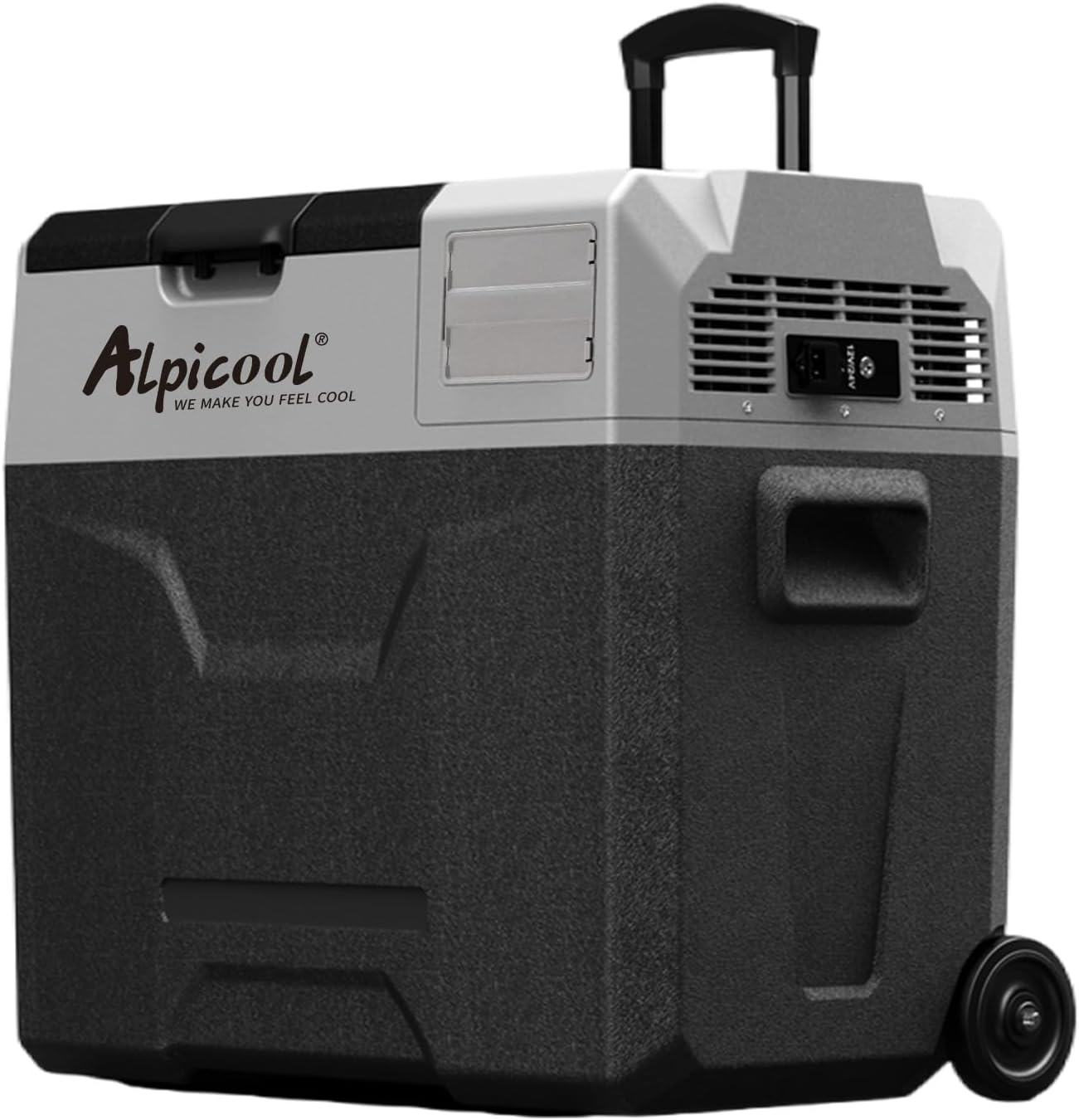
Image 1.1: The Alpicool CX-IR42 Portable Refrigerator, showcasing its compact design and extended telescopic handle for easy transport.
2. Safety Information
To ensure safe operation and prevent injury or damage, please observe the following safety precautions:
- Read all instructions before operating the appliance.
- Do not operate the refrigerator if the power cord is damaged or if the appliance is visibly damaged.
- Ensure adequate ventilation around the unit. Do not block air vents.
- Avoid placing the refrigerator in direct sunlight or near heat sources.
- Do not immerse the appliance in water or expose it to heavy rain.
- Use only the provided power adapters (DC 12V/24V and AC 100-240V).
- When connecting to a vehicle's power supply, ensure the vehicle's battery protection system is correctly set to prevent excessive discharge.
- Do not store explosive substances such as aerosol cans with a flammable propellant in this appliance.
- Keep children away from the appliance, especially when it is operating.
3. Product Components and Features
The Alpicool CX-IR42 (ECX50) is designed for convenience and performance. Key features include:
- Efficient Compressor Refrigeration: Provides rapid cooling and stable temperature control.
- Dual-Zone Capability: Can function as a refrigerator or freezer.
- Telescopic Handle & Wheels: For easy portability and transport.
- Digital Control Panel: Intuitive interface for temperature adjustment and mode selection.
- 3-Level Battery Protection: Prevents vehicle battery drain.
- Multiple Power Inputs: Compatible with DC 12V/24V (car cigarette lighter) and AC 100-240V (home outlet), and can be connected to solar panels (solar panel not included).
3.1. Internal Capacity and Cooling Performance

Image 3.1: The spacious interior of the refrigerator, illustrating its large capacity for both refrigeration and freezing, suitable for various food items.

Image 3.2: A performance graph demonstrating the rapid cooling capability, reaching 0°C (32°F) in approximately 15 minutes and -20°C (-4°F) within 45-60 minutes from an ambient temperature of 25°C (77°F).
3.2. Power Modes and Noise Level

Image 3.3: Illustration of the refrigerator's efficient compressor, highlighting its low noise operation (≤45dB) and two power modes: ECO (45W for power saving) and MAX (60W for fast cooling).
3.3. Dimensions and Portability

Image 3.4: Detailed external and internal dimensions of the ECX50 model, indicating its compact yet spacious design for various uses.

Image 3.5: Overview of the refrigerator's ultra-portable design, featuring a digital control panel for precise temperature adjustment and its versatile fridge/freezer 2-in-1 capability.
4. Setup
4.1. Unpacking and Initial Inspection
- Carefully remove the refrigerator from its packaging.
- Inspect the unit for any signs of damage during transit. If damage is found, do not operate and contact customer support.
- Remove all internal packing materials.
4.2. Initial Cleaning
Before first use, clean the interior and exterior of the refrigerator with a damp cloth and mild detergent. Dry thoroughly.
4.3. Power Connection
The Alpicool CX-IR42 supports multiple power sources:

Image 4.1: The three primary ways to power the refrigerator: via a car cigarette lighter, a standard home outlet, or a solar panel (solar panel not included).
- Car Cigarette Lighter (DC 12V/24V): Use the provided DC power cord. Plug one end into the refrigerator's DC input and the other into your vehicle's cigarette lighter socket.
- Home Outlet (AC 100-240V): Use the provided AC adapter and power cord. Connect the AC adapter to the refrigerator's DC input, then plug the AC power cord into the adapter and a standard wall outlet.
- Solar Panel (DC 12-42V): The unit can be connected to a compatible solar panel system (sold separately) for off-grid power. Ensure the voltage is within the specified range.
4.4. Positioning
Place the refrigerator on a flat, stable surface. Ensure there is at least 10 cm (4 inches) of clear space around all sides for proper ventilation. Avoid placing it on soft surfaces like carpets that might block the vents.
5. Operating Instructions
5.1. Control Panel Overview

Image 5.1: The multi-function control panel, showing buttons for temperature adjustment (+/-), power on/off, and mode selection (ECO/MAX).
- Power Button: Press and hold to turn the unit ON/OFF. Short press to enter/exit settings menu.
- Temperature Increase (+): Increases the target temperature.
- Temperature Decrease (-): Decreases the target temperature.
- Settings Button (Gear Icon): Short press to cycle through settings (e.g., battery protection, ECO/MAX mode).
5.2. Powering On/Off
Press and hold the Power Button for 3 seconds to turn the refrigerator on or off. The display will illuminate when the unit is on.
5.3. Setting Temperature
Once powered on, use the + and - buttons to set your desired temperature. The display will show the current internal temperature and then switch to the set temperature. The unit will automatically adjust to reach and maintain the set temperature.
5.4. ECO/MAX Mode Selection
The refrigerator offers two operating modes:
- MAX Mode (60W): Provides maximum cooling power for rapid temperature reduction. Ideal for initial cooling or when ambient temperatures are high.
- ECO Mode (45W): Energy-saving mode, suitable for maintaining temperature once the desired level is reached.
To switch between modes, short press the Settings Button (Gear Icon) until 'ECO' or 'MAX' appears on the display, then use the + or - buttons to select your preferred mode. Confirm by pressing the Settings Button again or waiting a few seconds.

Image 5.2: Visual representation of the two power modes: ECO for energy efficiency and MAX for rapid cooling, demonstrating the powerful compressor's ability to achieve fast freezing.
5.5. Battery Protection Settings
The unit features a 3-level battery protection system to prevent your vehicle's battery from excessive discharge. This is crucial when operating the refrigerator from a car battery.

Image 5.3: Explanation of the 3-level battery protection system (Low, Medium, High) designed to prevent the car battery from over-discharging when the refrigerator is in use.
To adjust the battery protection level:
- With the unit on, short press the Settings Button (Gear Icon) repeatedly until you see a battery icon or 'H', 'M', 'L' on the display.
- Use the + or - buttons to select the desired level: H (High), M (Medium), or L (Low).
- Confirm by pressing the Settings Button again or waiting a few seconds.
Recommendation: Set to 'H' (High) for vehicle battery protection, especially if your vehicle's battery is not fully charged or if you plan to leave the refrigerator connected for extended periods without the engine running. 'L' (Low) is suitable for external power sources or when the engine is running.
5.6. Using the Telescopic Handle and Wheels
To extend the telescopic handle, press the button on the handle and pull upwards. To retract, press the button and push downwards until it locks into place. The integrated wheels allow for easy movement of the refrigerator, even when fully loaded.
5.7. Usage Scenarios

Image 5.4: The refrigerator positioned in a vehicle's trunk, highlighting its convenience for long-distance driving and travel.

Image 5.5: Various application scenarios for the portable refrigerator, including camping, general outdoor use, travel, and fishing, demonstrating its versatility.
6. Maintenance
6.1. Cleaning
- Always unplug the refrigerator before cleaning.
- Clean the interior and exterior with a soft cloth dampened with mild detergent and warm water.
- Do not use abrasive cleaners, harsh chemicals, or sharp objects to clean the unit.
- Ensure the unit is completely dry before reconnecting power.
6.2. Defrosting
If a thick layer of frost builds up inside the freezer compartment, it will reduce cooling efficiency. To defrost:
- Turn off the refrigerator and unplug it.
- Remove all contents.
- Leave the lid open to allow the frost to melt naturally. You can place a towel inside to absorb water.
- Once defrosted, wipe the interior dry with a clean cloth.
6.3. Storage
When storing the refrigerator for an extended period:
- Ensure the unit is clean and dry.
- Leave the lid slightly ajar to prevent odors and mold growth.
- Store in a dry, well-ventilated area, away from direct sunlight and extreme temperatures.
7. Troubleshooting
If you encounter issues with your Alpicool portable refrigerator, refer to the table below for common problems and solutions:
| Problem | Possible Cause | Solution |
|---|---|---|
| Refrigerator not turning on. | No power supply; Damaged power cord; Low voltage protection activated. | Check power connection; Replace damaged cord; Adjust battery protection level or provide higher voltage. |
| Not cooling sufficiently. | Vents blocked; Temperature setting too high; Too much content; Ambient temperature too high. | Ensure clear vents; Lower temperature setting; Do not overfill; Move to a cooler environment. |
| Unusual noise. | Unit not level; Fan obstruction; Compressor issue. | Place on a flat surface; Check for obstructions in fan; If noise persists, contact support. |
| Display error codes. | Specific internal fault. | Refer to the full user manual for specific error code meanings or contact customer support. |
If the problem persists after attempting these solutions, please contact Alpicool customer support.
8. Specifications
| Attribute | Specification |
|---|---|
| Model | ECX50 |
| Capacity | 50 Litres |
| Dimensions (L x W x H) | 61 cm x 37.8 cm x 55 cm (24 x 14.9 x 21.7 inches) |
| Weight | 13.4 Kilograms |
| Voltage | DC 12V/24V, AC 100-240V |
| Rated Power (MAX Mode) | 60W |
| Rated Power (ECO Mode) | 45W |
| Temperature Range | -20°C to +20°C (-4°F to +68°F) |
| Noise Level | ≤45dB |
| Refrigerant | R134a |
9. Warranty and Support
Your Alpicool CX-IR42 Portable Refrigerator comes with a manufacturer's warranty. Please refer to the warranty card included with your purchase for specific terms and conditions, including warranty period and coverage details.
9.1. Included Items

Image 9.1: The Alpicool ECX50 portable refrigerator and its standard accessories, including the DC power cord, AC cord with adapter, and the user manual.
The following items are included with your Alpicool CX-IR42 (ECX50) Portable Refrigerator:
- Alpicool CX-IR42 Portable Refrigerator x1
- DC Power Cord x1
- AC Cord + Adapter x1
- User Manual x1
9.2. Customer Support
For technical assistance, warranty claims, or general inquiries, please contact Alpicool customer support through the retailer where you purchased the product or visit the official Alpicool website for contact information.
Related documentsECX50


Ask a question about this manual
Ask about setup, troubleshooting, compatibility, parts, safety, or missing instructions. Manuals+ will review the question and use this page’s manual context to help answer it.