
Dreo DR-HAC009S White
Contents
Dreo Portable Air Conditioner User Manual
Model: DR-HAC009S White
Important Safety Instructions
Please read this manual thoroughly before operating your Dreo Portable Air Conditioner and retain it for future reference. Adhere to all safety warnings and instructions to prevent electric shock, fire, or injury.
- Always plug the unit into a grounded 3-prong outlet. Do not remove the grounding prong.
- Do not operate the unit with a damaged cord or plug. If the supply cord is damaged, it must be replaced by the manufacturer, its service agent, or similarly qualified persons to avoid a hazard.
- Ensure the unit is placed on a flat, stable surface to prevent tipping.
- Keep the air intake and exhaust vents clear of obstructions. Maintain at least 20 inches (50 cm) of clearance around the unit for proper airflow.
- Do not insert fingers or foreign objects into the air inlets or outlets.
- Unplug the unit before cleaning or performing any maintenance.
- This appliance is equipped with an LCDI (Leakage Current Detection and Interruption) 3-prong plug for enhanced safety, which will shut down power if a current leakage is detected.
Product Overview
The Dreo Portable Air Conditioner provides powerful and efficient cooling for your indoor spaces. Featuring a 3-in-1 design, it offers cooling, fan, and dehumidifier modes to suit various climate needs. Its advanced technology ensures quiet operation and a drainage-free experience in most humidity conditions.

The Dreo Portable Air Conditioner, showcasing its sleek design, accompanying remote control, and smartphone application interface for smart control.

Illustration of the unit's powerful Arctic-Level Cooling, capable of reaching up to 14 feet and providing optimum coverage for up to 200 square feet with 10,000 BTU (ASHRAE 128) cooling capacity.

The Dreo Portable Air Conditioner operates with quiet performance, reducing compressor and turbulence noise to just 45dB, thanks to its patented Noise Isolation System, making it suitable for bedrooms and quiet environments.

Detailed view of Dreo's patented True Drainage-Free System, which automatically evaporates excess water using an advanced algorithm, sensors, and pump, eliminating the need for manual drainage in environments with up to 90% humidity.

Dreo's commitment to innovation is demonstrated through 5 unique patents: Parabolic Airflow, Noise Reduction Air Duct, Drainage-Free System, Hassle-Free Panel Installation, and Noise-Isolated Compressor, all contributing to ultimate cooling performance.

Experience unmatched performance with the IceCool System, delivering 235 CFM cooling volume, a 30° parabolic outlet for optimized airflow, and a 30°-80° swing airflow for comprehensive room cooling.
Setup and Installation
The Dreo Portable Air Conditioner is designed for easy setup. Follow these steps to install your unit and the window kit.
1. Unpacking
- Carefully remove the air conditioner and all accessories from the packaging.
- Check for any damage during transit. If damaged, contact customer support immediately.
- Ensure all components are present: Portable AC unit, Remote Control, Window Mount Kit (modular panels), Exhaust Hose, Drain Hose (if applicable for specific modes).
2. Window Kit Installation
The modular window panels fit both horizontal and vertical sliding windows from 17 inches to 53 inches.
- Measure your window opening to determine which modular panels (A, B, C, D) are needed.
- Assemble the window panels to fit your window size. For smaller windows (18.1"-24.8"), use panels A+B. For larger windows (46"-53"), use panels A+B+C+D.
- Insert the assembled window panel into the window opening. Extend or retract as needed to fit snugly.
- Use non-adhesive foam to seal any remaining gaps around the window panels for optimal insulation.
- For wooden windows, optional security brackets can be installed by drilling a pilot hole and screwing the bracket into the window frame. (Not recommended for metal-framed windows).

Visual guide for hassle-free installation, demonstrating how the modular window panels can be configured for both horizontal and vertical sliding windows, accommodating various sizes from 17" to 53".
3. Connecting the Exhaust Hose
- Attach the exhaust hose to the unit's exhaust port. The hose extends from 12.9 inches to 59 inches.
- Connect the other end of the exhaust hose to the opening in the window panel. Ensure a secure connection to prevent hot air from re-entering the room.
Quick Start Guide Video
Official Dreo Portable Air Conditioners Quick Start Guide video, demonstrating the installation process and initial setup steps.
Operating Your Air Conditioner
Your Dreo Portable Air Conditioner offers multiple ways to control your comfort, including the intuitive control panel, a convenient remote, and smart control via the Dreo app or voice assistants.
Control Panel and Display
The unit features a large LED display and touch-sensitive controls on the top panel for easy access to all functions.
Remote Control
The included remote control allows you to adjust settings from a distance. It has a magnetic area strip on the top rear of the unit for convenient storage.
Dreo App & Smart Control
Enhance your cooling experience by connecting your unit to the Dreo app. This enables advanced features and control options:
- Voice Control: Compatible with Siri, Amazon Alexa, and Google Home for hands-free operation.
- Temperature & Humidity Monitoring: View real-time conditions in your room.
- Customizable Sleep Curve: Adjust temperature settings throughout the night for optimal sleep comfort.
- Scheduling: Set timers and schedules for automatic on/off operations.
- Desktop Widgets: Add widgets for quick access to controls on your smartphone.

Control your climate with just a tap using the Dreo app, offering comprehensive control over cooling, dehumidification, and fan settings, along with smart home integration.
Operating Modes
The unit features three versatile operating modes:
- Cool Mode: Provides powerful cooling, allowing you to set temperatures between 61°F to 86°F.
- Dry Mode (Dehumidifier): Reduces humidity levels in the room, with a recommended humidity range of 30%-80%.
- Fan Mode: Circulates air without cooling, offering multiple fan speed levels.

The 3-in-1 versatility of the Dreo Portable Air Conditioner allows you to choose between Cool, Dry (dehumidifier), and Fan modes, making it adaptable for various climate control needs.
Maintenance
Regular maintenance ensures optimal performance and longevity of your air conditioner.
Cleaning Air Filters
- The air filters should be cleaned regularly, typically every two weeks or more often depending on usage and air quality.
- Turn off and unplug the unit before cleaning.
- Remove the air filter from its designated slot.
- Wash the filter with warm, soapy water. Rinse thoroughly and allow it to air dry completely before reinserting.
Drainage System
The Dreo Portable Air Conditioner features a True Drainage-Free System. Its patented algorithm, sensors, and pump automatically evaporate excess water, eliminating the need for manual drainage in environments with up to 90% humidity. In extremely high humidity conditions, or if the unit indicates a full water tank, a small amount of water may accumulate and require manual draining via the drain hose.
Troubleshooting
If you encounter issues with your Dreo Portable Air Conditioner, refer to the following common problems and solutions. If the problem persists, contact customer support.
| Problem | Possible Cause | Solution |
|---|---|---|
| Unit does not turn on. | No power, tripped circuit breaker, LCDI plug tripped. | Check power outlet, reset circuit breaker, press the RESET button on the LCDI plug. |
| Unit is not cooling effectively. | Dirty air filter, blocked air intake/exhaust, room size too large, open doors/windows. | Clean air filter, ensure clear airflow, verify unit BTU matches room size, close all doors and windows. |
| Unit is noisy. | Unit not on a flat surface, internal components vibrating. | Ensure unit is on a stable, level surface. Normal operating sounds include fan noise and refrigerant circulation. |
| Water leakage. | Drain hose not properly connected (if used), extremely high humidity. | Ensure drain hose is securely connected if manual drainage is required. In very high humidity, some condensation may occur. |
| Remote control not working. | Dead batteries, obstruction between remote and unit. | Replace batteries, remove any obstructions, ensure remote is pointed at the unit. |
Specifications
Detailed technical specifications for the Dreo Portable Air Conditioner (Model: DR-HAC009S White).
| Feature | Detail |
|---|---|
| Model Number | DR-HAC009S White |
| Cooling Power (ASHRAE) | 10,000 BTU |
| Cooling Power (SACC) | 6,000 BTU |
| Noise Level | 45 dB |
| Product Dimensions (D x W x H) | 15.16" x 13.98" x 24.8" |
| Item Weight | 57.2 pounds |
| Voltage | 115 Volts |
| Floor Area Coverage | Up to 200 Square Feet (Optimum) |
| Refrigerant | R-32 |
| Included Components | Window Mount Kit & Drain Hose, Remote Control |

Guidance on matching room size to BTU capacity for optimal cooling performance. Factors like room occupancy, sunlight exposure, and insulation can impact required BTU capacity.

Reference table for BTU to Wattage, Voltage, and Current, based on normal operating conditions. Power output may vary depending on ambient and electric voltage.
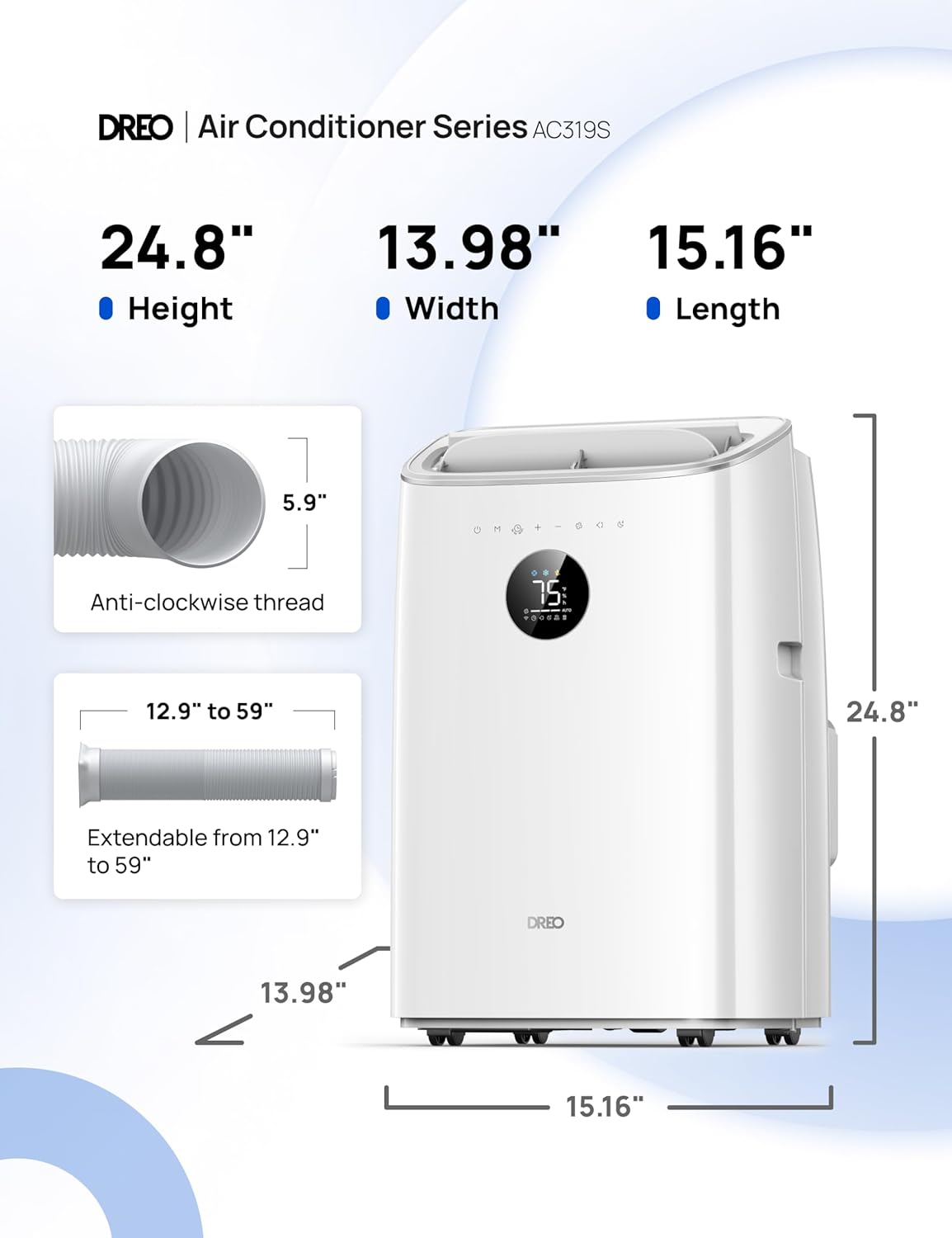
Detailed dimensions of the Dreo Portable Air Conditioner (Height: 24.8", Width: 13.98", Length: 15.16") and the extendable exhaust hose (12.9" to 59").
Warranty and Customer Support
Dreo is committed to providing excellent products and customer service.
Warranty Information
Your Dreo Portable Air Conditioner comes with a 1-year standard warranty. By registering your product, you may be eligible for an extended warranty period (up to 30 months as per some customer reviews). Please refer to the product registration details or contact customer support for more information.
Customer Support
DREO expert customer support is available around the clock to assist you with any questions, concerns, or product guidance you may need. For assistance, please visit the official Dreo website or refer to the contact information provided in your product packaging.
You can also find additional resources and FAQs on the Dreo Store on Amazon.
Ask a question about this manual
Ask about setup, troubleshooting, compatibility, parts, safety, or missing instructions. Manuals+ will review the question and use this page’s manual context to help answer it.