
1. Introduction
Thank you for choosing Conyat Open Ear Headphones Model X7. These wireless earbuds are designed to provide an immersive stereo experience while keeping you aware of your surroundings. Featuring Bluetooth 5.4 connectivity, a long-lasting battery, and IPX7 waterproof rating, they are ideal for sports and daily use. This manual will guide you through the setup, operation, and maintenance of your new headphones.
2. What's in the Box
- Conyat Open Ear Headphones (X7)
- Charging Case
- USB-C Charging Cable
- User Manual
3. Product Overview
3.1 Open-Ear Design for Awareness
The unique open-ear design allows you to enjoy audio while remaining aware of your environment. This is particularly beneficial for outdoor activities like running or cycling, enhancing safety by not completely blocking ambient sounds. The ergonomic earhook design ensures a lightweight and comfortable fit without pressure on the ear canal or glasses, even during extended wear.

3.2 Extended Playtime & LED Display
Enjoy up to 7-8 hours of playtime on a single charge (depending on volume levels). The compact charging case extends the total listening time to an impressive 58 hours. Advanced fast-charging technology provides 2 hours of listening time with just 20 minutes of charging. The charging case features an LED display to show the remaining battery percentage of the case and individual earbuds.
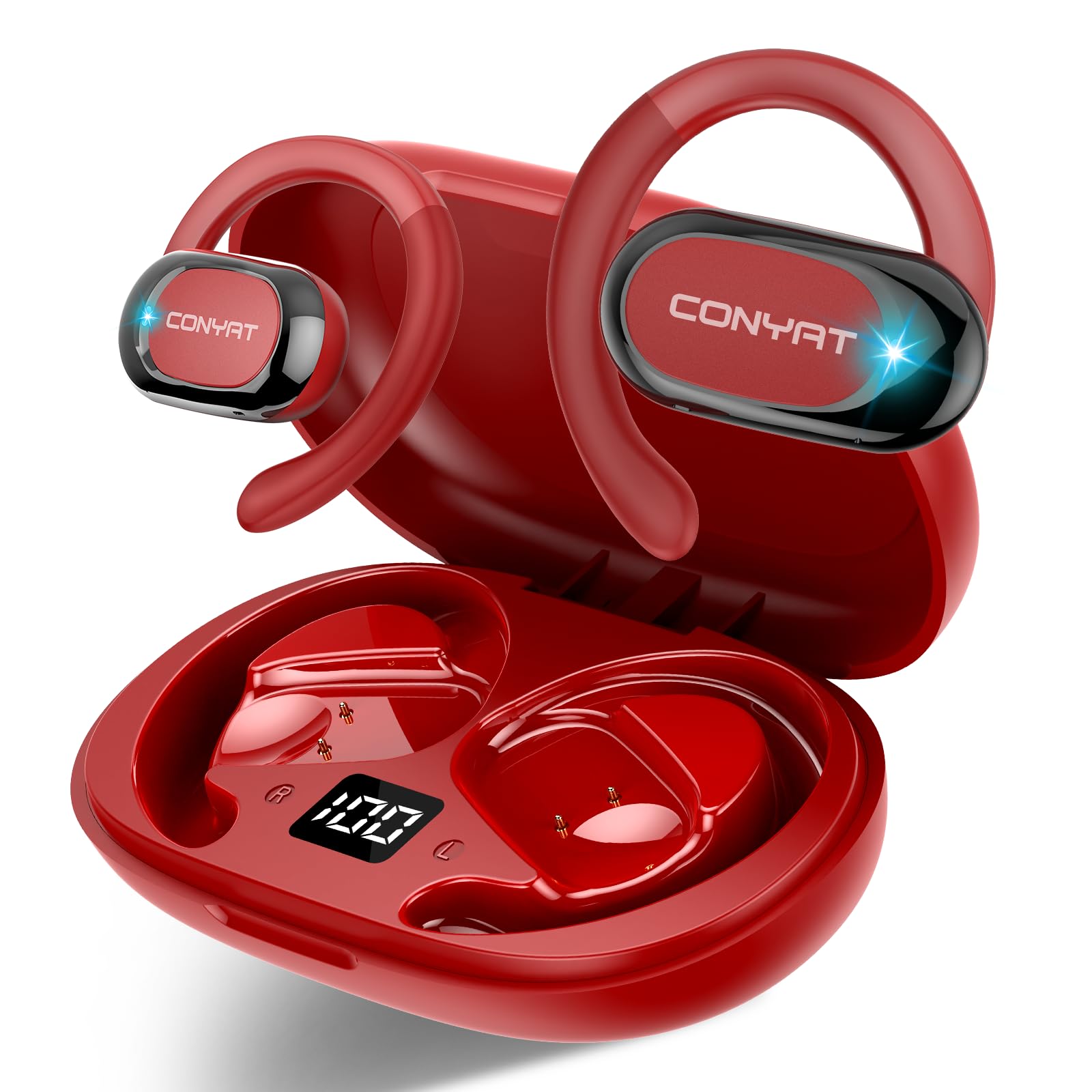
3.3 Superior Sound Quality & Clear Calls
Equipped with a built-in 14.2mm dynamic unit, the X7 headphones deliver full sound quality with crystal-clear treble. Air conduction technology and a sophisticated acoustic structure ensure accurate sound transmission. Dual microphones with intelligent Environmental Noise Cancellation (ENC) provide clear calls, even in noisy environments.


3.4 Bluetooth 5.4 for Stable Connection
The headphones feature the latest Bluetooth 5.4 technology, offering a 50% increase in connection speed, lossless sound quality, stable transmission within 10 meters, and stronger anti-interference capabilities. They automatically pair with your device upon removal from the charging case.

3.5 Smart Touch Controls & IPX7 Waterproof
Precise touch algorithms prevent misoperation, allowing you to adjust volume, change tracks, and answer calls with simple finger taps. With an IPX7 waterproof rating, these earbuds are resistant to sweat and heavy rain, making them suitable for various outdoor activities and intense workouts.

4. Setup
4.1 Charging the Case and Earbuds
- Connect the provided USB-C charging cable to the charging port on the case.
- Plug the other end of the cable into a compatible USB power source.
- The LED display on the charging case will indicate the charging status.
- Place the earbuds into the charging case. They will begin charging automatically. The LED display will show individual earbud battery levels.
4.2 Pairing with Your Device
- Ensure the earbuds are fully charged.
- Open the charging case. The earbuds will automatically enter pairing mode.
- On your smartphone or Bluetooth-enabled device, go to the Bluetooth settings.
- Search for available devices and select "X7" from the list.
- Once connected, you will hear an audible confirmation.
4.3 Wearing the Earbuds
- Identify the left (L) and right (R) earbuds.
- Gently place the earbud over your ear, ensuring the earhook sits securely around the back of your ear.
- Adjust the earbud for a comfortable and stable fit. The flexible earhook can be rotated for optimal positioning.
5. Operating Instructions
5.1 Touch Controls
The X7 headphones feature intuitive touch controls on each earbud:
- Play/Pause: Single tap on either earbud.
- Next Track: Double tap on the right earbud.
- Previous Track: Double tap on the left earbud.
- Volume Up: Triple tap on the right earbud.
- Volume Down: Triple tap on the left earbud.
- Answer/End Call: Single tap on either earbud during an incoming call.
- Reject Call: Press and hold either earbud for 2 seconds during an incoming call.
- Activate Voice Assistant (Siri/Google Assistant): Press and hold either earbud for 2 seconds (when not on a call).
5.2 LED Display on Charging Case
The LED display on the charging case provides real-time information:
- Shows the remaining battery percentage of the charging case.
- Indicates the charging status of the individual left and right earbuds.
6. Maintenance
6.1 Cleaning
Regularly clean your headphones and charging case to ensure optimal performance and hygiene:
- Use a soft, dry, lint-free cloth to wipe the earbuds and charging case.
- Avoid using harsh chemicals, cleaning solvents, or strong detergents.
- Do not allow liquids to enter any openings.
6.2 Water Resistance (IPX7)
The X7 headphones are IPX7 waterproof, meaning they can withstand immersion in water up to 1 meter for 30 minutes. This makes them suitable for workouts and rainy conditions. However, they are not designed for swimming or prolonged submersion. Ensure the charging port is dry before charging.
7. Troubleshooting
- No Power: Ensure the charging case and earbuds are fully charged.
- Cannot Pair: Make sure Bluetooth is enabled on your device and the earbuds are in pairing mode. Try forgetting the device on your phone and re-pairing.
- Sound Issues: Check the volume levels on both your device and the earbuds. Ensure there are no obstructions between the earbuds and your device.
- Intermittent Connection: Move closer to your paired device. Avoid environments with strong electromagnetic interference.
- Touch Controls Unresponsive: Ensure your fingers are clean and dry. Try restarting the earbuds by placing them back in the case and taking them out again.
8. Specifications
| Model | X7 |
| Brand | Conyat |
| Connectivity Technology | Bluetooth 5.4, Wireless |
| Noise Control | Passive Noise Cancellation |
| Headphones Jack | No Jack |
| Included Components | Cable, User Manual, Earphones |
| Material | Plastic |
| Specific Uses for Product | Sports, Biking |
| Charging Time | 20 minutes (for 2 hours listening) |
| Compatible Devices | Tablets, Smartphone |
| Water Resistance Level | IPX7 (Water Resistant) |
| Style | Sports |
| Control Method | Touch |
| Special Features | Air Conduction Technology, LED Display |
| Battery Average Life | 8 Hours (earbuds), 58 Hours (with charging case) |
| Battery Cell Composition | Lithium Polymer |
| Ear Placement | Open Ear |
| Form Factor | Open Ear |
| Impedance | 32 Ohms |
9. Warranty and Support
Conyat products are designed and manufactured to the highest quality standards. For warranty information and customer support, please refer to the official Conyat website or contact your retailer. Keep your proof of purchase for any warranty claims.

