
Product Overview
The Varstrom VD03 Ebike Display is a compact and robust LED screen designed for Bafang mid-drive motor systems. It provides essential riding information and allows for control over various ebike functions. Its IP67 waterproof rating ensures durability in diverse weather conditions.

Image: The Varstrom VD03 Ebike Display, showing its compact design and the handlebar mounting position. The display features a clear LED screen and a wired connection.
Compatibility
The VD03 display is specifically designed for BAFANG M200, M300, M400, M410, M420, M500, M560, M510, M600, M620, M800, M820 CAN Version mid-motor systems. It is crucial to verify your motor's protocol before installation.
Important Note:
This display uses the CAN protocol and is not compatible with UART protocol motors (which typically have a 5-pin circular connector). Attempting to use adapter cables or modifying connectors will not resolve compatibility issues. Ensure your 1T4 cable connector is a 5-pin female triangle connector.

Image: A visual guide illustrating the compatibility of the VD03 display. It shows the required 5-pin male triangular CAN protocol connector and highlights incompatibility with UART protocol motors and certain Bafang hub motors or older BBS series motors.
Setup and Installation
1. Unboxing and Inspection
Carefully unbox the VD03 display and inspect all components for any signs of damage. Ensure all parts listed in the packaging are present.
2. Mounting the Display
The VD03 display is designed to fit handlebars with a diameter of 22.2mm. Locate a suitable position on your handlebar that allows for clear visibility and easy access to the buttons without obstructing other controls.
- Loosen the mounting screw on the display bracket.
- Position the display on the 22.2mm section of your handlebar.
- Tighten the mounting screw securely, ensuring the display is stable and does not rotate freely. Do not overtighten.

Image: The VD03 Ebike Display mounted on a bicycle handlebar, demonstrating its compact size and how it fits the standard 22.2mm handlebar diameter. This image shows the display from a rider's perspective.
3. Electrical Connection
Connect the display's cable to the corresponding 5-pin male triangular CAN protocol connector on your ebike's wiring harness (typically part of the 1T4 cable). Ensure the connection is firm and secure to maintain IP67 waterproofing.

Image: A detailed wiring diagram showing the pinout for the female 5-pin EB1T4 connector and the male 5-pin display connector. It labels Green (CAN H), Black (GND), Brown (P+), Orange (Key signal), and White (CAN L), along with an illustration of the full wiring harness connection.
Operating Instructions
Display Interface Overview

Image: An illustration of the VD03 Digital Display highlighting its key features: 5.2 + BLE Bluetooth, IP67 Waterproofing, 1.5" IPS Screen, 3/5/9 PAS Level options, Ø22.2mm Holder Size, English Language support, and Headlight indication. It also points out specific display elements like Battery level indication, Maintenance tips, Real-time speed display, Bluetooth icon, and Headlight display.
Basic Operation
- Power On/Off: Press and hold the Power button (usually the central button) for 3 seconds to turn the display on or off.
- Adjusting PAS Level: Use the "+" and "-" buttons to cycle through the available Pedal Assist System (PAS) levels (e.g., 0-9 levels).
- Headlight Control: A dedicated button or combination of buttons may control the ebike's headlight. Refer to your ebike's specific wiring for this function.
Advanced Features (via Application)
The VD03 display supports connection to a smartphone application (search for "BIKEGO+" on App Store or Google Play) via Bluetooth (5.2 + BLE). This application allows for advanced customization and data tracking.
- Track Data: Monitor real-time speed, trip distance, and battery percentage on your phone.
- Settings Adjustment: Configure wheel size, PAS levels, and speed limitations directly from the application.
- Riding Modes: Access 4 Riding Modes and adjust 3/5/9 PAS Level settings to adapt to various road conditions.
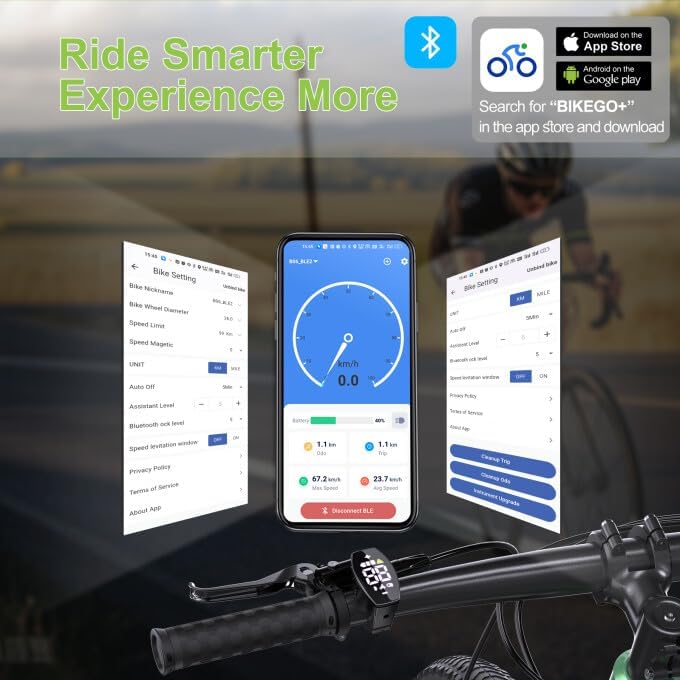
Image: Screenshots of the "BIKEGO+" smartphone application interface, demonstrating how users can track ride data (speed, distance, battery) and adjust various settings such as wheel size, PAS levels, and speed limitations. The image also shows the app's availability on App Store and Google Play.
Speed Limitation Mode
To activate or deactivate the 25km/h speed limitation mode, press and hold the Power button and the "-" button simultaneously for 3 seconds. This feature is useful for compliance with local regulations or for specific riding scenarios. The application still allows for adjustment of 0-99km/h limits.
Maintenance
- Cleaning: Wipe the display screen and body with a soft, damp cloth. Avoid using abrasive cleaners or solvents that could damage the screen or casing.
- Connection Check: Periodically inspect the electrical connection for any signs of corrosion or looseness. Ensure the waterproof plug is securely seated.
- Storage: If storing your ebike for an extended period, ensure the display is clean and dry. Store in a cool, dry place away from direct sunlight.
- Firmware Updates: Check the BIKEGO+ application periodically for any available firmware updates for your display to ensure optimal performance and access to new features.
Troubleshooting
| Problem | Possible Cause | Solution |
|---|---|---|
| Display does not power on. | Low ebike battery; Loose electrical connection; Display malfunction. | Charge ebike battery; Check all connections, especially the 5-pin connector; Contact customer support if issue persists. |
| Incorrect speed reading. | Incorrect wheel size setting in app; Speed sensor issue. | Verify and adjust wheel size in the BIKEGO+ application; Check speed sensor for proper alignment and damage. |
| Display shows error code. | Specific system fault. | Refer to the BIKEGO+ app or Bafang motor manual for specific error code meanings; Contact customer support. |
| Bluetooth connection issues. | Bluetooth off on phone; App not updated; Interference. | Ensure Bluetooth is enabled on your phone; Update BIKEGO+ app; Try reconnecting in a different location. |
Specifications

Image: A diagram showing the physical dimensions of the VD03 Ebike Display (45mm height, 48mm width, 26mm depth) and its cable length (200mm). It also lists key specifications such as Connector (Male 5 PIN), Protocol (CAN), Screen (1.5" TFT), Voltage (12V/24V/36V/48V/52V/60V), PAS Level (3/5/9 Optional), Speed Limited (0km/h ~ 99km/h), Button Holder (Ø22.2mm), Bluetooth (5.2 + BLE Optional), Waterproof (IP67), Weight (28g), Operating temperature (-20°C ~ 70°C), Auto OFF (0-60min Optional), and Bluetooth lock (Yes).
| Feature | Detail |
|---|---|
| Model | VD03 |
| Screen Size | 1.5 inches |
| Display Type | LED |
| Connectivity | Wired (CAN Protocol), Bluetooth 5.2 + BLE (Optional) |
| Voltage Compatibility | 12V-60V |
| PAS Levels | 0-9 (Adjustable via app) |
| Handlebar Diameter | 22.2mm |
| Waterproof Rating | IP67 |
| Operating Temperature | -20°C to 70°C |
| Weight | 28g |
Warranty and Support
Warranty Service
Varstrom provides a comprehensive warranty for the VD03 Ebike Display:
- 30 Days Return: For any quality problems within 30 days of purchase.
- 90 Days Replacement: Replacement service if any quality problem within 90 days.
- 1 Year Warranty: Replacement or maintenance service if any quality problem within 1 year.
Technical Support
North American after-sales service center is available to provide technical support and maintenance guidance. For assistance, please refer to the contact information provided with your purchase or visit the official Varstrom website.
Lifetime technical guidance is also available to assist with any long-term operational or compatibility questions.