
Powerhorse D2500iS
Powerhorse D2500iS Inverter Generator User Manual
Model: D2500iS | Brand: Powerhorse
1. Introduction
Thank you for choosing the Powerhorse D2500iS Inverter Generator. This manual provides essential information for the safe and efficient operation, maintenance, and troubleshooting of your generator. Please read this manual thoroughly before operating the unit and keep it for future reference.
The Powerhorse D2500iS is designed to provide clean, stable power for various applications, from camping and tailgating to emergency home backup. Its inverter technology ensures less than 3% total harmonic distortion, making it safe for sensitive electronics. Key features include quiet operation, an efficient 80cc engine with Engine Smart Control, and a carbon monoxide detection system for enhanced safety.

Figure 1: Powerhorse D2500iS Inverter Generator, front-side view.
2. Safety Information
Operating this generator safely is paramount. Failure to follow these instructions can result in serious injury or death. Always prioritize safety.
2.1 Carbon Monoxide Hazard
- NEVER operate the generator indoors or in partially enclosed areas, even with ventilation. Carbon monoxide (CO) is a colorless, odorless, and poisonous gas that can be fatal.
- Always operate the generator outdoors, far away from windows, doors, and vents.
- The generator is equipped with a CO detection system that will automatically shut down the engine if CO levels become unsafe. Do not disable this feature.
2.2 Fire and Burn Hazard
- Gasoline is highly flammable and its vapors are explosive. Handle fuel with extreme care.
- Refuel in a well-ventilated area with the engine off and cool.
- Do not overfill the fuel tank.
- Keep fuel away from sparks, open flames, pilot lights, heat, and other ignition sources.
- The generator's engine and muffler become very hot during operation and remain hot for a period after shutdown. Avoid touching hot surfaces.
2.3 Electrical Shock Hazard
- Do not operate the generator in wet conditions (rain, snow, excessive humidity).
- Ensure all electrical connections are secure and in good condition.
- Never connect the generator directly to a building's electrical system without a qualified electrician and an approved transfer switch.
- Use only grounded extension cords that are rated for outdoor use and the intended load.
3. Setup
3.1 Unpacking
- Carefully remove the generator from its packaging.
- Inspect the unit for any shipping damage. If damage is found, contact your dealer immediately.
- Ensure all included accessories are present.
3.2 Adding Engine Oil
The generator is shipped without engine oil. You must add the correct amount and type of oil before first use.
- Place the generator on a level surface.
- Remove the oil filler cap/dipstick.
- Add approximately 0.37 quarts (0.35 liters) of SAE 10W-30 engine oil. Do not overfill.
- Reinstall the oil filler cap/dipstick securely.
3.3 Adding Fuel
Use only fresh, unleaded gasoline with an octane rating of 87 or higher.
- Ensure the generator is off and cool.
- Open the fuel tank cap.
- Slowly add gasoline to the fuel tank, being careful not to overfill. The tank capacity is 1.18 gallons.
- Securely close the fuel tank cap.
4. Operating Instructions
4.1 Control Panel Overview

Figure 2: Control Panel of the Powerhorse D2500iS.

Figure 3: Detailed view of the ESC Throttle and Run/Choke knob.
4.2 Starting the Generator
- Ensure the generator is on a level, outdoor surface, away from any obstructions.
- Turn the fuel cap vent lever to the "ON" position.
- Turn the engine switch to the "RUN" position.
- If the engine is cold, move the choke lever to the "CHOKE" position. If warm, leave it in "RUN".
- Pull the recoil starter handle slowly until resistance is felt, then pull quickly and firmly.
- Once the engine starts, slowly move the choke lever to the "RUN" position.
- Allow the engine to run for a few minutes to warm up before connecting electrical loads.
4.3 Connecting Electrical Loads
Before connecting any devices, ensure the generator is running smoothly.
- Plug your electrical devices into the appropriate AC 120V outlets.
- Do not exceed the generator's rated running wattage of 1800W or surge wattage of 2500W. Overloading will trip the circuit breaker.
- The generator produces clean electricity with less than 3% THD, suitable for sensitive electronics.
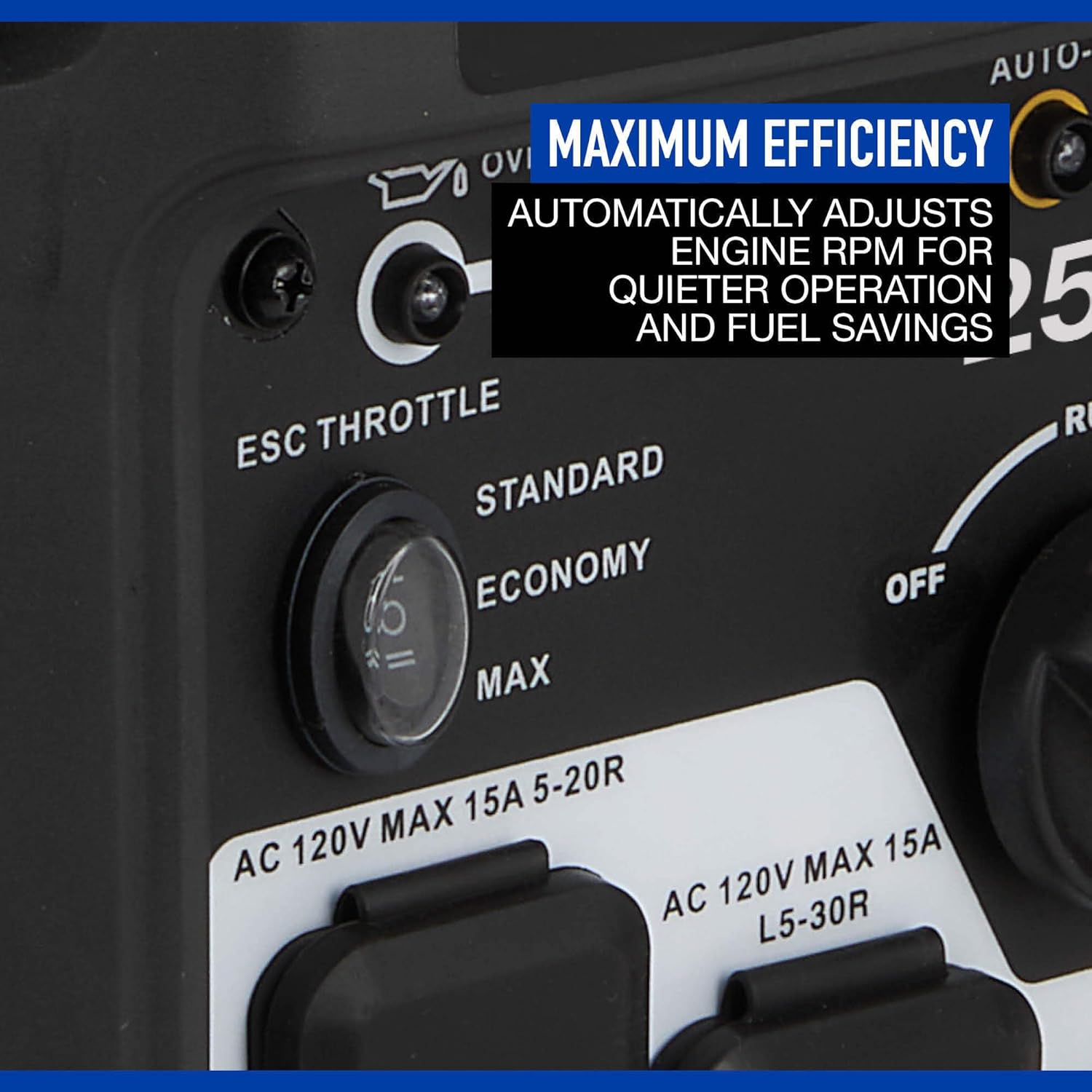
Figure 4: Generator in operation, powering an external device.
4.4 ESC Throttle (Engine Smart Control)
The ESC Throttle switch allows you to optimize fuel consumption and noise levels.
- Standard Mode: The engine runs at a constant speed, providing full power immediately.
- Economy Mode: The engine speed automatically adjusts to the load, reducing fuel consumption and noise when less power is needed. This is recommended for lighter loads.
4.5 Stopping the Generator
- Disconnect all electrical loads from the generator.
- Allow the generator to run for a few minutes without load to cool down.
- Turn the engine switch to the "OFF" position.
- Turn the fuel cap vent lever to the "OFF" position.
5. Maintenance
Regular maintenance ensures the longevity and reliable performance of your generator. Always perform maintenance with the engine off and cool.
5.1 Maintenance Schedule
| Item | Interval |
|---|---|
| Check Engine Oil Level | Before each use |
| Change Engine Oil | First 20 hours, then every 50 hours or annually |
| Clean Air Filter | Every 50 hours or as needed |
| Check Spark Plug | Every 100 hours or annually |
| Clean Fuel Filter | Every 100 hours or annually |
5.2 Storage
For long-term storage (over 30 days), proper preparation is essential to prevent fuel degradation and engine damage.
- Add a fuel stabilizer to the fuel tank and run the engine for a few minutes to circulate it.
- Drain the fuel from the carburetor by opening the drain screw.
- Change the engine oil.
- Remove the spark plug and pour a small amount of engine oil into the cylinder. Pull the recoil starter a few times to distribute the oil, then reinstall the spark plug.
- Store the generator in a clean, dry, well-ventilated area.
6. Troubleshooting
This section addresses common issues you might encounter. For problems not listed here, contact customer support.
| Problem | Possible Cause | Solution |
|---|---|---|
| Engine will not start | No fuel; Low oil level; Engine switch OFF; Choke incorrect; Faulty spark plug | Add fuel; Add oil; Turn engine switch to RUN; Adjust choke; Clean/replace spark plug |
| No power output | Circuit breaker tripped; Overload; Loose connection | Reset circuit breaker; Reduce load; Check connections |
| Engine runs, then stops | Low fuel; Low oil; CO sensor activated | Add fuel; Add oil; Move generator to well-ventilated area |
7. Specifications
| Feature | Specification |
|---|---|
| Model | D2500iS |
| Brand | Powerhorse |
| Surge Wattage | 2500 Watts |
| Running Wattage | 1800 Watts |
| Engine Displacement | 80 cc |
| Fuel Type | Gasoline |
| Fuel Tank Volume | 1.18 Gallons |
| Noise Level | 52 dB |
| Total Harmonic Distortion (THD) | < 3% |
| Item Weight | 54 Pounds |
| Product Dimensions (L x W x H) | 20.4" x 12.5" x 18.3" |
| Ignition System Type | Recoil Start |
| Included Components | (1) Generator |
8. Warranty
The Powerhorse D2500iS Inverter Generator comes with a 2-year limited warranty. This warranty covers defects in materials and workmanship under normal use. For specific terms, conditions, and to make a warranty claim, please refer to the warranty card included with your product or contact Powerhorse customer support.
9. Customer Support
If you have any questions, require technical assistance, or need to order replacement parts, please contact Powerhorse customer support. Have your model number (D2500iS) and serial number ready when you call.
For the most up-to-date contact information, please visit the official Powerhorse website or refer to the documentation included with your generator.
Ask a question about this manual
Ask about setup, troubleshooting, compatibility, parts, safety, or missing instructions. Manuals+ will review the question and use this page’s manual context to help answer it.