1. Introduction
This manual provides detailed instructions for the installation, operation, and maintenance of your VECHTEL 8 CORE Android 15 Car Radio. This unit is specifically designed for Mercedes Benz Smart Fortwo models from 2011 to 2015, offering an upgraded in-car entertainment and navigation experience.
Key features include a Qualcomm Snapdragon 8-CORE processor, 4GB RAM, 64GB ROM, a 10.1-inch HD IPS touchscreen (1280x720 resolution), wireless CarPlay and Android Auto, GPS navigation, WiFi connectivity, Bluetooth 5.1, Digital Sound Processor (DSP), Steering Wheel Control (SWC) support, and AHD backup camera compatibility.

Image 1: Comparison of the car dashboard before and after installing the VECHTEL car radio.
2. Package Contents
Please verify that all items listed below are included in your package:
- 1 x Car Multimedia Stereo
- 1 x GPS Antenna
- 1 x Power Cable
- 1 x RCA Cable
- 1 x User Manual
- 1 x Installation Tool
- 1 x USB Cable
- 1 x Rear Camera Input Cable
- 1 x Rear Camera (if included with your specific purchase)
- 1 x MIC
- 1 x LVDS Cable
- 1 x Antenna Adapter

Image 2: Visual representation of the package contents.
3. Setup and Installation
Installation of the VECHTEL car radio requires careful attention to wiring, especially for vehicles with fiber optic amplifier systems. It is recommended that installation be performed by a qualified professional.
3.1 Fiber Optic Canbus Connection
For vehicles equipped with an original fiber optic amplifier, a fiber optic Canbus decoder is required to ensure proper audio functionality. The decoder receives information from the original amplifier and connects it to the Android radio.
- Locate the original fiber optic cable from your vehicle's amplifier.
- Disconnect the original fiber optic cable.
- Connect the fiber optic Canbus decoder to the disconnected original fiber optic cable.
- Connect the RCA cables (red for right input, white for left input) from the decoder to the corresponding inputs on the Android radio.
- Connect the power cables (ground and ACC +12V) from the decoder to the main power cable of the Android radio. This ensures the original amplifier and fiber optic Canbus function correctly.
Video 1: Detailed guide on connecting the fiber optic Canbus decoder for Mercedes Benz or Cayenne vehicles to enable sound with the new head unit.
Upon correct connection, the sound from the original amplifier will be routed through the new head unit. If sound is not immediately present, ensure all connections are secure and allow a few seconds for the system to initialize.
3.2 General Wiring
Connect the main power harness, GPS antenna, USB cables, and any other accessory cables (e.g., for backup camera, external microphone) as per the provided wiring diagram in the included user manual. Ensure all connections are secure to prevent intermittent issues.
4. Operating Instructions
4.1 Initial Power On and System Overview
After installation, turn on your vehicle's ignition. The unit will boot up, displaying the Android 15 interface. The 10.1-inch HD IPS touchscreen provides a vibrant and responsive display for all functions.
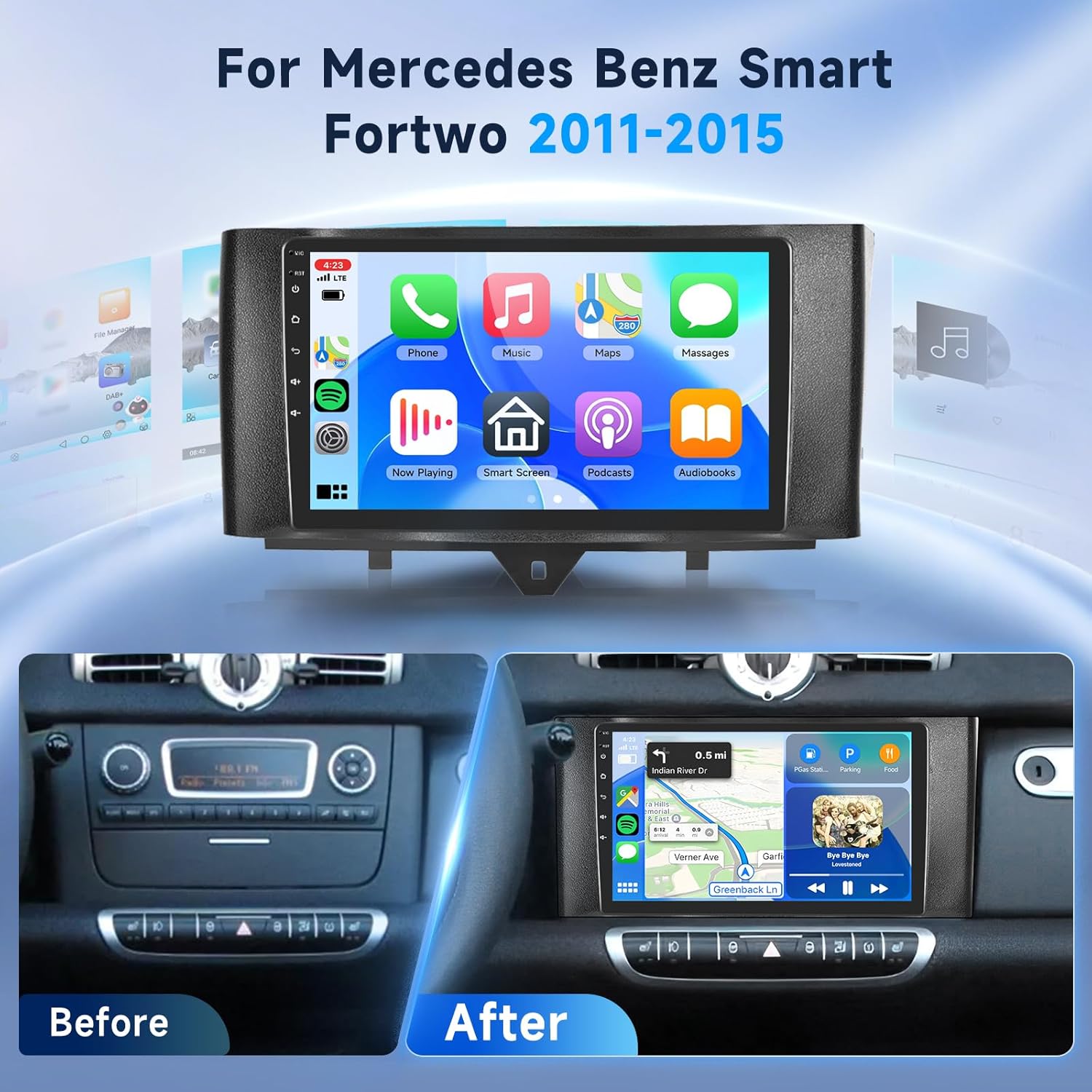
Image 3: The main interface of the VECHTEL Android 15 car radio.
4.2 Wireless CarPlay and Android Auto
The unit supports wireless CarPlay and Android Auto. To connect:
- Ensure Bluetooth is enabled on your smartphone and the car radio.
- Pair your smartphone with the car radio via Bluetooth.
- Once paired, the CarPlay or Android Auto interface should automatically launch or be accessible from the main menu.
This allows direct access to phone calls, maps, music, and voice assistants through the car radio's display.

Image 4: Wireless CarPlay and Android Auto interface.
4.3 GPS Navigation and WiFi Connectivity
Utilize the built-in GPS for real-time navigation. You can also download offline maps for use without an internet connection. Connect to WiFi to browse the internet, stream music, and download applications directly to the car stereo.

Image 5: GPS navigation and WiFi features.
4.4 Bluetooth 5.1 and DSP
Bluetooth 5.1 enables easy smartphone connection for hands-free calls and music streaming. The Digital Sound Processor (DSP) allows for customization of your audio experience with various sound styles and equalizer settings.

Image 6: Bluetooth 5.1 and DSP functionality.
4.5 FM/RDS Radio
The unit includes an FM radio with RDS (Radio Data System) support, allowing you to listen to local stations and receive broadcast information such as traffic, weather, and song titles.

Image 7: FM/RDS Radio interface.
4.6 Steering Wheel Control (SWC) and AHD Backup Camera
The car radio supports the original car's steering wheel controls, allowing you to manage tracks, volume, and other functions without taking your hands off the wheel. It is also compatible with AHD backup cameras, providing high-definition night vision and a wide-angle view for safer parking and reversing.

Image 8: Steering Wheel Control and AHD Backup Camera display.
4.7 Customizable Interface
The unit offers various customization options, including split-screen, picture-in-picture, and multiple UI themes. You can personalize the display, including 3D car model display with customizable license plate, car color, type, speed unit, and even font and icon colors.

Image 9: Multiple UI options for personalization.
Video 2: Demonstration of the multi-function display and various user interface features.
5. Maintenance
To ensure the longevity and optimal performance of your VECHTEL car radio, consider the following maintenance tips:
- Screen Cleaning: Use a soft, lint-free cloth to gently wipe the touchscreen. Avoid abrasive cleaners or harsh chemicals that could damage the screen.
- Software Updates: Periodically check for system software updates to ensure you have the latest features and security patches. Updates can typically be found in the system settings menu.
- Cooling Fan: The unit features a cooling fan to prevent overheating. Ensure the fan vents are not obstructed. The fan can be set to automatic or manual operation via the settings.
- Cable Connections: Regularly check all cable connections behind the unit to ensure they remain secure, especially after driving on rough terrain.

Image 10: Cooling fan settings for temperature management.
6. Troubleshooting
If you encounter issues with your VECHTEL car radio, please refer to the following common troubleshooting steps:
- No Power: Check all power cable connections. Ensure the vehicle's ignition is on and the fuse for the car radio is intact.
- No Sound: Verify that the fiber optic Canbus decoder is correctly installed and connected, especially if your vehicle has an original fiber optic amplifier. Check all RCA audio connections. Ensure the volume is not muted or set too low.
- Touchscreen Unresponsive: Try restarting the unit by turning off and on the vehicle's ignition. If the issue persists, perform a factory reset (refer to the system settings, note that this will erase all user data).
- GPS Signal Issues: Ensure the GPS antenna is installed in a clear location, free from obstructions. Check the GPS settings in the unit to confirm it is enabled.
- Bluetooth Connectivity Problems: Ensure Bluetooth is enabled on both the car radio and your smartphone. Delete previous pairings and attempt to re-pair the devices.
- CarPlay/Android Auto Not Connecting: Confirm Bluetooth is connected. Ensure your phone's operating system is up to date. Try restarting both the phone and the car radio.
For persistent issues, please contact customer support.
7. Specifications
| Feature | Specification |
|---|---|
| Model | B0F23V6XYN |
| Applicable Car Models | Mercedes Benz Smart Fortwo (2011-2015) |
| Processor | Qualcomm Snapdragon 8-CORE |
| RAM | 4GB |
| ROM | 64GB |
| Operating System | Android 15 |
| Screen Size | 10.1 inches |
| Display Type | HD IPS Touchscreen |
| Resolution | 1280x720 |
| Connectivity | Wireless CarPlay, Android Auto, Bluetooth 5.1, WiFi, USB |
| Navigation | Built-in GPS, supports offline maps |
| Audio Features | DSP (Digital Sound Processor), FM/RDS Radio |
| Camera Support | AHD Backup Camera (waterproof grade 68, high-definition night vision, wide-angle) |
| Control Integration | Steering Wheel Control (SWC) |
| Customization | Split-screen, Picture-in-Picture, Multiple UI options, 3D car model display |
| Item Weight | 1.5 Kilograms (3.3 pounds) |
| Package Dimensions | 10.24 x 5.91 x 3.35 inches |
8. Warranty and Support
Your VECHTEL car radio comes with a 1-year warranty from the manufacturer. For technical support, warranty claims, or any questions regarding your product, please contact VECHTEL customer service directly through Amazon.
To contact support via Amazon:
- Go to the product page on Amazon.
- Locate "Sold by VECHTEL" and click on "VECHTEL".
- On the VECHTEL store page, click "Ask a question" to send a message to customer support.

Image 11: Steps to contact VECHTEL technical support.
Additionally, protection plans are available for purchase, including 2-Year and 3-Year options, as well as a monthly "Complete Protect" plan.