
Avhrit AH03
Avhrit Cordless Impact Wrench 1/2 Inch User Manual
Model: AH03
1. Introduction
Thank you for choosing the Avhrit Cordless Impact Wrench. This powerful 1/2 inch impact gun is designed for heavy-duty fastening tasks, offering up to 1300Nm (960ft-lbs) of torque. Equipped with a brushless motor and two 4.0Ah batteries, it is ideal for automotive repairs, industrial applications, and various DIY projects. This manual provides essential information for safe operation, proper setup, maintenance, and troubleshooting to ensure optimal performance and longevity of your tool.
2. Safety Instructions
Always read and understand all safety warnings, instructions, illustrations, and specifications provided with this power tool. Failure to follow all instructions listed below may result in electric shock, fire, and/or serious injury.
General Power Tool Safety Warnings
- Work Area Safety: Keep your work area clean and well-lit. Cluttered or dark areas invite accidents. Do not operate power tools in explosive atmospheres, such as in the presence of flammable liquids, gases, or dust.
- Electrical Safety: Avoid body contact with earthed or grounded surfaces such as pipes, radiators, ranges, and refrigerators. There is an increased risk of electric shock if your body is earthed or grounded.
- Personal Safety: Always wear eye protection. Use safety glasses, goggles, or a face shield. Wear hearing protection when operating the tool for extended periods. Dress properly; do not wear loose clothing or jewelry. Keep your hair, clothing, and gloves away from moving parts.
- Tool Use and Care: Do not force the power tool. Use the correct power tool for your application. It will do the job better and safer at the rate for which it was designed. Disconnect the battery pack from the power tool before making any adjustments, changing accessories, or storing power tools.
- Battery Tool Use and Care: Recharge only with the charger specified by the manufacturer. Use power tools only with specifically designated battery packs. Use of any other battery packs may create a risk of injury and fire.
- Service: Have your power tool serviced by a qualified repair person using only identical replacement parts. This will ensure that the safety of the power tool is maintained.
3. Package Contents
Upon opening the portable box, verify that all items listed below are present and undamaged:
- 1 x Avhrit Cordless Impact Wrench (1300N.m)
- 2 x 4.0Ah Lithium-Ion Battery Packs (21V)
- 1 x Fast Charger
- 4 x Impact Sockets (17mm, 19mm, 21mm, 22mm)
- 1 x 5-inch Extension Bar
- 1 x User Manual (this document)
- 1 x Customized Storage Box
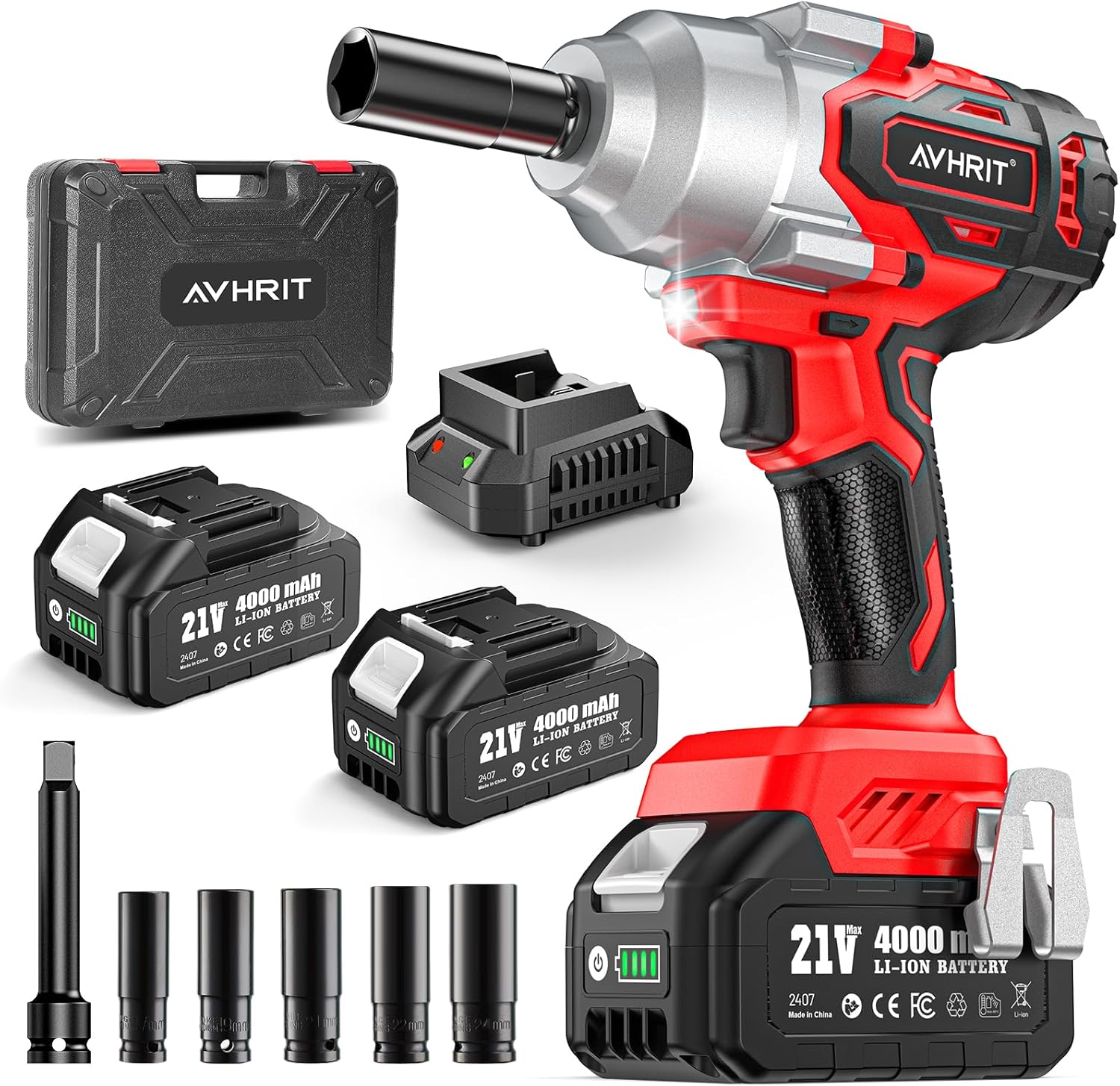
Image: The Avhrit Cordless Impact Wrench kit, including the wrench, two batteries, charger, sockets, and extension bar, all neatly arranged with the storage case.
4. Specifications
| Feature | Specification |
|---|---|
| Model Number | AH03 |
| Drive Size | 1/2 Inch Square Drive |
| Max Torque | 1300 Nm (960 ft-lbs) |
| Motor Type | Brushless Motor |
| Speed Settings | 3-Speed (0-1500 RPM, 0-1800 RPM, 0-2200 RPM) |
| Battery Voltage | 21V DC |
| Battery Capacity | 4.0 Ah Lithium-Ion |
| Wattage | 800 Watts |
| Item Weight | 1.58 kg (3.48 lbs) |
| Material | Acrylonitrile Butadiene Styrene, Alloy Steel |
| Included Components | Impact Wrench, 2 Batteries, Charger, 4 Sockets, Extension Bar |

Image: An exploded view highlighting key features of the impact wrench, including the 1/2" square drive, brushless motor, LED light, speed switch, forward/reverse switch, soft rubberized handle, battery release button, and smart control panel.
5. Setup
5.1 Battery Charging
Before first use, fully charge both battery packs. Ensure the charger is connected to a standard power outlet (100-240V AC).
- Insert the battery pack into the charger. Ensure it clicks securely into place.
- The charger's indicator light will show the charging status (e.g., red for charging, green for fully charged).
- Once fully charged, remove the battery from the charger. Do not overcharge the batteries.

Image: Two 4000mAh battery packs, one connected to the charger and indicating charging status, and the other ready for use, demonstrating the charging process.
5.2 Attaching/Removing Battery Pack
- Attaching: Align the battery pack with the base of the impact wrench and slide it in until it clicks securely into place.
- Removing: Press the battery release button located on the front of the battery pack and slide the battery out.
5.3 Attaching/Removing Sockets
- Attaching: Push the desired impact socket or extension bar onto the 1/2 inch square drive anvil until it locks securely.
- Removing: Pull the socket or extension bar firmly off the anvil.
6. Operating Instructions
6.1 Powering On/Off
The tool is activated by pressing the trigger switch. The speed of the tool increases as you increase pressure on the trigger switch. Release the trigger switch to turn the tool off.
6.2 Speed Control
The Avhrit impact wrench features a 3-speed control panel, allowing you to adjust the RPM for different applications. Press the speed switch button to cycle through the available speeds:
- Speed 1 (Low): 0-1500 RPM - Suitable for delicate tasks or initial loosening/tightening of screws.
- Speed 2 (Medium): 0-1800 RPM - Ideal for general maintenance, such as lawnmowers or motorbikes.
- Speed 3 (High): 0-2200 RPM - For heavy-duty applications like car repairs or large agricultural machinery.

Image: A visual representation of the 3-speed control panel on the impact wrench, showing the different RPM ranges and their recommended uses, such as low for furniture, medium for mowers, and high for car/truck tires.
6.3 Forward/Reverse Switch and Brake Stop
The tool has a forward/reverse switch to change the direction of rotation. This switch also incorporates a two-way brake stop feature.
- Forward (Tighten Screws): Push the switch to the left for clockwise rotation.
- Reverse (Remove Screws): Push the switch to the right for counter-clockwise rotation. In reverse mode, once the nut or bolt is loosened, the brake stop activates to reduce speed and torque, preventing the fastener from flying off and getting lost.
- Locking Protection: When the switch is in the center position, the trigger is locked, preventing accidental startup.

Image: A demonstration of the one-touch switching mechanism for forward (tighten screws) and backward (remove screws) operations, showing the position of the switch for each function.
6.4 Built-in LED Work Light
The impact wrench is equipped with a bright built-in LED light that illuminates the work area when the trigger is pressed. This feature is particularly useful when working in dimly lit or confined spaces, enhancing visibility and precision.

Image: A person using the Avhrit Impact Wrench in a low-light environment, with the integrated LED light clearly illuminating the work area on a piece of machinery.
6.5 Applications
This cordless impact gun is versatile and suitable for a wide range of applications, including but not limited to:
- Automotive repairs (e.g., tire removal, engine work)
- Truck and RV maintenance
- Tractor tire removal
- Agricultural machinery maintenance
- Construction tasks
- Furniture assembly
- General DIY projects

Image: A worker using the Avhrit Impact Wrench to fasten bolts on a large metal structure, illustrating its high torque capability for industrial applications.

Image: A person using the Avhrit Impact Wrench to secure a metal bracket to a wooden beam, demonstrating its utility for various daily fastening needs.
7. Maintenance
Regular maintenance ensures the longevity and optimal performance of your Avhrit Impact Wrench.
- Cleaning: After each use, wipe the tool with a clean, damp cloth. Do not use harsh chemicals or abrasive cleaners. Keep the ventilation openings clear of dust and debris.
- Storage: Store the tool, batteries, and charger in a cool, dry place, away from direct sunlight and moisture. Use the provided storage box for organized and protected storage.
- Battery Care: Store batteries with a partial charge (around 50%) if not used for extended periods. Do not store fully discharged batteries. Avoid exposing batteries to extreme temperatures.
- Inspection: Periodically inspect the tool for any signs of damage, loose screws, or worn parts. If any damage is found, do not use the tool and contact customer support for repair.
8. Troubleshooting
This section addresses common issues you might encounter with your impact wrench.
| Problem | Possible Cause | Solution |
|---|---|---|
| Tool does not start | Battery not charged Battery not properly inserted Forward/Reverse switch in center (locked) position | Charge battery Re-insert battery until it clicks Move switch to forward or reverse position |
| Low power/torque | Battery charge is low Incorrect speed setting Socket is worn or incorrect size | Recharge battery Select a higher speed setting Use correct and undamaged socket |
| Battery not charging | Charger not plugged in Battery not properly inserted into charger Faulty battery or charger | Ensure charger is securely plugged into outlet Re-insert battery into charger Contact customer support for replacement |
| Excessive vibration or noise | Loose components Damaged internal parts | Check for loose screws and tighten Discontinue use and contact customer support |
9. Warranty and Support
Avhrit stands behind the quality of its products. For specific warranty details, including coverage period and terms, please refer to the warranty card included with your product or visit the official Avhrit website. If you encounter any issues not covered in this manual or require technical assistance, please contact Avhrit customer support through the contact information provided on the product packaging or the official brand store.
Note: No official product videos were available in the provided data for embedding in this manual.
Related documentsAH03

Ask a question about this manual
Ask about setup, troubleshooting, compatibility, parts, safety, or missing instructions. Manuals+ will review the question and use this page’s manual context to help answer it.