
DECIUU DER32S01-50
DECIUU Max 100 Pint Dehumidifier User Manual
Model: DER32S01-50
Brand: DECIUU
1. Introduction
Thank you for choosing the DECIUU Max 100 Pint Dehumidifier. This appliance is designed to efficiently remove excess moisture from your indoor environment, providing a more comfortable and healthier living space. This manual provides essential information for the safe operation, maintenance, and troubleshooting of your dehumidifier.
Key Features:
- Energy Star Most Efficient 2024: Removes 70 pints/D (86°F, 80% RH) and up to 100 pints/D (95°F, 90% RH), covering up to 5,000 sq. ft.
- Three Engines Powerful Dehumidification: Features a high-efficiency rotary compressor, large vortex fan, and high-conductivity copper tubing for superior performance.
- Intelligent Humidity Control System: High-precision sensor monitors ambient humidity, allowing users to set desired levels between 35% and 80% RH. Smart Memory Chip restores last settings.
- Three Drainage Options: Includes a 3/4" garden hose adapter, a 2m (6.56ft) drain hose for continuous drainage, and a 5.5L (1.45 gal) tank with auto shut-off.
- Smart Control Panel: Clear LED panel for easy control, 1–24h timer, three fan speeds, child lock, and full-tank indicator.
- Engineered for Easy Living: Hidden handle, 360° swivel wheels for mobility, and a removable, washable filter for convenient maintenance.

Figure 1: The DECIUU Max 100 Pint Dehumidifier, showcasing its sleek design and Energy Star certification.
2. Safety Information
Please read all instructions carefully before using the dehumidifier. Keep this manual for future reference.
- Always plug the unit into a grounded electrical outlet.
- Do not operate the dehumidifier with a damaged power cord or plug.
- Ensure the unit is placed on a level, stable surface to prevent tipping.
- Do not block the air intake or exhaust vents. Maintain at least 8 inches (20 cm) clearance from walls and furniture.
- Do not use the dehumidifier in areas where flammable liquids or gases are stored.
- Unplug the unit before cleaning, moving, or performing any maintenance.
- Keep children and pets away from the unit during operation.
- Do not immerse the unit, power cord, or plug in water or other liquids.
3. Package Contents
Verify that all items are present in the package:
- DECIUU Max 100 Pint Dehumidifier Unit
- Drain Hose (2m / 6.56ft)
- User Manual
4. Product Overview
Familiarize yourself with the main components and control panel of your DECIUU dehumidifier.

Figure 2: LED Touch Control Panel. This panel allows for easy adjustment of settings.

Figure 3: Optimized Design and Internal Components. The unit features a premium rotor compressor, large vortex fan blade, and high-density copper tubes for efficient dehumidification.

Figure 4: AI Smart Sensor Chip. This chip enables precise humidity tracking and energy optimization for intelligent humidity control.
5. Setup
Follow these steps to set up your dehumidifier for first use:
- Placement: Place the dehumidifier on a firm, level surface in the area where you want to reduce humidity. Ensure there is at least 8 inches (20 cm) of space around the unit for proper airflow.
- Power Connection: Plug the power cord into a grounded electrical outlet.
- Drainage Option Selection: Choose one of the three drainage methods:
- Manual Drainage (1.45 Gallon Tank): The unit will collect water in its internal tank. When the tank is full, the unit will automatically shut off and indicate that the tank needs emptying.
- Continuous Drainage (Gravity): Connect the included 2m (6.56ft) drain hose to the continuous drain port on the back of the unit. Ensure the hose is sloped downwards to allow water to drain by gravity into a suitable floor drain or container.
- Extended Outdoor Drainage (with Garden Hose Adapter): For connecting to a standard garden hose (not included), use the 3/4" garden hose adapter. Ensure the hose is positioned for continuous drainage.
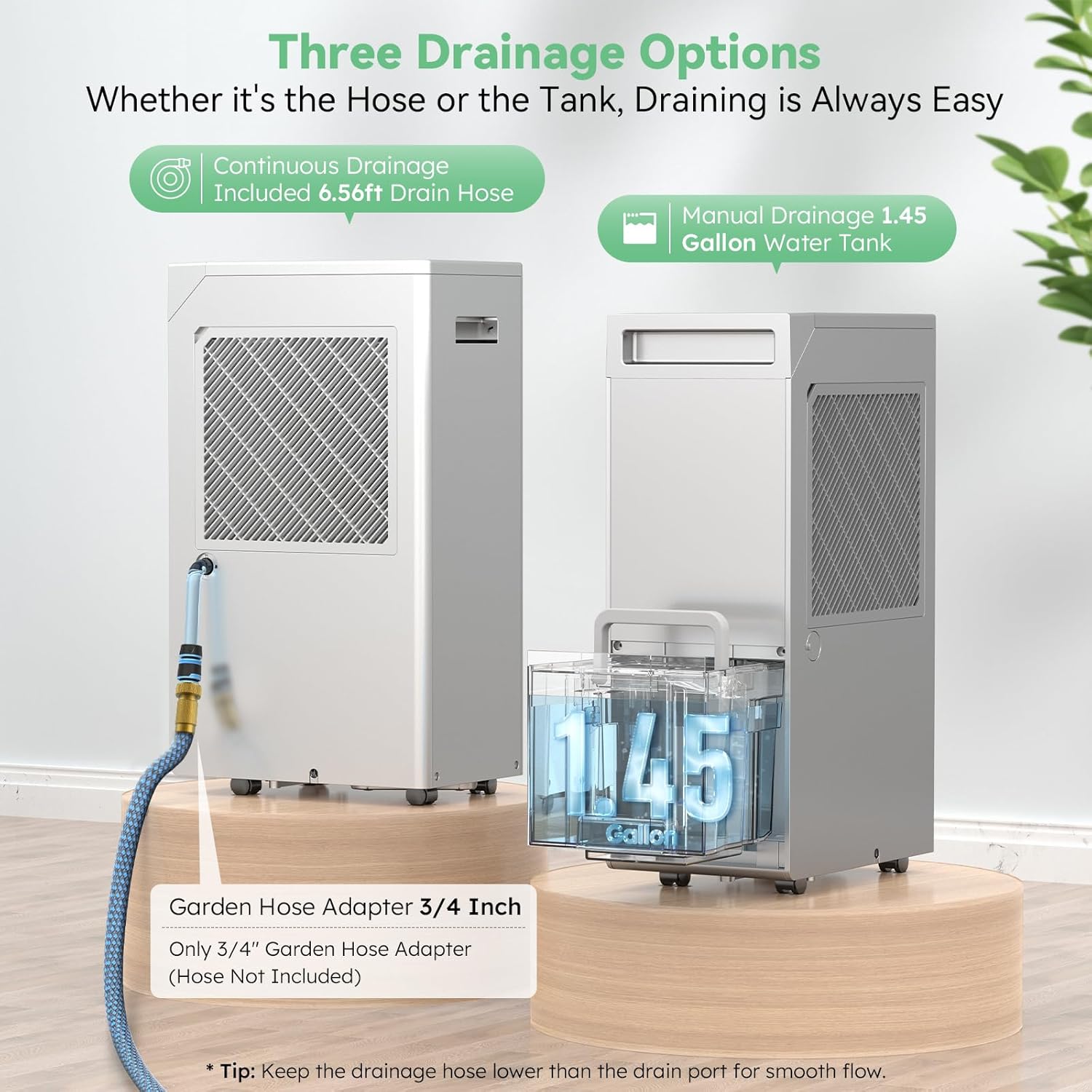
Figure 5: Three Drainage Options. Choose the method that best suits your needs for water removal.
6. Operating Instructions
Learn how to operate your DECIUU dehumidifier using the LED touch panel.
- Power On/Off: Press the Power button (⏻) to turn the unit on or off.
- Setting Desired Humidity: Press the Humidity Setting button (💧) to adjust the target humidity level between 35% and 80% Relative Humidity (RH) in 5% increments. The unit will operate until the set humidity is reached, then cycle on and off to maintain it.
- Fan Speed: Press the Fan Speed button (💨) to cycle through three fan speeds: Low, Medium, and High. Higher fan speeds result in faster dehumidification.
- Timer Function: Press the Timer button (🕒) to set an auto-on or auto-off timer from 1 to 24 hours. Press repeatedly to adjust the time. The unit will automatically turn on or off after the set duration.
- Child Lock: Press and hold the Child Lock button (🔒) for 3 seconds to activate or deactivate the child lock. When activated, the control panel buttons will be disabled to prevent accidental changes.
- Continuous Mode: The unit can operate in continuous mode, where it will dehumidify continuously regardless of the set humidity level. Refer to the control panel for the specific button or combination to activate this mode.

Figure 6: Smart 24 Hour Timer. This feature allows for scheduled operation, optimizing energy use and comfort.

Figure 7: Child Lock. Provides peace of mind by preventing unintended changes to settings.
7. Maintenance
Regular maintenance ensures optimal performance and longevity of your dehumidifier.
7.1. Cleaning the Air Filter
The dehumidifier features a removable, washable filter. Clean the filter every two weeks or more frequently depending on usage and air quality.
- Turn off the dehumidifier and unplug it from the power outlet.
- Locate the air filter on the back of the unit. Gently pull the filter cover outwards to remove it.
- Wash the filter with warm, soapy water. Rinse thoroughly and allow it to air dry completely before reinserting. Do not use a dishwasher.
- Once dry, slide the filter back into its slot until it clicks into place.
Video 1: How to clean the air filter. This video demonstrates the process of removing, washing, and reinserting the dehumidifier's air filter for proper maintenance.
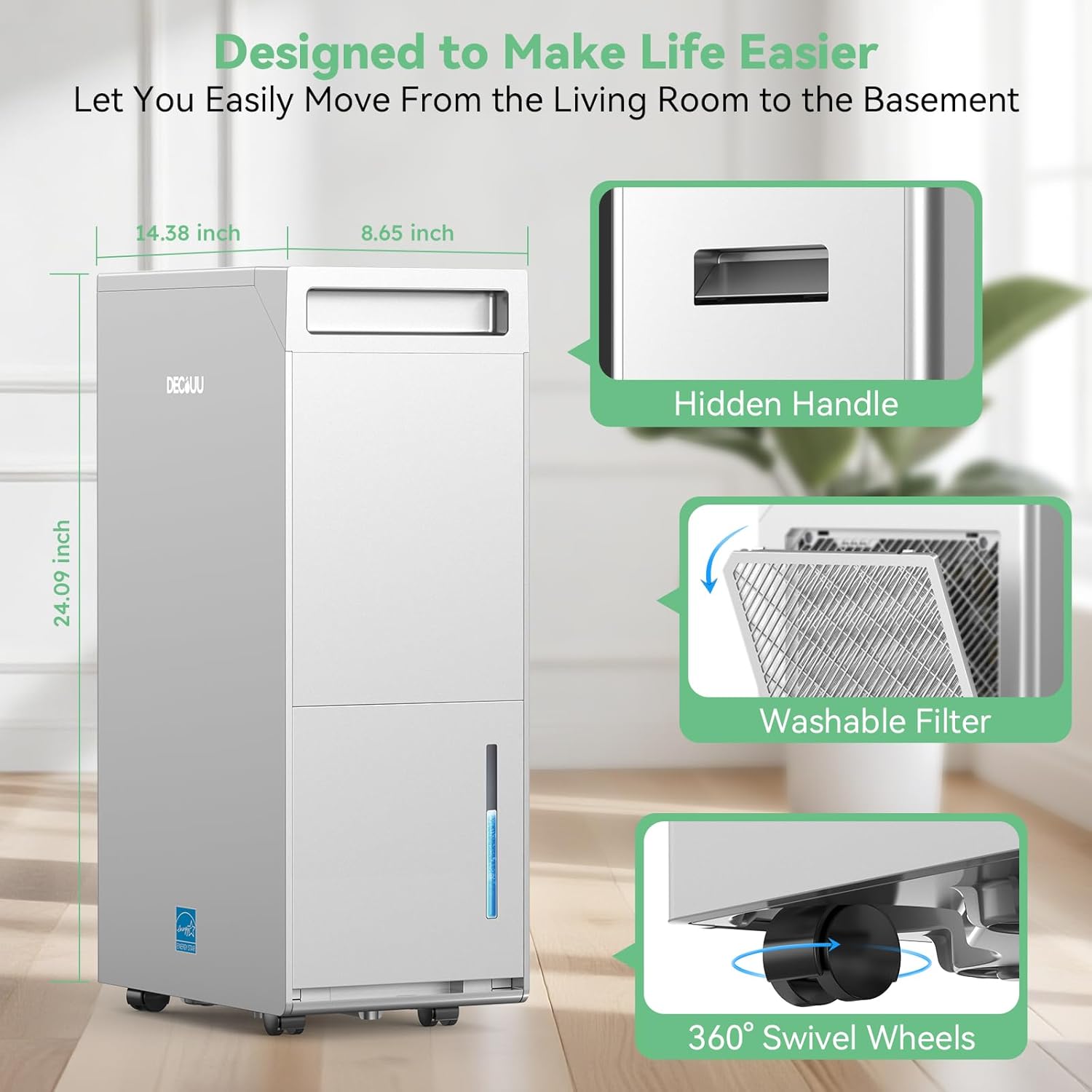
Figure 8: Washable Filter. The filter is easily accessible for routine cleaning.
7.2. Cleaning the Water Tank
If using the manual drainage option, regularly clean the water tank to prevent mold and mildew growth.
- Remove the water tank from the unit.
- Empty any collected water.
- Wash the tank with warm water and a mild detergent. Rinse thoroughly.
- Allow the tank to air dry completely before placing it back into the dehumidifier.
8. Troubleshooting
If you encounter issues with your dehumidifier, refer to the following common problems and solutions:
| Problem | Possible Cause | Solution |
|---|---|---|
| Dehumidifier does not turn on. | No power; Power cord not plugged in; Full water tank. | Check power outlet; Ensure power cord is securely plugged in; Empty water tank. |
| Unit is running but not collecting water. | Humidity level too low; Room temperature too low; Air filter clogged. | Adjust desired humidity setting lower; Ensure room temperature is above 41°F (5°C); Clean the air filter. |
| Unit is noisy. | Unit not level; Air filter clogged; Fan obstruction. | Place unit on a level surface; Clean the air filter; Check for any obstructions around the fan. |
| Water is leaking. | Water tank not properly seated; Drain hose loose or clogged. | Reinsert water tank correctly; Check drain hose connection and clear any blockages. |
If the problem persists after trying these solutions, please contact customer support.
9. Specifications
| Specification | Value |
|---|---|
| Brand | DECIUU |
| Model Name | DER32S01-50 |
| Floor Area Coverage | 5000 Square Feet |
| Color | Grey |
| Capacity (Standard) | 70 Pints/Day (86°F, 80% RH) |
| Capacity (Max) | 100 Pints/Day (95°F, 90% RH) |
| Tank Volume | 1.45 Gallons (5.5 Liters) |
| Product Dimensions (D x W x H) | 8.65"D x 14.38"W x 24.09"H |
| Item Weight | 32.78 Pounds |
| Material | Acrylonitrile Butadiene Styrene (ABS) |
| Operation Mode | Continuous |
| Special Features | Adjustable Humidity Control, Automatic Defrost, Child Lock, Continuous Draining, Timer |
10. Warranty and Support
Your DECIUU dehumidifier comes with comprehensive after-sales protection:
- Standard Warranty: Enjoy a 1-year warranty from the date of purchase.
- Extended Warranty: Register your product to receive an additional year of coverage, totaling 2 years of warranty. (Refer to the user manual for registration details).
For technical assistance, troubleshooting, or warranty claims, please contact DECIUU customer support. Our team is committed to responding within 24 hours to address your concerns.
For a downloadable PDF version of this user manual, please visit: DECIUU Dehumidifier User Manual (PDF)
Related documentsDER32S01-50


Ask a question about this manual
Ask about setup, troubleshooting, compatibility, parts, safety, or missing instructions. Manuals+ will review the question and use this page’s manual context to help answer it.