
Megachef MCOV-4500
MegaChef 25 Liter Digital Electric French Door Multi-Function Countertop Oven User Manual
Model: MCOV-4500 | Brand: Megachef
Introduction
Thank you for choosing the MegaChef 25 Liter Digital Electric French Door Multi-Function Countertop Oven. This versatile appliance is designed to enhance your cooking experience with its wide range of functions, including Toast, Bagel, Pizza, Bake, Roast, Broil, Cookies, Rotisserie, Dehydrate, Ferment, and Warm. With its generous capacity and intuitive digital controls, preparing delicious meals for your family and friends has never been easier. Please read this manual thoroughly before operating the oven to ensure safe and efficient use.
Important Safety Instructions
When using electrical appliances, basic safety precautions should always be followed to reduce the risk of fire, electric shock, and injury to persons, including the following:
- Read all instructions before using the appliance.
- Do not touch hot surfaces. Use handles or knobs.
- To protect against electrical shock, do not immerse cord, plugs, or appliance in water or other liquid.
- Close supervision is necessary when any appliance is used by or near children.
- Unplug from outlet when not in use and before cleaning. Allow to cool before putting on or taking off parts.
- Do not operate any appliance with a damaged cord or plug or after the appliance malfunctions or has been damaged in any manner.
- The use of accessory attachments not recommended by the appliance manufacturer may cause injuries.
- Do not use outdoors.
- Do not let cord hang over edge of table or counter, or touch hot surfaces.
- Do not place on or near a hot gas or electric burner, or in a heated oven.
- Extreme caution must be used when moving an appliance containing hot oil or other hot liquids.
- Always attach plug to appliance first, then plug cord into the wall outlet. To disconnect, turn any control to "off", then remove plug from wall outlet.
- Do not use appliance for other than intended use.
- Oversized foods or metal utensils must not be inserted in a toaster oven as they may create a fire or risk of electric shock.
- A fire may occur if the oven is covered or touching flammable material, including curtains, draperies, walls, and the like, when in operation.
- Do not place any of the following materials in the oven: paper, cardboard, plastic, or any other materials not specifically designed for oven use.
- Do not store any materials, other than manufacturer's recommended accessories, in this oven when not in use.
- Do not place cooking utensils or baking dishes on the glass door.
- Always wear protective, insulated oven mitts when inserting or removing items from the hot oven.
Parts and Features
Familiarize yourself with the components of your MegaChef Countertop Oven.

Figure 1: The MegaChef 25 Liter Digital Electric French Door Multi-Function Countertop Oven, showcasing its spacious interior with a rotisserie chicken and roasted vegetables.
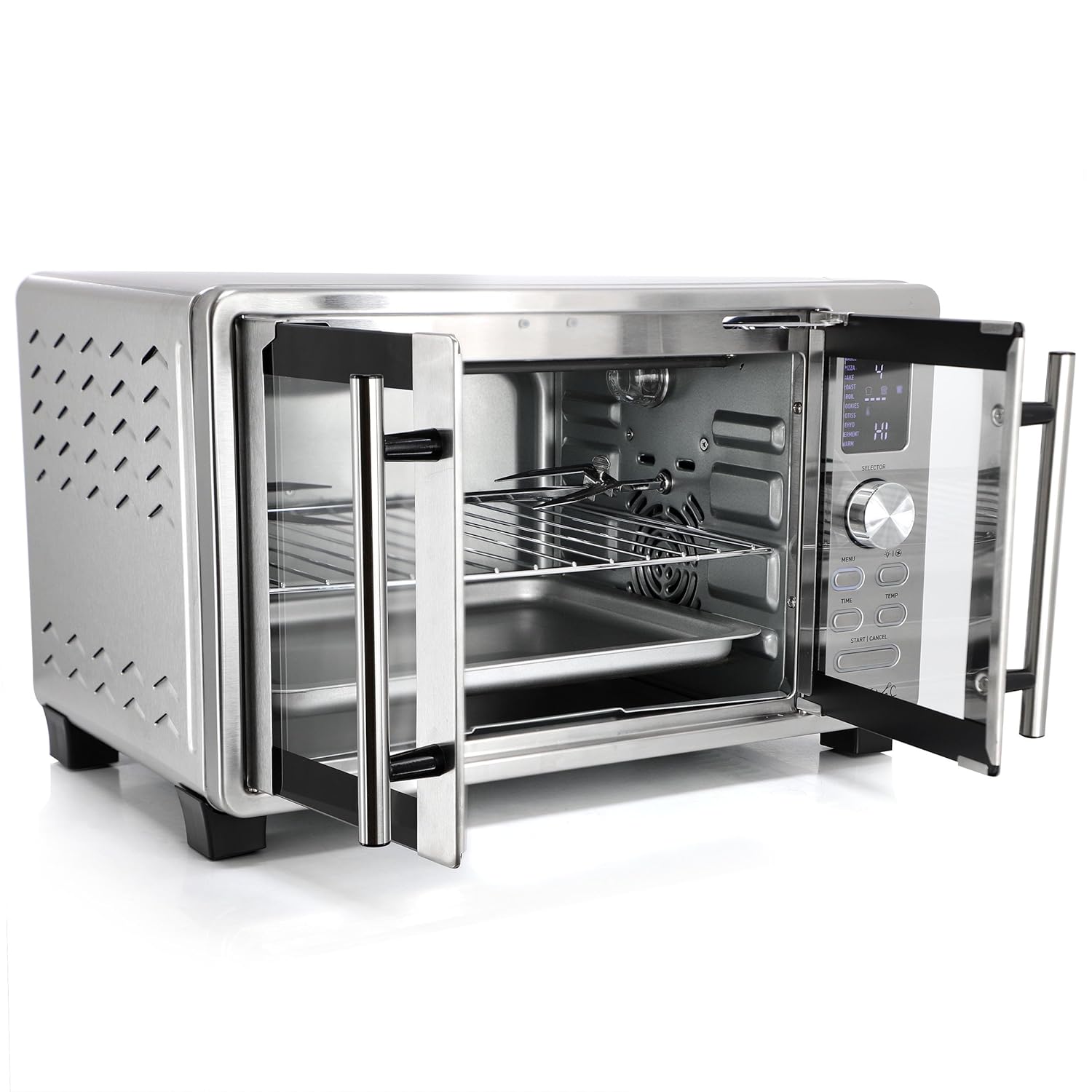
Figure 2: The oven with its elegant French doors open, providing easy access to the interior, including the wire rack and bake tray.
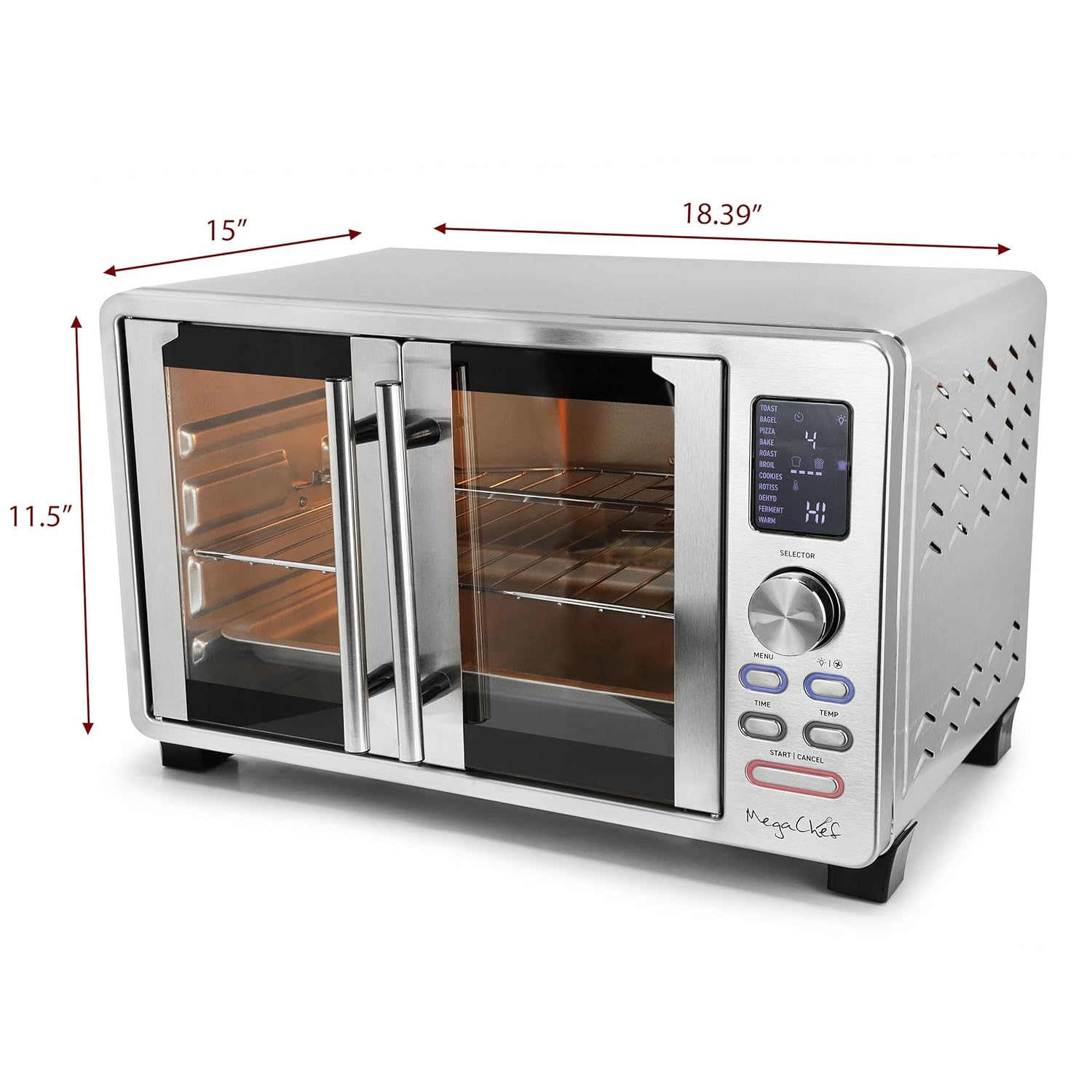
Figure 3: Product dimensions of the MegaChef oven, indicating its compact yet spacious design suitable for countertops.

Figure 4: All essential accessories included with your oven: the Rotisserie Set, Wire Rack, Bake Tray, and Crumb Tray.
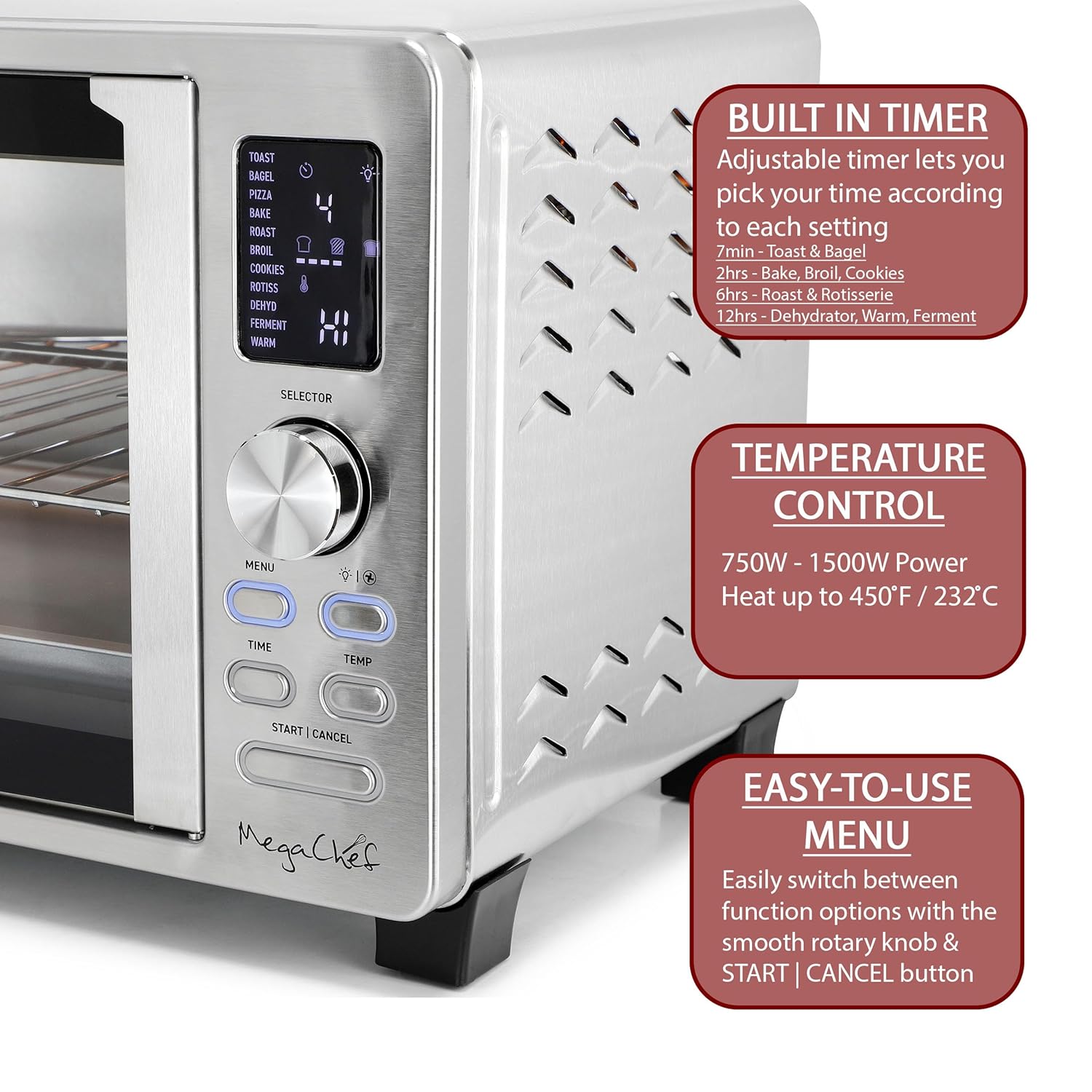
Figure 5: Detailed view of the digital control panel, highlighting the intuitive menu, adjustable timer, and temperature controls.
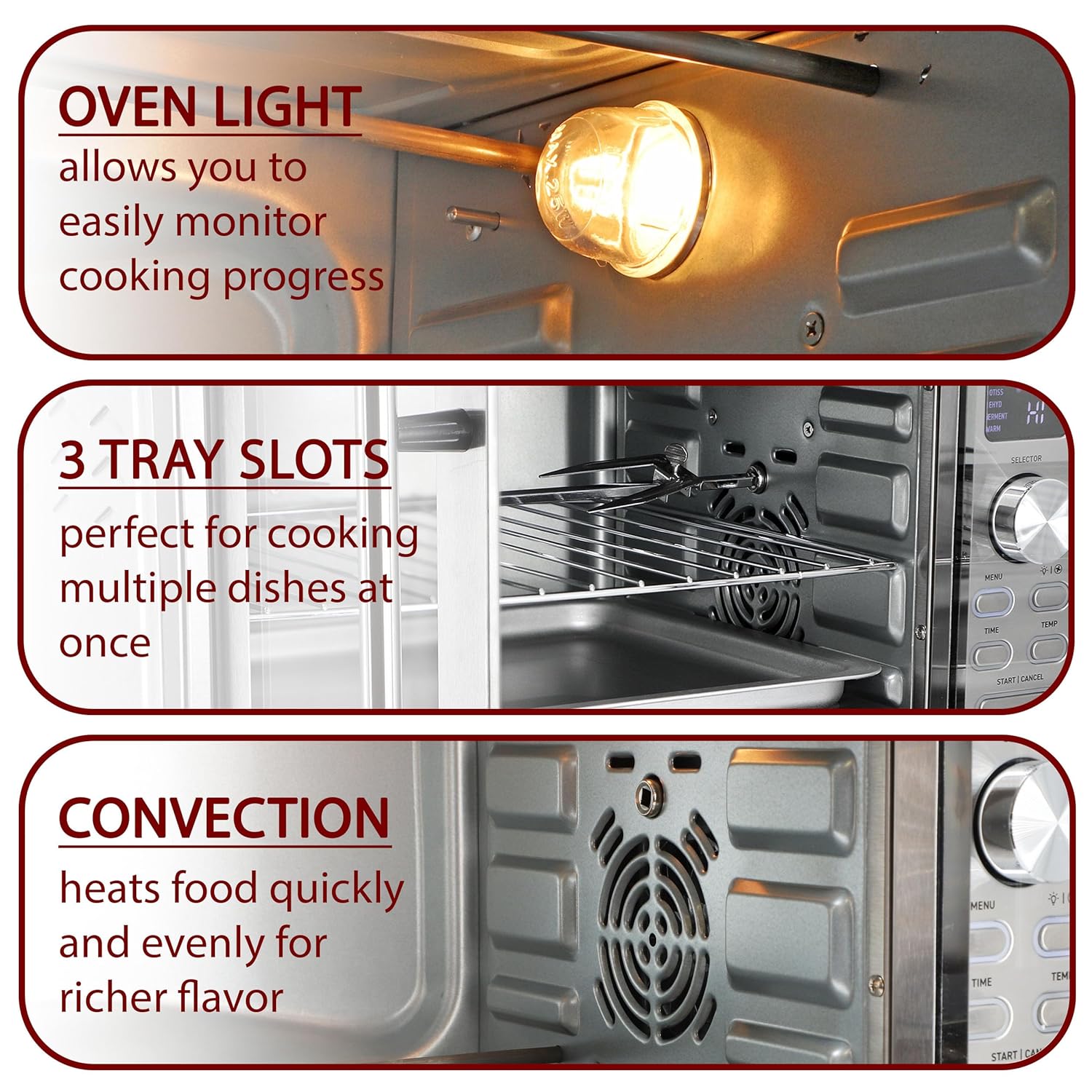
Figure 6: Interior features of the oven, including the bright oven light, multiple tray slots for versatile cooking, and the convection fan for even heat distribution.
Components:
- French Doors: Dual doors for easy access and heat retention.
- Digital Control Panel: Intuitive interface for selecting functions, time, and temperature.
- Rotary Knob: For navigating menu options and adjusting settings.
- Start/Cancel Button: To begin or end cooking cycles.
- Interior Oven Lamp: Allows monitoring of cooking progress without opening the door.
- Heating Elements: Four stainless steel heating elements for even cooking.
- Convection Fan: Circulates hot air for faster and more even cooking.
- Wire Rack: For baking, roasting, and toasting.
- Bake Tray: For baking and catching drips.
- Crumb Tray: Removable tray for easy cleaning of crumbs and spills.
- Rotisserie Set: Includes spit and forks for rotisserie cooking.
Setup and First Use
- Unpacking: Carefully remove the oven and all accessories from the packaging. Retain packaging for future storage or shipping.
- Placement: Place the oven on a stable, heat-resistant, and level surface. Ensure there is at least 4-6 inches of clearance on all sides for proper ventilation. Do not place near flammable materials.
- Cleaning: Before first use, wipe down the exterior with a damp cloth. Wash the wire rack, bake tray, crumb tray, and rotisserie set in warm, soapy water. Rinse thoroughly and dry completely.
- First Burn-in: To eliminate any manufacturing odors, operate the oven empty for approximately 15 minutes at 400°F (205°C) in the "Bake" function. Ensure the area is well-ventilated during this process. A slight odor or smoke is normal during initial use.
- Power Connection: Plug the power cord into a grounded 120V AC electrical outlet.
Operating Instructions
Your MegaChef oven features a digital control panel for easy operation.
General Operation:
- Power On: Plug the oven into a suitable electrical outlet. The display will illuminate.
- Select Function: Use the "MENU" button or the rotary knob to cycle through the available cooking functions (Toast, Bagel, Pizza, Bake, Roast, Broil, Cookies, Rotisserie, Dehydrate, Ferment, Warm).
- Adjust Time: Once a function is selected, press the "TIME" button and use the rotary knob to set the desired cooking time.
- Adjust Temperature: Press the "TEMP" button and use the rotary knob to set the desired temperature (up to 450°F / 232°C).
- Start Cooking: Press the "START | CANCEL" button to begin the cooking cycle. The oven light will turn on during operation.
- Cancel/Stop: To stop cooking at any time, press the "START | CANCEL" button.
Specific Functions:
- Toast/Bagel: Ideal for bread, bagels, and frozen waffles. Adjust shade level using the time setting.
- Bake/Roast/Pizza/Cookies: Use for general baking and roasting. Place food on the wire rack or bake tray.
- Broil: For browning and crisping. Place food on the wire rack with the bake tray underneath to catch drips. Ensure food is positioned close to the top heating elements.
- Rotisserie:
- Assemble the rotisserie spit by securing the food (e.g., whole chicken) with the forks.
- Insert the pointed end of the spit into the rotisserie drive socket on the right side of the oven interior.
- Rest the square end of the spit onto the rotisserie support on the left side.
- Select the "Rotisserie" function. Set time and temperature as needed.
- Press "START | CANCEL". The spit will rotate during cooking.
- Dehydrate: For drying fruits, vegetables, and jerky. Use low temperatures over extended periods.
- Ferment: Provides a low, consistent temperature for proofing dough or making yogurt.
- Warm: Keeps cooked food warm without further cooking.
Note: Always preheat the oven for 5-10 minutes before placing food inside for optimal results, especially for baking and roasting functions.
Maintenance and Cleaning
Regular cleaning will ensure the longevity and optimal performance of your MegaChef oven.
- Always Unplug: Before cleaning, always unplug the oven from the electrical outlet and allow it to cool completely.
- Crumb Tray: Remove the crumb tray from the bottom of the oven. Discard crumbs and wash the tray in warm, soapy water. Rinse and dry thoroughly.
- Accessories: Wash the wire rack, bake tray, and rotisserie set in warm, soapy water. For stubborn stains, use a non-abrasive cleaning pad. Rinse and dry completely.
- Interior: Wipe the interior walls with a damp cloth and mild detergent. For baked-on food, a non-abrasive cleaner designed for oven interiors can be used. Avoid harsh chemicals or abrasive pads that could damage the surface.
- Exterior: Wipe the exterior surfaces with a soft, damp cloth. Do not use abrasive cleaners or metal scouring pads, as they may scratch the stainless steel finish.
- Glass Doors: Clean the glass doors with a glass cleaner or a damp cloth.
- Do Not Immerse: Never immerse the main body of the oven, cord, or plug in water or any other liquid.
Troubleshooting
| Problem | Possible Cause | Solution |
|---|---|---|
| Oven does not turn on. | Not plugged in; power outage; faulty outlet. | Ensure plug is securely in a working outlet. Check circuit breaker. |
| Food not cooking evenly. | Improper temperature/time setting; food placement; convection fan issue. | Adjust settings. Ensure food is centered. Check if convection fan is obstructed. Preheat oven. |
| Smoke/odor during first use. | Normal burn-in of manufacturing oils. | This is normal. Ensure good ventilation. It will dissipate after initial uses. |
| Rotisserie not rotating. | Spit not properly seated; food too heavy/unbalanced. | Ensure spit is correctly inserted into drive socket and support. Balance food on spit. |
| Digital display not working. | Power issue; internal malfunction. | Unplug and plug back in. If issue persists, contact customer support. |
Specifications
- Model Number: MCOV-4500
- Capacity: 25 Liter (approx. 26.4 Quart)
- Power Supply: 120V
- Wattage: 1500 Watts
- Temperature Range: Up to 450°F (232°C)
- Timer: Up to 120 minutes (specific functions may vary, e.g., 60 minutes for Toast/Bagel)
- Dimensions (D x W x H): 15" x 18.39" x 11.5"
- Material: Stainless Steel
- Special Features: Automatic Shut-Off, Temperature Control, Timer, Convection, Rotisserie, Digital Controls, Internal Light, French Door Design.
Warranty and Customer Support
Megachef products are manufactured to the highest quality standards. For warranty information, product support, or to inquire about replacement parts, please contact Megachef customer service. Please have your model number (MCOV-4500) and purchase date available when contacting support.
Contact information (e.g., website, phone number) can typically be found on the product packaging or the manufacturer's official website.
Related documentsMCOV-4500


Ask a question about this manual
Ask about setup, troubleshooting, compatibility, parts, safety, or missing instructions. Manuals+ will review the question and use this page’s manual context to help answer it.