
Introduction
Thank you for choosing the GGSTOPWATER XG99PRO Open Ear Headphones. These wireless Bluetooth 5.4 earbuds are designed for comfort and stability, featuring an open-ear design, earhooks, and IPX5 water resistance. This manual provides detailed instructions to help you set up, operate, and maintain your headphones for optimal performance.
The ergonomic design ensures a firm fit, preventing slippage during activities. With multi-point support, the weight is evenly distributed for comfortable long-term wear. Bluetooth 5.4 technology provides a stable and fast connection. The open-ear design helps prevent pressure and irritation to the ear canal and eardrum, promoting extended comfortable use.
Package Contents
- GGSTOPWATER XG99PRO Open Ear Headphones (Left and Right)
- Wireless Charging Case
- USB Charging Cable
- User Manual (this document)
Product Overview
Familiarize yourself with the components of your GGSTOPWATER XG99PRO Open Ear Headphones.
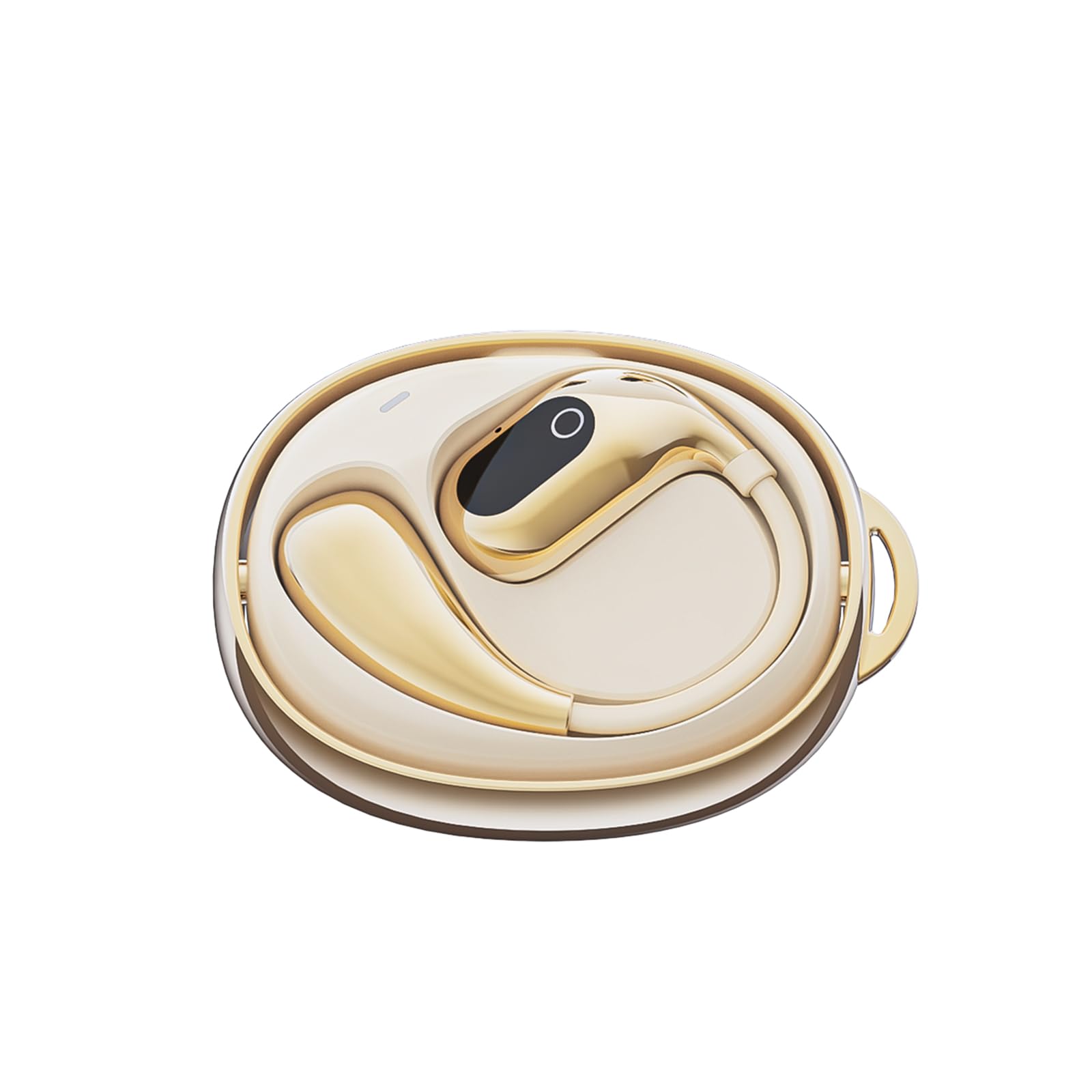
Figure 1: The GGSTOPWATER XG99PRO wireless charging case. This compact case protects and charges your earbuds.

Figure 2: The XG99PRO earbuds securely placed within their charging case. The case ensures the earbuds are charged and ready for use.

Figure 3: An XG99PRO earbud worn on the ear, demonstrating its open-ear design and secure earhook fit. This design allows for situational awareness while listening.
Setup
1. Charging the Headphones
- Place both earbuds into the charging case. Ensure they are correctly seated.
- Connect the USB charging cable to the charging port on the case and to a power source (e.g., USB wall adapter, computer USB port).
- The indicator light on the charging case will show the charging status. A full charge for the case and earbuds typically takes approximately 1.5-2 hours.
- The earbuds provide up to 6 hours of listening time on a single charge, and the charging case extends the total battery life to up to 60 hours.
2. Pairing with a Bluetooth Device
- Ensure the earbuds are charged.
- Open the charging case. The earbuds will automatically enter pairing mode, indicated by a flashing LED light on the earbuds.
- On your device (smartphone, tablet, computer), enable Bluetooth.
- Search for available Bluetooth devices. Select "XG99PRO" from the list.
- Once connected, the LED indicator on the earbuds will stop flashing, and you will hear a confirmation tone.
- The headphones will automatically reconnect to the last paired device when taken out of the case, if Bluetooth is enabled on the device.
Operating Instructions
The XG99PRO headphones feature touch controls for easy management of audio and calls.
Power On/Off
- Power On: Open the charging case, and the earbuds will power on automatically. Alternatively, press and hold the touch control area on both earbuds for 3 seconds.
- Power Off: Place the earbuds back into the charging case and close the lid. They will power off automatically. Alternatively, press and hold the touch control area on both earbuds for 5 seconds.
Music Control
- Play/Pause: Single tap the touch control area on either earbud.
- Next Track: Double tap the touch control area on the right earbud.
- Previous Track: Double tap the touch control area on the left earbud.
- Volume Up: Triple tap the touch control area on the right earbud.
- Volume Down: Triple tap the touch control area on the left earbud.
Call Control
- Answer/End Call: Single tap the touch control area on either earbud.
- Reject Call: Press and hold the touch control area on either earbud for 2 seconds.
Voice Assistant
- Activate Voice Assistant: Press and hold the touch control area on either earbud for 3 seconds (when not on a call).
Maintenance
Proper maintenance ensures the longevity and optimal performance of your headphones.
Cleaning
- Gently wipe the earbuds and charging case with a soft, dry, lint-free cloth.
- Do not use abrasive cleaners, solvents, or aerosol sprays.
- Avoid getting moisture into any openings. The earbuds are IPX5 water-resistant, meaning they can withstand splashes and sweat, but are not designed for submersion.
Storage
- When not in use, always store the earbuds in their charging case to protect them and keep them charged.
- Store in a cool, dry place, away from extreme temperatures and direct sunlight.
Troubleshooting
If you encounter any issues, refer to the following common problems and solutions:
| Problem | Solution |
|---|---|
| Earbuds not pairing with device. |
|
| No sound from one or both earbuds. |
|
| Charging case not charging. |
|
Specifications
| Feature | Detail |
|---|---|
| Model Name | XG99PRO |
| Brand | GGSTOPWATER |
| Connectivity Technology | Wireless (Bluetooth 5.4) |
| Ear Placement | On Ear (Open Ear Design) |
| Form Factor | On Ear |
| Water Resistance | IPX5 |
| Impedance | 40 Ohms |
| Item Weight | 2 ounces |
| Batteries | 2 C batteries required (included) |
| Included Components | Wireless Charging Case |
Warranty Information
GGSTOPWATER products are covered by a limited warranty from the date of purchase. Please retain your proof of purchase for warranty claims. This warranty covers manufacturing defects and does not cover damage caused by misuse, accidents, unauthorized modifications, or normal wear and tear. For specific warranty terms and conditions, please refer to the warranty card included with your product or contact customer support.
Customer Support
If you have any questions, require technical assistance, or need further support, please contact our customer service team. You can find contact information on our official website or through the retailer where you purchased the product.
Online Support: Visit the GGSTOPWATER official website for FAQs and support resources.
Email Support: [Placeholder for Support Email Address]