1. Product Overview
The WKSBBTS T13 Titan 13 Action Figure 2-Pack Set includes two 3D printed, pre-assembled robot figures. These collectible toys feature articulated joints and come with various interchangeable accessories, allowing for diverse posing and display options. The figures are designed for users aged 3 years and up.
Key Features:
- Fully Assembled: Figures are ready for immediate use upon unboxing.
- Interchangeable Accessories: Includes multiple hand sizes, weapons, and other parts for customization.
- Articulated Joints: Each figure features fully movable joints for dynamic posing.
- 3D Printed Construction: Detailed design achieved through advanced 3D printing technology.
- Display Stand: An adjustable stand is included for stable display.

Image 1.1: Overview of the T13 Titan 13 Action Figure 2-Pack, showing both figures and included accessories.
2. Setup
Your T13 Titan 13 action figures arrive pre-assembled. Initial setup primarily involves attaching desired accessories and preparing the display stand.
2.1 Unboxing and Inspection
- Carefully remove all components from the packaging.
- Verify that all parts are present: two T13 figures, multiple hand sets, various weapons (e.g., swords, guns), and an adjustable display stand.
- Inspect figures and accessories for any visible damage.
2.2 Attaching Accessories
The figures feature interchangeable parts. To attach or swap accessories:
- Hands: Gently pull off the existing hands from the wrist joints. Align the desired hand accessory with the wrist joint and push firmly until it is securely in place.
- Weapons: Weapons are designed to fit into the figures' hands. Insert the weapon handle into the figure's grip.
- Other Parts: Some figures may include interchangeable heads or wing attachments. Align these parts with their respective connection points and attach them carefully. Some connections may utilize magnetic attraction for secure fitting.
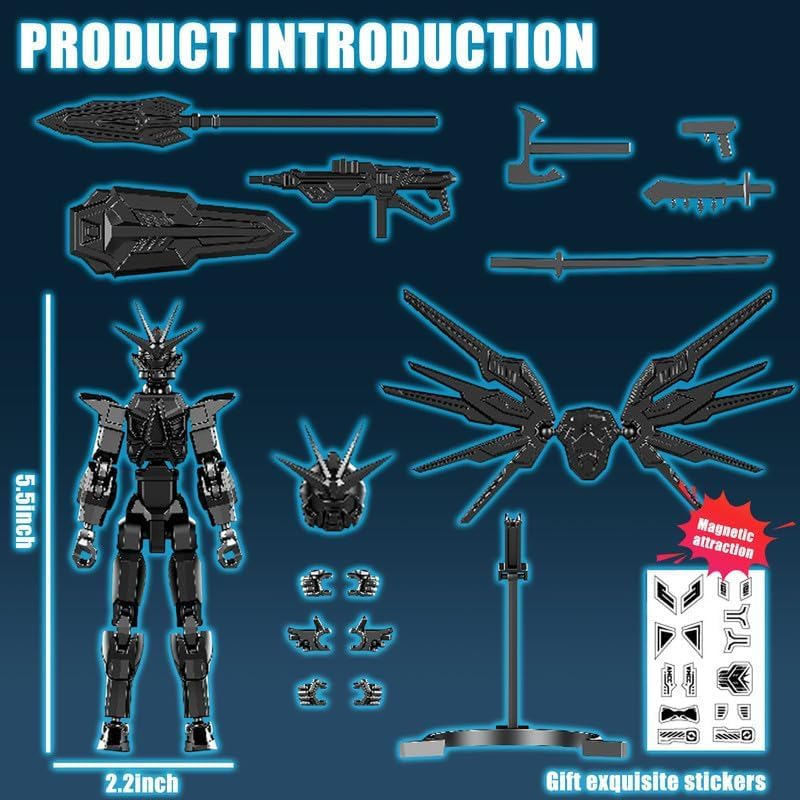
Image 2.1: Components of a T13 figure, including dimensions and accessories for assembly.
2.3 Assembling the Display Stand
The adjustable display stand provides stability for posing. Connect the base to the support arm, and then attach the figure clip to the top of the support arm. Position the figure clip around the figure's waist or leg to secure it.

Image 2.2: Features of the T13 figure, including the movable bracket for display.
3. Operating the Figures
The T13 figures are designed for dynamic posing and display. Their articulated joints allow for a wide range of motion.
3.1 Posing the Figure
- Gently manipulate the joints at the neck, shoulders, elbows, wrists, waist, hips, knees, and ankles to achieve desired poses.
- The wings on some models are movable and can be adjusted for different display configurations.
- Some foot components feature a magnetic suction function for enhanced stability on compatible surfaces.

Image 3.1: Detailed view of T13 figure articulation and features.

Image 3.2: Example of a T13 figure in an action pose with accessories.
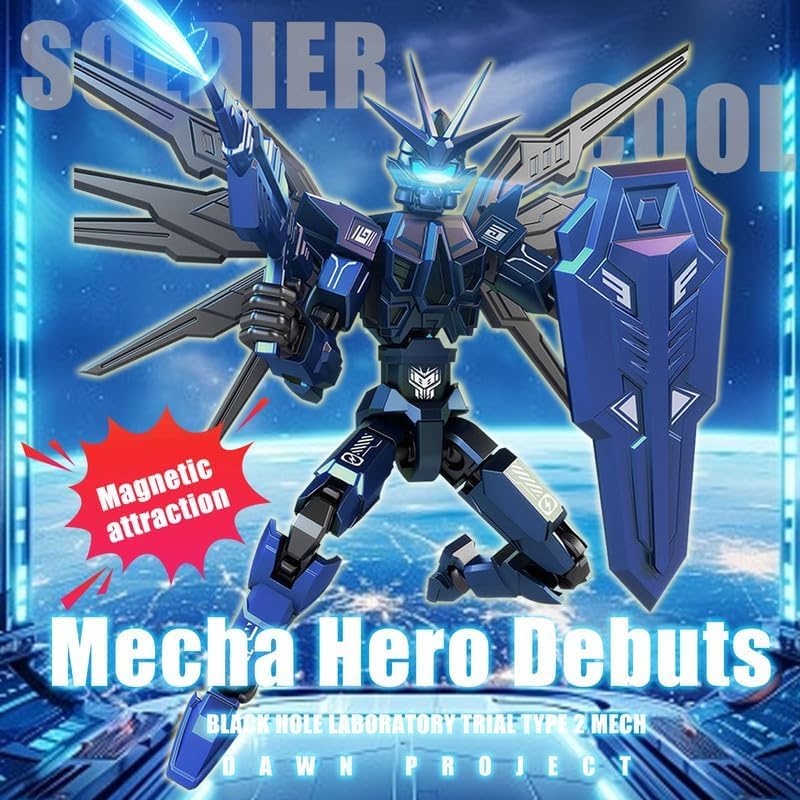
Image 3.3: A blue T13 figure demonstrating magnetic attraction for stability.
4. Maintenance
Proper care and maintenance will help preserve the condition and functionality of your T13 action figures.
4.1 Cleaning
- Wipe the figures and accessories with a soft, dry cloth to remove dust and debris.
- Avoid using harsh chemicals, abrasive cleaners, or excessive moisture, as these can damage the 3D printed material and paint finish.
4.2 Storage
- Store figures in a cool, dry place away from direct sunlight and extreme temperatures to prevent material degradation or discoloration.
- When not on display, consider storing figures and accessories in their original packaging or a dedicated storage container to prevent loss or damage to small parts.
4.3 Handling
- Handle figures gently, especially when manipulating joints or attaching/detaching accessories. Excessive force can cause parts to break.
- The 3D printed nature of the figures means some parts may be more delicate than traditional injection-molded toys.
5. Troubleshooting
This section addresses common issues that may arise during the use of your T13 action figures.
5.1 Parts Detaching or Falling Off
- Issue: Limbs, hands, or accessories detach easily during handling or posing.
- Solution: Re-attach the part by aligning it with the joint and applying gentle, firm pressure. Ensure the part is fully seated. If a joint feels loose, careful manipulation to find the optimal angle for connection may be necessary. Avoid excessive force.
5.2 Difficulty Attaching Accessories
- Issue: Hands or weapons are difficult to attach to the figure.
- Solution: Ensure correct alignment of the accessory with the joint or grip. Apply steady, gentle pressure. Do not force parts, as this can cause breakage. If a part is too tight, slight rotation while pushing may help.
5.3 Figure Instability on Stand
- Issue: The figure does not stand securely on the display stand.
- Solution: Adjust the position of the figure clip on the stand to ensure a firm grip on the figure's waist or leg. Ensure the stand's base is on a flat, stable surface. Reposition the figure's legs and feet to achieve better balance.
6. Specifications
| Product Dimensions | 2 x 1 x 7 inches (per figure, approximate) |
| Item Weight | 4.6 ounces (total for 2-pack) |
| Item Model Number | D65 |
| Manufacturer Recommended Age | 3 years and up |
| Manufacturer | WKSBBTS |

Image 6.1: A collection of T13 figures in different color variants, showcasing their design and accessories.
7. Warranty and Support
Information regarding specific warranty coverage for the WKSBBTS T13 Titan 13 Action Figure 2-Pack is not provided in the product details.
For any product-related inquiries, support, or concerns, please contact the seller directly through the platform where the purchase was made. They can provide assistance with product issues, returns, or further information.


