1. Introduction
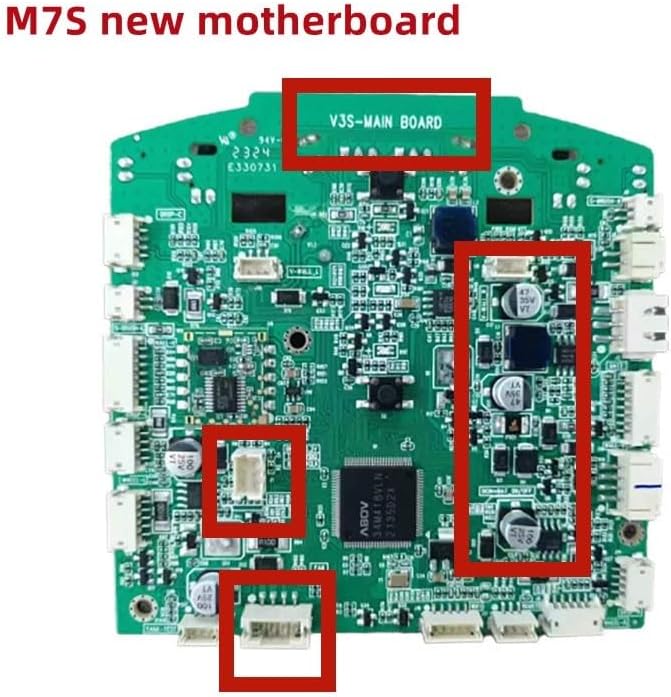
This manual provides essential information for the installation, operation, and maintenance of the ZDMTDKXT Robot Vacuum Cleaner Motherboard, designed for compatibility with Liectroux M7s Pro(B) robot vacuum models. This component is crucial for the intelligent control and efficient functioning of your robot vacuum.
Key Features:
- Intelligent Control: Equipped with a high-performance main control chip, enabling rapid sensor data integration, precise cleaning route planning, and efficient obstacle avoidance for comprehensive deep cleaning.
- Stable Compatibility: Features a well-designed circuit board suitable for various components including the drive motor, vacuum fan, and battery, utilizing advanced processes to minimize signal interference.
- Convenient Function Expansion: Supports voice control adaptation and includes reserved upgrade interfaces for adding new functions to meet diverse user needs.
- Energy-saving and Efficient: Integrates an intelligent power management system that adjusts power consumption based on working state, optimizes charging curves, extends battery life, and conserves energy.

2. Setup and Installation
Replacing the robot vacuum cleaner motherboard requires careful handling and basic technical knowledge. It is recommended to consult a professional if you are unsure about any steps. Always ensure the robot vacuum is powered off and disconnected from any power source before beginning installation.
Safety Precautions:
- Ensure the robot vacuum is completely powered off and unplugged.
- Discharge any static electricity from your body before handling the motherboard.
- Use appropriate tools to avoid damaging components.
- Keep small parts away from children.
Installation Steps (General Guide):
- Access the Motherboard: Carefully open the robot vacuum's casing to expose the existing motherboard. Refer to your specific Liectroux M7s Pro(B) model's service manual for exact disassembly instructions.
- Disconnect Components: Gently disconnect all cables, connectors, and screws securing the old motherboard. Take photos or make notes of the connections to aid reassembly.
- Remove Old Motherboard: Once all connections are detached, carefully lift and remove the old motherboard.
- Install New Motherboard: Position the new ZDMTDKXT motherboard in the same location. Ensure it aligns correctly with mounting points.
- Reconnect Components: Reconnect all cables and connectors to the new motherboard. Refer to your notes or photos. Ensure all connections are secure and correctly oriented.
- Secure Motherboard: Fasten the new motherboard with the appropriate screws.
- Reassemble Casing: Carefully reassemble the robot vacuum's casing, ensuring all clips and screws are properly secured.
- Test Functionality: After reassembly, connect the robot vacuum to power and perform a test run to ensure all functions are operating correctly.

3. Operating Principles
The ZDMTDKXT motherboard serves as the central processing unit for your Liectroux M7s Pro(B) robot vacuum. It orchestrates all functions, from navigation and cleaning modes to power management and sensor interpretation. Once installed, the motherboard enables the vacuum to:
- Process data from various sensors (e.g., anti-drop, anti-collision, dust detection) to navigate effectively.
- Control the drive motors for movement and the vacuum fan for suction.
- Manage battery charging and discharge cycles for optimal performance and longevity.
- Execute programmed cleaning schedules and modes.
- Communicate with external interfaces, such as Wi-Fi modules for app control or voice assistants (if supported by the vacuum model).
No direct user operation of the motherboard is required after installation; its functionality is integrated into the robot vacuum's overall system.
4. Maintenance
Proper care of the motherboard, primarily by ensuring the robot vacuum's internal environment is clean and dry, will contribute to its longevity.
- Keep Dry: Avoid exposing the robot vacuum to liquids or high humidity, as moisture can damage electronic components.
- Dust Prevention: Regularly clean the robot vacuum's dustbin and filters to prevent excessive dust accumulation inside the unit, which could potentially affect internal components.
- Gentle Handling: When performing any internal maintenance on the robot vacuum, handle the motherboard and its connections gently to avoid physical damage.
5. Troubleshooting
If your Liectroux M7s Pro(B) robot vacuum experiences issues after motherboard replacement, consider the following common troubleshooting steps:
| Problem | Possible Cause | Solution |
|---|---|---|
| Robot vacuum does not power on. | Loose power connection to motherboard; faulty battery; incorrect motherboard installation. | Check all power connections to the motherboard. Ensure the battery is properly connected and charged. Re-verify motherboard installation. |
| Erratic movement or navigation issues. | Sensor connections loose; motherboard not fully seated; software glitch. | Inspect all sensor connections to the motherboard. Ensure the motherboard is securely installed. Try resetting the robot vacuum (refer to its original manual). |
| Vacuum functions (e.g., suction, brush) not working. | Motor/fan connections loose; component failure. | Check connections for the vacuum motor, fan, and brushes to the motherboard. If connections are secure, the component itself might be faulty. |
| No response to remote control or app. | Wi-Fi module connection issue; motherboard communication error. | Verify the connection of the Wi-Fi module (if applicable) to the motherboard. Ensure the robot vacuum is properly paired with the app/remote. |
If issues persist after troubleshooting, it may indicate a more complex problem or a faulty component. Contact the seller or a qualified technician for further assistance.
6. Specifications
| Attribute | Detail |
|---|---|
| Product Type | Robot Vacuum Cleaner Motherboard Accessory |
| Compatibility | Liectroux M7s Pro(B) Robot Vacuum Cleaners |
| Brand | ZDMTDKXT |
| Model Number (Manufacturer) | hongxkai |
| Package Dimensions | 1.18 x 0.79 x 0.39 inches |
| Item Weight | 1.76 ounces |
| ASIN | B0F223RHH6 |
| Country of Origin | China |
| Date First Available | March 20, 2025 |
7. Warranty and Support
For information regarding the warranty of this ZDMTDKXT Robot Vacuum Cleaner Motherboard, please refer to the purchase documentation or contact the seller directly. Warranty terms and conditions are typically provided at the point of sale.
For technical support or further assistance with installation and troubleshooting, please reach out to the seller or manufacturer. Ensure you have your product's ASIN (B0F223RHH6) and purchase details available when contacting support.


