
iCarsoft UK-JP V2.0
iCarsoft JP V2.0 Diagnostic Tool User Manual
Model: UK-JP V2.0
Introduction
The iCarsoft JP V2.0 OBD2 diagnostic tool is specifically designed for Japanese and Korean vehicle manufacturers including Daewoo, Toyota, Honda, Mitsubishi, Suzuki, Mazda, and Hyundai. This tool provides comprehensive diagnostics for all major vehicle systems, offering detailed insights into vehicle status and facilitating effective repair processes.
It integrates full OBD2/EOBD functionalities and a suite of 9 essential maintenance services, making it a versatile tool for both professional mechanics and DIY enthusiasts. The device also includes a battery test function and a live data monitor, capable of displaying up to 118 real-time data streams.
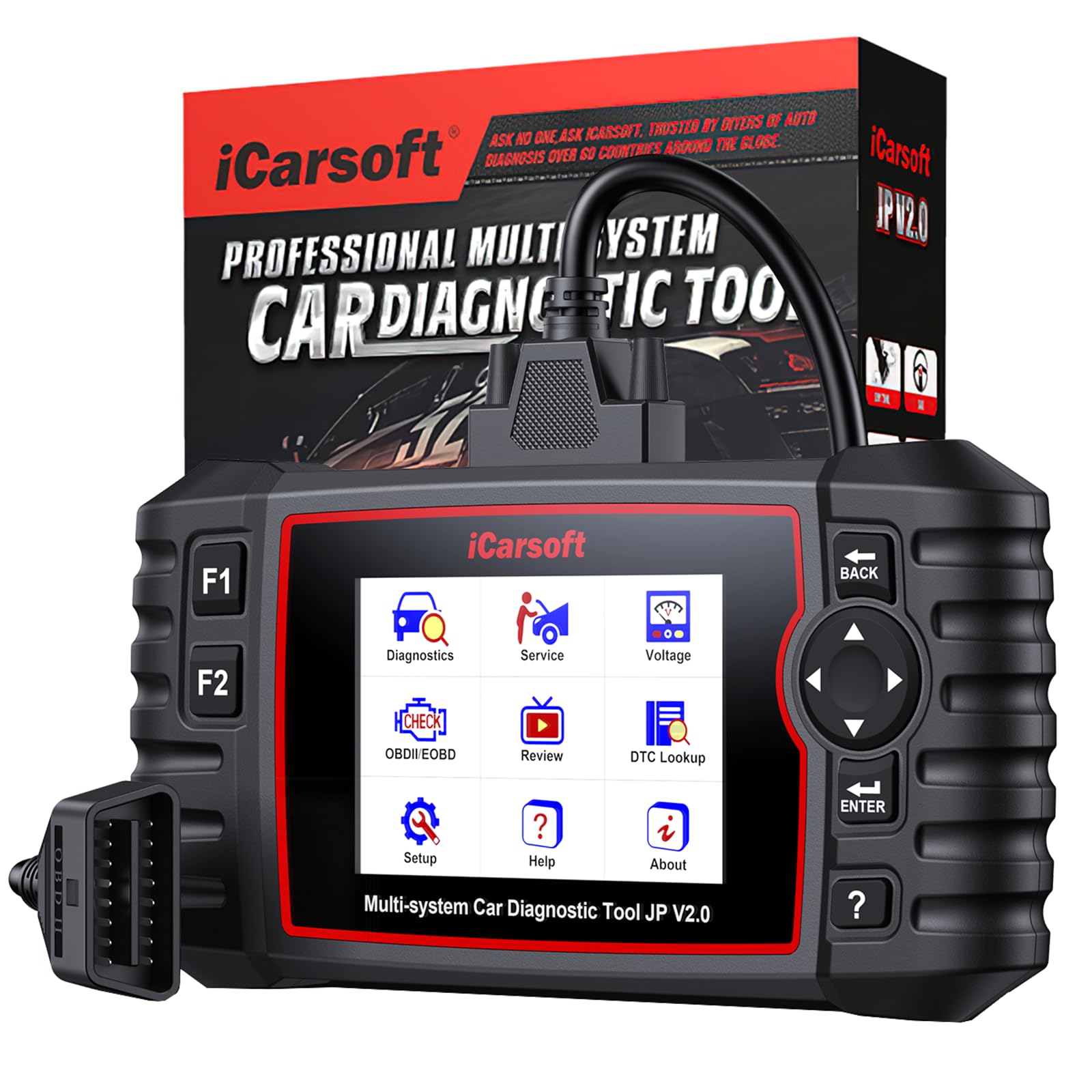
Image: The iCarsoft JP V2.0 Diagnostic Tool, a handheld device with a color screen and buttons, connected via an OBD2 cable.
Key Features
- Full System Diagnostics: Performs in-depth diagnosis of all vehicle systems (engine, transmission, ABS, SRS, fuel, steering, A/C, brake system, suspension, etc.) for Japanese and Korean vehicles from 1996 to 2025.
- Comprehensive OBD2/EOBD Functions: Includes Read/Clear Codes, Freeze Frame, I/M Readiness, O2 Sensor Test, On-Board Monitor Test, and EVAP System Test.
- 9 Maintenance Services: Supports essential reset services such as Oil Reset, Steering Angle Sensor (SAS) Calibration, Electronic Parking Brake (EPB), Battery Management System (BMS), Electronic Throttle Control (ETC), Diesel Particulate Filter (DPF) Regeneration, ABS Bleeding, Injector Coding, and Tire Pressure Monitoring System (TPMS) Reset.
- Battery and Charging System Test: Quickly and accurately assesses the health of the car battery and its starting/charging systems.
- Live Data Monitoring: Provides real-time monitoring of up to 118 data streams from various vehicle systems and components, displayed in colorful graphs.
- Automatic VIN Identification: Enables quick access to vehicle details for streamlined diagnostics.
- Diagnostic Reports: Generates printable and shareable status reports for efficient problem analysis.
- Ergonomic Design: Features a comfortable, handheld design with a durable TPU shell resistant to abrasion and high temperatures (up to 100 ℃).
- Lifetime Free Software Updates: Ensures the tool remains up-to-date with the latest vehicle data and functionalities.
Setup Guide
Follow these steps to set up your iCarsoft JP V2.0 Diagnostic Tool:
- Unpack the Device: Carefully remove the OBD2 scanner, connection cable, and user manual from the packaging. Ensure the TF card is inserted into the scanner.
- Locate the OBD-II Port: The OBD-II port is typically located under the dashboard on the driver's side of the vehicle. Refer to your vehicle's owner's manual if you cannot find it.
- Connect the Scanner: Plug the main connection cable into the OBD-II port of your vehicle. Then, connect the other end of the cable to the iCarsoft JP V2.0 diagnostic tool.
- Power On: The scanner will typically power on automatically once connected to the vehicle's OBD-II port. If not, press the power button (if available) or ensure the vehicle's ignition is in the "ON" position (engine off).
- Initial Language Setting: Upon first use, you may be prompted to select your preferred language. Navigate using the directional buttons and confirm your selection.

Image: Close-up of the iCarsoft JP V2.0 Diagnostic Tool's screen and buttons, showing the OBD2 connector.
Operating Instructions
This section outlines the basic operation of the iCarsoft JP V2.0 Diagnostic Tool.
1. Full System Diagnostics
- From the main menu, select "Diagnosis".
- The tool will automatically identify the vehicle's VIN (Vehicle Identification Number). Confirm the vehicle details.
- Choose "Auto Scan" or select specific systems (e.g., Engine, ABS, SRS) for diagnosis.
- The scanner will perform a comprehensive scan and display any detected Diagnostic Trouble Codes (DTCs).
- Select a DTC to view its detailed description and potential causes.
2. Reading and Clearing Codes
- Read Codes: After a system scan, select "Read Codes" to view current, pending, and permanent DTCs.
- Clear Codes: Once repairs are completed, select "Clear Codes" to erase the DTCs from the vehicle's ECU. Ensure the ignition is on and the engine is off before clearing codes. Clearing codes will also turn off the Malfunction Indicator Lamp (MIL).
3. Live Data Monitoring
- From the main menu or within a diagnostic session, select "Live Data".
- Choose the parameters you wish to monitor (e.g., engine speed, coolant temperature, O2 sensor readings).
- The data will be displayed in real-time, often with graphical representations for easier analysis.
4. Maintenance Services (Resets)
The tool supports 9 common maintenance services. Access these from the "Service" menu.
- Oil Reset: Resets the oil service light after an oil change.
- SAS Calibration: Calibrates the Steering Angle Sensor.
- EPB: Performs Electronic Parking Brake service functions (e.g., deactivating/activating for pad replacement).
- BMS: Registers new batteries and performs battery management resets.
- ETC: Electronic Throttle Control learning.
- DPF: Diesel Particulate Filter regeneration and reset.
- ABS Bleeding: Performs ABS brake bleeding procedures.
- Injector Coding: Codes new injector numbers into the ECU.
- TPMS: Tire Pressure Monitoring System reset and relearn procedures.
Note: Specific procedures for each service may vary by vehicle model. Always refer to your vehicle's service manual for detailed instructions. Not all services are supported on all vehicles.
5. Battery Test
- Select "Battery Test" from the main menu.
- Follow the on-screen prompts to test the vehicle's battery and charging system.
- The tool will display the battery's health status, voltage, and charging system performance.

Image: The iCarsoft JP V2.0 Diagnostic Tool displaying its main menu with various diagnostic and service options.
Maintenance
- Cleaning: Use a soft, damp cloth to clean the device. Do not use abrasive cleaners or solvents.
- Storage: Store the tool in a dry, clean environment away from direct sunlight and extreme temperatures.
- Software Updates: The iCarsoft JP V2.0 comes with lifetime free software updates. Regularly check the official iCarsoft website for available updates to ensure optimal performance and compatibility with new vehicle models. Connect the device to a computer via USB and follow the update instructions provided on the website.
- Cable Care: Inspect the connection cable regularly for any signs of damage. Replace if necessary to ensure reliable communication.
Troubleshooting
| Problem | Possible Cause | Solution |
|---|---|---|
| Device does not power on. | Not properly connected to OBD-II port; vehicle ignition off; faulty cable. | Ensure the cable is securely connected. Turn the vehicle ignition to the "ON" position (engine off). Check the cable for damage. |
| Communication error with vehicle. | Incorrect vehicle protocol; loose connection; vehicle's ECU issue. | Verify the vehicle's compatibility. Reconnect the cable. Ensure the vehicle's battery is adequately charged. Try on another compatible vehicle if possible. |
| Cannot clear DTCs. | Underlying fault still present; ignition not on. | Ensure the actual fault causing the DTC has been repaired. Turn the ignition to "ON" (engine off) before attempting to clear codes. |
| Specific service function not working. | Vehicle not supported for that specific function; incorrect procedure. | Refer to the compatibility list for your vehicle model. Consult your vehicle's service manual for the correct procedure. Contact iCarsoft support if issues persist. |
| Screen frozen or unresponsive. | Software glitch. | Disconnect the tool from the vehicle, then reconnect. If the issue persists, perform a software update. |
Specifications
- Brand: iCarsoft
- Model: UK-JP V2.0
- Power Source: Corded Electric (via OBD-II port)
- Screen Size: 4 inches
- Vehicle Fitment: Vehicle-specific fitment for Japanese and Korean manufacturers (Daewoo, Toyota, Honda, Mitsubishi, Suzuki, Mazda, Hyundai)
- Included Components: 1 x OBD2 scanner with TF card, 1 x connection cable, 1 x user manual, 1 x main cable
- UPC/GTIN: 850070349987
Warranty and Support
Warranty: The iCarsoft JP V2.0 Diagnostic Tool comes with a 1-year manufacturer's warranty from the date of purchase. This warranty covers defects in materials and workmanship under normal use.
Support: For technical assistance, compatibility inquiries, or warranty claims, please contact iCarsoft customer support. You can typically find contact information on the official iCarsoft website or within the included user manual. When contacting support, please have your model number (UK-JP V2.0) and vehicle VIN readily available.
Software Updates: Benefit from lifetime free software updates to ensure your tool is always up-to-date. Visit the official iCarsoft website for download instructions and the latest software versions.
Related documentsUK-JP V2.0


Ask a question about this manual
Ask about setup, troubleshooting, compatibility, parts, safety, or missing instructions. Manuals+ will review the question and use this page’s manual context to help answer it.