1. Introduction
This manual provides detailed instructions for the installation, operation, and maintenance of your DDPAI Type-C USB Dash Cam Hardwire Kit. This kit is designed to provide continuous power to your compatible DDPAI dash cam, enabling 24-hour parking monitoring and protecting your vehicle's battery from discharge.
The hardwire kit is compatible with DDPAI Z50 Pro, Z60 Pro, and Z60 dash cam models.
2. Product Overview
The DDPAI Hardwire Kit ensures a stable power supply for your dash cam, even when the vehicle is turned off. It features intelligent power management to prevent battery drain and includes multiple safety protections.
Kit Components
- DDPAI Hardwire Kit with integrated voltage converter
- Type-C USB connector for dash cam
- Fuse taps (various sizes may be included)
- Ground wire

Image 2.1: Overview of the DDPAI Type-C USB Dash Cam Hardwire Kit components.
Key Features
- 24-Hour Parking Monitor: Provides continuous power to the dash cam for surveillance when the vehicle is parked.
- IPS Power Management: Intelligently monitors vehicle voltage to prevent battery drain.
- Stable Performance: Offers excellent voltage regulation (12V/2A input to 5V/3A output).
- Safety Protections: Includes low voltage, overcurrent, short-circuit, overload, and reverse connection protection.

Image 2.2: Illustration of the 24-hour parking monitoring feature.

Image 2.3: Diagram illustrating IPS Power Management and low voltage shutdown.

Image 2.4: Visual representation of the built-in safety protection features.
3. Setup and Installation
Proper installation is crucial for the hardwire kit to function correctly and safely. If you are unsure about any steps, it is recommended to seek professional assistance.
Compatibility Check
Ensure your dash cam model is compatible with this hardwire kit. This kit is designed for DDPAI Z50 Pro, Z60 Pro, and Z60 models.

Image 3.1: Visual guide for compatible DDPAI dash cam models.
Installation Steps
- Locate the Fuse Box: Identify your vehicle's fuse box. This is typically located under the dashboard, in the glove compartment, or in the engine bay. Consult your vehicle's owner's manual for the exact location.
- Identify Fuse Slots: You will need to identify two types of fuse slots:
- ACC (Accessory) Fuse: This fuse provides power only when the ignition is on. Use a circuit tester to find a fuse that is live when the car is on and off when the car is off. Connect the red wire of the hardwire kit to this fuse using a fuse tap.
- B+ (Constant Power) Fuse: This fuse provides continuous power, even when the ignition is off. Use a circuit tester to find a fuse that is always live. Connect the yellow wire of the hardwire kit to this fuse using a fuse tap.
- Connect Ground Wire: Locate a metal bolt or screw on the vehicle's chassis that is directly connected to the car's metal frame. Loosen the bolt, attach the black wire (ground) of the hardwire kit to it, and tighten the bolt securely. Ensure a good metal-to-metal connection.
- Route the Cable: Carefully route the 10-foot Type-C USB cable from the fuse box to your dash cam's mounting location. Tuck the cable neatly along the windshield trim, headliner, and A-pillar to conceal it and prevent interference with driving.
- Connect to Dash Cam: Plug the Type-C USB connector into your DDPAI dash cam.
- Test the Installation: Start your vehicle to ensure the dash cam powers on. Turn off the vehicle and remove the key to verify that the dash cam enters parking monitoring mode.
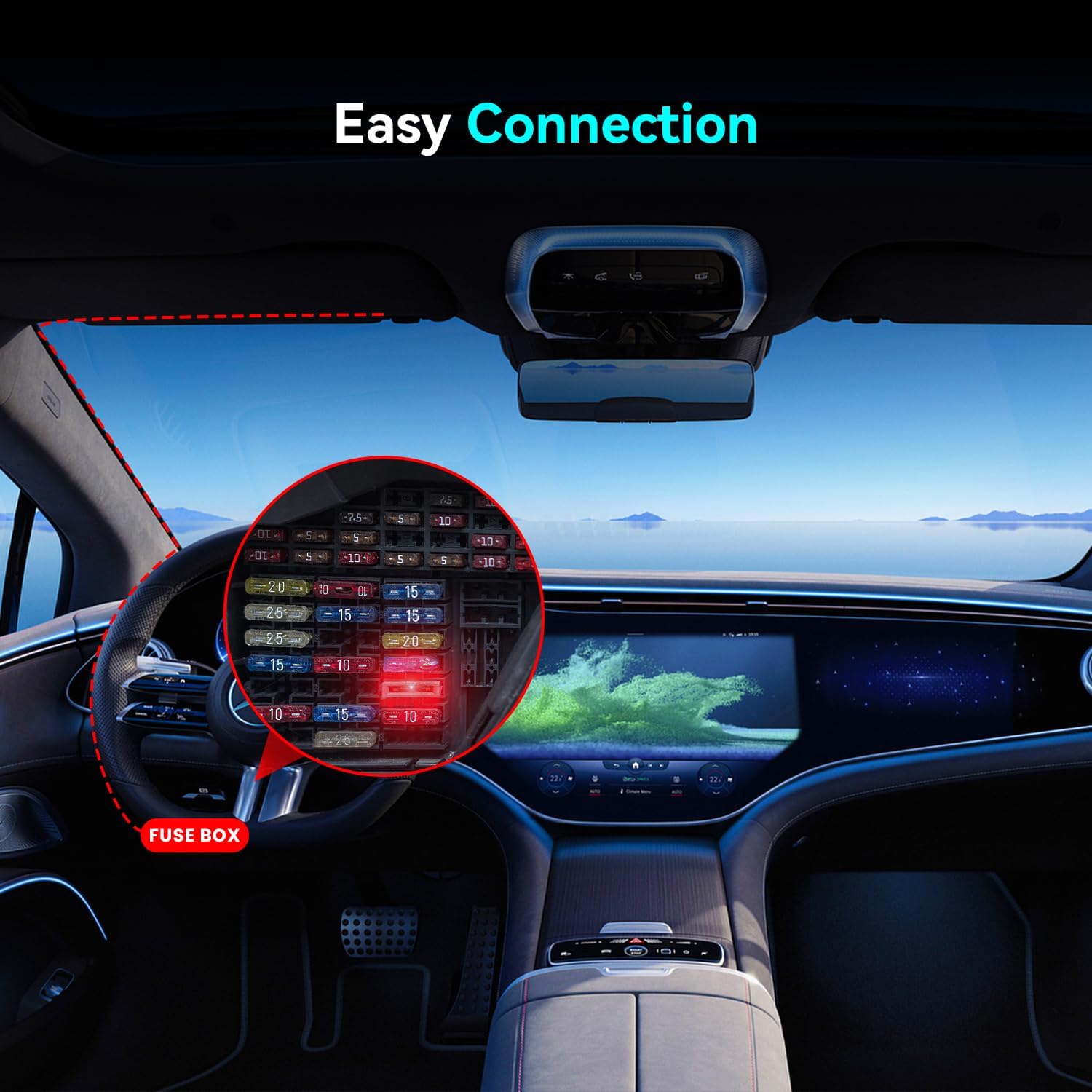
Image 3.2: Illustration of the hardwire kit connection points within a car's interior, highlighting the fuse box.
4. Operating Instructions
Once the hardwire kit is correctly installed, the operation of the parking monitor is largely automatic, managed by the dash cam's settings and the kit's intelligent power management.
24-Hour Parking Monitoring
When your vehicle's ignition is turned off, the hardwire kit continues to supply power to the dash cam from the constant power (B+) connection. The dash cam will then automatically switch to its designated parking monitoring mode (e.g., time-lapse recording, motion detection, or impact detection), as configured in your dash cam's settings.
IPS Power Management
The integrated IPS (Intelligent Power System) in the hardwire kit, combined with your DDPAI dash cam's power management system, continuously monitors your vehicle's battery voltage. If the battery voltage drops below a preset threshold, the hardwire kit will automatically cut off power to the dash cam to prevent excessive battery discharge, ensuring your vehicle can still start.
Refer to your specific DDPAI dash cam's manual for detailed settings related to parking mode and low voltage cut-off thresholds.
5. Maintenance
The DDPAI Hardwire Kit requires minimal maintenance. Regular checks can help ensure optimal performance.
- Connection Check: Periodically inspect all connections (fuse taps, ground wire, Type-C USB connection to dash cam) to ensure they are secure and free from corrosion.
- Cable Routing: Ensure the cable remains neatly tucked away and is not pinched or exposed to excessive heat or sharp edges.
- Fuse Integrity: If the dash cam stops receiving power, check the fuses in the fuse taps. Replace any blown fuses with ones of the same amperage.
6. Troubleshooting
If you encounter issues with your hardwire kit, refer to the following troubleshooting guide:
Dash Cam Does Not Power On in Parking Mode
- Check B+ Fuse: Ensure the yellow wire is connected to a constant power fuse and that the fuse itself is not blown.
- Verify Ground Connection: Confirm the black ground wire is securely attached to a clean, unpainted metal part of the vehicle chassis.
- Dash Cam Settings: Check your dash cam's settings to ensure parking monitoring mode is enabled and configured correctly.
- Battery Voltage: If your vehicle's battery voltage is too low, the IPS power management system may have cut off power to protect the battery. Charge your vehicle's battery.
Dash Cam Does Not Turn Off with Ignition
- Check ACC Fuse: Ensure the red wire is connected to an accessory fuse that only receives power when the ignition is on. If it's connected to a constant power fuse, the dash cam will remain on.
Vehicle Battery Drains Quickly
- IPS Threshold: Ensure your dash cam's low voltage cut-off setting is configured appropriately for your vehicle's battery health. A lower threshold will allow the dash cam to run longer but increases the risk of battery drain.
- Parking Mode Duration: Excessive parking mode recording (e.g., continuous recording for very long periods) can still drain a battery over time, even with IPS protection.
7. Specifications
| Feature | Specification |
|---|---|
| Model Name | Type-C USB Dash Cam Hardwire Kit |
| Input Voltage | DC 12V/2A |
| Output Voltage/Current | DC 5V/3A |
| Cable Length | 10 Feet (approx. 3 meters) |
| Connector Type | Type-C USB |
| Special Feature | 24-Hour Parking Monitor, IPS Power Management |
| Compatible Dash Cams | DDPAI Z50 Pro, Z60 Pro, Z60 |
| Product Dimensions | 0.7"D x 2"W x 2.5"H (main unit) |
| Item Weight | 3.52 ounces |
8. Warranty and Support
Warranty Information
The DDPAI Type-C USB Dash Cam Hardwire Kit comes with an 18-month warranty from the date of purchase, covering manufacturing defects.
Return Policy
A 7-day return policy is applicable for products with defects from the date of receipt.
Customer Support
For any technical assistance, troubleshooting, or warranty claims, please contact DDPAI customer support:
Email: servicecenter@ddpai.com
Please provide your product model, purchase date, and a detailed description of the issue when contacting support.


