1. Introduction
This manual provides detailed instructions for the safe and efficient operation, maintenance, and troubleshooting of your Coolfiqu 6L Humidifier, Model LP-2113. Please read this manual thoroughly before first use and retain it for future reference.

Image 1.1: The Coolfiqu 6L Humidifier, featuring a digital display, water level indicator, and essential oil tray.
2. Important Safety Instructions
- Always place the humidifier on a firm, flat, waterproof surface at least 12 inches (30 cm) away from walls and appliances.
- Do not place the humidifier directly on carpet, towels, or other absorbent surfaces.
- Ensure the white foam from the base is removed before initial use. Failure to do so may prevent proper operation.
- Do not inject water beyond the maximum water level line indicated on the tank.
- Do not add water directly into the base chamber or mist tube. Always add water to the top-fill tank.
- Do not add essential oils or supplemental water treatment liquids directly into the water tank. Use only the designated essential oil diffuser tray.
- The humidifier is equipped with an anti-dry burn function. If the water level is too low, a red indicator light will activate, and the device will shut off automatically to prevent damage. Refill the water tank promptly.
- Unplug the humidifier before cleaning, filling, or moving it.
- Keep out of reach of children and pets.

Image 2.1: Important safety warnings regarding water levels, filling methods, essential oil use, and the dry-burn protection feature.
3. Product Components
Familiarize yourself with the main parts of your humidifier:
- Water Tank: 6-liter capacity for extended operation.
- Nozzle Cap: 360° rotatable for mist direction control.
- Control Panel/Display: Digital interface for settings and status.
- Essential Oil Diffuser Tray: Separate compartment for aromatherapy.
- Base: Houses the ultrasonic atomizer and water purification device.
- Filters: Located in the top water tank for impurity filtration.
- Water Purification Device: Inhibits bacterial growth in the water tank.
- Nebulizer Tablets: Located in the lower base for mist generation.

Image 3.1: Detailed view of internal components, including filters, water purification device, sponge foam, and nebulizer tablets.
4. Setup Instructions
Follow these steps to set up your humidifier for first use:
- Unpack: Carefully remove all packaging materials from the humidifier.
- Remove Tape: Tear off any protective tape from the unit.
- Remove Foam: Locate and remove the white foam from the base of the humidifier. This foam protects internal components during shipping and must be removed for proper operation.
- Assemble Nozzle Cap: Align the nozzle cap with the humidifier cup lid and press them firmly to assemble. Ensure correct alignment as shown in the diagram.
- Place Assembled Lid: After assembling, place the lid onto the water tank.
- Fill Water Tank: The humidifier features a top-fill design. Open the top lid and pour clean, cool tap water directly into the tank. Do not exceed the 'MAX 6L' water level indicator.
- Initial Power On: Plug the power cord into a suitable electrical outlet. The display will illuminate.
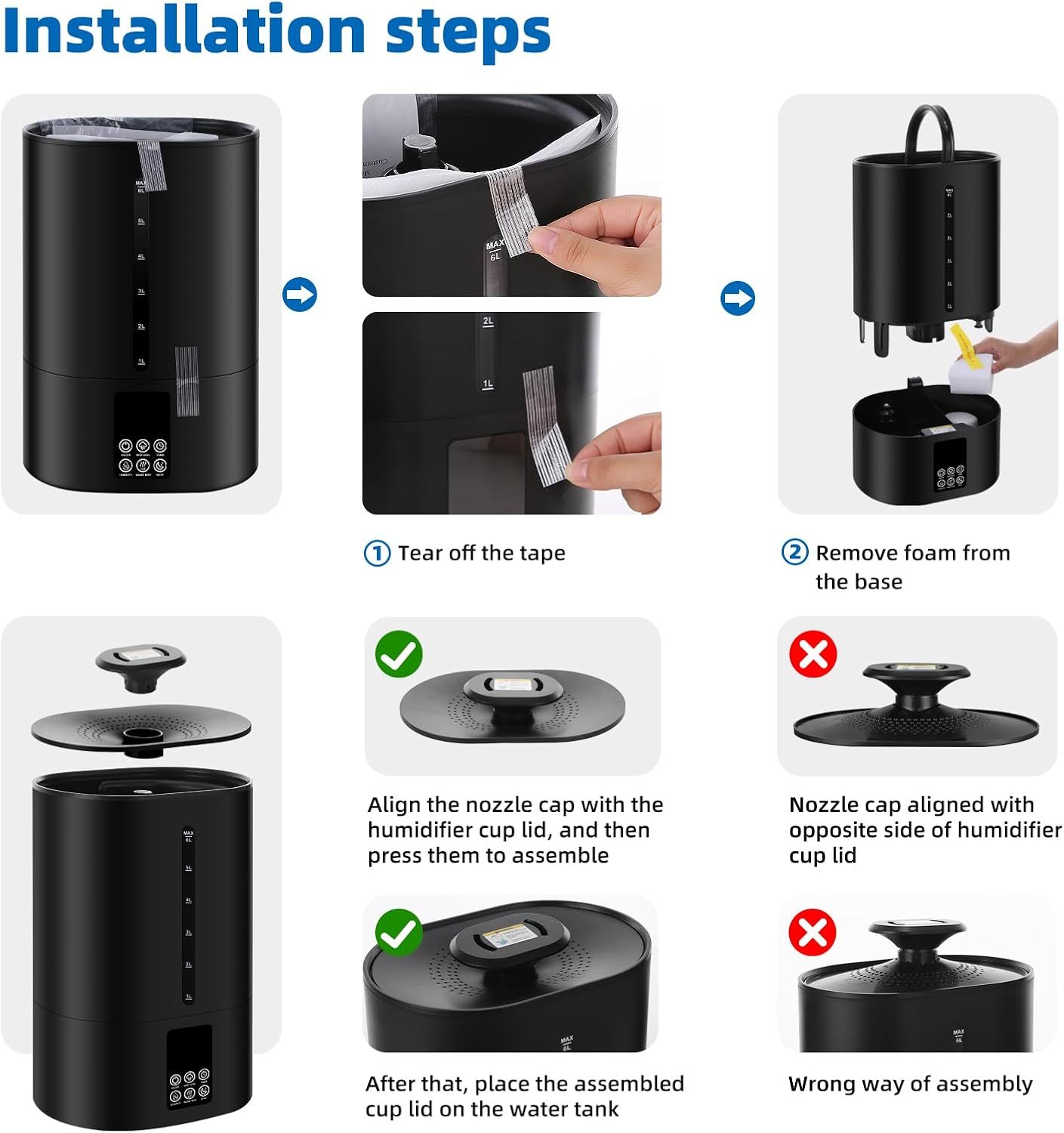
Image 4.1: Visual guide for initial setup, including tape and foam removal, and correct nozzle cap assembly.

Image 4.2: Sample operation and installation steps, emphasizing foam removal and correct nozzle placement.

Image 4.3: Instructions for the convenient top-fill water tank and its large opening for easy cleaning.
5. Operating Instructions
Your Coolfiqu humidifier offers various settings for personalized comfort:
5.1 Power On/Off
Press the 'ON/OFF' button on the control panel to turn the humidifier on or off.
5.2 Cool and Warm Mist Selection
The humidifier provides both cool and warm mist options. Press the 'WARM MIST' button to switch between cool mist and warm mist modes. The display will indicate the active mode.
5.3 Mist Level Adjustment
Press the 'MIST LEVEL' button to cycle through three adjustable mist output levels (Low, Medium, High) to suit your preference and room size.
5.4 Humidity Control
The smart sensor automatically regulates humidity. Press the 'HUMIDITY' button to set your desired humidity level. The humidifier will operate to maintain this level and automatically adjust mist output.
5.5 Sleep Mode
Activate 'SLEEP MODE' for undisturbed rest. In this mode, the LED screen turns off, and the humidifier operates quietly while maintaining the set humidity level.
5.6 Timer Function
Use the 'TIMER' button to set an operating duration. The humidifier will automatically turn off after the set time has elapsed.
5.7 Essential Oil Diffuser
To use the aromatherapy feature, pull out the essential oil tray located at the back of the unit. Add a few drops of your preferred essential oil onto the sponge pad within the tray. Reinsert the tray. The mist will diffuse the aroma into the air.

Image 5.1: Illustration of how to add essential oils to the dedicated diffuser tray.
6. Maintenance
Regular cleaning and maintenance ensure optimal performance and longevity of your humidifier.
6.1 Daily Maintenance
- Empty and rinse the water tank daily.
- Wipe the base chamber with a clean, damp cloth.
6.2 Weekly Cleaning
- Flush Water Tank: Flush the water tank and base chamber with clean water.
- Clean Corners and Gaps: Use a soft cleaning brush to clean corners and gaps within the base and tank.
- Clean Atomizing Sheet: Use a soft brush to gently clean the atomizing sheet (nebulizer tablets) to prevent damage.
- Clean Filters: Lift the filter clockwise upward to remove and clean.
- Clean Gaskets: To prevent leaks, clean the gaskets once a week.
- Descaling (if necessary): If mineral deposits accumulate, fill the tank with a mixture of equal parts white vinegar and water. Let it soak for 30 minutes, then rinse thoroughly.

Image 6.1: Step-by-step guide for cleaning the humidifier, including tank, base, filter, and gaskets.
6.3 Accessory Installation/Reinstallation
When reinstalling accessories after cleaning or for maintenance:
- Gasket: Remove the gasket upwards.
- Tie Rod Valve: Remove the tie rod valve with the spring.
- Clean Fittings: Ensure all fittings are clean.
- Install Gasket: Install the gasket with the concave side up.

Image 6.2: Guide for correct installation of internal accessories like gaskets and the tie rod valve.
7. Troubleshooting
If you encounter issues with your humidifier, refer to the following common problems and solutions:
| Problem | Possible Cause | Solution |
|---|---|---|
| No mist or low mist output |
|
|
| Red indicator light / Unit shuts off | Low water level (Anti-dry burn activated) | Refill the water tank. The unit will resume operation once sufficient water is added. |
| Unusual odor | Stagnant water or mineral buildup | Clean the water tank and base thoroughly. Use fresh water daily. |
| Water leakage |
|
|
| Warm mist not working | Heating element issue or not selected | Ensure warm mist mode is selected. If problem persists, contact customer support. |
If the problem persists after attempting these solutions, please contact Coolfiqu customer support for assistance.
8. Specifications
| Feature | Detail |
|---|---|
| Brand | Coolfiqu |
| Model Name | humidifiers (LP-2113) |
| Special Features | Adjustable Humidity Control, Aroma Diffuser, Auto Shut Off, Low Water Indicator, Manual |
| Color | C-Midnight Black |
| Floor Area Coverage | Up to 500 Square Feet |
| Operation Mode | Ultrasonic |
| Product Dimensions | 9.05"D x 6.29"W x 12.2"H |
| Item Weight | 2.24 Kilograms (4.93 pounds) |
| Room Type | Bedroom, Kids Room, Living Room, Nursery, Office |
| Included Components | Humidifier unit |
| Voltage | 120 Volts (AC) |
| Shape | Round |
| Manufacturer | Coolfiqu |
9. Warranty and Support
For warranty information or customer support, please refer to the documentation included with your product or visit the official Coolfiqu website. If you have a defective product or require assistance, please contact the customer support team directly.