Introduction
This manual provides detailed instructions for the safe and efficient operation of your Desobry CD Player, Model CD527B. Please read this manual thoroughly before use and retain it for future reference.
Package Contents
Verify that all items are present in the package:
- CD Player Unit x 1
- AC Adapter (Rated voltage: 3.7V/2A) x 1
- 3.5mm to 3.5mm AUX Cable x 1
- USB Type-C Charging Cable x 1
- User Manual x 1
Setup
1. Powering On and Charging
The Desobry CD Player features a built-in 3000mAh rechargeable battery. Before initial use, fully charge the device.
- Connect the provided USB Type-C charging cable to the player and to the AC adapter, a computer, or a mobile power bank.
- The power indicator light will illuminate red during charging.
- Charging typically takes approximately 3 to 4 hours.
- Once fully charged, the indicator light will turn green.

Image: The CD player connected to different power sources for charging, showing the 3000mAh battery capacity.
2. Initial Power On
Press and hold the Power button to turn on the device. The LCD screen will illuminate.
Operating Instructions
1. CD Playback
- Open the CD compartment cover.
- Place a compatible CD (CD, MP3, CD-R, WMA, HDCD) onto the spindle with the label side facing up.
- Close the CD compartment cover.
- The player will automatically detect and begin playing the CD.
- Use the Play/Pause, Next/Previous Track, and Volume buttons on the unit or remote control to manage playback.
Note: DVD, VCD, Blu-ray CDs, and data CDs are not supported.
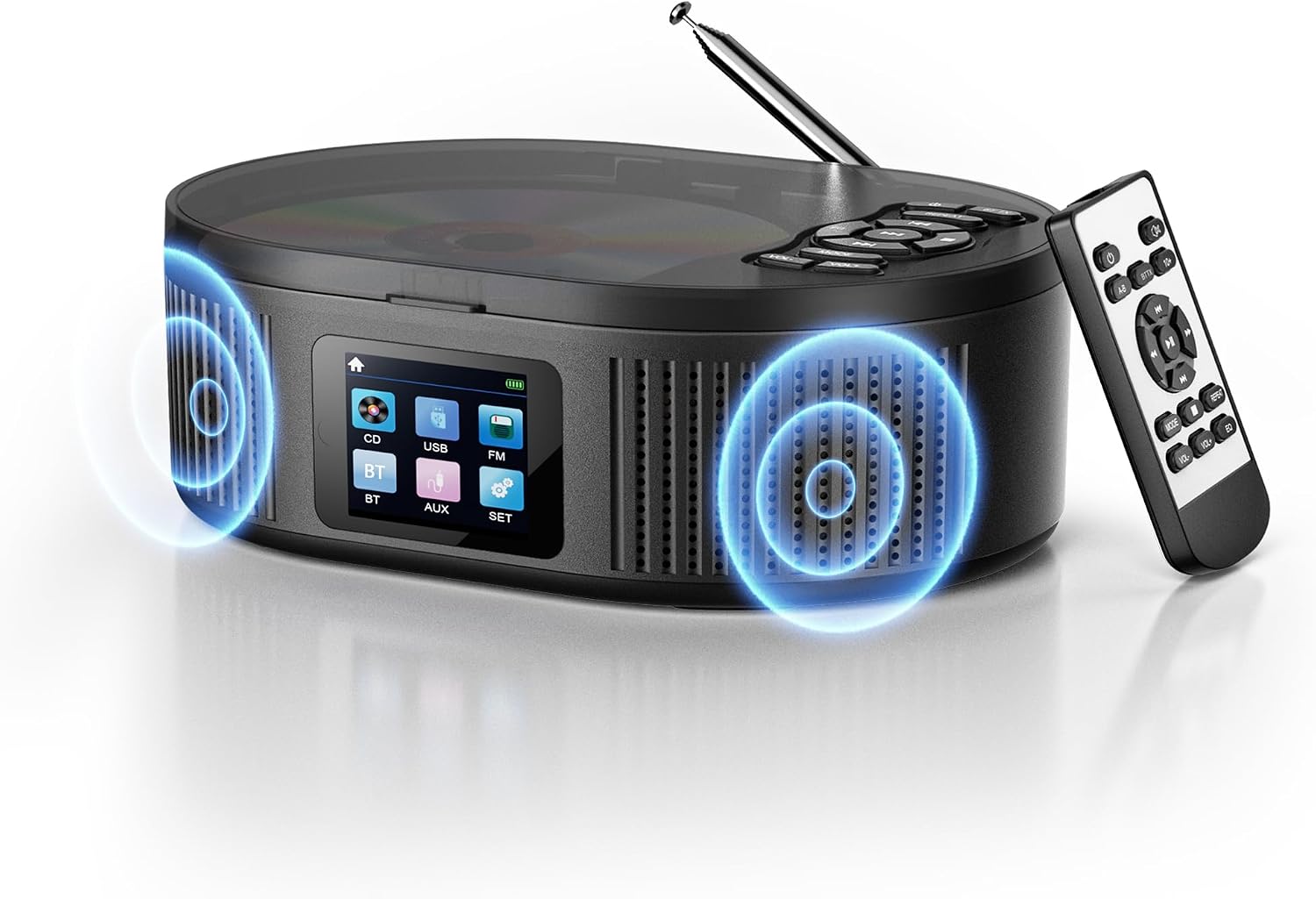
Image: The Desobry CD Player with its remote control, highlighting its compact design and dual speakers.
2. Bluetooth Functionality (Bluetooth 5.1)
The player supports both Bluetooth transmission (sending audio to Bluetooth headphones/speakers) and reception (receiving audio from smartphones/tablets).
Bluetooth Transmission Mode (Connecting to Bluetooth Headphones/Speakers)
- Press the MODE button to select Bluetooth transmission mode.
- Ensure your Bluetooth headphones or speaker are in pairing mode.
- The CD player will search for nearby Bluetooth devices. Select your device from the list on the player's screen to connect.

Image: Visual guide for setting up Bluetooth transmission from the CD player to headphones or a speaker.
Bluetooth Reception Mode (Connecting from Smartphone/Tablet)
- Press the MODE button to select Bluetooth reception mode. The screen will display "BT Connected" or similar.
- On your smartphone, tablet, or other Bluetooth device, search for "CD527B" in the Bluetooth settings.
- Select "CD527B" to pair and connect. Audio from your device will now play through the CD player's speakers.

Image: Visual guide for connecting a smartphone or laptop to the CD player via Bluetooth reception.
3. FM Radio Function
- Press the MODE button to select FM Radio mode.
- The FM frequency range is 76KHz to 108MHz.
- Use the tuning buttons to scan for available radio stations.
- Extend the telescopic antenna for improved reception.

Image: The CD player displaying FM radio frequencies, indicating its use for various broadcasts.
4. USB Memory Playback
- Insert a USB memory stick (FAT32 format, up to 32GB) into the USB port.
- Press the MODE button to select USB mode.
- The player will automatically detect and play MP3/WMA files from the USB stick.
5. AUX Input/Output
- AUX Input: Connect external audio devices (e.g., smartphone, DVD player) to the player's AUX input using the provided 3.5mm AUX cable. Press the MODE button to select AUX mode.
- AUX Output (Headphone Jack): Connect wired headphones to the 3.5mm headphone jack for private listening. This jack also functions as a direct AUX output to connect to external audio devices like car stereos.

Image: The CD player showing its AUX input and headphone output ports, demonstrating connectivity options.
6. Playback Modes and EQ Effects
The player offers various playback modes and sound equalization options:
- Repeat Modes: Single track repeat (REP1), All track repeat (ALL).
- Shuffle Playback: (SHUF) Plays tracks in a random order.
- A-B Repeat: Repeats a specific section of a track.
- +10 Skip: Skips 10 tracks forward on a CD.
- Resume Function: Resumes playback from where it was last stopped.
- EQ Effects: Select from 5 equalizer presets: BBS, POP, JAZZ, ROCK, CLASSIC to enhance your listening experience.

Image: Illustrates the various playback modes and 5 EQ sound effects available on the CD player, suitable for language learning and music enjoyment.
7. Anti-Skip Protection (ASP)
The player features Anti-Skip Protection to prevent interruptions during playback. It provides approximately 60 seconds of skip protection for CDs and 120 seconds for MP3s.
Maintenance
- Keep the device clean by wiping it with a soft, dry cloth. Do not use liquid cleaners or abrasive materials.
- Ensure the CD compartment is free of dust and debris.
- Store the player in a cool, dry place away from direct sunlight and extreme temperatures.
- When not in use for extended periods, fully charge the battery every few months to maintain its lifespan.
Troubleshooting
| Problem | Possible Cause | Solution |
|---|---|---|
| Player does not turn on. | Battery is depleted. | Charge the player using the provided USB Type-C cable and AC adapter. |
| CD does not play or skips. | CD is dirty, scratched, or incompatible format. | Clean the CD with a soft cloth. Try a different CD. Ensure the CD format is supported (CD, MP3, CD-R, WMA, HDCD). |
| No sound from speakers/headphones. | Volume is too low or muted. Incorrect mode selected. | Increase the volume. Check if the device is muted. Ensure the correct input mode (CD, Bluetooth, FM, USB, AUX) is selected. |
| Bluetooth device cannot connect. | Device is not in pairing mode or too far away. | Ensure both the CD player and the Bluetooth device are in pairing mode and within range (approx. 10 meters). Try restarting both devices. |
| FM radio reception is poor. | Weak signal or antenna not extended. | Extend the telescopic antenna fully. Try repositioning the player for better signal. |
Specifications
| Feature | Detail |
|---|---|
| Brand | Desobry |
| Model Number | CD527B |
| Display Type | LCD |
| Tuner Type | FM |
| Speaker Channels | 2 (Stereo) |
| Supported Media | CD, FM Radio, MP3 Player (via USB) |
| Supported Audio Formats | CD, CD-R, HDCD, MP3, WMA |
| Color | Black |
| Included Components | CD Player Unit, AC Adapter, 3.5mm AUX Cable, USB Type-C Charging Cable, User Manual |
| Material | Acrylonitrile Butadiene Styrene (ABS) |
| Connectivity Technology | AUX, Bluetooth |
| Power Consumption | 3 W |
| Product Dimensions (L x W x H) | 18.7 x 13.4 x 6.3 cm |
| Product Weight | 1.08 kg |
| Battery | Built-in 3000mAh Rechargeable Battery |
| FM Frequency Range | 76KHz - 108MHz |
| USB Support | FAT32, up to 32GB |
Warranty and Support
This product comes with a 1-year quality warranty from the date of purchase. In case of any natural defects or malfunctions within the warranty period, please contact our customer support. To do so, navigate to your "Order History" and select "Contact Seller".
For further assistance or inquiries, please refer to the contact information provided with your purchase or visit the official Desobry website.
Safety Information
- Do not expose the device to water or excessive moisture.
- Avoid dropping or subjecting the device to strong impacts.
- Do not attempt to disassemble or repair the device yourself. Contact qualified personnel for service.
- Keep out of reach of children.
- Use only the provided or approved charging accessories.


