
1. Important Safety Warnings
Please read all instructions carefully before assembly and use. Retain this manual for future reference.
- Use with caution: Always operate the desk carefully to prevent injury or damage.
- Cable Integrity: Do not use the desk if any cables are damaged. Damaged cables can pose an electrical hazard.
- Stability Check: Ensure the desk is stable before placing items on it or adjusting its height. An unstable desk can tip over.
- Assembly and Maintenance: Follow all assembly and maintenance instructions precisely to ensure safe and proper operation.
- Weight Limit: Do not exceed the maximum weight capacity of the desk. Refer to the specifications section for details.
- Clearance: Ensure there are no obstructions above or below the desk when adjusting its height to prevent pinching or crushing.
2. Setup and Assembly
The OffiGo Sit-Stand Desk is designed for straightforward assembly. Detailed and complete installation instructions are included in the packaging to help you identify different accessories and complete the installation quickly and efficiently. Please follow the step-by-step guide provided with your product.
Before starting, ensure all components are present and undamaged. Lay out all parts on a clean, soft surface to prevent scratches.

Image 2.1: Product dimensions and key components. This image illustrates the overall size of the desk, including its length, width, and height range, along with the dimensions of the fabric drawers and the length of the power cord. Use this as a reference during assembly.
3. Operating Instructions
3.1 Height Adjustment
The OffiGo electric sit-stand desk allows you to adjust its height between 78 cm and 121 cm. This feature helps reduce fatigue during work, study, or leisure.
- Up/Down Buttons: Use the up and down arrows on the control panel to manually adjust the desk to your desired height.
- Memory Presets: The desk features three height memory functions. To save a height setting, adjust the desk to the desired height, then press and hold one of the memory buttons (e.g., '1', '2', or '3') until you hear a beep or see a confirmation on the display.
- Recall Presets: To move the desk to a saved height, simply press the corresponding memory button once. The desk will automatically adjust to the stored position.
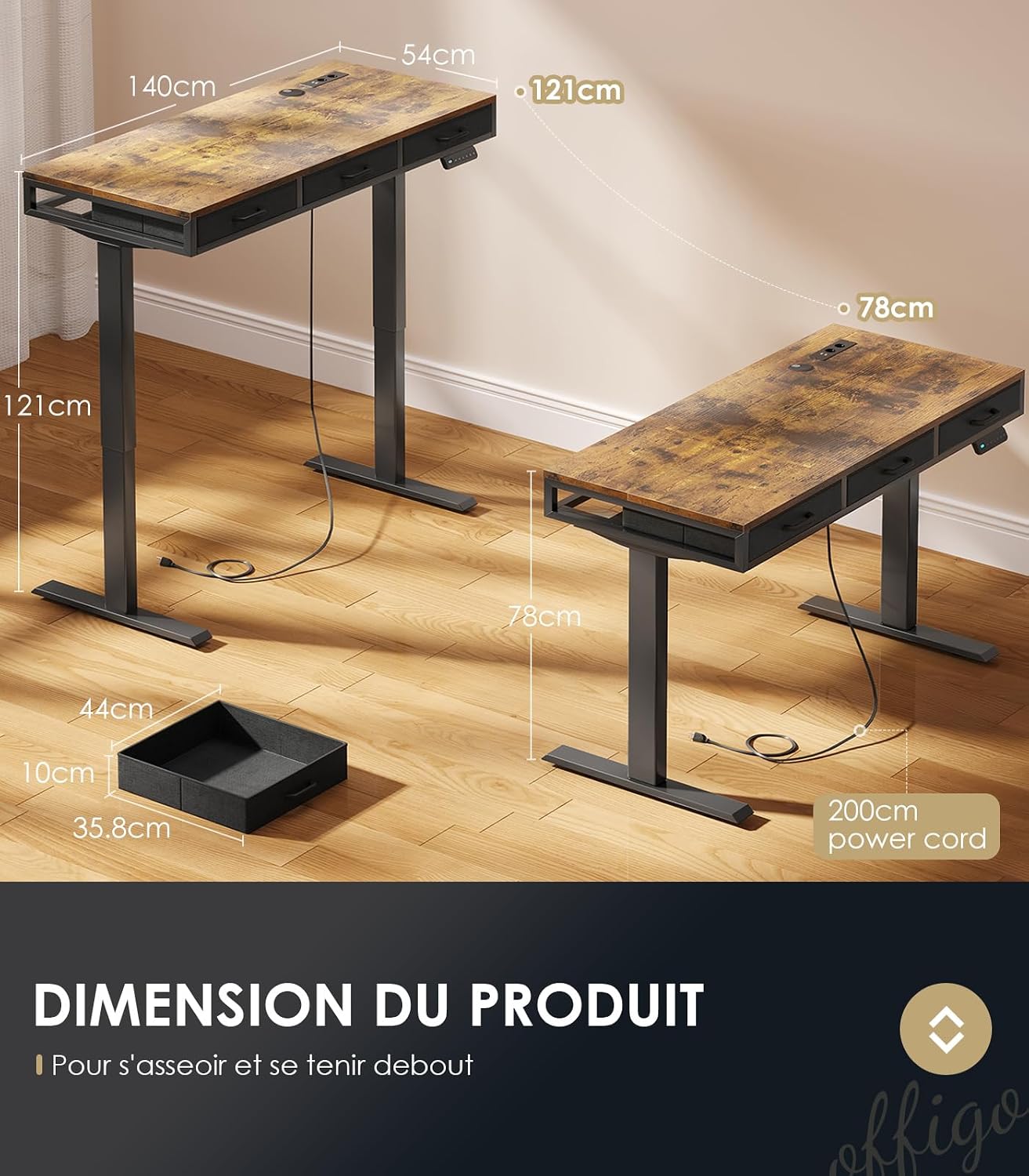
Image 3.1: Desk height adjustment range. This image visually demonstrates the minimum (78cm) and maximum (121cm) height settings of the desk, highlighting its adjustable functionality.
3.2 Integrated Charging Station
The desk is equipped with a convenient charging station to power your electronic devices.
- USB Ports: Utilize the two 5V/2A USB ports to charge smartphones, tablets, and other USB-powered devices.
- AC Outlets: The two 110-240V/15A AC outlets provide power for laptops, monitors, and other standard electrical appliances.
- Cable Management: Use the integrated cable management system to organize power cords and keep your workspace tidy and free from clutter.

Image 3.2: Integrated charging station. This image details the USB ports and AC outlets available on the desk, demonstrating how various devices can be conveniently powered and charged directly from your workspace.
4. Features Overview
The OffiGo Sit-Stand Desk is designed with user comfort and productivity in mind, incorporating several key features:
- Ergonomic Design: The height-adjustable feature promotes an ergonomic working posture, allowing you to switch between sitting and standing to reduce fatigue and improve well-being during long periods of work or study.
- Ample Storage: Equipped with three fabric drawers, the desk provides significant storage space for notebooks, pens, books, and other office supplies, helping to keep your desktop spacious and organized.
- Integrated Power: The built-in charging station with USB ports and AC outlets ensures all your devices are powered and ready, minimizing cable clutter.
- Robust Construction: Made from FSC certified wood, the desk offers durability and a stable work surface.

Image 4.1: Fabric drawers for storage. This image highlights the three integrated fabric drawers, demonstrating their capacity and utility for organizing office supplies and maintaining a clutter-free workspace.
5. Maintenance
Proper maintenance ensures the longevity and optimal performance of your OffiGo Sit-Stand Desk.
- Cleaning: Wipe the desk surface with a soft, damp cloth. Avoid harsh chemicals or abrasive cleaners that could damage the finish.
- Cable Inspection: Regularly inspect all power cables and connections for any signs of wear, fraying, or damage. If any damage is found, discontinue use immediately and contact customer support.
- Stability Check: Periodically check all screws and fasteners to ensure they are tight. Retighten if necessary to maintain desk stability.
- Motor Care: Avoid overloading the desk, as this can strain the electric motor. Do not obstruct the motor or lifting columns during operation.
6. Troubleshooting
If you encounter any issues with your OffiGo Sit-Stand Desk, refer to the following common troubleshooting steps:
| Problem | Possible Cause | Solution |
|---|---|---|
| Desk does not move up or down. | Power cable disconnected; motor overload; control panel error. | Check if the power cable is securely plugged into both the desk and the wall outlet. Unplug and replug the power for 10 seconds. Reduce weight on the desk. |
| Desk moves unevenly or makes unusual noises. | Uneven load; loose fasteners; obstruction. | Ensure weight is evenly distributed. Check and tighten all assembly screws. Inspect for any obstructions in the lifting mechanism. |
| Memory presets are not working. | Incorrect saving procedure; power interruption. | Re-save the desired height settings by adjusting the desk and holding the memory button until confirmed. |
| Charging ports (USB/AC) are not working. | Desk not powered; device not compatible; faulty port. | Ensure the desk is powered on. Test with a different device or port. If issues persist, contact support. |
If the problem persists after attempting these solutions, please contact OffiGo customer support for further assistance.
7. Specifications
| Feature | Detail |
|---|---|
| Brand | OffiGo |
| Model Number | B0F2153F7G |
| Color | Brown |
| Product Dimensions (L x W x H) | 140 x 54 x 78 cm (Min Height) |
| Adjustable Height Range | 78 cm to 121 cm |
| Item Weight | 28.3 Kilograms |
| Material | FSC Certified Wood |
| Desk Design | Standing Desk |
| Special Features | Height Adjustable, Electric, 3 Fabric Drawers, Integrated Charging Station (2 USB, 2 AC Outlets) |
| USB Port Output | 5V/2A |
| AC Outlet Rating | 110-240V/15A |
| Power Cord Length | 200 cm |
8. Warranty and Support
For warranty information and customer support, please refer to the documentation included with your purchase or visit the official OffiGo website. Details regarding warranty periods, coverage, and how to contact support for service or parts are typically provided by the manufacturer.
Please have your product model number (B0F2153F7G) and purchase date ready when contacting support.