
chartustriable B0F1ZYMR1Z
Contents
chartustriable 71-inch Fireplace TV Stand User Manual
Model: B0F1ZYMR1Z
Introduction
Thank you for purchasing the chartustriable 71-inch Fireplace TV Stand. This manual provides detailed instructions for assembly, operation, maintenance, and troubleshooting to ensure safe and efficient use of your product. Please read this manual thoroughly before assembly and operation, and retain it for future reference.
Safety Information
To prevent injury and ensure proper function, observe the following safety guidelines:
- Always follow the assembly instructions carefully.
- It is recommended that two people assemble this unit to prevent injury.
- Be cautious of sharp edges during assembly.
- Do not overload the tabletop; the maximum weight capacity is 200 pounds (90.7 kg).
- Keep the product away from direct heat sources.
- Ensure the anti-toppling device is properly installed to improve overall stability.
Package Contents
Your chartustriable Fireplace TV Stand is delivered in two separate packages (Box A and Box B). These packages may arrive at different times. Please ensure both packages have arrived before beginning assembly.

Image: Illustration of two packages, Box A and Box B, indicating separate delivery for the TV stand components.
Each package contains various components and hardware necessary for assembly. Refer to the included assembly guide for a complete list of parts.
Setup and Assembly
Assembly of this TV stand requires careful attention to the provided instructions. It is strongly recommended that two individuals perform the assembly to facilitate the process and ensure safety.
Preparation:
- Clear a spacious area for assembly.
- Unpack all components and verify against the parts list in the separate assembly guide.
- Gather necessary tools (e.g., screwdriver, hammer - typically not included).
Assembly Steps:
Follow the step-by-step instructions provided in the dedicated assembly manual. Key considerations include:
- Component Identification: Carefully identify each part using the labels or diagrams in the assembly guide.
- Secure Connections: Ensure all screws, cam locks, and dowels are securely fastened.
- Cable Management: Utilize the integrated cable holes for organizing wires from your TV and other devices.
- Anti-Toppling Device: Install the anti-toppling device as instructed to enhance stability and prevent accidental tipping.

Image: Close-up views of the stable base, cable management hole, integrated power outlet, and soft-close damper hinge for cabinets.

Image: Product dimensions diagram, highlighting the overall length (70.9"), depth (15.8"), height (25.6"), and the 40" wide fireplace insert.
Operating Instructions
Electric Fireplace Operation:
The integrated 40-inch electric fireplace provides both aesthetic ambiance and heating functionality. It features a sleek black glass panel and crystal stone bed.
- Power: Use the power button on the fireplace unit or the remote control to turn the fireplace ON/OFF.
- Temperature Control: Adjust the temperature between 62°F and 82°F (17°C - 28°C) using the digital thermostat.
- Timer Function: Set an automatic shut-off timer for 1 to 8 hours.
- Flame Brightness: Select from 5 levels of flame brightness to suit your preference.
- LED Background Lights: Choose from 12 different LED background light colors to enhance the flame effect.
- Heating Output: The 1500W heater provides 5000 BTU heat output, capable of heating an area up to 40 square meters (approximately 430 sq. ft.).
- Overheat Protection: The fireplace is equipped with an automatic shut-off feature to prevent overheating.
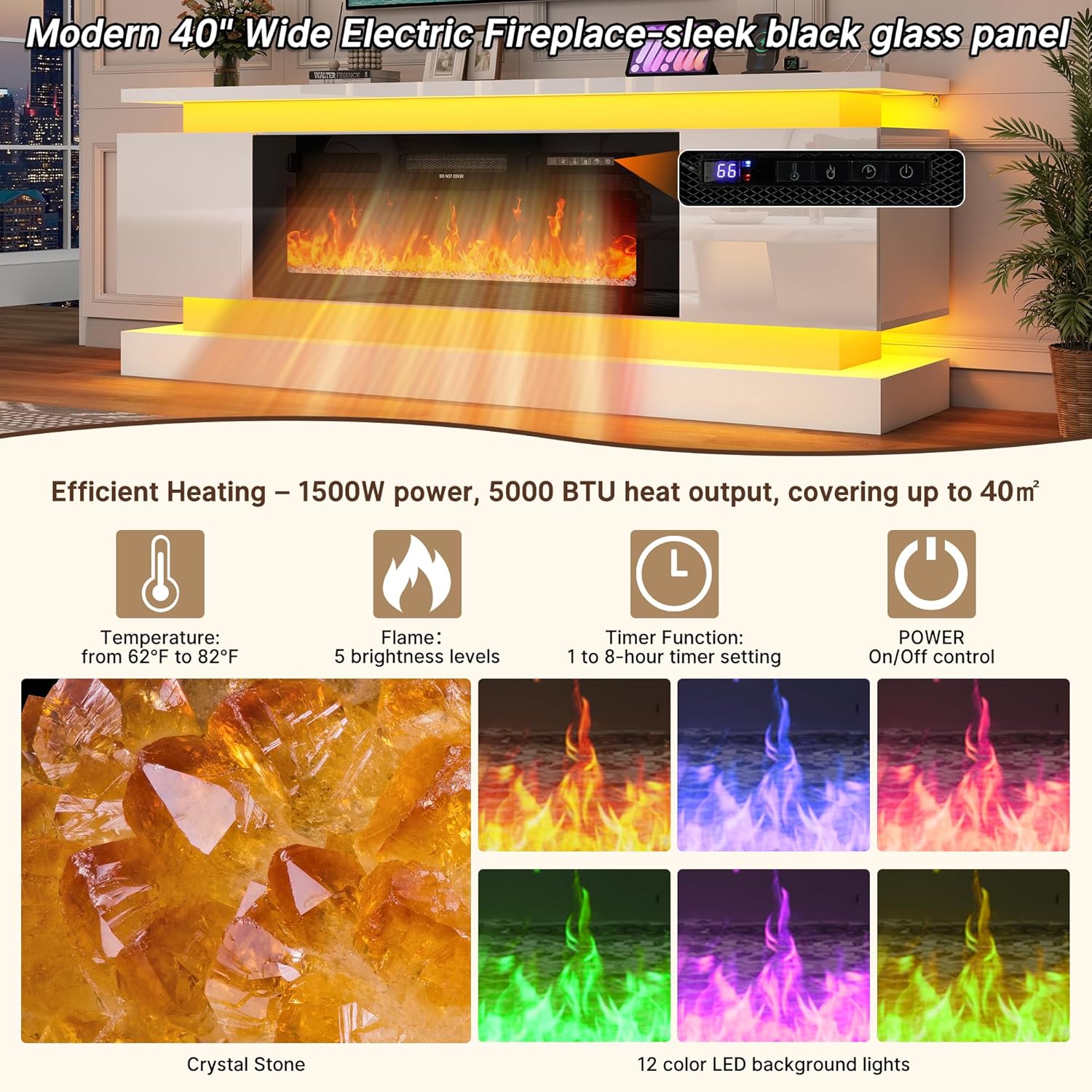
Image: Detailed view of the electric fireplace's control panel and remote, illustrating temperature settings, flame brightness levels, timer function, and various LED background light colors.
Dual RGB LED Lighting System:
The TV stand features dual LED light strips on the top and bottom, controllable via remote or a dedicated mobile application.
- Color Selection: Access hundreds of color options to personalize your lighting.
- Dynamic Modes: Choose from 25 dynamic flashing modes for various effects.
- Music Synchronization: The lights can fluctuate with music, creating an immersive experience.
- Brightness Adjustment: Adjust the intensity of the LED lights.
- Timing Function: Set schedules for the lights to turn on or off.

Image: The TV stand illuminated by dual LED light strips, demonstrating various color options and control methods via remote and mobile application.
Integrated Power Outlets:
The TV cabinet includes a built-in power strip for convenient device charging and power supply.
- USB Ports: Two (2) built-in USB ports are available for charging mobile devices.
- Standard Outlets: Two (2) standard AC outlets provide power for TVs, game consoles, stereos, and other electronics.
- Power Cord: The unit includes a 4.92 ft (1.5 m) power cord.

Image: A close-up of the integrated power station, featuring two standard AC outlets and two USB charging ports, certified by ETL.
Maintenance
Proper care will extend the life and appearance of your TV stand.
- Cleaning: Wipe surfaces with a soft, damp cloth. Avoid abrasive cleaners or harsh chemicals that may damage the high-gloss finish.
- Dusting: Regularly dust the unit to prevent buildup.
- Fireplace Maintenance: Ensure the fireplace vents are clear of obstructions for optimal heating performance.
- Hinges: Periodically check and tighten any loose screws on cabinet hinges if necessary.
Troubleshooting
If you encounter issues with your TV stand, refer to the following common problems and solutions:
| Problem | Possible Cause | Solution |
|---|---|---|
| Parts do not align during assembly. | Incorrect part orientation or mislabeled parts. | Double-check the assembly guide for correct part numbers and orientation. If parts are genuinely mislabeled or incorrect, contact customer support. |
| Fireplace not turning on or heating. | Power cord not fully plugged in, power outlet issue, or overheat protection activated. | Ensure the power cord is securely plugged into a functional outlet. Check if the overheat protection has been triggered; allow the unit to cool down. |
| LED lights not working or displaying incorrect colors. | Loose connection, remote control battery low, or LED strip damage. | Check all LED strip connections. Replace remote control batteries. If issues persist, contact customer support. |
| Unit feels unstable. | Loose fasteners or anti-toppling device not installed. | Ensure all assembly fasteners are tightened. Verify that the anti-toppling device is correctly installed and secured to the wall. |
For issues not covered here, or if troubleshooting steps do not resolve the problem, please contact chartustriable customer support.
Specifications
| Brand | chartustriable |
| Model Number | B0F1ZYMR1Z |
| Material | Engineered Wood |
| Item Weight | 138 pounds (62.6 kg) |
| Product Dimensions (L x W x H) | 70.9 x 15.8 x 25.6 inches (180 x 40 x 65 cm) |
| Fireplace Width | 40 inches (101.6 cm) |
| Fireplace Heating Power | 1500W (5000 BTU) |
| Heating Area Coverage | Up to 40 square meters (approximately 430 sq. ft.) |
| Temperature Range | 62°F - 82°F (17°C - 28°C) |
| Power Outlets | 2 AC outlets, 2 USB ports |
| Power Cord Length | 4.92 ft (1.5 m) |
| Max TV Size Supported | Up to 85 inches |
| Tabletop Weight Capacity | 200 pounds (90.7 kg) |
Warranty and Support
For warranty information or technical support, please refer to the documentation included with your product or visit the official chartustriable website. If you have questions regarding assembly, missing parts, or product functionality, please contact chartustriable customer service directly.
Contact information can typically be found on the manufacturer's website or on the packaging materials.
Ask a question about this manual
Ask about setup, troubleshooting, compatibility, parts, safety, or missing instructions. Manuals+ will review the question and use this page’s manual context to help answer it.