
Thermaltake CA-1Z1-00MOWN-00
Thermaltake Tower 600 Mid Tower Instruction Manual
Model: CA-1Z1-00MOWN-00
Introduction
The Thermaltake Tower 600 ATX Mid Tower chassis is designed to accommodate full ATX builds with an octagon-style form factor. This chassis supports hidden connector ATX motherboards for streamlined cable management and offers extensive compatibility for components such as GPUs up to 400mm in length and radiators up to 420mm. It comes equipped with two 140mm CT fans pre-installed at the top for exhaust.

Overview of the Thermaltake Tower 600 Light-Year Green Mid Tower Chassis, highlighting its octagonal prism shape and ATX compatibility.
Setup
Chassis Overview
Familiarize yourself with the exterior and interior layout of the Tower 600 chassis before beginning assembly.

Front view of the Tower 600 chassis, showcasing its clear front panel.

Side view of the Tower 600 chassis, highlighting the tempered glass side panel.

Rear view of the Tower 600 chassis, showing the exhaust fan mount and PCIe slots.
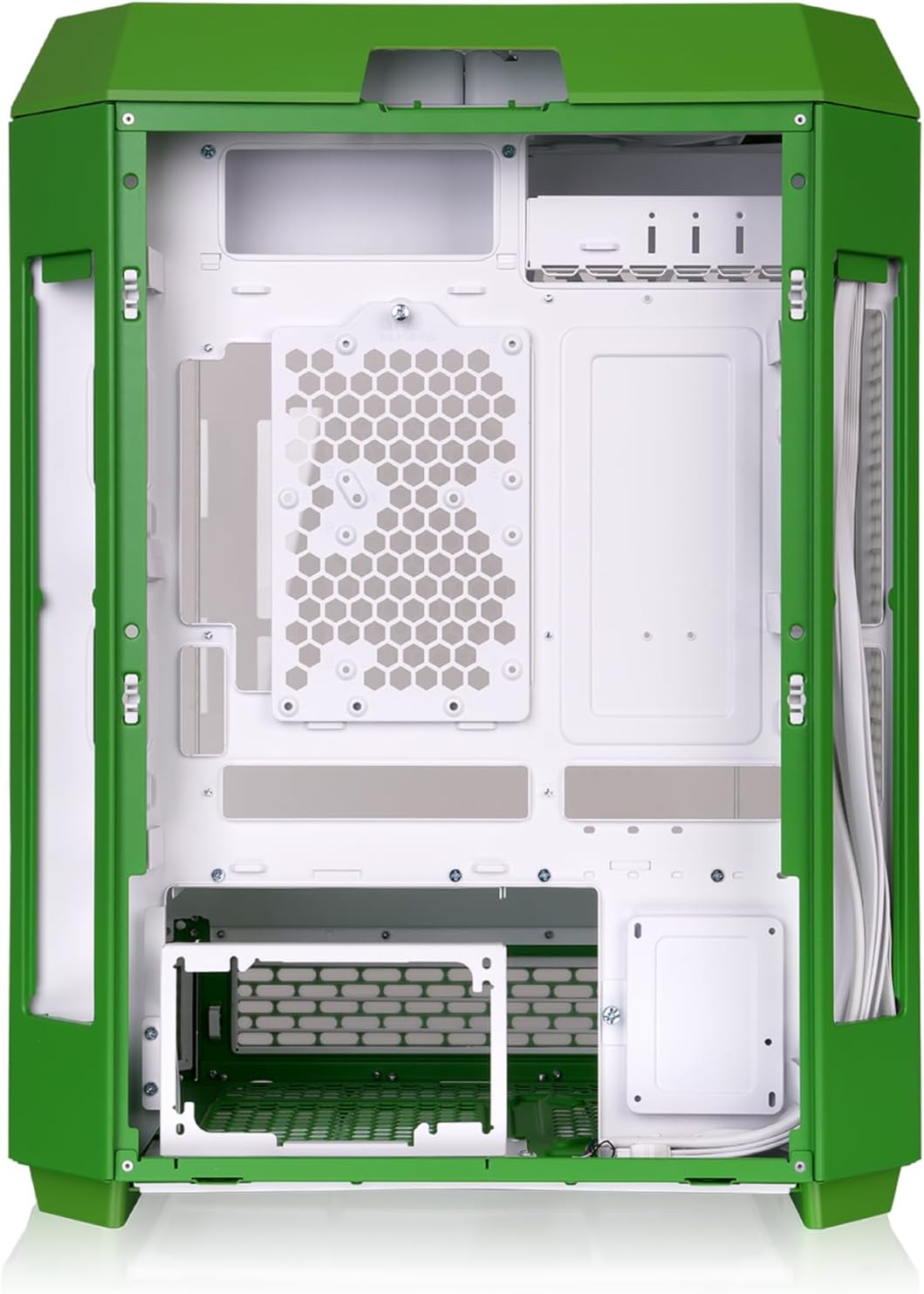
Internal view of the Tower 600 chassis, illustrating the spacious interior for component installation.
Tool-Free Panel Access
The Tower 600 features three 3mm tempered glass panels on the front and two perforated panels on each side, all designed for tool-free removal to facilitate easy access during installation and maintenance.

Illustration of the tool-free removable panels for convenient access to the chassis interior.
Hidden Connector Motherboard Support
This chassis is designed to support next-generation hidden connector ATX motherboards (e.g., ASUS BTF, MSI PROJECT ZERO, GIGABYTE PROJECT STEALTH Series). Extra cutouts and two removable panels on the left and right sides of the rear chamber allow for clean cable routing and a tidier build.

Diagram showing the internal layout optimized for hidden connector motherboards, enabling cleaner cable management.
Dismantlable Modular Design (DMD)
The Tower 600 features a Dismantlable Modular Design, allowing for easy disassembly of components for simplified installation and maintenance.

Exploded view of the Tower 600, demonstrating its modular design for easy assembly and disassembly.
Easy Installation
Installation is simplified thanks to removable fan brackets and ample space for components. The chassis supports various radiator and fan configurations.

Visual representation of the easy installation process, highlighting removable brackets and accessible areas.
Optimal Cable Management
The Tower 600 provides effective cable management with spacious rear chamber, cable clips, Velcro straps, and cable ties included in the accessory box for a neat and organized setup.

Diagram illustrating the designated cable routing points and clips for optimal cable management within the chassis.
Operating
Cooling Solution
The Tower 600 is designed for excellent thermal performance, supporting large radiators and multiple fans to maintain optimal internal temperatures.

The Tower 600 supports up to a 420mm radiator on the right side and a 360mm radiator on the left side for superior cooling.
The vertical chassis design ensures well-designed cold air intakes and hot air exhausts to keep internal temperatures low.

Diagram illustrating the intake and exhaust airflow paths within the Tower 600 chassis.
I/O Ports
The top-located I/O ports provide convenient access to essential connections:
- Power Button with Integrated Power LED (White)
- HDD LED (Red)
- USB 3.0 Type-A x 4
- USB 3.2 Gen 2 Type-C x 1
- HD Audio

Close-up view of the conveniently located top I/O ports on the Tower 600 chassis.
Hardware Support
The Tower 600 offers extensive compatibility for various PC components.

Diagram showing supported motherboard sizes (Mini-ITX, Micro-ATX, ATX), GPU length (up to 400mm), and PSU length (max 220mm).
Fan Support List
| Location | 120mm Fans | 140mm Fans |
|---|---|---|
| Top | 3 | 2 |
| Right Side | 3 | 3 |
| Left Side | 3 | - |
| Rear | 2 | 2 |
| PSU Cover | 1 | 1 |
| Bottom | 1 | 1 |

Visual guide to fan mounting locations and supported sizes within the chassis.
Radiator Support List
| Location | Supported Radiator Sizes |
|---|---|
| Top | 1 x 360mm, 1 x 280mm, 1 x 240mm, 1 x 140mm, 1 x 120mm |
| Right Side | 1 x 420mm, 1 x 360mm, 1 x 280mm, 1 x 240mm, 1 x 140mm, 1 x 120mm |
| Left Side | 1 x 360mm, 1 x 240mm, 1 x 120mm |
| Rear | 1 x 140mm, 1 x 120mm |

Visual guide to radiator mounting locations and supported sizes within the chassis.
Storage Compatibility
The Tower 600 can accommodate one 3.5" hard drive or up to three 2.5" hard drives.

Illustration of the SSD and HDD mounting locations within the chassis.
Rotatable PCIe Slots
The chassis features rotatable PCIe slots, allowing you to mount your graphics card in various orientations. Two additional GPU brackets provide support for your GPU and riser cables (riser cable sold separately).

Diagram showing the flexibility of rotatable PCIe slots for vertical or horizontal GPU mounting.
Optional LCD Display Customization
Maximize your Tower 600's visual effects by upgrading with an optional LCD Screen Kit. The 3.9" LCD Display can monitor real-time information and display images or GIFs using TT RGB Plus software. It also interacts with cooling components featuring LCD displays and includes weather and time modes.

Illustration of the optional LCD display, showcasing its ability to show real-time information and custom visuals.
Maintenance
Dust Protection
The Tower 600 is equipped with well-designed filters on the top, rear, inner sides, and inner bottom layer to protect your system from dust accumulation, ensuring longevity and performance.

Diagram highlighting the locations of the various dust filters for comprehensive system protection.
Specifications
| Feature | Detail |
|---|---|
| Brand | Thermaltake |
| Series | The Tower 600 Light-Year Green |
| Model Number | CA-1Z1-00MOWN-00 |
| Item Weight | 26.2 pounds |
| Package Dimensions | 25.3 x 19.3 x 14.1 inches |
| Color | Light-Year Green |
| Motherboard Compatibility | ATX |
| Case Type | Mid Tower |
| Recommended Uses | Computer Chassis |
| Material | Acrylonitrile Butadiene Styrene (ABS), Glass, Stainless Steel, Tempered |
| Power Supply Mounting Type | Bottom Mount |
| Cooling Method | Fan |
| Light Color | RGB |
Related documentsCA-1Z1-00MOWN-00


Ask a question about this manual
Ask about setup, troubleshooting, compatibility, parts, safety, or missing instructions. Manuals+ will review the question and use this page’s manual context to help answer it.