
LUIRSAY BN59-01432A
LUIRSAY BN59-01432A Solar Voice Remote Control for Samsung TV
User Instruction Manual
1. Introduction
This manual provides detailed instructions for the setup, operation, and maintenance of your LUIRSAY BN59-01432A Solar Voice Remote Control. This remote is designed for seamless integration with compatible Samsung Smart TVs, offering convenient voice control, quick access buttons, and eco-friendly solar and USB-C charging options.

Image 1.1: Front and back view of the BN59-01432A remote, showcasing its design and solar panel.
2. Setup
2.1 Charging the Remote
Your remote control features dual charging capabilities:
- Solar Charging: Place the remote with its solar panel facing upwards in an area with ambient light. Direct sunlight is not required but will charge faster.
- USB Type-C Charging: For faster charging or in low-light conditions, connect a USB Type-C cable (not included) to the charging port on the remote and a compatible USB power source.
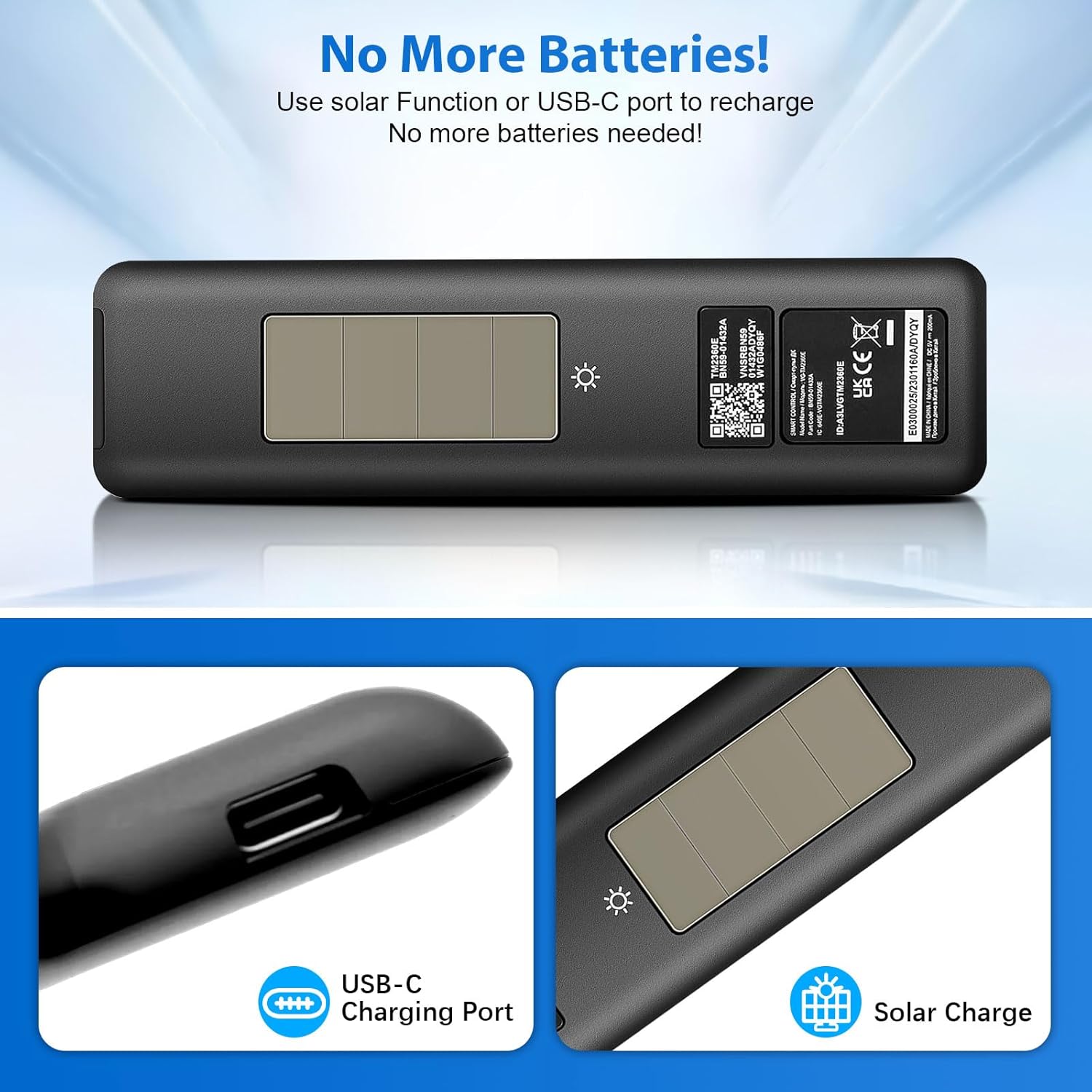
Image 2.1: The remote's USB-C charging port and solar panel for convenient power replenishment.
2.2 Pairing with Your Samsung TV
To pair the remote control with your Samsung Smart TV via Bluetooth, follow these steps:
- Ensure your TV is powered on.
- Point the remote towards your TV.
- Press and hold the Return (
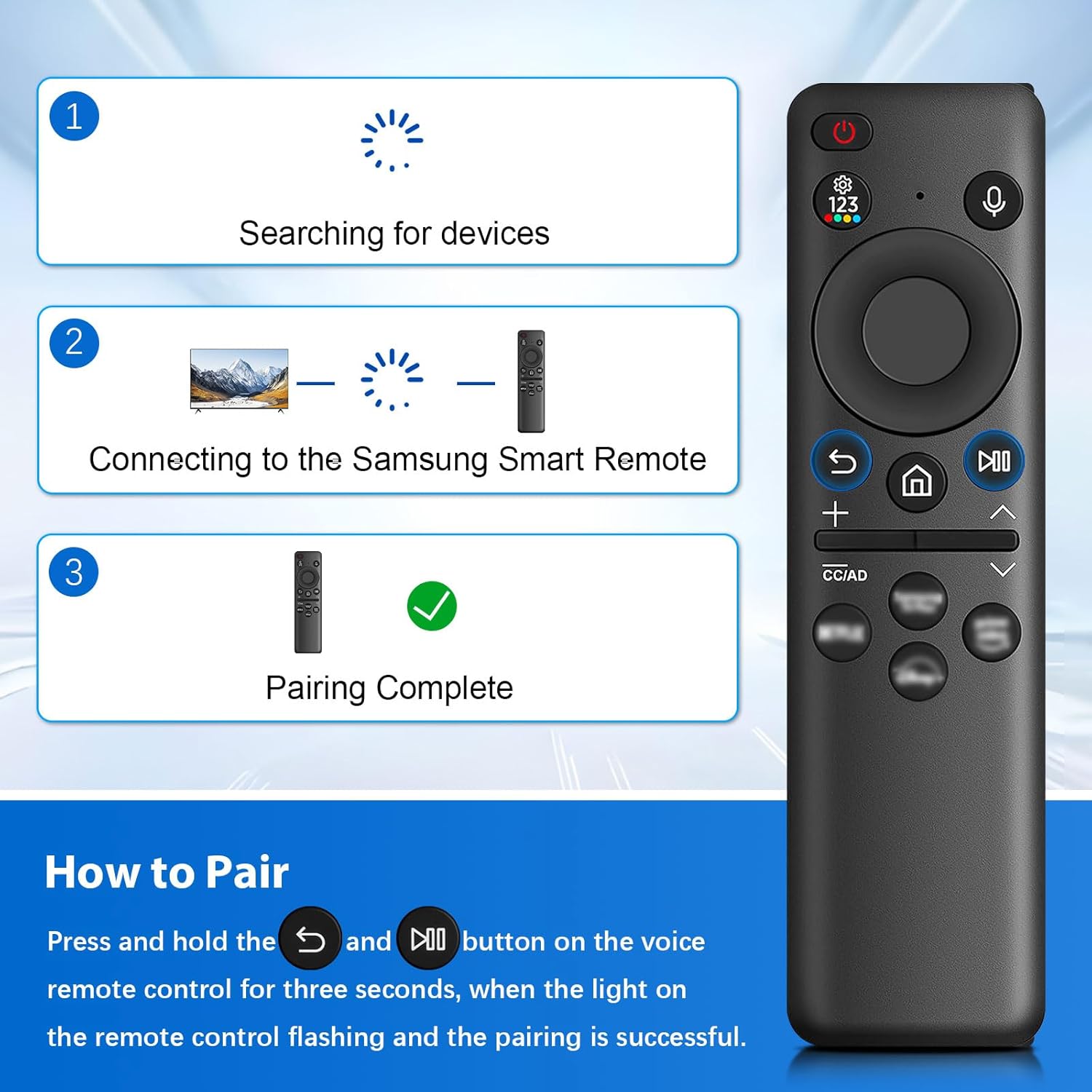 ) and Play/Pause () buttons simultaneously for at least three (3) seconds.
 - The indicator light on the remote will flash, indicating it is searching for devices.
- Once successfully paired, a confirmation message will appear on your TV screen.
Image 2.2: Visual guide for the remote control pairing process with a Samsung Smart TV.
3. Operating Instructions
3.1 Voice Control Function
The remote features integrated voice control for convenient navigation and command execution:
- Press the Voice Button (microphone icon) on the remote.
- Speak clearly into the remote's microphone.
- Examples of commands include: "Open Prime Video," "Please open the settings," "Search for movies," or "Check the weather."

Image 3.1: Demonstrating the voice control feature for hands-free operation.
3.2 Shortcut Buttons
The remote includes dedicated shortcut buttons for instant access to popular streaming services. Simply press the desired button to launch the corresponding application without navigating through menus.
3.3 Basic Navigation
Utilize the directional pad for menu navigation, the volume buttons for audio adjustment, and the channel buttons for changing TV channels. The power button controls the TV's on/off state.
4. Compatibility
The LUIRSAY BN59-01432A Solar Voice Remote Control is compatible with a wide range of Samsung 2023-2024 Neo QLED 8K Smart TVs and other specified models. A partial list of compatible models includes:
- 2023 Neo QLED 8K Smart TVs: 65QN800C, 75QN800C, 85QN800C, 65QN900C, 75QN900C, 85QN900C
- Other Compatible Models: QN32LS03CBFXZA, QN43LS03CBFXZA, QN43Q60CAFXZA, QN43Q70CAFXZA, QN43Q80CAFXZA, QN43QN800CFXZA, QN43QN900CFXZA, QN43QN90CAFXZA, QN50LS03CBFXZA, QN50Q60CAFXZA, QN50Q70CAFXZA, QN50Q80C, QN50Q80CAFXZA, QN50QN800CFXZA, QN50QN900CFXZA, QN50QN90CAFXZA, QN55LS03CBFXZA, QN55Q60CAFXZA, QN55Q70CAFXZA, QN55Q80C, QN55Q80CAFXZA, QN55QN800CFXZA, QN55QN85CAFXZA, QN55QN900CFXZA, QN55QN90CAFXZA, QN55S95CAFXZA, QN60Q60CAFXZA, QN65LS03CBFXZA, QN65Q60CAFXZA, QN65Q70CAFXZA, QN65Q80C, QN65Q80CAFXZA, QN65QN800CFXZA, QN65QN85CAFXZA, QN65QN900CFXZA, QN65QN900CFXZC, QN65QN90CAFXZA, QN65S95CAFXZA, QN70Q60CAFXZA, QN75LS03CBFXZA, QN75Q60CAFXZA, QN75Q70CAFXZA, QN75Q80C, QN75Q80CAFXZA, QN75QN800CFXZA, QN75QN85CAFXZA, QN75QN900CFXZA, QN75QN900CFXZC, QN75QN90CAFXZA, QN77S95CAFXZA, QN85LS03CBFXZA, QN85Q60CAFXZA, QN85Q70CAFXZA, QN85Q80C, QN85Q80CAFXZA, QN85QN800CFXZA, QN85QN85CAFXZA, QN85QN900CFXZA, QN85QN900CFXZC, QN85QN90CAFXZA, QN98Q60CAFXZA, QN98Q70CAFXZA, QN98Q80CAFXZA, UN43CU8000FXZA, UN50CU8000FXZA, UN55CU8000FXZA, UN65CU8000FXZA, UN75CU8000FXZA, UN85CU8000FXZA.

Image 4.1: The BN59-01432A remote is compatible with 2023 Neo QLED and Neo QLED 8K Smart TVs.
5. Specifications
| Feature | Detail |
|---|---|
| Model Number | BN59-01432A |
| Brand | LUIRSAY |
| Connectivity Technology | Bluetooth |
| Special Features | Ergonomic, Lightweight, Rechargeable, Voice Search |
| Power Source | Solar Charging, USB Type-C |
| Item Weight | 1.76 ounces |
| Package Dimensions | 5.71 x 1.73 x 0.87 inches |
| Max Number of Supported Devices | 4 |
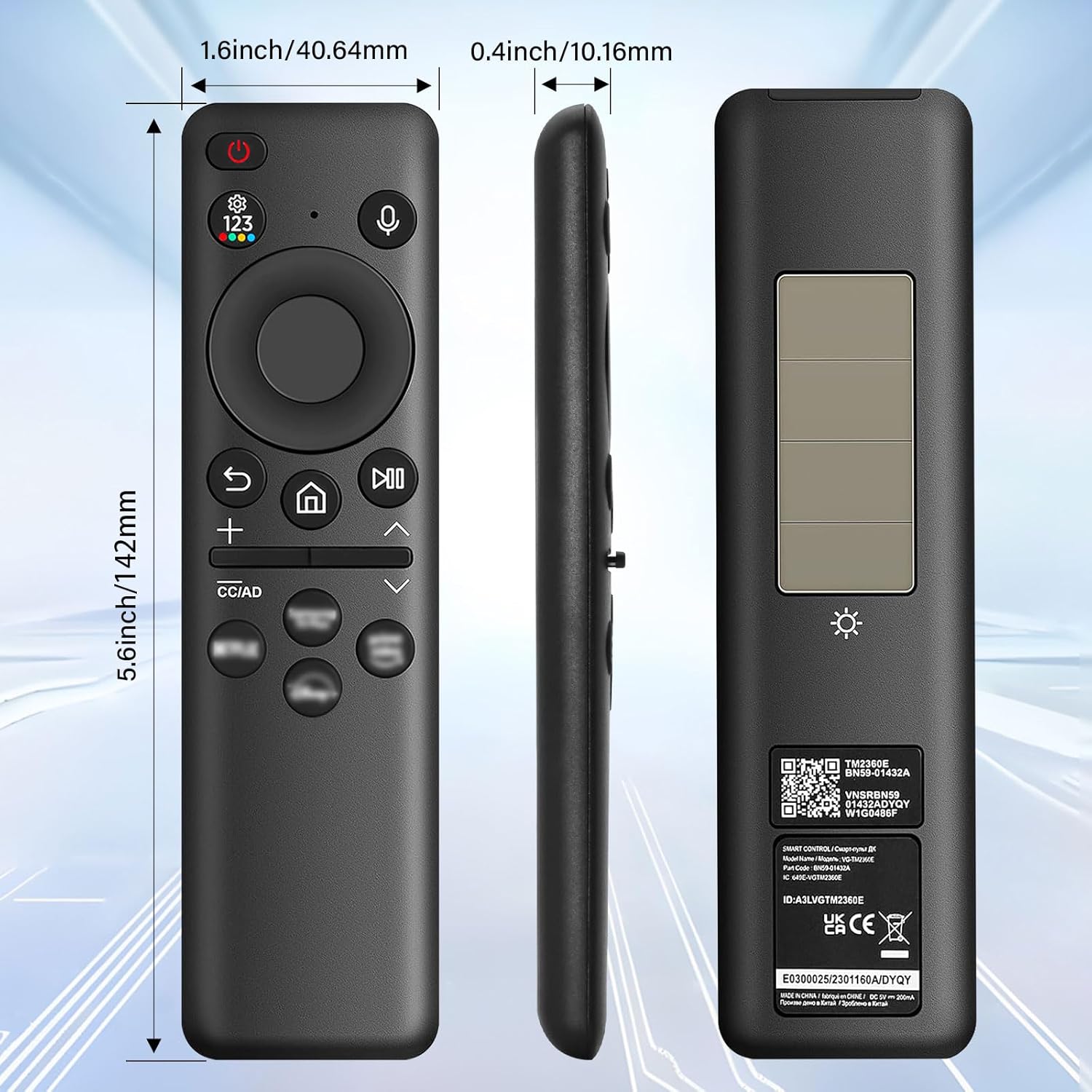
Image 5.1: Physical dimensions of the BN59-01432A remote control.
6. Troubleshooting
If you encounter issues with your remote control, please refer to the following common problems and solutions:
- Remote Not Responding:
- Ensure the remote is sufficiently charged. Try charging via USB-C.
- Re-pair the remote with your TV (refer to Section 2.2).
- Ensure there are no obstructions between the remote and the TV.
- Voice Command Not Working:
- Confirm the remote is successfully paired via Bluetooth.
- Press the voice button firmly before speaking.
- Check your TV's settings to ensure voice control is enabled.
- Remote Requires Constant Plugging In:
- Ensure the solar panel on the back of the remote is regularly exposed to ambient light.
- Verify the USB-C cable and charging port are clean and undamaged.
- A full charge should last for an extended period; if not, contact support.
- Limited Range / Must Be Directly in Front of TV:
- This remote operates via Bluetooth, which typically offers a wider range than infrared. If experiencing limited range, ensure the remote is fully charged and re-pair it.
- Minimize physical obstructions between the remote and the TV.
7. Maintenance
To ensure the longevity and optimal performance of your remote control:
- Clean the remote regularly with a soft, dry cloth. Avoid abrasive cleaners or liquids.
- Keep the solar panel free from dust and debris to ensure efficient charging.
- Avoid exposing the remote to extreme temperatures, direct moisture, or harsh chemicals.
- Store the remote in a safe place to prevent physical damage.
8. Warranty and Support
For warranty information or technical support, please refer to the product packaging or contact the manufacturer directly. Keep your purchase receipt as proof of purchase.
Related Documents - BN59-01432A
 |
Samsung Remote Control User Guide and Compatibility Comprehensive guide to Samsung remote control functions, installation steps, and compatibility with various Samsung TV models. Includes model numbers for easy reference. |
 |
Remote Control User Manual - Shenzhen Kingsway Technology User manual for the Remote Control by Shenzhen Kingsway Technology, detailing product information, manufacturer details, safety warnings, and operating instructions. |
 |
Samsung Smart TV Remote Control Guide A comprehensive guide to using the Samsung Smart TV Remote Control, including pairing instructions, button functions, and voice command usage. |
 |
Samsung BN59-01259E Universal Smart TV Remote Control User Manual User guide for the Samsung BN59-01259E Universal Smart TV Remote Control, covering usage steps, safety restrictions, and CE certification details. |
 |
BN59-01315B Replacement Remote Control for Samsung Smart TVs - User Guide Detailed specifications and features for the BN59-01315B replacement remote control, compatible with various Samsung Smart TV models. Includes safety advisories and CE compliance information. |
 |
Samsung BN59-00516A Replacement Remote Control Guide This guide provides button mapping details for the Samsung BN59-00516A replacement remote control, covering TV, DVD, STB, and CABLE-VCR functions. Compare original remote buttons to their replacements. |