1. Product Overview
The Eureka Vector ENRICH RO+UV+MC 2X Water Purifier is designed to provide pure and safe drinking water. This system incorporates advanced RO+UV+MC (Mineral Charge) filtration technology, suitable for various water sources including borewell, tanker, and municipal supply. It features a compact design, 6.2 liters storage capacity, and LED indicators for operational status.
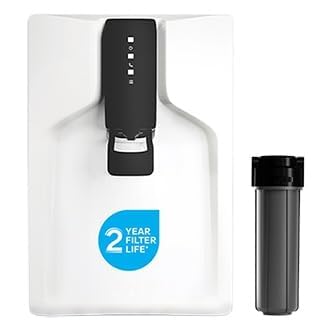
Image 1.1: Front view of the Eureka Vector ENRICH RO+UV+MC 2X Water Purifier. This image displays the sleek, white exterior of the water purifier with its black control panel and dispensing area.
Key Features:
- Advanced Filtration: Utilizes RO+UV+MC (Mineral Charge) technology for 30X impurity removal.
- UV e-boiling Technology: Ensures water is as pure and safe as water boiled for 20+ minutes.
- Water-Saving Design: Reduces water wastage by over 60% compared to conventional models.
- Versatile Compatibility: Effective for borewell, tanker, and municipal water sources with TDS levels up to 500 PPM.
- Purification Modules: Includes i-Filter, Chemi-Block, High Recovery Reverse Osmosis Cartridge, UV e-boiling, and Mineral Cartridge.
- Storage Capacity: 6.2 liters of purified water storage.
- LED Indicators: Provides status updates for power, tank full, and service requirements.
- Compact Design: Aesthetically pleasing and space-saving, suitable for wall mount or countertop installation.
2. Safety Information
Please read all safety instructions carefully before installing or operating the water purifier. Retain this manual for future reference.
- Ensure the power supply matches the specifications mentioned on the product label.
- Do not immerse the appliance, cord, or plug in water or other liquids.
- Keep the purifier away from direct sunlight, heat sources, and corrosive chemicals.
- Do not attempt to open or repair the purifier yourself. Contact authorized service personnel for assistance.
- Ensure proper ventilation around the unit.
- Children should be supervised to ensure they do not play with the appliance.
- Always unplug the purifier before cleaning or performing any maintenance.
3. Package Contents
Verify that all items are present in the package:
- Eureka Vector ENRICH RO+UV+MC 2X Water Purifier Unit
- Installation Kit (includes necessary fittings, pipes, and mounting accessories)
- User Manual (this document)
4. Installation & Setup
Professional installation is recommended for optimal performance and to ensure warranty validity. Contact Eureka customer support for installation services.
4.1 Pre-Installation Checks:
- Water Source: Ensure a continuous supply of potable water.
- Water Pressure: The water pressure should be within the recommended range for RO purifiers.
- Electrical Outlet: A grounded 3-pin electrical outlet (230V AC, 50Hz) should be available within 1.5 meters of the installation site.
- Space: Choose a location that allows for easy access for maintenance and is away from direct sunlight or heat. The purifier can be wall-mounted or placed on a countertop.
4.2 Installation Steps:
- Mounting: If wall-mounting, use the provided template and hardware to securely fix the purifier to a sturdy wall. For countertop placement, ensure a stable, flat surface.
- Water Inlet Connection: Connect the raw water inlet pipe from the water source to the purifier's inlet port using the provided fittings.
- Drain Connection: Connect the waste water drain pipe to a suitable drainage point.
- Power Connection: Plug the power cord into the electrical outlet.
- Initial Flush: Before first use, allow the purifier to fill and drain completely 2-3 times to flush out any manufacturing residues from the filters. This process ensures optimal water quality from the first use.
5. Operation
5.1 Powering On and LED Indicators:
Once connected to power, the purifier will automatically begin the purification process. The control panel features LED indicators to display the operational status:

Image 5.1: Close-up view of the control panel with LED indicators on the Eureka Vector ENRICH RO+UV+MC 2X Water Purifier. The LEDs typically indicate power, purification in progress, tank full, and service alerts.
- Power Indicator: Illuminates when the purifier is connected to power and switched on.
- Purification Indicator: Lights up when the purification process is active.
- Tank Full Indicator: Illuminates when the storage tank is full of purified water. The purification process will automatically stop.
- Service Indicator: Flashes or changes color to indicate that filter replacement or service is due.
5.2 Water Dispensing:
Place a clean container under the dispensing faucet and operate the lever or button to dispense purified water.
5.3 Taste Adjuster (TA) Function:
The Taste Adjuster allows you to manually control the TDS (Total Dissolved Solids) level of the output water, optimizing taste based on your preference and the source water quality. Refer to the diagram below for a visual representation of the advanced filtration stages, including the Taste Adjuster.

Image 5.2: Diagram illustrating the advanced filtration technologies including RO Membrane, UV e-boiling, and the Taste Adjuster. This visual explains how the purifier processes water from various sources like tap, tanker, and borewell water to achieve desired taste and purity.
Adjust the Taste Adjuster knob (if externally accessible) as per your desired water taste. Turning it clockwise generally increases TDS, while counter-clockwise decreases it. It is recommended to adjust this setting during installation or service by a qualified technician.
6. Maintenance
Regular maintenance ensures the longevity and efficient performance of your water purifier. Always unplug the unit before performing any maintenance.
6.1 Filter Replacement:
The Eureka Vector ENRICH RO+UV+MC 2X features long-life filters, with an estimated life of 2 years or 12,000 liters, whichever comes first. The Service Indicator LED will alert you when filter replacement is due.

Image 6.1: The Eureka Vector ENRICH RO+UV+MC 2X Water Purifier highlighting its 2-year filter life. This image emphasizes the durability and long-term efficiency of the filtration system.
- Filter replacement should only be performed by an authorized service technician.
- Using non-genuine filters may void your warranty and compromise water quality.
6.2 Cleaning the Purifier:
- Wipe the exterior of the purifier with a soft, damp cloth. Do not use harsh chemicals or abrasive cleaners.
- Clean the dispensing area regularly to prevent accumulation of dust or residue.
- Do not spray water directly onto the unit.
6.3 Storage Tank Cleaning:
The internal storage tank should be cleaned periodically by an authorized service technician to maintain hygiene.
7. Troubleshooting
If you encounter any issues, refer to the table below. For problems not listed or if solutions do not resolve the issue, contact customer support.
| Problem | Possible Cause | Solution |
|---|---|---|
| No power/Unit not turning on | Power cord unplugged, no electricity, fuse blown | Check power connection, ensure outlet is working, check household fuse/breaker. |
| No water dispensing | Water supply off, tank empty, faucet blocked | Check water supply, wait for tank to fill, clear any obstruction in faucet. |
| Slow water flow | Low water pressure, clogged filters | Check inlet water pressure. If filters are old, contact service for replacement. |
| Unpleasant taste/odor | New filters (initial flush needed), old filters, Taste Adjuster setting | Perform initial flush if new. If filters are old, contact service for replacement. Adjust Taste Adjuster. |
| Service Indicator light on | Filter replacement due, system error | Contact customer service for filter replacement or system check. |
8. Specifications
Technical specifications for the Eureka Vector ENRICH RO+UV+MC 2X Water Purifier:
| Feature | Specification |
|---|---|
| Model Name | Eureka Vector RO+UV+TA Water Purifier |
| Model Number | GWPDVERUM03000 |
| Brand | Eureka (Manufactured by Eureka Forbes Ltd) |
| Filtration Technology | RO+UV+MC (Mineral Charge) with Taste Adjuster |
| Storage Capacity | 6.2 Liters |
| Supported Water TDS Level (Max) | 500 PPM |
| Product Dimensions (L x W x H) | 30L x 30W x 30H Centimeters |
| Item Weight | 4 Kilograms |
| Installation Type | Countertop / Wall Mount |
| Power Source | Corded Electric |
| Special Features | UV, Built-In TDS Meter, Leak Proof, Reduce TDS, Automatic Shut-Off |
| Country of Origin | India |
| Manufacture Year | 2025 |
9. Warranty & Customer Support
For warranty information, service requests, or any product-related queries, please contact Eureka Forbes Ltd. customer support.
- Manufacturer: Eureka Forbes Ltd
- Customer Care Numbers: 18602661177 / 9212222051
- Email: customercare@eurekaforbes.com
Please keep your purchase receipt and product model number (GWPDVERUM03000) handy when contacting customer support.


