
1MORE HQ20
1MORE HQ20 Wireless On-Ear Headphones
User Manual
Introduction
This manual provides detailed instructions for the proper use and maintenance of your 1MORE HQ20 Wireless On-Ear Headphones. Please read this manual thoroughly before using the product to ensure optimal performance and longevity.

Image: The 1MORE HQ20 Wireless On-Ear Headphones in blue, showcasing their sleek design.
Safety Information
To prevent hearing damage, avoid listening at high volume levels for prolonged periods. The 1MORE HQ20 headphones feature an intelligent 3-level automatic volume control to ensure sound never exceeds 85dB, promoting long-term hearing health. Always be aware of your surroundings when using headphones, especially in traffic or other potentially hazardous environments.

Image: A visual representation of the 1MORE HQ20's safe listening volume feature, showing different decibel limits.
Package Contents
Upon opening the package, please verify that all components are present:
- 1MORE HQ20 Wireless On-Ear Headphones
- Charging Cable
- Carrying Pouch
- User Manual (this document)
Product Overview
Familiarize yourself with the various components and controls of your 1MORE HQ20 headphones:

Image: A detailed diagram highlighting the Type-C charging port, power/connection indicator light, microphone, hearing protection indicator light, volume up/next song button, power on/off/play/pause button, and volume down/previous song button.
- Type-C Port: For charging the headphones.
- Power/Connection Indicator Light: Displays power status and Bluetooth connection status.
- Microphone: For calls and voice assistant commands.
- Hearing Protection Indicator Light: Indicates the active volume level.
- Volume Up / Next Song Button: Click for volume up, hold for 1 second for next song.
- Power On/Off / Play/Pause Button: Hold for 2 seconds to power on, 5 seconds to power off. Click to play/pause music.
- Volume Down / Previous Song Button: Click for volume down, hold for 1 second for previous song.
Setup
1. Charging the Headphones
Before first use, fully charge the headphones. Connect the provided USB Type-C cable to the charging port on the headphones and the other end to a USB power source (e.g., computer USB port, wall adapter). The indicator light will show charging status and turn off when fully charged. A 5-minute quick charge provides approximately 2.5 hours of playback.
2. Power On/Off
- Power On: Press and hold the Power/Play/Pause button for 2 seconds. The indicator light will illuminate.
- Power Off: Press and hold the Power/Play/Pause button for 5 seconds. The indicator light will turn off.
3. Bluetooth Pairing
The 1MORE HQ20 headphones utilize Bluetooth 5.3 for stable and efficient wireless connectivity.
- Ensure the headphones are powered off.
- Press and hold the Power/Play/Pause button for 2 seconds to power on. The headphones will automatically enter pairing mode if not previously paired, or if no known device is found. The indicator light will flash rapidly.
- On your device (smartphone, tablet, computer), enable Bluetooth and search for new devices.
- Select "1MORE HQ20" from the list of available devices.
- Once connected, the indicator light will stop flashing and remain solid blue.
The headphones support dual-device connectivity, allowing simultaneous connection to two devices for seamless switching between audio sources.

Image: The 1MORE HQ20 headphones positioned between a laptop and a smartphone, illustrating their dual-connection capability via Bluetooth 5.3.
Operating Instructions
Music Playback
- Play/Pause: Click the Power/Play/Pause button.
- Next Song: Hold the Volume Up button for 1 second.
- Previous Song: Hold the Volume Down button for 1 second.
- Volume Up: Click the Volume Up button.
- Volume Down: Click the Volume Down button.
Call Management
- Answer/End Call: Click the Power/Play/Pause button.
- Reject Call: Hold the Power/Play/Pause button for 2 seconds.
1MORE APP Integration
Enhance your experience by downloading the 1MORE APP. The app allows for multi-function control, sound options customization (EQ settings), earphone monitoring, and management of the hearing protection feature.
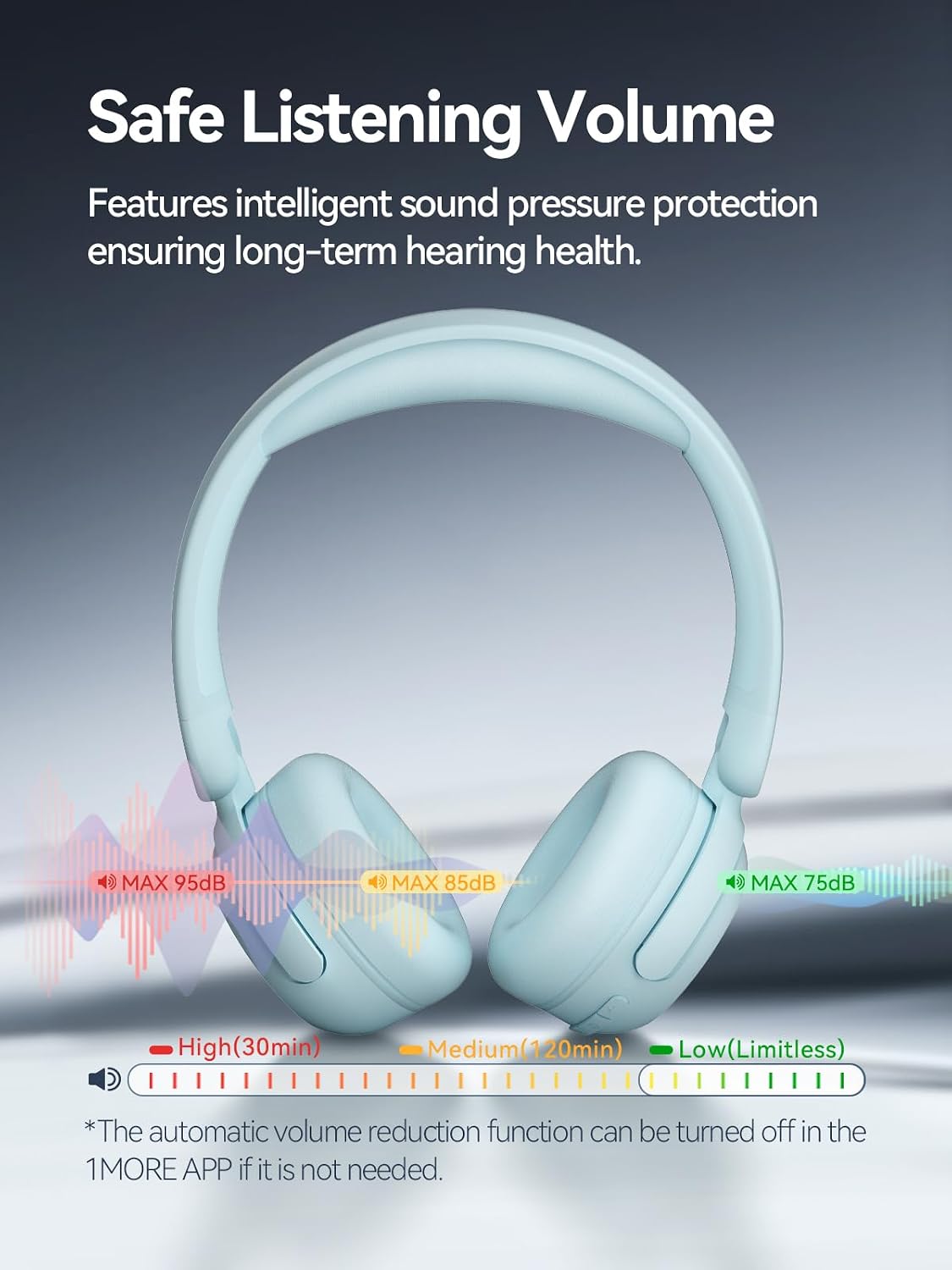
Image: The 1MORE HQ20 headphones alongside a smartphone screen showing the 1MORE APP, which offers various controls and settings for the headphones.
Maintenance
Cleaning
Regularly clean your headphones to maintain hygiene and performance. Use a soft, dry cloth to wipe the earcups and headband. For stubborn dirt, a slightly damp cloth with mild soap can be used, but ensure no moisture enters the headphone components. Do not use harsh chemicals or abrasive materials.
Storage
The 1MORE HQ20 headphones feature a lightweight, foldable design for easy portability. When not in use, fold the headphones and store them in the included carrying pouch to protect them from dust, scratches, and impacts. Avoid storing in extreme temperatures or high humidity.

Image: A visual guide demonstrating how the 1MORE HQ20 headphones can be folded for compact storage and travel.
Troubleshooting
| Problem | Possible Cause | Solution |
|---|---|---|
| Headphones do not power on. | Low battery. | Charge the headphones fully. |
| Cannot pair with device. | Bluetooth not enabled on device; headphones not in pairing mode; device too far. | Ensure Bluetooth is on. Put headphones in pairing mode. Move device closer (within 10m). Forget device on phone and re-pair. |
| No sound or intermittent sound. | Volume too low; not connected; interference. | Increase volume. Reconnect Bluetooth. Move away from sources of interference. |
| Microphone not working. | Microphone muted on device; app permissions. | Check device settings. Ensure app has microphone permissions. |
Specifications
| Feature | Detail |
|---|---|
| Model Name | HQ20 |
| Connectivity Technology | Wireless (Bluetooth 5.3) |
| Ear Placement | On Ear |
| Driver Size | 40mm Dynamic Drivers |
| Playtime | Up to 65 hours |
| Fast Charge | 5 minutes charge for 2.5 hours playback |
| Weight | 181g (0.34 Kilograms / 12 ounces) |
| Noise Control | Environmental Noise Cancellation (for calls) |
| Hearing Protection | 3-level automatic volume control (max 85dB) |
| Impedance | 16 Ohm |
| Included Components | Cable |
Warranty and Support
1MORE products are designed and manufactured to the highest quality standards. For detailed warranty information, please refer to the warranty card included in your product packaging or visit the official 1MORE website. If you encounter any issues or require technical assistance, please contact 1MORE customer support through their official channels.
You can find more information and support on the official 1MORE store page: 1MORE Official Store
Related documentsHQ20


Ask a question about this manual
Ask about setup, troubleshooting, compatibility, parts, safety, or missing instructions. Manuals+ will review the question and use this page’s manual context to help answer it.