
1. Introduction
Thank you for choosing the KZ Sora True Wireless Earbuds. These earbuds are designed to provide a superior audio experience with HiFi deep bass stereo sound, advanced Bluetooth 5.4 connectivity, and a comfortable, sweat-resistant design. This manual will guide you through the setup, operation, and maintenance of your new earbuds to ensure optimal performance and longevity.

Image: KZ Sora True Wireless Earbuds resting in their open charging case, showcasing their sleek design.
2. What's in the Box
Please check the package contents to ensure all items are present:
- KZ Sora True Wireless Earbuds (Left and Right)
- Charging Station
- Ear Cushions (S/M/L sizes)
- User Manual (this document)
- USB-A to USB-C Charging Cable (not explicitly listed in 'whats_in_the_box' but implied by 'fast-charging USB A to USB C cable' in feature bullets)
3. Product Overview
The KZ Sora earbuds feature a compact and ergonomic design for comfortable wear. The charging case not only protects your earbuds but also provides extended battery life.

Image: The KZ Sora earbuds displayed within their charging case, highlighting their HiFi audio capabilities and professional design.
3.1 Key Components
- Earbuds: Left and Right earbuds with touch control surfaces.
- Charging Case: Houses and charges the earbuds, with a USB-C charging port and LED indicator.
- Ear Tips: Silicone ear tips in various sizes (S, M, L) for a secure and comfortable fit.
3.2 Super Linear Internal Magnetic Driver
The KZ Sora incorporates a super-linear wide-band internal magnetic dynamic driver. This advanced technology ensures exceptional depth, accuracy, and resolution across low, mid, and high frequencies, delivering a truly immersive audio experience.

Image: An exploded view diagram illustrating the components of the Super Linear Wideband Internal Magnetic Driver within the KZ Sora earbuds.
4. Setup
4.1 Charging the Earbuds and Case
Before first use, fully charge the earbuds and the charging case.
- Place the earbuds into the charging case, ensuring they are correctly seated.
- Connect the USB-C charging cable to the charging port on the case and the other end to a USB power source.
- The LED indicator on the case will show charging status. A full charge for the case takes approximately 1.5 hours.
The earbuds offer over 5 hours of playtime on a single charge, with a total of 25 hours using the charging case.

Image: The KZ Sora earbuds in their charging case, illustrating the fast charging capability and extended battery life of 25 hours total playtime.
4.2 Pairing with Your Device
The KZ Sora earbuds feature one-step pairing for convenience.
- Open the charging case and take out both earbuds. They will automatically power on and connect to each other.
- Enable Bluetooth on your mobile phone or audio device.
- Search for "KZ Sora" in the list of available Bluetooth devices and select it to pair.
- Once paired, the earbuds are ready for use.
5. Operating
5.1 Touch Controls
The KZ Sora earbuds utilize intuitive touch controls for various functions:
| Action | Function |
|---|---|
| Tap once (either earbud) | Play/Pause music, Answer/Hang up call |
| Long press right earbud for 2 seconds | Activate Siri / Voice Assistant |
| Tap left earbud twice | Previous Song |
| Tap right earbud twice | Next Song |
| Long press either earbud for 2 seconds during incoming call | Reject incoming call |
| Touch either earphone for three seconds | Switch between High-Performance Mode and Standard Mode |
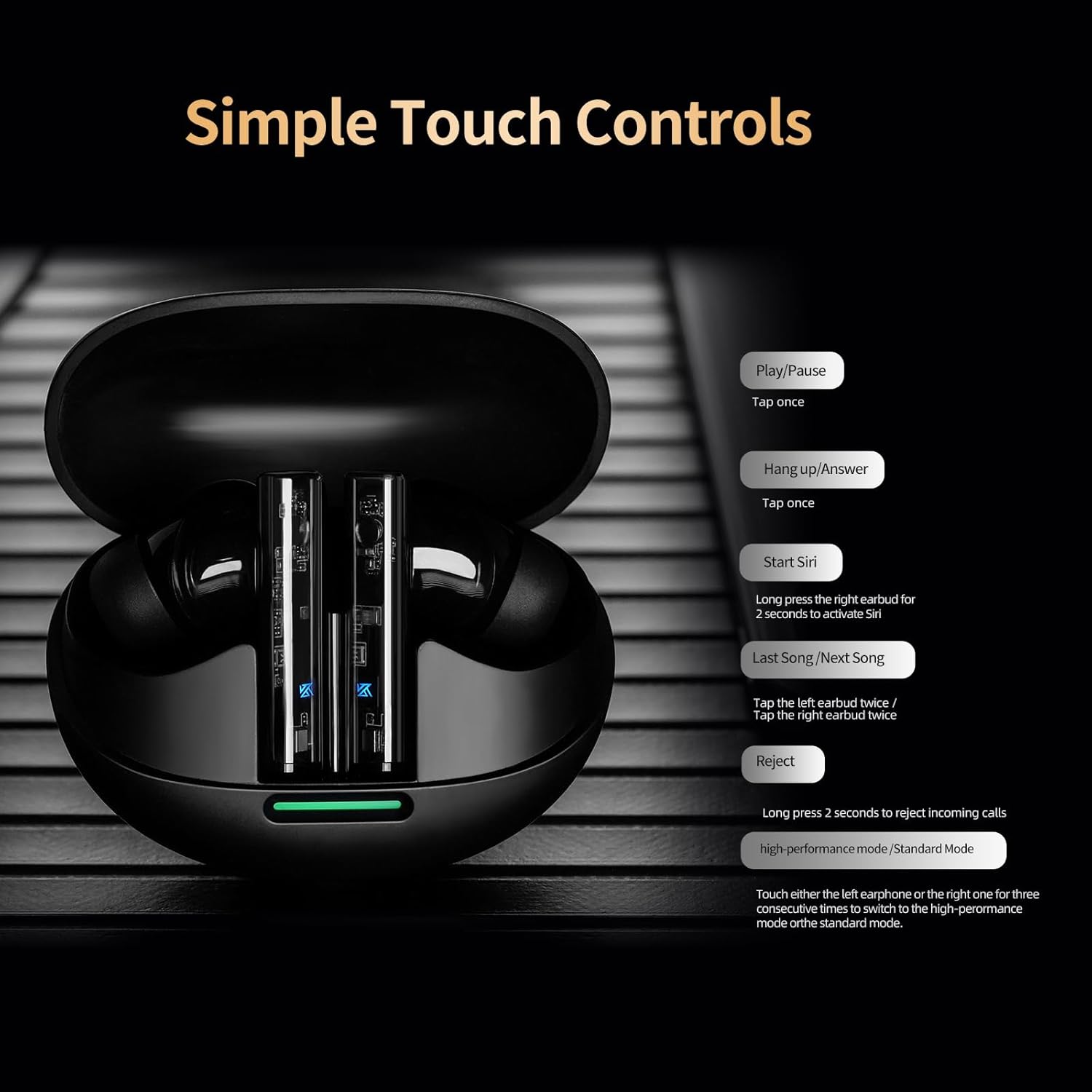
Image: A visual guide to the simple touch controls on the KZ Sora earbuds, detailing actions for music playback, calls, and voice assistant activation.
5.2 Standard and High-Performance Modes
The KZ Sora supports both SBC and AAC transmission protocols, allowing you to switch between standard and high-performance modes.
- Standard Mode: Ideal for music listening, delivering powerful resolution, a grand soundstage, and balanced frequencies.
- High-Performance Mode: Reduces latency to as low as 55ms, perfect for gaming to pinpoint sounds and enhance the experience.

Image: Comparison illustrating the KZ Sora's Standard Mode for music listening and High-Performance Mode for gaming, highlighting the low latency.
5.3 Wearing the Earbuds
Choose the ear tips that provide the most comfortable and secure fit. A proper seal is crucial for optimal sound quality and bass response. Insert the earbuds gently into your ear canal and twist slightly to secure them.
6. Maintenance
Proper maintenance ensures the longevity and performance of your KZ Sora earbuds.
- Cleaning: Regularly clean the earbuds, especially the ear tips and charging contacts, with a soft, dry, lint-free cloth. Do not use harsh chemicals or abrasive materials.
- Storage: When not in use, always store the earbuds in their charging case to protect them from dust, dirt, and physical damage.
- Water Resistance: The earbuds are sweat-resistant and water-resistant. However, they are not waterproof. Avoid submerging them in water or exposing them to heavy rain. Dry them thoroughly if they get wet.
- Battery Care: To preserve battery life, avoid fully discharging the earbuds and case frequently. Charge them regularly, even if not in constant use.
7. Troubleshooting
If you encounter any issues with your KZ Sora earbuds, refer to the following common solutions:
- Earbuds not pairing with each other: Place both earbuds back into the charging case, close the lid, wait a few seconds, then open the lid and take them out again. They should automatically connect.
- Earbuds not connecting to device: Ensure Bluetooth is enabled on your device and the earbuds are in pairing mode. Forget "KZ Sora" from your device's Bluetooth list and try pairing again.
- No sound from one earbud: Check if both earbuds are charged. Try resetting them by placing them in the case and then taking them out.
- Charging issues: Ensure the charging cable is securely connected and the charging contacts on both the earbuds and case are clean and free of debris. Try a different USB power source or cable.
- Low volume or poor sound quality: Ensure ear tips are properly sealed in your ear canal. Clean any earwax or debris from the earbud nozzles.
If the issue persists, please contact KZ customer support for further assistance.
8. Specifications
Detailed technical specifications for the KZ Sora True Wireless Earbuds:
| Feature | Specification |
|---|---|
| Model Name | KZ Sora |
| Connectivity Technology | Wireless (Bluetooth 5.4) |
| Bluetooth Range | 50 Feet |
| Audio Driver Type | Dynamic Driver |
| Audio Driver Size | 10 Millimeters |
| Frequency Response | 20 Hz - 20 KHz |
| Sensitivity | 105 dB |
| Impedance | 22 Ohm |
| Noise Control | Sound Isolation |
| Control Method | Touch |
| Carrying Case Battery Capacity | 300 Milliamp Hours |
| Carrying Case Battery Average Life | 25 Hours (with case) |
| Carrying Case Battery Charging Time | 1.5 Hours |
| Audio Latency | 55 Milliseconds (High-Performance Mode) |
| Water Resistance Level | Water Resistant (Sweat Resistant) |
| Material | Acrylonitrile Butadiene Styrene (ABS) |
| Item Weight | 3.52 ounces |

Image: A graph illustrating the excellent acoustic curve of the KZ Sora earbuds, demonstrating their sound performance across frequencies.
9. Warranty and Support
KZ products are manufactured to high-quality standards. For warranty information and customer support, please refer to the warranty card included in your product packaging or visit the official KZ website. Keep your proof of purchase for any warranty claims.
For technical assistance or inquiries, please contact KZ customer service through their official channels.

