1. Introduction
Thank you for choosing the ZIHNIC S12A Open Ear Clip-on Earbuds. These earbuds are designed to provide a comfortable and immersive audio experience with advanced features such as Bluetooth 5.4 connectivity, a smart LED touch screen, and an open-ear design for environmental awareness. This manual provides detailed instructions for setup, operation, maintenance, and troubleshooting to ensure optimal performance and longevity of your device.
2. Package Contents
Please verify that all items are present in your package:
- ZIHNIC S12A Open Ear Clip-on Earbuds (Left and Right)
- Charging Case with Smart LED Touch Screen
- USB Charging Cable
- User Manual (this document)
3. Product Overview
The ZIHNIC S12A earbuds feature an innovative open-ear clip-on design for comfort and situational awareness, paired with a smart charging case that includes an LED touch screen for intuitive control.

Image: ZIHNIC S12A Open Ear Clip-on Earbuds in their charging case, showcasing the LED screen.
3.1 Open-Ear Clip-on Design
The unique clip-on design ensures a secure fit without entering the ear canal, reducing ear fatigue and allowing you to remain aware of your surroundings.

Image: An earbud clipped onto an ear, illustrating the open-ear design and liquid silicone material.
3.2 Smart LED Touch Screen
The charging case features an intuitive LED touch screen for easy control and customization of settings.
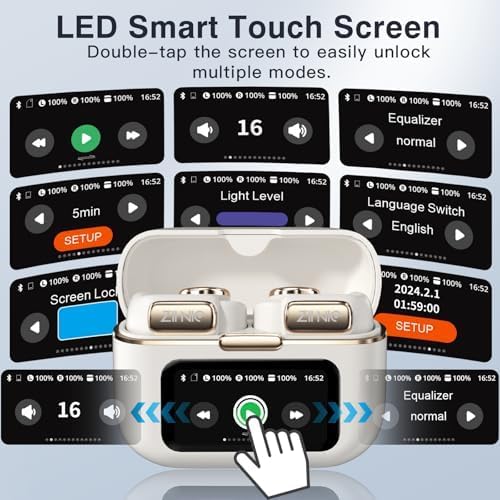
Image: The charging case's LED touch screen displaying various functions such as playback controls, volume, equalizer settings, language selection, screen lock, and a 'find earphone' feature.
4. Setup
4.1 Charging the Earbuds and Case
- Place the earbuds into the charging case. Ensure they are correctly seated.
- Connect the USB charging cable to the charging port on the case and to a power source.
- The LED screen on the case will indicate charging status. A full charge takes approximately 1.5 hours.
4.2 Bluetooth Pairing
- Open the charging case. The earbuds will automatically enter pairing mode.
- On your device (smartphone, tablet, laptop), enable Bluetooth and search for available devices.
- Select "ZIHNIC S12A" from the list of devices.
- Once connected, the LED screen on the case or an audio prompt will confirm successful pairing.
5. Operating Instructions
5.1 Basic Controls (via LED Touch Screen)
The LED touch screen on the charging case provides access to various functions. Double-tap the screen to unlock and navigate through modes.
- Playback Control: Play/Pause, Next/Previous Track.
- Volume Adjustment: Increase or decrease audio volume.
- Equalizer Settings: Select from various audio profiles (e.g., normal).
- Language Switch: Change the system language.
- Screen Lock: Lock the touch screen to prevent accidental input.
- Find Earphone: Utilize this feature to locate a misplaced earbud.
5.2 Audio Performance
The earbuds deliver HiFi Stereo Sound, optimizing amplitude and sensitivity for clear and dynamic audio reproduction.

Image: A detailed diagram illustrating the internal components of the earbud's speaker driver, emphasizing its HiFi Stereo Sound capabilities.
5.3 Noise Cancellation
The built-in microphone features advanced noise-cancellation technology, ensuring clear hands-free communication.
5.4 Water Resistance
The earbuds are IPX5 water-resistant, protecting them from sweat and light rain. They are not designed for submersion in water.

Image: Two ZIHNIC S12A earbuds shown with water splashing around them, indicating their IPX5 waterproof rating.
5.5 Battery Life
The earbuds offer extended battery performance for prolonged listening.
- Single Playtime: Up to 9 hours.
- Total Playtime (with charging case): Up to 60 hours.
- Quick Charge: 1.5 hours for a full charge.

Image: ZIHNIC S12A earbuds and their charging case, displaying '1.5 Hours Quick charge 100%', '9 Hours Play time', and '36 Hours Standby in case'. Note: The image shows 36 hours standby, while feature bullets mention 'hours of standby time' and another image shows '60 Hours Total Playtime'. For consistency, we use the 9 hours playtime and 60 hours total playtime from the more detailed image.
5.6 Internal Storage
The earbuds include 4GB of internal storage, capable of storing up to 1000 songs for offline listening.

Image: ZIHNIC S12A earbuds and charging case with a large '1000' graphic, representing the capacity to store 1000 songs.
6. Maintenance
6.1 Cleaning
- Wipe the earbuds and charging case with a soft, dry, lint-free cloth.
- Do not use abrasive cleaners, alcohol, or chemical solvents.
- Keep charging contacts clean and dry.
6.2 Storage
When not in use, store the earbuds in their charging case in a cool, dry place away from direct sunlight and extreme temperatures.
7. Troubleshooting
If you encounter issues with your ZIHNIC S12A earbuds, please refer to the following common solutions:
| Problem | Possible Solution |
|---|---|
| Earbuds not pairing |
|
| No sound or low volume |
|
| Charging issues |
|
| Touch screen unresponsive |
|
8. Specifications
| Feature | Detail |
|---|---|
| Model Name | S12A |
| Connectivity Technology | Wireless (Bluetooth 5.4) |
| Noise Control | Active Noise Cancellation (for Mic) |
| Water Resistance Level | IPX5 |
| Battery Life (Single Playtime) | Up to 9 Hours |
| Charging Time | 1.5 Hours |
| Control Type | Touch Control |
| Ear Placement | Open Ear / Clip-on |
| Frequency Range | 20 Hz to 20,000 Hz |
| Impedance | 32 Ohm |
| Item Weight | 50 Grams (approx. 1.76 ounces) |
| Material | Metal, Plastic, Rubber |
| Compatible Devices | Cellphones, Tablets, Laptops |
9. Warranty and Support
9.1 Warranty Information
The ZIHNIC S12A Open Ear Clip-on Earbuds come with a 12-month warranty from the date of purchase. This warranty covers manufacturing defects and workmanship under normal use. It does not cover damage caused by misuse, accidents, unauthorized modifications, or normal wear and tear.
9.2 Customer Support
For any questions, technical assistance, or warranty claims, please contact ZIHNIC customer support. Our dedicated team is available to provide reliable service and ensure your complete satisfaction.
Contact Information:
- Please refer to the contact details provided on the product packaging or the official ZIHNIC website.
- Alternatively, you may contact the seller directly through your purchase platform.


