
1. Introduction
Thank you for choosing the Salange MST-14 Projector Stand. This versatile stand is designed to provide stable and adjustable support for a wide range of mini projectors, including models from Nebula, XGIMI, and others with a standard 1/4-inch screw mount. It offers multiple mounting options: desktop, wall, and ceiling, making it suitable for various environments such as home, office, classroom, and outdoor use.
Please read this manual carefully before installation and operation to ensure proper use and to maximize the lifespan of your product.
2. Product Features
- Universal 1/4" (6.35mm) Mount: Compatible with most LCD/DLP projectors, including Nebula, XGIMI, Yaber, Wimius, and Toptro models.
- Ultra-compact and Rock-solid Design: Measures approximately 6.1 × 5.5 inches and weighs 1.4 pounds (650g). Constructed for exceptional stability, supporting projectors up to 4.4 pounds (2kg).
- Multi-angle Rotation: Features a universal joint design with 360-degree swivel control for effortless adjustment to achieve the perfect viewing angle, including ceiling projection.
- Versatile Mounting Options: Can be used as a desktop stand or securely installed on walls or ceilings using the two reinforced base screws. Ideal for compact projectors with a base length under 4.5 inches and weighing less than 2.3 lbs for wall/ceiling mounting.
- Quick-Install: Designed for fast and easy setup, allowing instant desktop mounting in seconds.
3. Package Contents
Please verify that all components are present:
- Salange MST-14 Projector Stand
- Mounting Screws and Wall Anchors (for wall/ceiling installation)
Note: Projector is not included.
4. Setup and Installation
4.1 Desktop Setup
- Place the projector stand on a stable, flat surface.
- Align the 1/4-inch screw on the stand with the mounting hole on the bottom of your projector.
- Twist the screw clockwise to securely attach the projector to the stand. Ensure it is tightened firmly but do not overtighten.

Image: Attaching the projector to the stand using the 1/4-inch screw.
4.2 Wall or Ceiling Installation
For wall or ceiling mounting, the stand features two reinforced base screws. This method is recommended for compact projectors with a base length under 4.5 inches and weighing less than 2.3 lbs.
- Choose a suitable location on the wall or ceiling. Ensure the surface can support the weight of the stand and projector.
- Mark the positions for the two base screws using the stand's base as a template.
- Drill pilot holes at the marked positions. Insert the provided wall anchors if necessary (for drywall or plaster).
- Secure the stand to the wall or ceiling using the provided screws.
- Attach your projector to the stand's 1/4-inch screw as described in the Desktop Setup section.

Image: Example of ceiling mounting for the projector stand.
5. Operation and Adjustment
The Salange MST-14 Projector Stand allows for flexible positioning of your projector to achieve optimal viewing angles.
- Angle Adjustment: The stand features a universal joint that allows for 360-degree rotation and various tilt angles (0°, 45°, 90°). Gently adjust the projector to your desired angle. The stand is designed to hold its position firmly.
- Ceiling Projection: For ceiling projection, adjust the stand to point the projector upwards. Ensure the projector's image correction settings are configured for inverted projection if required.
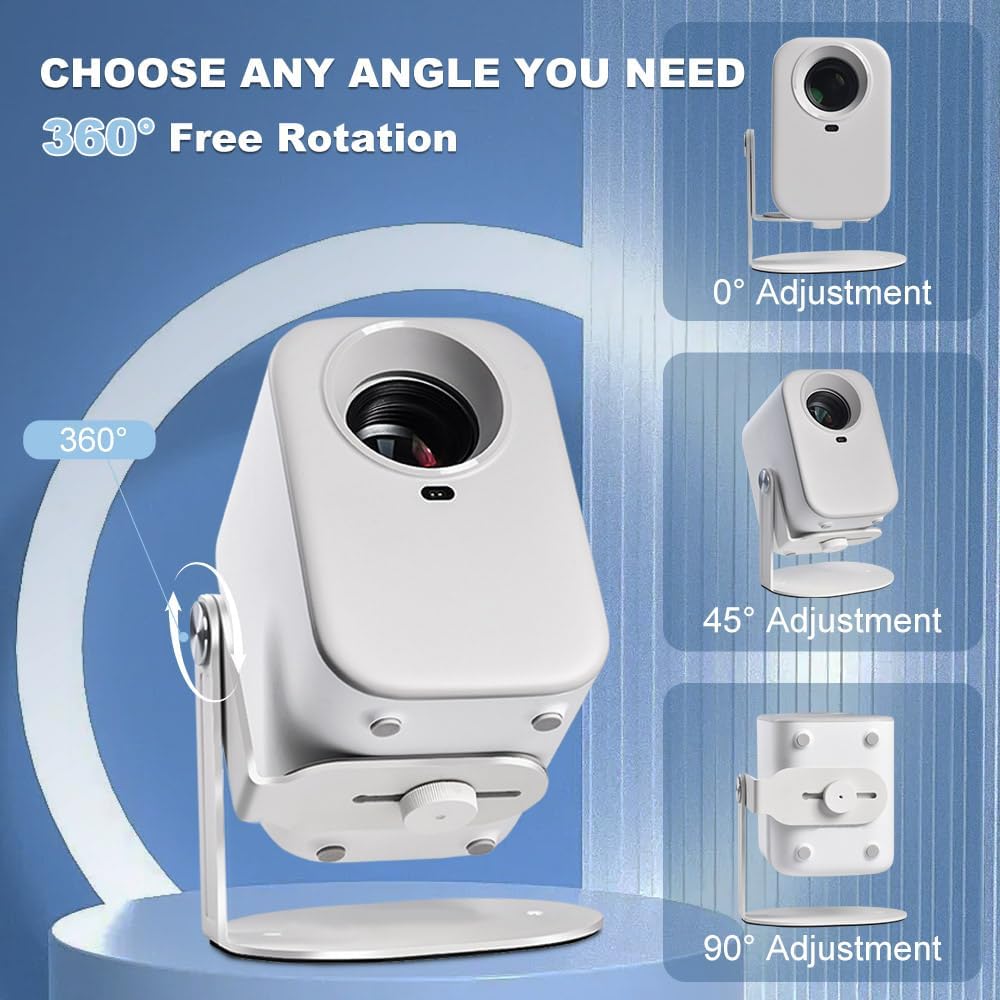
Image: Demonstrating 360-degree rotation and angle adjustments (0°, 45°, 90°).
Video: Official Salange demonstration of projector stand setup and angle adjustment.
6. Maintenance
To ensure the longevity and proper function of your Salange MST-14 Projector Stand, follow these simple maintenance guidelines:
- Cleaning: Wipe the stand with a soft, dry cloth. For stubborn marks, a slightly damp cloth can be used, followed by immediate drying. Avoid abrasive cleaners or solvents.
- Inspection: Periodically check all screws and connections to ensure they are secure. Tighten any loose screws as needed.
- Storage: If storing the stand for an extended period, ensure it is clean and dry. Store in a cool, dry place away from direct sunlight.
7. Troubleshooting
If you encounter any issues with your projector stand, please refer to the following common solutions:
- Projector feels unstable: Ensure the 1/4-inch screw is fully tightened. Verify that the projector's weight does not exceed the stand's maximum capacity of 4.4 pounds (2kg). For wall/ceiling mounts, ensure the base screws are securely fastened to a sturdy surface.
- Difficulty adjusting angle: The universal joint is designed to be firm. Apply gentle, consistent pressure to adjust. If it feels excessively stiff, ensure no debris is obstructing the mechanism.
- Stand slides on desktop: Ensure the desktop surface is clean and dry. The stand's base has non-slip padding; check if it is intact.
If the issue persists, please contact customer support.
8. Specifications
| Feature | Specification |
|---|---|
| Brand | Salange |
| Model Name | MST-14 |
| Mounting Type | Tabletop Mount, Wall Mount, Ceiling Mount |
| Compatible Devices | Most LCD/DLP projectors with 1/4" screw (e.g., XGIMI MoGo/Halo, Nebula Capsule 3/Air) |
| Weight Capacity (Maximum) | 4.4 pounds (2 kg) |
| Item Dimensions (Approx.) | 6.1 x 5.5 inches (Base) |
| Material | Plastic (with metal components for stability) |
| Special Features | Adjustable, Lightweight, Non-Slip, 360-degree Rotation |

Image: Salange MST-14 Projector Stand dimensions.
9. Warranty and Support
Salange is committed to providing high-quality products and customer satisfaction. This product comes with a standard warranty as per local regulations. For specific warranty details, please refer to the product packaging or contact Salange customer support.
For technical assistance, troubleshooting, or any inquiries regarding your Salange MST-14 Projector Stand, please contact our customer support team:
- Email: SalangeTech@outlook.com
- Support Hours: 24 Hours
We offer lifetime technical support and a 30-day hassle-free return policy.
