
Introduction
This manual provides instructions for the Generic remote control designed for the Omne Sleep OS2 Adjustable Bed Base. Please read this guide carefully to ensure proper setup, operation, and maintenance of your remote control.
Important Compatibility Note:
This remote control is not universal. It is specifically designed to work with certain control boxes, such as MACB0030, C144980C180229, and C121480C180036A. To ensure compatibility, your existing remote must have identical buttons, and your control box must match the specified models. It is highly recommended to provide clear pictures of your control box and old remote (front and back) to the seller before purchase to confirm compatibility.

Image description: An image illustrating the importance of verifying compatibility by providing pictures of the existing remote control (front and back) and the control box model number, with examples of where to find the model information on the control box.
Setup
Battery Installation
The remote control requires two AAA batteries (not included). Follow these steps to install them:
- Locate the battery compartment on the back of the remote control.
- Open the battery compartment cover.
- Insert two AAA batteries, ensuring correct polarity (+ and - symbols).
- Close the battery compartment cover securely.

Image description: A view of the back of the remote control with the battery compartment open, showing where to insert AAA batteries.
Pairing Instructions
Follow these steps to pair your new remote control with your adjustable bed base:
- Ensure the remote batteries are functioning. Replace if necessary.
- Ensure the power cord of your adjustable bed base is plugged into a powered source.
- Press and hold the HEAD UP and FOOT UP buttons simultaneously on the remote.
- While still holding these buttons, also press and hold the blue button located on the control box cord until you hear two beeps.
- The remote is now paired and ready for use.

Image description: A screenshot showing the three steps for pairing the remote control with the adjustable bed base, including checking batteries, power, and the button sequence for pairing.
Operating Instructions
The remote control features several buttons for adjusting your bed base. Familiarize yourself with the layout and functions:
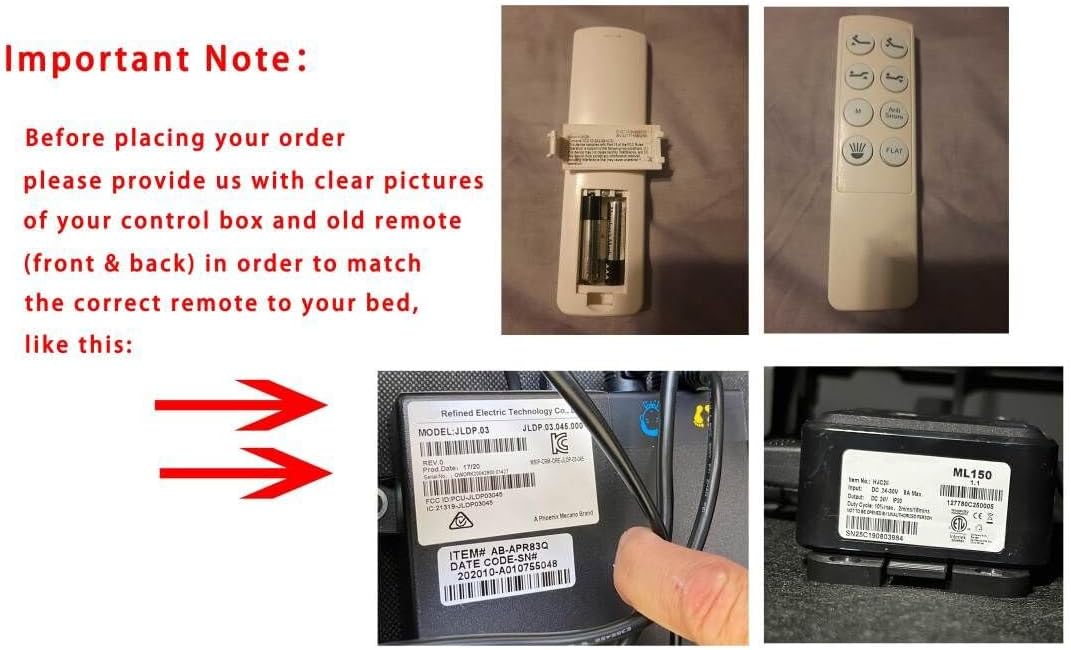
Image description: A clear front view of the remote control, displaying all its buttons and their icons.
- HEAD UP / HEAD DOWN: Adjusts the head section of the bed up or down.
- FOOT UP / FOOT DOWN: Adjusts the foot section of the bed up or down.
- FLAT: Returns the bed to a completely flat position.
- M (Memory): This button is typically used to set or recall a favorite bed position. Consult your bed base manual for specific memory programming instructions.
- Light Icon: This button usually controls an under-bed light or other integrated lighting features of your adjustable base.
- Other Preset Position Icons: These buttons adjust the bed to various pre-programmed comfort positions (e.g., Zero Gravity, Anti-Snore).
Note: Specific functions for 'M' and 'Light' buttons may vary based on your bed base model and its features.
Maintenance
Battery Replacement
When the remote control's range decreases or buttons become unresponsive, it's time to replace the batteries. Refer to the "Battery Installation" section for detailed instructions.
Cleaning
Wipe the remote control with a soft, dry cloth. Do not use liquid cleaners, abrasive materials, or harsh chemicals, as these can damage the remote's surface or internal components.
Troubleshooting
Remote Not Responding
- Check Batteries: Ensure batteries are correctly installed and have sufficient charge. Replace if necessary.
- Power Supply: Verify the adjustable bed base is plugged into a working power outlet.
- Re-Pairing: If the remote was working previously and stopped, try re-pairing it using the "Pairing Instructions" section.
- Obstructions: Ensure there are no objects blocking the signal path between the remote and the control box. The remote uses infrared technology with a maximum range of 8 meters.
Bed Base Not Moving
- Power Check: Confirm the bed base is receiving power. Check the power cord connection to both the wall outlet and the control box.
- Control Box: Ensure the control box under the bed is properly connected and powered. Check for any loose cables.
- Overload Protection: Some bed bases have overload protection. If the motor has been used excessively, it might temporarily shut down. Wait a few minutes before trying again.
Specifications
| Feature | Detail |
|---|---|
| Brand | Generic |
| Model Number | for Omne Sleep OS2 Adjustable Base |
| Compatible Devices | Adjustable bed base (specifically Omne Sleep OS2 and compatible control boxes) |
| Connectivity Technology | Infrared |
| Maximum Range | 8 meters |
| Batteries Required | 2 AAA batteries (not included) |
| Color | White |
| Maximum Number of Supported Devices | 1 |

Image description: A diagram illustrating the connections of the adjustable bed base, including the control box, power supply, and motors.
Warranty and Support
Warranty Information
This product comes with a 90-day warranty. Please retain your proof of purchase for any warranty claims. The warranty covers manufacturing defects under normal use.
Customer Support
For further assistance, troubleshooting not covered in this manual, or to inquire about compatibility before purchase, please contact the seller or manufacturer. When contacting support, provide details about your control box model and your old remote control for efficient service.
