
Atlodas M100
Contents
Atlodas M100 Smart Touchscreen Bluetooth Earbuds User Manual
Model: M100
Introduction
This manual provides detailed instructions for the proper use, setup, and maintenance of your Atlodas M100 Smart Touchscreen Bluetooth Earbuds. Please read this manual thoroughly before using the product to ensure optimal performance and longevity.
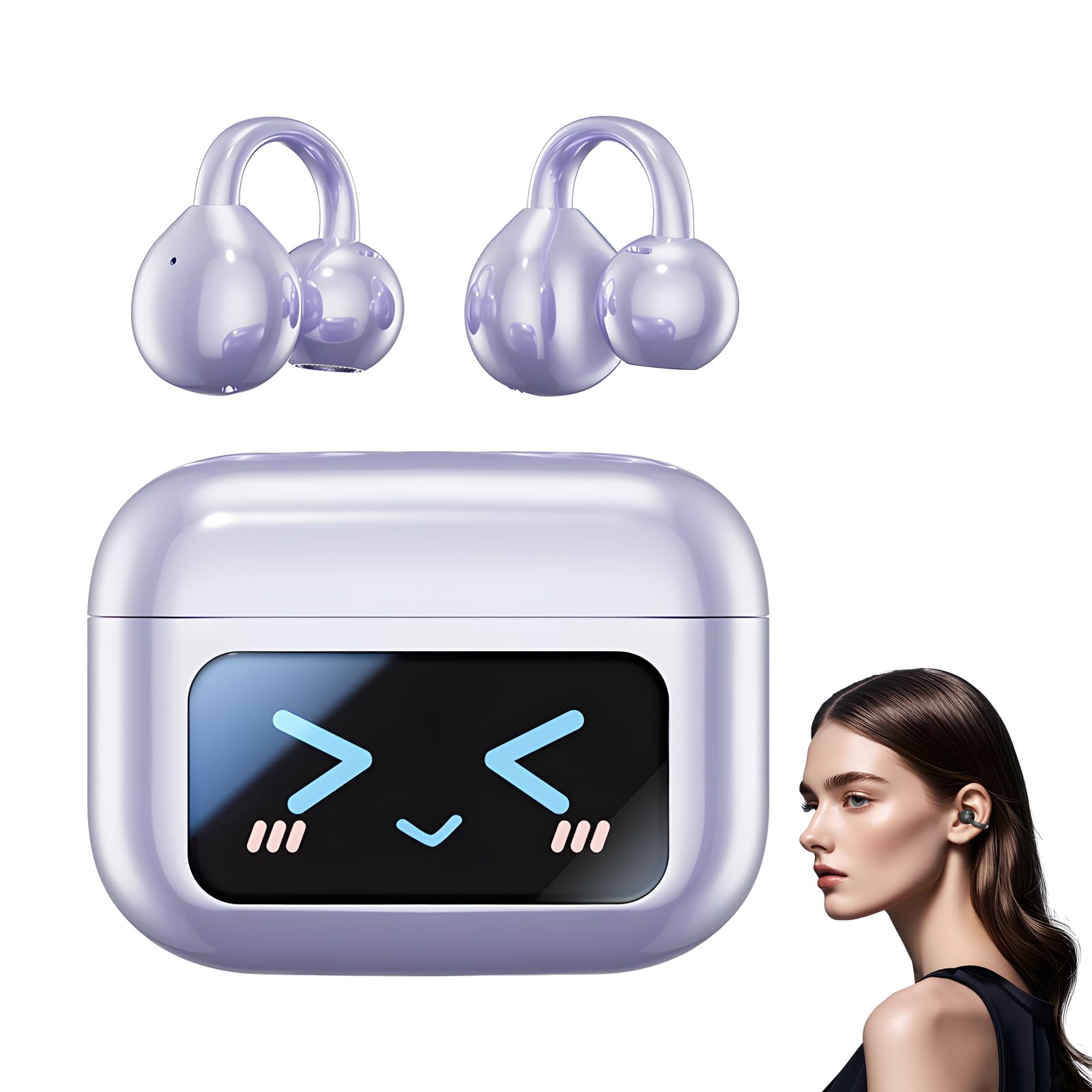
Image: The Atlodas M100 Smart Touchscreen Bluetooth Earbuds and their charging case, featuring a full-color touch screen.
Safety Information
- Do not expose the earbuds or charging case to extreme temperatures or direct sunlight.
- Avoid dropping or applying excessive force to the device.
- Keep out of reach of children and pets.
- Do not disassemble or modify the product. This will void the warranty.
- Use only the provided charging cable and adapter.
- Prolonged listening at high volume levels may cause hearing damage.
Package Contents
- Atlodas M100 Smart Touchscreen Bluetooth Earbuds (1 pair)
- Wireless Charging Case (1)
- USB Charging Cable (1)
- User Manual (1)
Product Overview
The Atlodas M100 features a compact design with a smart touchscreen charging case. The earbuds are designed for an open-ear, clip-on fit.

Image: The Atlodas M100 charging case displaying its full-color LCD touchscreen interface, showing battery levels and media controls.
Setup
1. Charging the Device
Before first use, fully charge the earbuds and the charging case. Connect the USB charging cable to the charging port on the case and to a power source. The touchscreen display will indicate the charging status.
2. Pairing with a Device
- Ensure the earbuds are in the charging case and the case is open.
- On your smartphone or other Bluetooth-enabled device, go to the Bluetooth settings.
- Search for available devices and select "Atlodas M100" from the list.
- Once connected, the touchscreen on the case will confirm the pairing.

Image: The Atlodas M100 charging case and earbuds positioned near a smartphone, illustrating the wireless connection capability with various devices.
3. Wearing the Earbuds
The M100 earbuds feature a clip-on, open-ear design. Gently clip each earbud onto your ear, ensuring a comfortable and secure fit. The open-ear design allows for awareness of your surroundings.

Image: A person wearing the Atlodas M100 clip-on earbuds, demonstrating the comfortable and open-ear fit.
Operating Instructions
Touchscreen Controls
The 1.5-inch full-color touchscreen on the charging case provides intuitive control over various functions. You can navigate menus, adjust settings, and control media playback directly from the screen.
Basic Functions (Earbud Touch Controls)
- Play/Pause: Single tap on either earbud.
- Next Track: Double tap on the right earbud.
- Previous Track: Double tap on the left earbud.
- Answer/End Call: Single tap on either earbud.
- Reject Call: Long press on either earbud.
- Activate Voice Assistant: Triple tap on either earbud.
- Volume Adjustment: Swipe up/down on the earbud stem (refer to specific model instructions for exact gesture).
AI Real Time Translation
The earbuds support AI Real Time Translation. To use this feature, ensure your earbuds are connected to a compatible device with the necessary translation application installed. Follow the application's instructions to initiate and manage translation services.
Remote Camera Control
The M100's touchscreen case can function as a remote camera trigger. Access the camera control feature through the case's menu to remotely capture photos on your paired smartphone.
Anti-Loss Tracker
If an earbud is misplaced, the charging case can activate a locator beep to help you find it. This feature is accessible via the touchscreen interface on the charging case.
Noise Reduction Features
The earbuds incorporate HD noise reduction technology for clearer calls and directional sound transmission to minimize sound leakage, enhancing privacy and audio clarity in various environments.

Image: A person wearing Atlodas M100 earbuds in a busy setting, illustrating the effectiveness of noise reduction for clear voice calls.

Image: A diagram illustrating the directional sound technology of the Atlodas M100 earbuds, showing how sound is directed to the ear while minimizing leakage.
Maintenance
Cleaning
- Wipe the earbuds and charging case with a soft, dry, lint-free cloth.
- Do not use abrasive cleaners, alcohol, or chemical solvents.
- Ensure charging contacts are clean and free of debris.
Storage
Store the earbuds in their charging case when not in use to protect them and keep them charged. Store in a cool, dry place away from direct sunlight.
Water Resistance
The Atlodas M100 earbuds are rated PX5 waterproof, meaning they are resistant to splashing water from any direction. They are suitable for exercise and light rain but should not be submerged in water.
Troubleshooting
| Problem | Solution |
|---|---|
| Earbuds not pairing | Ensure earbuds are charged. Turn off and on Bluetooth on your device. Place earbuds back in case, close, then reopen to re-enter pairing mode. |
| No sound from earbuds | Check volume levels on both earbuds and connected device. Ensure earbuds are properly paired and selected as the audio output. |
| Charging case not charging | Verify the charging cable and adapter are working. Ensure the cable is securely connected to the case and power source. |
| Touchscreen unresponsive | Restart the charging case by closing and reopening it. Ensure the screen is clean and dry. |
| Poor call quality | Ensure earbuds are positioned correctly. Check for strong Bluetooth connection. Move closer to your paired device. |
Specifications
| Feature | Detail |
|---|---|
| Model Name | Smart Touchscreen Bluetooth Earbuds |
| Model Number | M100 |
| Brand | Atlodas |
| Bluetooth Version | 5.4 |
| Transmission Range | 10m (obstacle-free) |
| Connectivity Technology | Wireless |
| Earpiece Shape | Clip-On |
| Control Method | Touch |
| Water Resistance Level | PX5 Waterproof |
| Special Feature | Noise Cancellation, AI Real Time Translation, Remote Camera Control |
| Compatible Devices | Smartphones, Tablets, Laptops, Desktops, Smart Speakers, Televisions |
| Included Components | Wireless Charging Case |
| Material | PC+ABS |
| Dimensions (Case) | 11.5 x 9.2 x 3.6 cm (4.53 x 3.62 x 1.42 in) |
Warranty and Support
Atlodas is committed to providing quality products. If you encounter any issues or have questions regarding your M100 Smart Touchscreen Bluetooth Earbuds, please contact our customer support. We offer a satisfaction guarantee and will assist you with any problems related to your purchase.
For support, please refer to the contact information provided with your purchase or visit the official Atlodas website.
Ask a question about this manual
Ask about setup, troubleshooting, compatibility, parts, safety, or missing instructions. Manuals+ will review the question and use this page’s manual context to help answer it.