
1. Introduction
This manual provides detailed instructions for the installation, operation, and maintenance of your VECHTEL 9-inch Car Radio. Designed for Ford Transit Tourio and Custom Tourneo models from 2013 to 2018, this unit features an Android 13 operating system, an 8-core processor, 6GB RAM, and 128GB ROM, offering a comprehensive in-car entertainment and navigation experience.
Key features include wireless CarPlay and Android Auto, a built-in DSP, Bluetooth 5.0, RDS/FM radio, Wi-Fi connectivity for online navigation, and support for an AHD reverse camera. Please read this manual thoroughly before installation and use to ensure proper functionality and safety.

Image: Overview of the VECHTEL 9-inch Car Radio's core features, highlighting its Android operating system, memory, processor, connectivity options, and display capabilities.
2. Setup and Installation
2.1 Package Contents
Before beginning installation, verify that all components are present in the package:

Image: A visual representation of all items included in the VECHTEL 9-inch Car Radio package, such as cables, antennas, installation tools, and the main unit.
- Main Head Unit (Host)
- Frame (Fream)
- Power Cable
- RCA Cable
- Rear Camera Input Cable
- Radio Antenna
- Antenna Head
- USB Cable (Dual USB Interface)
- GPS Antenna
- Microphone (MIC)
- Installation Tool
- User Manual
- Rear Camera (AHD)
- CANBUS Decoder (Integrated with power cable for Ford Transit Tourio/Custom Tourneo 2013-2018)
2.2 Compatibility Check
This car radio is specifically designed for Ford Transit Tourio/Custom Tourneo models manufactured between 2013 and 2018. Before installation, it is crucial to verify the compatibility with your vehicle's center console. Compare your vehicle's dashboard with the provided images to ensure a proper fit.

Image: Visual guide for checking vehicle compatibility. The image displays compatible and incompatible center console designs for Ford Transit models, indicating where the unit will fit correctly.
If your center console matches the compatible design (top image), proceed with installation. If it resembles the incompatible designs (bottom images), this unit is not suitable for your vehicle.
2.3 Installation Steps
Professional installation is recommended. Refer to the included wiring diagrams and your vehicle's service manual for specific instructions. The general steps are:
- Disconnect Battery: Before starting, disconnect the negative terminal of your vehicle's battery to prevent electrical shorts.
- Remove Old Radio: Carefully remove the existing car radio and trim panels using the provided installation tool.
- Connect Wiring:
- Connect the main power cable harness to the vehicle's wiring. Ensure the CANBUS decoder is properly connected.
- Connect the RCA cables for audio output and auxiliary input.
- Connect the rear camera input cable.
- Attach the radio antenna and GPS antenna.
- Connect the external microphone.
- Connect the USB cables to the designated ports.
- Install New Unit: Mount the VECHTEL head unit into the dashboard opening, securing it with screws or clips as appropriate for your vehicle.
- Reconnect Battery: Reconnect the negative terminal of the battery.
- Test Functionality: Turn on the vehicle and the car radio to test all functions (power, audio, touch screen, radio, Bluetooth, GPS, camera).
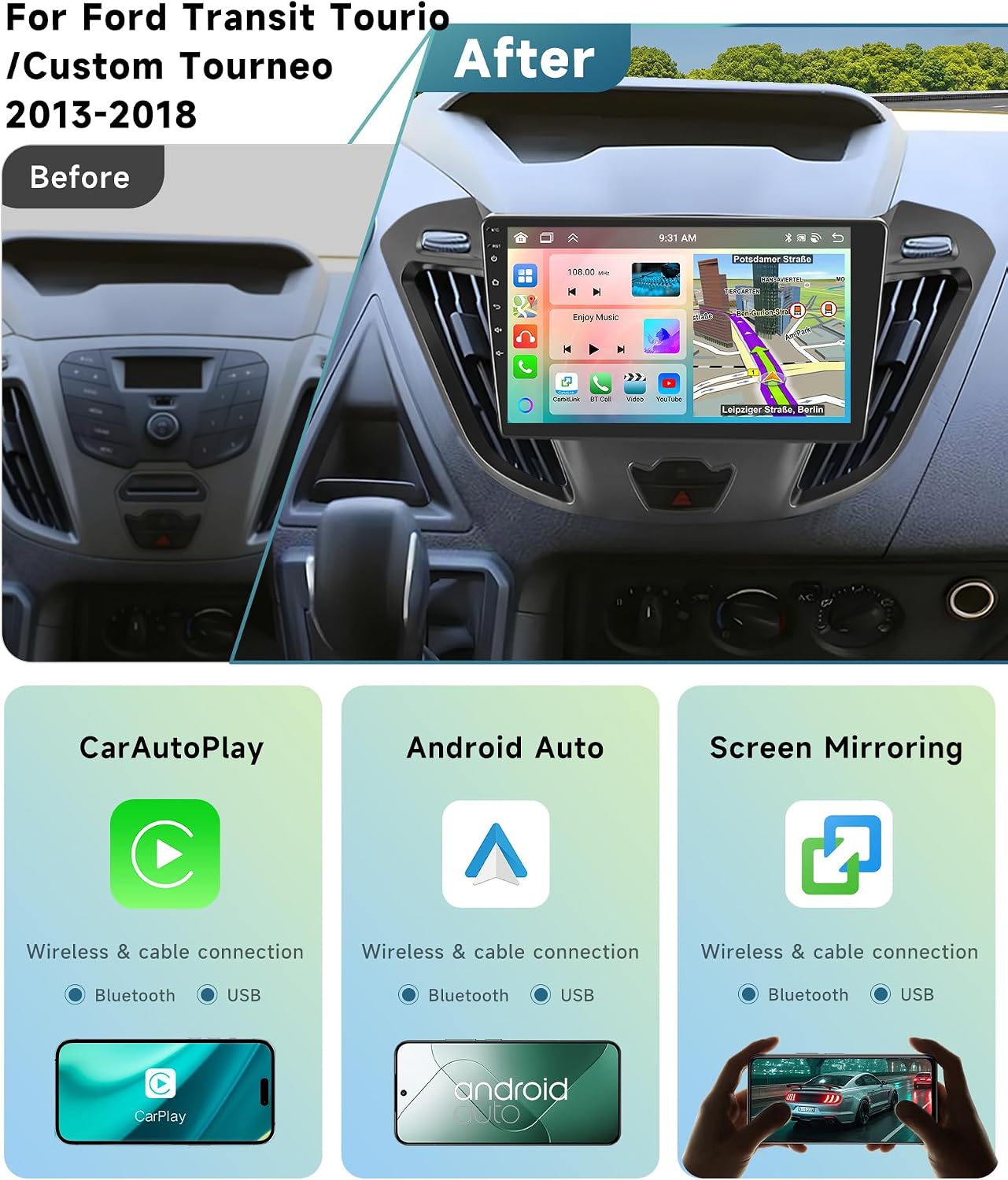
Image: A visual comparison showing the vehicle's dashboard before and after the installation of the VECHTEL car radio, demonstrating its integrated appearance.
3. Operating Instructions
3.1 Wireless CarPlay and Android Auto
The unit supports wireless CarPlay and Android Auto for seamless smartphone integration. This allows access to navigation, music, calls, and messages directly from the car radio display.
- Ensure Bluetooth is enabled on your smartphone and the car radio.
- Pair your smartphone with the car radio via Bluetooth.
- Once paired, select the CarPlay or Android Auto icon on the car radio's home screen.
- Follow the on-screen prompts to complete the connection.
Note: A wired connection via USB is also supported for both CarPlay and Android Auto.
3.2 Navigation (GPS)
The unit comes with built-in offline maps (data download required) and supports online navigation via Wi-Fi.
- Offline Maps: Access the pre-installed navigation application. Download map data for your region via Wi-Fi for offline use.
- Online Navigation: Connect the unit to a Wi-Fi hotspot (e.g., from your smartphone) to use online mapping services and real-time traffic updates.
- Split Screen: Utilize the split-screen function to view navigation and other applications (e.g., music player) simultaneously.
3.3 Bluetooth 5.0
Bluetooth 5.0 provides stable and fast connectivity for hands-free calling and audio streaming.
- Pairing: Go to the Bluetooth settings on the car radio, enable Bluetooth, and search for your device. Select your device and confirm pairing.
- Hands-Free Calling: Once paired, you can make and receive calls directly from the car radio interface using the built-in or external microphone.
- Audio Streaming: Play music from your smartphone through the car's speakers via Bluetooth.

Image: Displays the DSP equalizer, Wi-Fi hotspot connectivity, Bluetooth 5.0 interface for calls and music, and the rear camera input view with its features.
3.4 RDS/FM Radio
The integrated radio tuner supports FM frequencies and RDS (Radio Data System) for enhanced information display.
- Scanning: Use the auto-scan function to find available radio stations.
- Saving Presets: Save your favorite stations as presets for quick access.
- RDS: When available, RDS will display station names, program types, and other information.
3.5 Media Playback
The unit supports various audio and video formats for playback from USB drives or internal storage.
- Supported Audio Formats: APE, FLAC, WAV, MP3, WMA, etc.
- Supported Video Formats: MKV, RMVB, AVI, MP4, MDV, etc.
- Supported Image Formats: PNG, JPEG, JPG, GIF, WBMP, BNP, etc.
- USB Playback: Insert a USB drive into one of the dual USB interfaces to play media files.
3.6 Screen Mirroring
Mirror your smartphone's screen onto the car radio display for a larger view of apps and content.
- Access the "Mirror Link" application on the car radio.
- Follow the instructions to connect your smartphone (usually via Wi-Fi or USB).
3.7 User Interface (UI) Themes
Customize the look and feel of your car radio with 59 different UI themes.
- Navigate to the "Settings" menu.
- Select "UI Themes" or "Display Settings" to browse and apply different themes.
- Long-press on commonly used apps on the home screen to rearrange or replace them.

Image: Examples of the 59 different user interface themes, demonstrating various layouts for radio, music, navigation, and app icons.
3.8 Rear Camera Input (AHD)
The unit supports AHD (Analog High Definition) rear cameras, providing a clear view when reversing.
- When the vehicle is shifted into reverse gear, the screen will automatically switch to the rear camera view.
- The included camera is waterproof, offers night vision, HD image quality, and a wide-angle view.
3.9 Steering Wheel Control
The unit supports existing steering wheel controls for convenience and safety.
- After installation, the CANBUS decoder should enable steering wheel control functionality automatically.
- You can typically control volume, track skipping, and answer/end calls directly from your steering wheel.
- If controls do not work, check the wiring and the car radio's settings for steering wheel control configuration.
4. Maintenance
- Screen Cleaning: Use a soft, lint-free cloth to clean the touch screen. Avoid abrasive cleaners or solvents.
- Software Updates: Periodically check for software updates via the system settings. Connecting to Wi-Fi is required for downloads.
- General Care: Keep the unit free from dust and moisture. Avoid exposing it to extreme temperatures.
5. Troubleshooting
| Problem | Possible Cause | Solution |
|---|---|---|
| No Power | Loose power connection, blown fuse. | Check power cable connections. Inspect vehicle's fuse box and the unit's inline fuse. |
| No Sound | Volume too low, incorrect audio source, loose speaker wires. | Increase volume. Select correct audio source. Check speaker wiring connections. |
| Bluetooth Not Connecting | Bluetooth off on device/unit, device not in pairing mode, interference. | Ensure Bluetooth is enabled on both devices. Put phone in pairing mode. Try restarting both devices. |
| GPS Signal Lost/Inaccurate | GPS antenna obstruction, poor satellite reception. | Ensure GPS antenna has a clear view of the sky. Check antenna connection. |
| Rear Camera Not Displaying | Incorrect wiring, camera malfunction, reverse trigger not connected. | Verify camera input cable connection. Check reverse trigger wire. Test camera functionality. |
| Touch Screen Unresponsive | Software glitch, temporary freeze. | Restart the unit (turn off vehicle ignition and restart). If issue persists, perform a factory reset (refer to settings). |
For persistent issues, please contact VECHTEL customer support.
6. Specifications
| Feature | Detail |
|---|---|
| System | Android 13 |
| Chipset | 8257 (8-core processor) |
| Screen Size | 9 inches |
| Memory | 6GB RAM + 128GB ROM |
| Screen Resolution | 1280 x 720 (IPS HD) |
| Radio Chip | 8035 |
| Output Power | 4 x 45 W |
| Bluetooth Version | 5.0 |
| Operating Temperature | -20 °C to 75 °C |
| Steering Wheel Control | Supported |
| Power Amplifier Chip | YD7388 |
| Radio Frequency | FM/RDS |
| Video Output | Supported |
| Rear Camera Input | AHD/CVBS |
| External Microphone | Supported |
| Split Screen | Supported |
| Maps | Built-in offline maps (data download required) |
| Wi-Fi | Supported |
| USB Interface | Dual USB |
| Factory Settings Code | 1234 |
| Product Dimensions | 5.5 x 23.5 x 13.4 cm |
| Item Weight | 1 Kilogram |
| Supported Languages | Chinese, English, French, Italian, Korean, Japanese, Arabic, Spanish, Portuguese, Russian, Turkish, Vietnamese, Hebrew, Polish, German |

Image: Detailed view of the 9-inch IPS screen, emphasizing its resolution, video playback capabilities, and touch screen technology.
7. Warranty and Support
7.1 Manufacturer Warranty
This VECHTEL car radio comes with a 2-year manufacturer's warranty. Please retain your proof of purchase for warranty claims.
7.2 Technical Support
VECHTEL offers 24/7 technical support for any questions or issues you may encounter. For assistance, please contact the seller directly through the platform where you purchased the product.

Image: Guide on how to access VECHTEL's 24/7 technical support by contacting the seller directly through the purchase platform.