1. Product Overview
The FUNYET Touchscreen Laptop Computer (Model FUN01-05) is a versatile 14.1-inch 2-in-1 device designed for productivity and flexibility. Featuring an Intel Core i7-1265U processor, 16GB RAM, and a 512GB SSD, it delivers efficient performance for daily tasks. The 1920x1080 Full HD touchscreen and 360-degree reversible hinge allow for seamless transitions between laptop, stand, tent, and tablet modes. It comes pre-installed with Windows 11 Pro and includes essential connectivity options like Wi-Fi 6 and Bluetooth 5.2.

Figure 1: The FUNYET 2-in-1 laptop showcasing its adaptable design for various usage scenarios, including notebook, stand, tent, and tablet modes.
2. Setup
2.1 Initial Setup
- Unboxing: Carefully remove the laptop and all accessories from the packaging. Verify that all items listed in the 'What's in the Box' section are present.
- Charging: Before first use, connect the AC adapter to the DC-IN port on the laptop and plug it into a power outlet. Allow the battery to charge fully. The charging indicator light will confirm the charging status.
- Power On: Press and hold the Power Button (located on the side) for a few seconds until the screen illuminates.
- Windows 11 Pro Configuration: Follow the on-screen instructions to complete the initial Windows 11 Pro setup, including language selection, network connection, and user account creation.
2.2 Powering On/Off
- To Power On: Press the Power Button.
- To Shut Down: Click the Start button, then select Power > Shut down.
- To Restart: Click the Start button, then select Power > Restart.
- To Sleep: Briefly press the Power Button or close the lid.
3. Operating Instructions
3.1 Touchscreen Functionality
The 14.1-inch Full HD (1920x1080) display supports multi-touch gestures for intuitive interaction with Windows 11 Pro. Use taps, swipes, and pinch-to-zoom just like a tablet. The screen features a narrow 0.2-inch bezel and a 91% screen-to-body ratio for an immersive visual experience.

Figure 2: Close-up of the laptop's 14.1-inch Full HD display, emphasizing its high screen-to-body ratio and visual quality.
3.2 Keyboard and Touchpad
The ergonomic backlit keyboard provides comfortable key travel for extended typing sessions. The integrated fingerprint reader allows for quick and secure login. The large touchpad supports multi-finger gestures for navigation.

Figure 3: The backlit keyboard and integrated fingerprint reader for enhanced security and usability.
3.3 Connectivity
- Wi-Fi 6: Connect to high-speed wireless networks for fast internet access.
- Bluetooth 5.2: Pair with compatible wireless accessories such as headphones, mice, or external speakers.

Figure 4: Wireless connectivity options: Wi-Fi 6 and Bluetooth 5.2.
3.4 Ports and Interfaces
The laptop is equipped with various ports for connecting peripherals and external devices:
- DC-IN: For connecting the AC power adapter.
- Type-C: Multi-functional port for data transfer and charging.
- Audio Jack: For connecting headphones or external speakers.
- Power Button: To turn the device on/off or put it to sleep.
- TF Card Slot: For expanding storage with a TF (MicroSD) card.
- USB 3.0: For connecting USB devices.
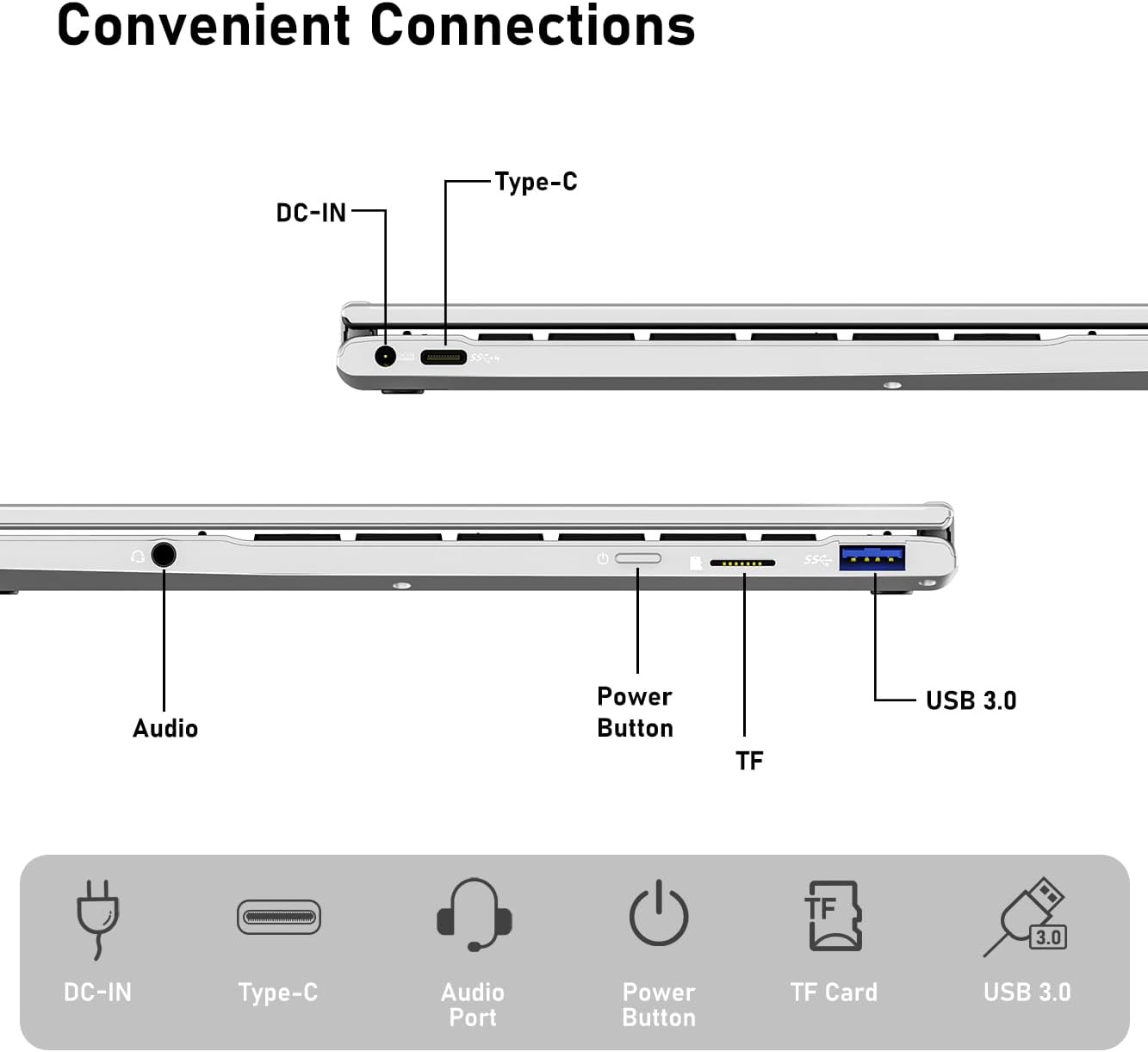
Figure 5: Overview of the laptop's convenient connection ports.
3.5 2-in-1 Modes
The 360-degree hinge allows the laptop to transform into four distinct modes:
- Notebook Mode: Traditional laptop use for typing and productivity.
- Stand Mode: Ideal for watching movies or presentations.
- Tent Mode: Perfect for touch-based applications or small spaces.
- Tablet Mode: Fold the keyboard back for a full tablet experience.

Figure 6: The laptop's flexible hinge enabling multiple usage modes.
4. Media Integration
4.1 Product Images
Below are additional images illustrating key features of your FUNYET laptop:

Image 7: The FUNYET Touch Screen 2-in-1 Laptop, highlighting its modern aesthetic and convertible design.

Image 8: The laptop's long battery life, capable of up to 8 hours of use on a single charge.
4.2 Official Product Videos
Watch the official product video from the seller for a visual guide to the laptop's features:
Video 1: An overview of the FUNYET laptop, highlighting its features and benefits as a budget-friendly option. This video is provided by MITUNTUN Direct.
Video 2: Demonstrates the 2-in-1 functionality of a Windows 11 laptop/tablet, similar to the FUNYET device. This video is provided by Jiechengxin Limited.
5. Maintenance
- Cleaning: Use a soft, lint-free cloth to clean the screen and exterior. Avoid harsh chemicals.
- Software Updates: Regularly check for and install Windows updates to ensure optimal performance and security.
- Storage Management: The 512GB SSD can be expanded up to 1TB using a TF (MicroSD) card. Regularly back up important data.
- Battery Care: To prolong battery life, avoid extreme temperatures and fully discharging the battery frequently.
6. Troubleshooting
- Laptop not powering on: Ensure the AC adapter is securely connected and the battery is charged. Try holding the power button for 10-15 seconds for a hard reset.
- Wi-Fi connectivity issues: Check if Wi-Fi is enabled in Windows settings. Restart your router and the laptop.
- Touchscreen unresponsive: Restart the laptop. If the issue persists, check for driver updates in Device Manager.
- Slow performance: Close unnecessary applications, check for Windows updates, and ensure sufficient free storage space.
7. Specifications
| Feature | Description |
|---|---|
| Model Name | Magbook (FUN01-05) |
| Processor | Intel Core i7-1265U (up to 4.8 GHz, 8 cores, 12 threads) |
| RAM | 16 GB DDR4 (3733 MHz) |
| Storage | 512 GB SSD (eSATA interface, expandable up to 1TB with TF card) |
| Display | 14.1 Inches FHD (1920 x 1080 pixels), Touchscreen, 0.2-inch bezel, 91% screen-to-body ratio |
| Operating System | Windows 11 Pro |
| Graphics Card | Integrated Intel Graphics |
| Wireless Connectivity | Wi-Fi 6 (2.4 GHz Radio Frequency), Bluetooth 5.2 |
| Ports | 1x USB 3.0, 1x Type-C, 1x DC-IN, 1x Audio Jack, 1x TF Card Slot |
| Battery Life | Average 6-8 Hours (5000mAh) |
| Item Weight | 3 pounds |
| Product Dimensions | 12.7 x 8.3 x 0.8 inches |
| Special Features | Backlit Keyboard, Fingerprint Reader, HD Audio, Lightweight, 360-degree reversible screen |
8. Warranty and Support
Your FUNYET Touchscreen Laptop Computer comes with a 2-Year Warranty. Additionally, you are eligible for a 180-day free return period. For any technical assistance or inquiries, please utilize our 24/7 instant online support or contact our English phone support at +1 800-986-9631.
What's in the Box:
- Touch Screen Laptop
- AC Adapter
- Warranty Card
- Instructions


