
1. Product Overview
The SOCICO Socico-3328 Digital Sports Watch is designed for active individuals, offering a clear digital display and multiple functions in a durable, waterproof design. It is suitable for various outdoor activities and daily wear.

Front view of the SOCICO Socico-3328 Digital Sports Watch.
Key Features:
- Digital Display: Large face for clear time, date, and function visibility.
- Waterproof Design: Rated for 3ATM, suitable for swimming and water activities.
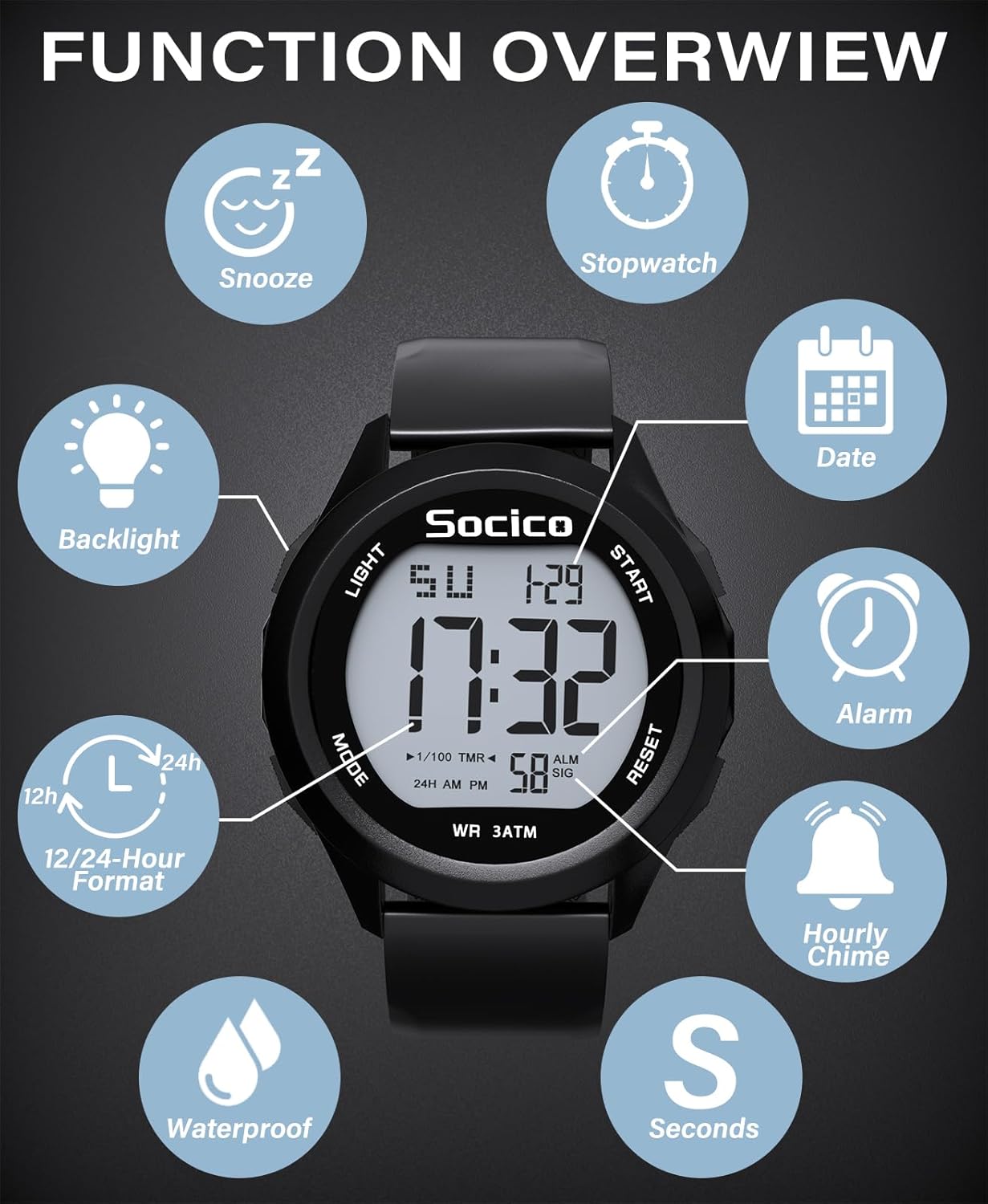
- Multiple Functions: Includes stopwatch, hourly chime, date display, alarm clock, and backlight.
- Durable Construction: Rugged ABS case, comfortable TPU band, and stainless steel back.
- Backlight: Green LED backlight for nighttime visibility.

Visual overview of the watch's various functions.
2. Initial Setup
2.1 Setting Time and Date
- Press the 'MODE' button three times to enter time setting mode.
- Press the 'RESET' button once to select the hour, then use the 'START' button to adjust the hour.
- Press 'RESET' again to select minutes, then use 'START' to adjust.
- Continue pressing 'RESET' to cycle through year, month, and day settings, adjusting each with the 'START' button.
- Once all settings are complete, press the 'MODE' button to exit.
Step-by-step guide for setting the watch's time and date.
2.2 Adjusting 12/24-Hour Format
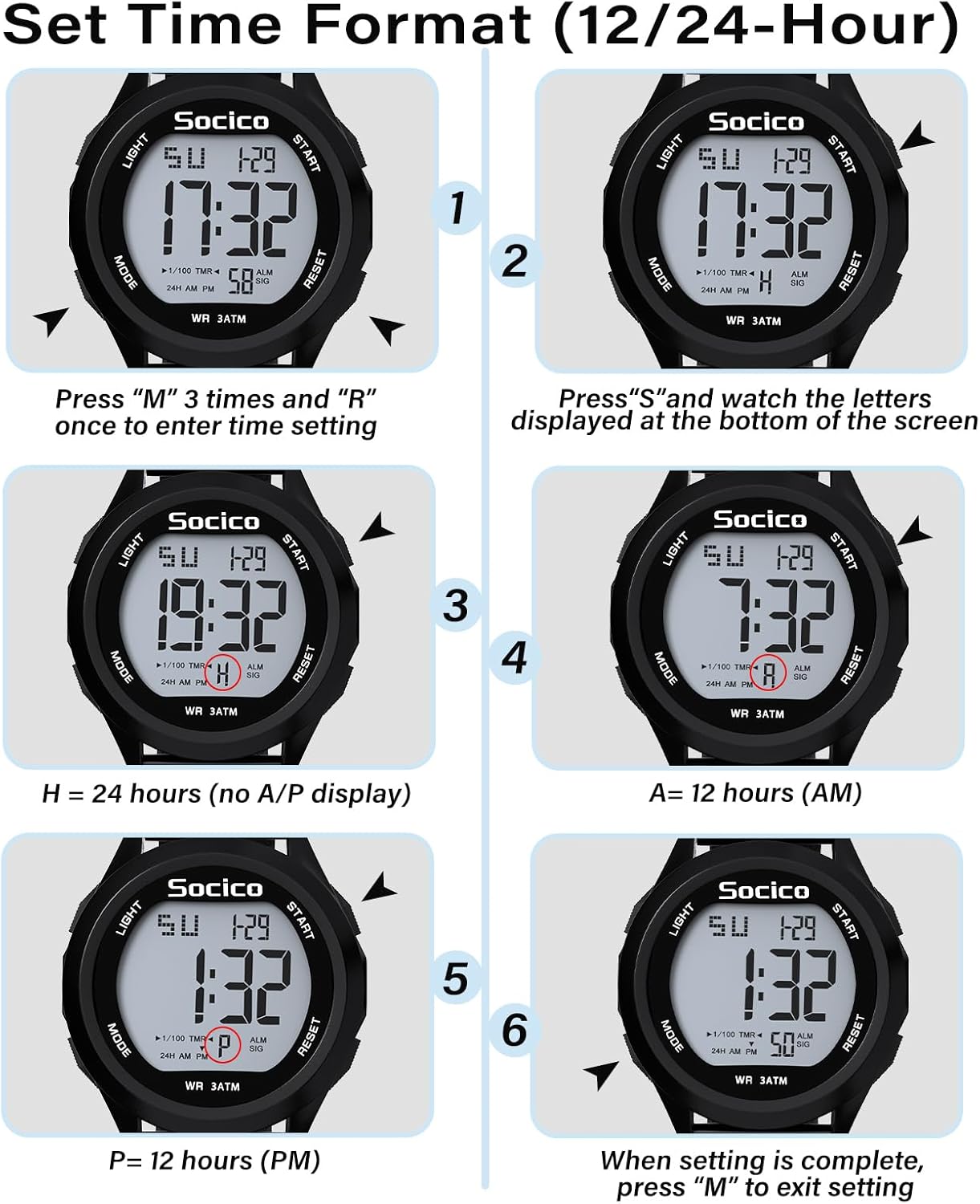
The watch supports both 12-hour (AM/PM) and 24-hour (military) time formats. Follow these steps to switch between them:
- Press the 'MODE' button three times to enter time setting mode.
- Press the 'RESET' button until the hour display is blinking.
- Press the 'START' button to cycle through 'H' (24-hour), 'A' (12-hour AM), and 'P' (12-hour PM) indicators. Select your desired format.
- Press the 'MODE' button to exit the settings.
Video tutorial on how to adjust the 12-hour or 24-hour time format on your watch.
3. Operating Modes
3.1 Stopwatch Function
The watch includes a precision stopwatch for timing activities.
- Press the 'MODE' button once to enter stopwatch mode (display shows 'ST').
- Press the 'START' button to begin timing.
- Press 'START' again to pause the stopwatch.
- Press 'RESET' to clear the stopwatch to zero.
- Press the 'MODE' button to exit stopwatch mode and return to normal time display.
Video demonstration on how to use the stopwatch function.
3.2 Alarm Setting and Snooze
Set an alarm for daily reminders or wake-up calls. The snooze function provides an additional 5 minutes of sleep.
- Press the 'MODE' button twice to enter alarm mode (display shows 'AL').
- Press the 'RESET' button once to adjust alarm hours, then use 'START' to set the desired hour.
- Press 'RESET' again to adjust alarm minutes, then use 'START' to set the desired minutes.
- To activate the alarm, ensure the alarm symbol is displayed.
- When the alarm sounds, press the 'MODE' button to activate snooze. The alarm will repeat after 5 minutes.
- To stop the alarm immediately, press 'START' or 'RESET'.
Video guide on setting and using the snooze function for the alarm.
3.3 Backlight Activation
For visibility in low-light conditions, the watch features a green LED backlight.
- Press the 'LIGHT' button located on the top left side of the watch to activate the backlight.
- The backlight will illuminate the display for a few seconds before automatically turning off.
Video showcasing the easy-to-read large dial and backlight feature.
4. Specifications
| Feature | Detail |
|---|---|
| Model Number | Socico-3328 |
| Dial Diameter | 46 mm / 1.81 inches |
| Case Thickness | 14 mm / 0.55 inches |
| Weight | 47 grams / 0.1 pounds |
| Water Resistance | 3ATM (30 meters) |
| Case Material | ABS |
| Band Material | TPU (Thermoplastic Polyurethane) |
| Back Material | Stainless Steel |
| Battery | 1 Nonstandard Battery (included) |

Detailed dimensions of the watch for proper fit assessment.

View of the watch's stainless steel back.
5. Maintenance and Care
To ensure the longevity and optimal performance of your SOCICO digital watch, follow these maintenance guidelines:
- Cleaning: Wipe the watch regularly with a soft, damp cloth to remove dirt and sweat. Avoid harsh chemicals.
- Water Resistance (3ATM): The watch is designed to withstand splashes, rain, handwashing, and brief immersion in water (e.g., swimming). It is not recommended for diving, snorkeling, or prolonged underwater activities. Do not press buttons while the watch is submerged in water.
- Temperature: Avoid exposing the watch to extreme temperatures (hot or cold) as this can affect battery life and internal components.
- Impact: While durable, avoid strong impacts or dropping the watch to prevent damage to the display or internal mechanisms.
The watch demonstrating its 3ATM water resistance.
Short video highlighting the watch's waterproof capabilities for sports and daily use.
6. Troubleshooting
If you encounter any issues with your SOCICO digital watch, please refer to the following common solutions:
- Display is blank or dim: Check the battery. If the issue persists after battery replacement, contact support.
- Buttons are unresponsive: Ensure the watch is not in a locked mode. If submerged, ensure it is dry before attempting to press buttons.
- Time is inaccurate: Re-set the time and date following the instructions in Section 2.1.
- Alarm not sounding: Verify that the alarm is activated and set correctly in alarm mode.
For issues not covered here, please contact customer support.
7. Warranty and Support
For any setup issues or product inquiries, please contact the seller, Ym Precision Time, directly through your purchase platform. They will assist you in resolving your issues as soon as possible upon receiving your message.
Please retain your proof of purchase for any warranty claims.
