
Zhaumim 30V 3.5A
Contents
Zhaumim Starlink Mini 12V Adapter: DC Step Up Converter Instruction Manual
Model: 30V 3.5A
1. Product Overview
This Zhaumim DC Step Up Converter is engineered to provide a stable 30V 3.5A output, specifically optimized for Starlink Mini routers. It efficiently converts fluctuating DC input voltages ranging from 9V to 28V, making it ideal for various mobile and off-grid power sources such as RVs, marine vessels, and solar battery systems. The device features a robust, triple-sealed housing with vibration-dampening silicone, ensuring durability in challenging environments.
Key features include:
- IP68 Waterproof & Shockproof: Designed to resist torrential rain, salt spray, and impacts.
- Precision 30V/3.5A Output: Stable power delivery exclusively for Starlink Mini routers.
- Wide Input Voltage Range: Compatible with 9-28V DC input from various battery types.
- Smart Safety Protections: Includes auto-shutdown for overload, short-circuit, and overheating, with over 95% conversion efficiency.
- Durable Construction: Features 18AWG marine-grade cables with corrosion-resistant terminals and a durable aluminum shell.
2. Setup and Installation
Follow these steps to properly set up your Zhaumim Starlink Mini 12V Adapter:
- Identify Wires: The converter has three main wire sets: red (positive input), black (negative input/ground), and a gray cable with a DC male plug (output). Labels are provided for clarity.
- Connect Input: Connect the red wire to the positive terminal of your 9-28V DC power source (e.g., 12V or 24V battery). Connect the black wire to the negative terminal or ground. Ensure secure connections to prevent power loss or damage.
- Connect Output: Plug the gray output cable's DC male plug into the power input port of your Starlink Mini router.
- Mounting (Optional): The converter features mounting holes on its aluminum casing. Secure the device in a stable location using appropriate fasteners to prevent movement, especially in mobile applications like RVs or boats.
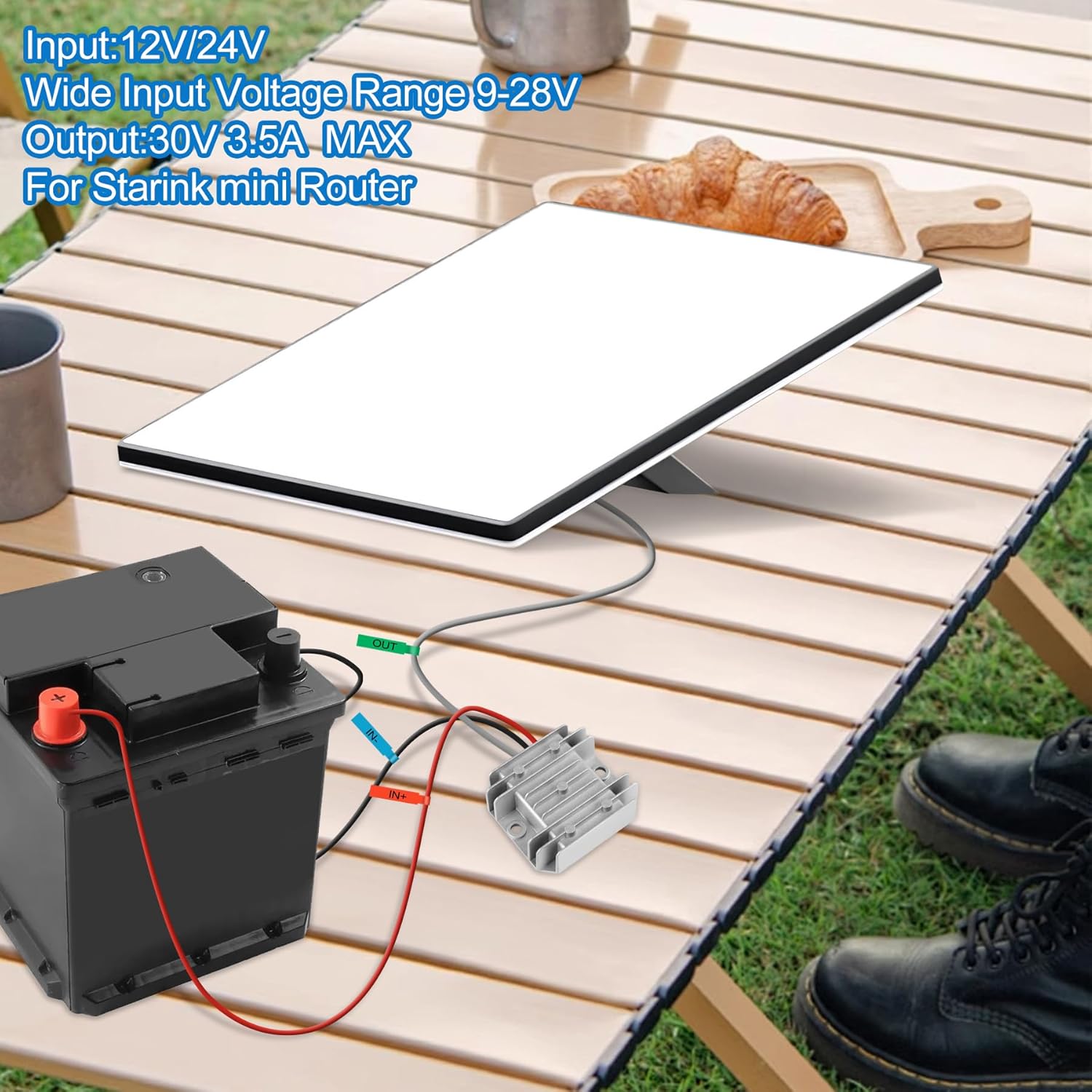
Figure 2.1: Connection diagram for the Zhaumim DC Step Up Converter with a battery and Starlink Mini.

Figure 2.2: Physical dimensions and cable details of the converter.
3. Operating Instructions
Once properly installed, the Zhaumim DC Step Up Converter operates automatically. It senses the input voltage (9-28V DC) and converts it to a stable 30V 3.5A output required by your Starlink Mini router. No manual adjustments are needed for voltage conversion within the specified input range.
- Ensure your power source (battery) is adequately charged and capable of providing the necessary input voltage and current.
- The converter's advanced voltage stabilization technology maintains consistent output even with fluctuating input from sources like car or solar batteries.
- The device is designed for continuous operation within its specified temperature and environmental limits.

Figure 3.1: Input voltage auto-sensing and stable output.
4. Maintenance
The Zhaumim DC Step Up Converter is built for durability and requires minimal maintenance. Its IP68 rating ensures protection against dust, water, and shock.
- Periodic Inspection: Regularly check all cable connections for tightness and signs of corrosion or damage.
- Cleaning: If necessary, gently wipe the exterior of the converter with a damp cloth. Do not use harsh chemicals or abrasive cleaners.
- Environmental Protection: While waterproof, avoid prolonged submersion or exposure to extreme conditions beyond its specified operating range.

Figure 4.1: IP68 protection features.
5. Troubleshooting
If you encounter issues with your Zhaumim DC Step Up Converter, consider the following:
- No Power Output:
- Check all input and output connections to ensure they are secure and correctly wired (red to positive, black to negative).
- Verify that your input power source (battery) is providing voltage within the 9-28V range and is adequately charged.
- The converter has auto-shutdown for overload, short-circuit, and overheating. Disconnect the device, allow it to cool, and check for any short circuits in your wiring or an overloaded Starlink Mini.
- Intermittent Power:
- Inspect cables for damage or loose connections.
- Ensure the input voltage is stable and not dropping below 9V under load.
- Overheating:
- Ensure the converter is installed in a location with adequate ventilation.
- Verify that the load on the output does not exceed 3.5A.
If problems persist after checking these points, please contact customer support.

Figure 5.1: Built-in safety protections.
6. Specifications
| Feature | Specification |
|---|---|
| Brand | Zhaumim |
| Model Number | 30V 3.5A |
| Input Voltage | 9-28 Volts (DC) |
| Output Voltage | 30 Volts (DC) |
| Output Current | 3.5 Amps (Max) |
| Plug Format | Type M |
| Number of Outlets | 1 |
| Waterproof Rating | IP68 |
| Cable Gauge | 18AWG |
| UPC | 762949976289 |
7. Warranty Information
This Zhaumim DC Step Up Converter comes with a 3-Year Manufacturer Warranty. This warranty covers defects in materials and workmanship under normal use. Please retain your proof of purchase for warranty claims. The warranty does not cover damage caused by misuse, accident, unauthorized modification, or improper installation.
8. Customer Support
For further assistance, technical support, or warranty inquiries, please contact Zhaumim customer support through the retailer's platform or the official Zhaumim website. Please have your product model number and purchase date available when contacting support.
Ask a question about this manual
Ask about setup, troubleshooting, compatibility, parts, safety, or missing instructions. Manuals+ will review the question and use this page’s manual context to help answer it.