
1. Introduction
This manual provides essential information for the safe and efficient use of your Hisense 32E43QT 32-inch HD Ready Smart TV. Please read it thoroughly before operating the device and retain it for future reference.

Image 1.1: Front view of the Hisense 32E43QT 32-inch HD Ready Smart TV.
2. What's in the Box
Verify that all the following items are included in your package:
- Hisense 32E43QT Television
- Power Cable
- Remote Control
- User Manual (this document)
- TV Stand Components (feet and screws)
3. Setup
3.1. Attaching the Stand
- Carefully place the TV screen-down on a soft, flat surface to prevent damage.
- Align the stand components with the designated slots on the bottom of the TV.
- Secure the stands using the provided screws and a Phillips head screwdriver.
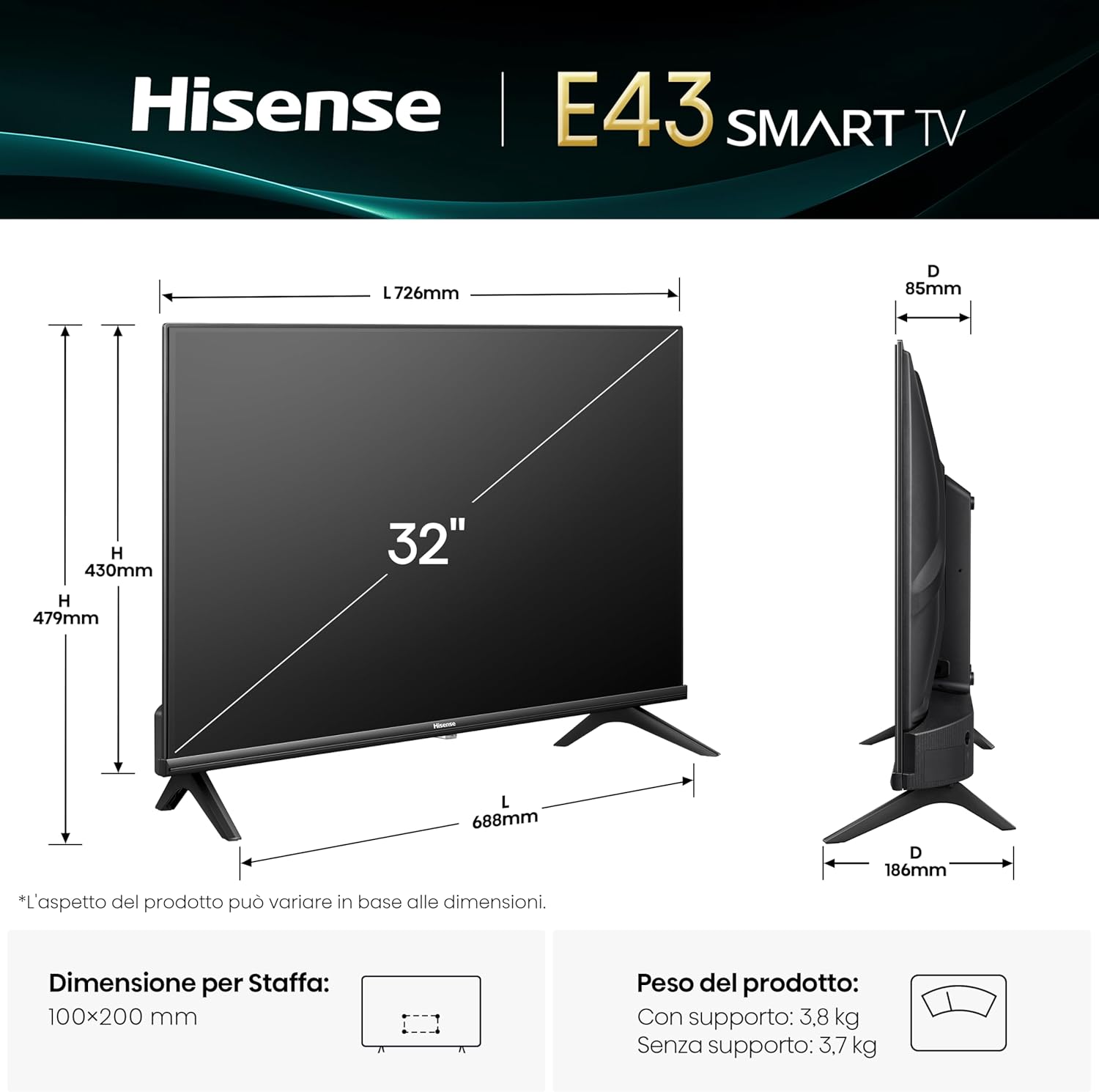
Image 3.1: TV dimensions and stand installation guide. The stand requires a 100x200 mm VESA mount if wall-mounting.
3.2. Connecting External Devices
Connect your antenna, cable box, gaming console, or other devices to the appropriate ports on the back of the TV.

Image 3.2: Rear panel connections including USB (x2), Digital Audio Out, Headphone, Antenna (x2), HDMI 2.1 (eARC), HDMI 2, and Ethernet.
- HDMI Ports: For high-definition video and audio from devices like Blu-ray players, game consoles, or set-top boxes. HDMI 1 supports eARC for enhanced audio return.
- USB Ports: For connecting USB flash drives to play media files.
- Antenna Inputs (ANT x2): For connecting terrestrial (DVB-T2) and satellite (DVB-S2) antennas.
- Digital Audio Out: For connecting to an external audio receiver or soundbar.
- Headphone Output: For connecting headphones.
- Ethernet Port: For a wired internet connection.
3.3. Power Connection
Plug the power cable into the TV's power input, then plug the other end into a wall outlet.
3.4. Initial Setup Wizard
Upon first power-on, the TV will guide you through an initial setup process. This includes language selection, network connection (Wi-Fi or Ethernet), channel scanning, and time zone settings.
4. Operating the TV
4.1. Remote Control Overview
The remote control allows you to navigate the TV's functions and access smart features.

Image 4.1: Remote control for the Hisense Smart TV, featuring dedicated buttons for popular streaming services like Disney+, YouTube, Prime Video, Netflix, and YouTube Kids.
- Power Button: Turns the TV on or off.
- Navigation Buttons (Up, Down, Left, Right, OK): For menu navigation and selection.
- Volume Up/Down: Adjusts the sound level.
- Channel Up/Down: Changes TV channels.
- Home Button: Accesses the Smart TV home screen (VIDAA U8).
- App Shortcut Buttons: Direct access to pre-installed streaming applications.
4.2. Smart TV (VIDAA U8) Navigation
The VIDAA U8 operating system provides access to a wide range of applications and content.

Image 4.2: The VIDAA U8 Smart TV interface, showing a selection of available applications.
- Press the Home button on your remote to access the VIDAA U8 home screen.
- Use the navigation buttons to browse through apps, settings, and content recommendations.
- Select an app or option by pressing the OK button.
5. Key Features
5.1. HD Ready Display
The 32-inch screen offers a resolution of 1280x720 pixels, providing clear and vibrant images for your viewing pleasure.
5.2. Natural Colour Enhancer
This feature optimizes color reproduction, delivering more vivid and realistic colors on screen.

Image 5.1: Visual representation of the Natural Colour Enhancer feature, enhancing the vibrancy of colors.
5.3. Noise Reduction
The TV incorporates noise reduction technology to minimize visual artifacts and deliver a cleaner, sharper image, especially in fast-moving scenes or low-light conditions.

Image 5.2: Visual representation of the Noise Reduction feature, improving image clarity.
5.4. DTS HD Audio
Experience enhanced audio quality with DTS HD support, providing clear dialogue and immersive sound effects.

Image 5.3: Illustration of the audio experience with Dolby Audio and DTSX technologies.
5.5. Share to TV (Airplay2)
Easily cast content from your compatible mobile devices to the TV screen using Airplay2 or similar screen sharing functions.

Image 5.4: Demonstrates the 'Share to TV' feature, allowing content mirroring from a tablet to the television.
5.6. Game Mode
Game Mode reduces input lag, providing a more responsive gaming experience. Activate this mode for optimal performance during gameplay.

Image 5.5: Representation of the Game Mode feature, designed to enhance gaming performance.
5.7. DVB-T2/S2 HEVC 10 Tuner
The integrated tuner supports DVB-T2 (terrestrial) and DVB-S2 (satellite) broadcasting standards with HEVC 10 decoding, ensuring compatibility with current and future digital TV signals.
5.8. Hotel Mode
This feature allows for customization of TV settings for use in hospitality environments, such as limiting volume, disabling certain functions, or setting a default channel.
6. Connectivity
Your Hisense TV offers various connectivity options:
- Wi-Fi: Built-in Wi-Fi for wireless internet access and smart features.
- Ethernet: RJ45 port for a stable wired internet connection.
- HDMI: Multiple HDMI ports for connecting various external devices.
- USB: USB 2.0 ports for media playback from storage devices.
- Digital Audio Out: Optical audio output for connecting to external sound systems.
- Headphone: 3.5mm jack for private listening.
7. Maintenance
7.1. Cleaning the Screen
- Turn off the TV and unplug it from the power outlet.
- Gently wipe the screen with a soft, dry, lint-free cloth.
- For stubborn marks, lightly dampen the cloth with water or a specialized screen cleaner (do not spray directly onto the screen).
- Avoid using abrasive cleaners, alcohol, or solvents.
7.2. General Care
- Keep the TV away from direct sunlight, heat sources, and excessive dust.
- Ensure adequate ventilation around the TV to prevent overheating.
- Do not place heavy objects on top of the TV.
8. Troubleshooting
If you encounter issues with your TV, refer to the following common problems and solutions:
| Problem | Possible Cause | Solution |
|---|---|---|
| No power | Power cable disconnected; no power from outlet | Check power cable connection; test outlet with another device. |
| No picture, but sound is present | Incorrect input source selected; external device off or disconnected | Press the 'Input' button on the remote to select the correct source; ensure external devices are powered on and connected. |
| No sound, but picture is present | Volume muted or too low; external audio system issues | Unmute or increase volume; check connections to external audio systems. |
| Remote control not working | Batteries depleted; obstruction between remote and TV | Replace batteries; remove any obstructions; ensure remote is pointed at the TV's IR sensor. |
| Smart TV apps not loading/slow | Poor internet connection; app server issues | Check Wi-Fi/Ethernet connection; restart router; try again later. |
9. Specifications
| Feature | Detail |
|---|---|
| Brand | Hisense |
| Model Number | 32E43QT |
| Screen Size | 32 Inches |
| Display Technology | LED |
| Resolution | 720p (HD Ready) |
| Aspect Ratio | 16:9 |
| Refresh Rate | 60 Hz |
| Connectivity Technology | Ethernet, HDMI, USB, Wi-Fi |
| Special Features | Parental Controls, Frameless Design, Game Mode |
| Product Dimensions (with stand) | 72.2 x 18.3 x 47.2 cm (W x D x H) |
| Product Weight (with stand) | 3.8 kg |
| VESA Mount Compatibility | 100x200 mm |
| Energy Efficiency Class (SDR) | F |
| Power Consumption (SDR) | 27 kWh/1000h |
| Country of Origin | China |

Image 9.1: EU Energy Label for the Hisense 32E43QT, indicating an 'F' energy efficiency class and 27 kWh/1000h consumption for SDR content.
For detailed product information and energy efficiency data, please refer to the EPREL database: https://eprel.ec.europa.eu/qr/2235661
10. Warranty and Support
10.1. Manufacturer's Warranty
This product comes with a minimum general manufacturer's warranty of 2 years from the date of purchase. Please retain your proof of purchase for warranty claims.
10.2. Customer Support
For technical assistance, troubleshooting beyond this manual, or warranty inquiries, please contact Hisense customer support. Refer to the official Hisense website for the most up-to-date contact information for your region.
You can also visit the Hisense store on Amazon for additional product information and support resources: Hisense Amazon Store