1. Introduction
This manual provides essential information for the safe and efficient operation of your Hisense 50U72Q 50-inch Mini-LED 4K Smart TV. Please read it thoroughly before using the product and retain it for future reference.

Image 1.1: Front view of the Hisense 50U72Q 50-inch Mini-LED 4K Smart TV.
2. Safety Information
Always follow basic safety precautions when using this television to reduce the risk of fire, electric shock, and injury.
- Do not expose the TV to rain or moisture.
- Do not open the TV casing; refer all servicing to qualified personnel.
- Ensure proper ventilation around the TV.
- Keep the TV away from direct sunlight, heat sources, and extreme temperatures.
- Use only the power cord supplied with the TV.
- Clean the TV with a soft, dry cloth. Do not use liquid or aerosol cleaners.
3. What's in the Box
Verify that all components are present:
- Hisense 50U72Q Television
- Power Cable
- Remote Control
- User Manual (this document)
4. Setup
4.1 Physical Installation
Before installation, consider the dimensions and weight of your TV to ensure proper placement and mounting.

Image 4.1: Dimensions and weight of the Hisense 50U72Q TV. The TV measures 1111mm (L) x 647mm (H) without stand, and 1111mm (L) x 712mm (H) with stand. Depth is 78mm without stand and 288mm with stand. Product weight with stand is 13.0 kg, without stand is 12.1 kg. VESA mount dimensions are 300x200 mm.
4.2 Connecting Devices
The Hisense 50U72Q TV offers various connectivity options for external devices.

Image 4.2: Back panel connections including USB, CI Card Slot, HDMI 2.1 (x2 for 4K@60Hz, x1 eARC for 4K@144Hz, x1 for 4K@144Hz), Antenna (x2), Ethernet (LAN), Digital Audio Out, AV Input, and Headphone jack.
- HDMI: Connect Blu-ray players, game consoles, and other HDMI-enabled devices. This model features HDMI 2.1 ports supporting 4K resolution at up to 144Hz, with one eARC port for enhanced audio return.
- USB: Insert USB flash drives for media playback.
- Ethernet (LAN): Connect to your home network for internet access.
- Digital Audio Out: Connect to external sound systems or soundbars.
- Antenna (ANT): Connect your terrestrial or satellite antenna.
- CI Card Slot: For Conditional Access Modules (CAM) to decrypt pay-TV channels.
- Headphone: Connect headphones for private listening.
5. Operating Instructions
5.1 Remote Control
The included remote control provides access to all TV functions. It features quick access buttons for popular streaming services and voice control capabilities.

Image 5.1: The remote control for the Hisense 50U72Q TV, featuring dedicated buttons for Disney+, YouTube, Prime Video, Netflix, YouTube Kids, Apple TV+, TV Channels+, and VOD. It also supports voice commands via Alexa Built-in and VIDAA Voice.
5.2 Smart TV Features (VIDAA U8)
Your Hisense TV runs on the VIDAA U8 operating system, offering a user-friendly interface for accessing apps, streaming services, and smart home integration.

Image 5.2: The VIDAA Smart TV interface, showcasing a selection of available applications and content recommendations.
- App Access: Navigate through pre-installed apps like Netflix, YouTube, Prime Video, and more.
- Voice Control: Use VIDAA Voice or Alexa Built-in for hands-free control of your TV and smart home devices.
- Smart Home Integration: Compatible with Google Home, Apple HomeKit, Apple AirPlay, and ConnectLife for seamless integration into your smart home ecosystem.
5.3 Picture and Sound Settings
Optimize your viewing experience with advanced picture and sound technologies.
- Mini-LED Technology: Enjoy superb contrast and surprising clarity with precise local dimming.
- QLED Colour: Experience vibrant and accurate colors, illuminating every hue.
- Dolby Vision IQ / HDR 10+ Adaptive: Unlock the full potential of HDR content with perfect details, enriched colors, and deep contrast.
- Hi-View AI Engine: An AI expert behind every image, optimizing picture, sound, scenario, and energy settings in real-time.
- Dolby Atmos 2.1 with Integrated Subwoofer: Delivers immersive deep bass and rich audio for a cinematic sound experience.
- Filmmaker Mode: Watch movies and TV shows as the directors intended, preserving original settings for audio, aspect ratio, color, and frame rate.
5.4 Gaming Features
The 50U72Q is equipped with features designed for an enhanced gaming experience.

Image 5.3: Illustration of 144Hz Game Mode PRO with VRR, showing a motorcycle racer. This mode ensures smooth, responsive gameplay with native 144Hz Variable Refresh Rate (VRR).
- 144Hz Game Mode PRO: Native 144Hz VRR for fluid and responsive gaming.
- Game Bar: Manage all game settings from a single dashboard, monitor real-time performance, and adjust options without interruption.
- AMD FreeSync Premium: Reduces screen tearing and stuttering for smoother gameplay.
6. Maintenance
Proper maintenance ensures the longevity and optimal performance of your TV.
- Screen Cleaning: Gently wipe the screen with a soft, lint-free cloth. For stubborn marks, slightly dampen the cloth with water or a specialized screen cleaner (ensure it's TV-safe).
- Dusting: Regularly dust the TV frame and back panel with a dry, soft cloth to prevent dust buildup in ventilation areas.
- Cable Management: Ensure all cables are neatly organized and not pinched or strained.
- Software Updates: Keep your TV's software updated to the latest version for improved performance and new features. Check for updates via the TV's settings menu.
7. Troubleshooting
If you encounter issues with your TV, refer to the following common solutions:
| Problem | Possible Cause | Solution |
|---|---|---|
| No Power | Power cable disconnected; outlet issue. | Check power cable connection; try a different outlet. |
| No Picture, Only Sound | Incorrect input source; external device issue. | Verify input source; check external device connections. |
| No Sound, Only Picture | Volume muted; audio settings incorrect. | Unmute volume; check audio output settings. |
| Remote Not Working | Low battery; obstruction. | Recharge remote (if applicable) or replace batteries; remove obstructions. |
| Network Connection Issues | Wi-Fi signal weak; router issue. | Restart router; check Wi-Fi settings on TV. |
If the problem persists after trying these solutions, please contact Hisense customer support.
8. Specifications
Detailed technical specifications for the Hisense 50U72Q TV.
| Feature | Specification |
|---|---|
| Brand | Hisense |
| Model Number | 50U72Q |
| Screen Size | 50 Inches |
| Display Technology | Mini LED |
| Resolution | 4K (3840x2160) |
| Refresh Rate | 144 Hz |
| Aspect Ratio | 16:9 |
| Special Features | Multi-voice Assistant, Parental Controls, Frameless Design, Game Mode, Local Dimming |
| Connectivity Technology | Bluetooth, Ethernet, HDMI, USB, Wi-Fi |
| Product Dimensions (with stand) | 111.1 x 28.8 x 71.2 cm |
| Product Weight (with stand) | 16 kg |
| Energy Efficiency Class | E |
| Power Consumption (SDR) | 54 kWh/1000h |
| Power Consumption (HDR) | 110 kWh/1000h |
| Country of Origin | China |
For more detailed energy information, refer to the EU EPREL database: https://eprel.ec.europa.eu/qr/2218378
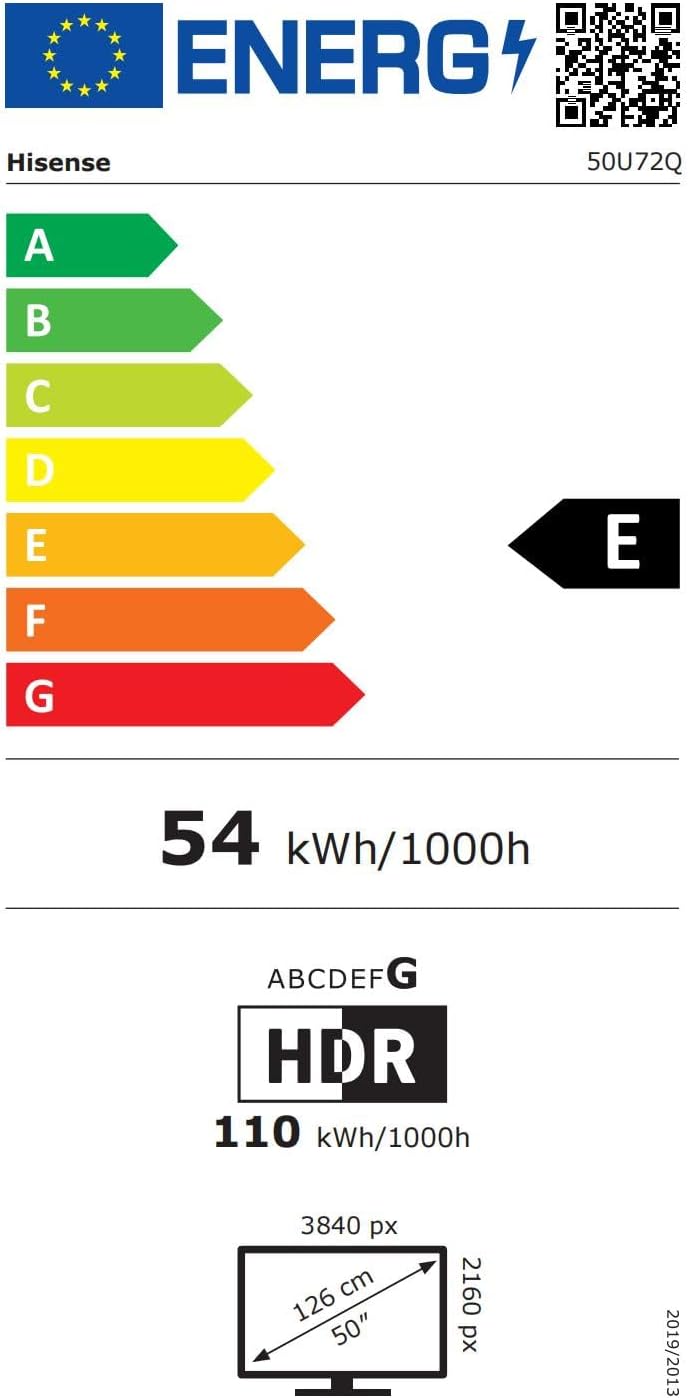
Image 8.1: EU Energy Label for Hisense 50U72Q, showing energy class E for SDR and 110 kWh/1000h for HDR.
9. Warranty and Support
9.1 Warranty Information
Hisense products are covered by a manufacturer's warranty. For specific details regarding your warranty, please refer to the documentation included with your product or visit the official Hisense website.
In general, if you wish to return a product within 30 days of receipt because you have changed your mind, consult the return policy of your retailer. If you have received a defective or damaged product, consult the retailer's help page on returns and refunds.
9.2 Customer Support
For technical assistance, troubleshooting, or service inquiries, please contact Hisense customer support:
- Manufacturer: Hisense
- Public Contact: Hisense-Public contact
- Telephone: +38618889720
- Address: Partizanska cesta 12, 3320 Velenje, Slovenia


