
Important Safety Information
- Do not expose the TV to rain or moisture.
- Do not open the TV casing; refer all servicing to qualified personnel.
- Ensure proper ventilation around the TV.
- Clean the TV with a soft, dry cloth only.
- Unplug the TV during lightning storms or when unused for long periods.
1. Setup
1.1 Unpacking
Carefully remove the TV from its packaging. It is recommended to have at least two people for this process due to the TV's size and weight. Inspect the TV for any damage before proceeding.
1.2 Stand Installation
The Hisense 85U8Q TV comes with an octagonal stand. Attach the stand securely to the TV following the instructions provided in the separate quick setup guide. The stand allows for two adjustable positions to optimize viewing.
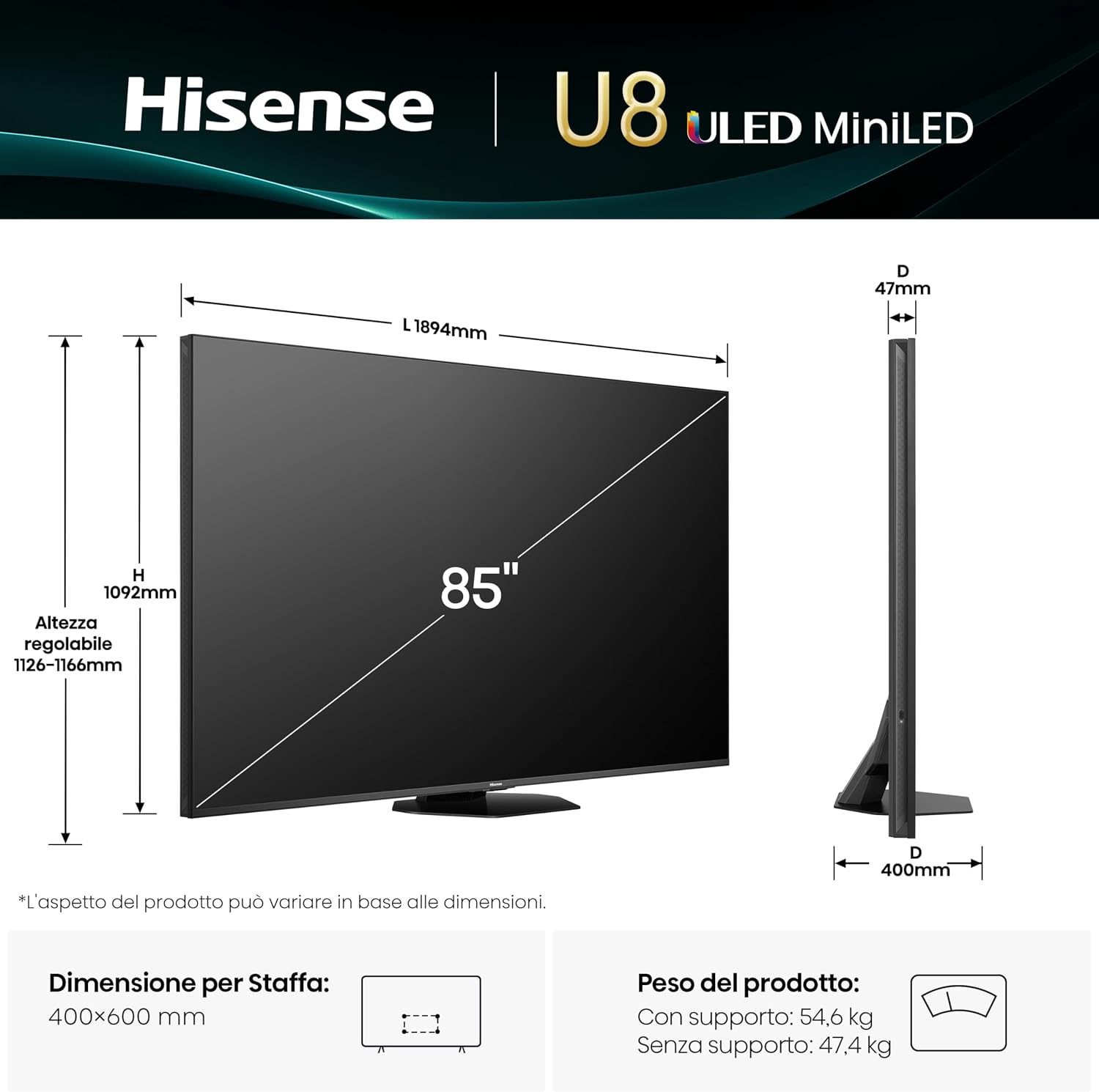 Image: Diagram showing the dimensions of the Hisense 85U8Q TV and instructions for stand installation. It indicates the TV's width (1894mm), height (1092mm), and adjustable stand height (1126-1166mm). The stand depth is 400mm. The diagram also shows the VESA mounting dimensions (400x600 mm) and product weight with and without the stand.
1.3 Wall Mounting
If you choose to wall mount your TV, ensure you use a VESA-compatible mount (400 x 400 mm). Consult a professional for wall mounting to ensure safety and proper installation, especially given the TV's weight of 63 kg.
1.4 Connections
Connect external devices to your TV using the appropriate ports. Refer to the diagram below for port locations.
 Image: Close-up view of the Hisense 85U8Q TV's rear panel, detailing various input and output ports. These include USB (Flash Drive), CI Card Slot, Headphone, AV Input, HDMI 2.1 (x2), HDMI 2.1 (eARC), ANT (x2), Digital Audio Out (Soundbars), Ethernet (Internet Router), and Type-C.
- USB Ports: Connect USB flash drives for media playback. The TV features 1x USB 2.0 and 1x USB 3.0 ports.
- CI Card Slot: For Conditional Access Modules (CAMs) used with pay-TV services.
- Headphone Jack: Connect headphones for private listening.
- AV Input: For connecting older devices using composite video and stereo audio cables.
- HDMI 2.1 Ports: Connect high-definition devices such as Blu-ray players, gaming consoles, and set-top boxes. Two HDMI 2.1 ports support 4K@165Hz. One HDMI 2.1 port supports eARC for enhanced audio return channel functionality.
- ANT (Antenna) Inputs: Connect your terrestrial or satellite antenna cables.
- Digital Audio Out: Connect to a soundbar or AV receiver for enhanced audio.
- Ethernet Port: Connect to your home network via an Ethernet cable for stable internet access.
- Type-C Port: A multi-functional Type-C port for various connections.
1.5 Power On
After all connections are made, plug the power cord into a wall outlet. Press the power button on the remote control or on the TV to turn it on.
2. Operating Your TV
2.1 Initial Setup and Smart TV Features
Upon first power-on, the TV will guide you through an initial setup process, including language selection, network connection, and channel scanning. The Hisense 85U8Q runs on the VIDAA U9 operating system, offering access to over 1000 applications, including popular streaming services like Netflix, YouTube, and Amazon Prime Video. It also supports Alexa Built-in and VIDAA Voice for voice control.
 Image: Screenshot of the Hisense VIDAA U9 Smart TV interface, showing various streaming app icons and a user-friendly layout.
2.2 Remote Control
The TV comes with an Eco Smart remote control. This remote features Type-C charging and a solar panel for environmental-friendly power. It supports voice commands via Alexa Built-in and VIDAA Voice. The remote also has backlit buttons for easy use in low-light conditions and a "Find My Remote" function.
 Image: Detailed view of the Hisense Eco Smart remote control, highlighting dedicated buttons for streaming services, voice control features (Alexa built-in, VIDAA Voice), and the Type-C charging port.
2.3 Picture Settings
Your Hisense 85U8Q TV features advanced picture technologies for optimal viewing.
- Mini-LED PRO with Local Dimming: Provides deep blacks and stellar brightness with precise backlight control.
- QLED Display: Delivers vibrant and accurate colors.
- 4K Resolution: Ensures sharp and detailed images.
- HDR Support: Compatible with Dolby Vision IQ, HDR10+, and HLG for enhanced contrast and color in supported content.
- 165Hz Game Mode Ultra: Offers a native 165Hz Variable Refresh Rate (VRR) for smooth gaming.
- Filmmaker Mode: Preserves the original aspect ratio, colors, and frame rates as intended by the director.
- Anti-Reflection PRO: Minimizes light intrusion for clear viewing in various lighting conditions.
- AI Chroma Light Sensor: Automatically adjusts brightness and color temperature based on ambient light.
- AI HDR Upscaler: Enhances SDR content to near-HDR quality.
- AI Scenario & AI Sports Mode: Optimizes picture and sound settings in real-time for different content types like movies, sports, or games.
 Image: Diagram illustrating the Mini-LED PRO technology, showing how full array local dimming contributes to deeper blacks and a peak brightness of up to 5000 nits.
 Image: Visual representation of the 165Hz Game Mode Ultra, showing a split screen with 120Hz and 165Hz refresh rates, emphasizing smoother gameplay. Features like Game Bar and 165Hz VRR are also highlighted.
2.4 Audio Settings
The TV features a Dolby Atmos Multi-Channel Surround 4.1.2 audio system with a maximum output of 90 watts, including built-in subwoofers. This configuration provides an immersive sound experience.
- Hi-Concerto: Unifies TV audio with a compatible soundbar for a seamless home theater experience without additional cables.
- EzPlay: Allows the TV remote to control both the TV and a compatible soundbar, displaying soundbar controls on-screen.
 Image: Graphic illustrating the 4.1.2 Multi-Channel Surround sound experience, showing sound waves emanating from the TV and surrounding a viewing audience, emphasizing depth and immersion.
2.5 Connectivity
The TV supports various connectivity options:
- Wireless: Wi-Fi 6 and Bluetooth 5.3 for network access and connecting wireless accessories.
- Screen Mirroring: Supports AirPlay 2, Google Cast, Miracast, and Smart View for casting content from mobile devices to the TV.
3. Maintenance
3.1 Cleaning Your TV
- Always unplug the TV before cleaning.
- Use a soft, dry cloth to wipe the screen and cabinet.
- Do not use liquid or aerosol cleaners directly on the screen or cabinet.
3.2 Software Updates
Your TV may receive software updates periodically to improve performance and add new features. Ensure your TV is connected to the internet to receive these updates. You can usually check for updates in the TV's settings menu.
4. Troubleshooting
If you encounter issues with your TV, refer to the following common solutions:
- No Power: Ensure the power cord is securely plugged into both the TV and the wall outlet. Check if the power outlet is working.
- No Picture/Sound: Verify that all cables are correctly connected to the TV and external devices. Ensure the correct input source is selected.
- Remote Control Not Working: Check the remote's battery level. If it's the Eco Smart remote, ensure it has sufficient light exposure for solar charging or connect a Type-C cable.
- Poor Picture Quality: Adjust picture settings (brightness, contrast, sharpness, color). Check the signal strength if using an antenna.
- No Internet Connection: Verify your Wi-Fi network is active or the Ethernet cable is properly connected. Restart your router if necessary.
For more detailed troubleshooting or persistent issues, please contact Hisense customer support.
5. Specifications
| Feature | Specification |
|---|---|
| Model Name | 85U8Q |
| Screen Size | 85 inches |
| Resolution | 4K (3840x2160) |
| Display Technology | Mini LED-QLED |
| Refresh Rate | 165 Hz |
| Peak Brightness | 5000 NIT |
| HDR Support | Dolby Vision IQ, HDR10+, HLG |
| Audio System | Dolby Atmos Multi-Channel Surround 4.1.2 |
| Speaker Output | 90 Watts |
| Operating System | VIDAA U9 |
| Connectivity | Wi-Fi 6, Bluetooth 5.3, Ethernet |
| HDMI Ports | 3 (HDMI 2.1, 1 with eARC) |
| USB Ports | 3 (1x USB 2.0, 1x USB 3.0, 1x USB-C) |
| VESA Mount Standard | 400 x 400 mm |
| Dimensions (WxHxD) | 189.4 x 112.6 x 4.7 cm (TV only, depth 47mm) |
| Weight (without stand) | 47.4 kg |
| Weight (with stand) | 54.6 kg |
| Power Consumption (SDR) | 86 kWh/1000h |
| Power Consumption (HDR) | 350 kWh/1000h |
 Image: Energy efficiency label for the Hisense 85U8Q TV, showing energy class C for SDR (86 kWh/1000h) and 350 kWh/1000h for HDR, along with screen dimensions.
 Image: Product information sheet for the Hisense 85U8Q TV, detailing various technical specifications and energy consumption data. A QR code linking to the EPREL database is visible.
For detailed product information, refer to the EPREL database (QR/2244815).
6. Warranty and Support
6.1 Manufacturer's Warranty
Your Hisense 85U8Q TV is covered by a 2-year manufacturer's warranty. Please retain your proof of purchase for warranty claims.
6.2 Customer Support
For technical assistance, troubleshooting, or warranty inquiries, please contact Hisense customer support. Refer to the contact information provided in your product packaging or visit the official Hisense website.


