
GREE Kula-18000
BOREAL Kula Mini Split Air Conditioner System User Manual
Model: Kula-18000
Your guide to efficient climate control
1. Introduction
Thank you for choosing the BOREAL Kula Mini Split Air Conditioner System. This manual provides essential information for the safe and efficient operation, installation, and maintenance of your 18,000 BTU, 23.5 SEER2, 230V single-zone ductless system. Please read this manual thoroughly before installation and use, and keep it for future reference.
The BOREAL Kula system is designed to deliver powerful and quiet heating and cooling, ensuring optimal temperature control for spaces up to 750 square feet.
2. Safety Information
WARNING: Improper installation, adjustment, alteration, service, or maintenance can cause property damage, injury, or death. Refer to this manual. For assistance or additional information, consult a qualified installer or service agency.
- Always ensure the unit is properly grounded.
- Do not attempt to install or service the unit yourself. Installation and major repairs must be performed by qualified and licensed HVAC professionals.
- Ensure the power supply matches the unit's requirements (230V).
- Keep children and pets away from the outdoor unit.
- Do not block air inlets or outlets of either unit.
- Turn off the power supply before any cleaning or maintenance.
3. Product Components
Your BOREAL Kula Mini Split System consists of the following main components:
- Indoor Unit (Air Handler): Mounted inside the conditioned space, responsible for air distribution.
- Outdoor Unit (Condenser): Mounted outside, responsible for heat exchange.
- Remote Control: For convenient operation and setting adjustments.
- 16ft Lineset: Pre-charged copper tubing and electrical wiring connecting the indoor and outdoor units.
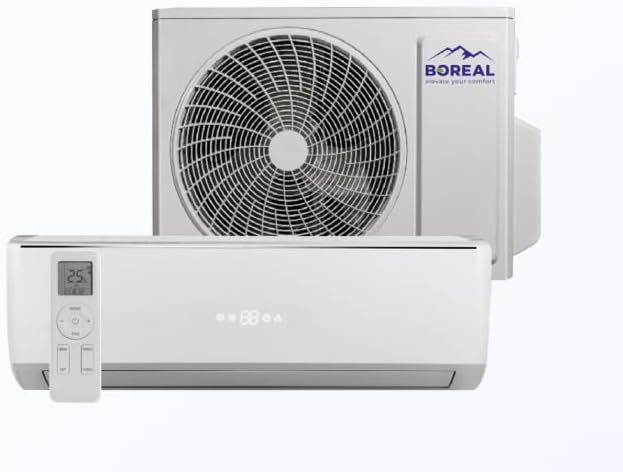
Figure 3.1: Overview of the BOREAL Kula Mini Split Air Conditioner System, showing both the indoor air handler and the outdoor condenser unit, along with the remote control.

Figure 3.2: The indoor air handler unit of the BOREAL Kula system, featuring a digital display and accompanied by its remote control.

Figure 3.3: The outdoor condenser unit of the BOREAL Kula Mini Split System, featuring the fan grille and BOREAL branding.
4. Setup and Installation
The BOREAL Kula Mini Split System requires professional installation due to its electrical and refrigerant connections. Attempting self-installation may void your warranty and pose safety risks.
4.1. Pre-Installation Checks
- Verify power supply (230V) and dedicated circuit availability.
- Ensure adequate space for both indoor and outdoor units, allowing for proper airflow and maintenance access.
- Confirm the 16ft lineset length is sufficient for your desired unit placement.
4.2. Professional Installation Steps (Overview)
- Mounting the indoor unit securely on an interior wall.
- Mounting the outdoor unit on a stable, level surface, ensuring proper drainage.
- Connecting the refrigerant lines and electrical wiring between the indoor and outdoor units using the provided 16ft lineset.
- Evacuating the refrigerant lines to remove air and moisture.
- Checking for leaks and charging the system if necessary.
- Connecting the unit to the 230V power supply.
- Testing the system's operation in all modes.
5. Operating Instructions
The BOREAL Kula system is operated primarily via the included remote control. The indoor unit features a digital LED display panel for easy temperature adjustments and mode selection.
5.1. Remote Control Functions
- Power Button: Turns the unit ON/OFF.
- Mode Button: Cycles through operating modes:
- Cool: For cooling the room.
- Heat: For heating the room.
- Fan: Circulates air without heating or cooling.
- Dry: Dehumidifies the air.
- Auto: Automatically selects mode based on room temperature.
- Temperature Adjustment Buttons (▲/▼): Increases or decreases the set temperature.
- Fan Speed Button: Adjusts fan speed (Auto, Low, Medium, High).
- Swing Button: Controls the louver's vertical swing for optimal air distribution.
- Sleep Mode: Adjusts temperature for comfortable sleep and energy saving.
- Timer Function: Sets the unit to turn ON/OFF automatically after a set period.
5.2. General Operation Tips
- For optimal efficiency, keep doors and windows closed when the unit is operating in Cool or Heat mode.
- Set the temperature to a comfortable yet energy-efficient level.
- Utilize the timer function to program operation according to your schedule.
- The advanced fan design ensures whisper-quiet performance.
6. Maintenance
Regular maintenance ensures the longevity and efficient operation of your BOREAL Kula system. Always turn off the power supply to the unit before performing any maintenance.
6.1. Air Filter Cleaning (Indoor Unit)
- Frequency: Clean every 2-4 weeks, or more often if used frequently or in dusty environments.
- Steps:
- Open the front panel of the indoor unit.
- Remove the air filters.
- Clean filters with a vacuum cleaner or wash with lukewarm water and mild detergent.
- Rinse thoroughly and allow to air dry completely before reinserting.
- Close the front panel.
6.2. Outdoor Unit Cleaning
- Frequency: Annually, or as needed.
- Steps:
- Ensure power to the outdoor unit is OFF.
- Remove any debris (leaves, dirt, etc.) from around the unit.
- Gently clean the condenser coils with a soft brush or low-pressure water spray. Avoid bending the fins.
- Ensure proper drainage around the unit.
6.3. Professional Servicing
It is recommended to have a qualified HVAC technician perform a comprehensive service check annually to ensure optimal performance and identify any potential issues.
7. Troubleshooting
Before contacting customer support, please refer to the following common issues and their solutions:
| Problem | Possible Cause | Solution |
|---|---|---|
| Unit does not turn ON. | No power supply; remote control batteries dead. | Check circuit breaker; replace remote batteries. |
| Insufficient cooling/heating. | Dirty air filters; blocked outdoor unit; incorrect mode/temperature setting; low refrigerant. | Clean filters; clear obstructions; adjust settings; contact professional for refrigerant check. |
| Unusual noise from unit. | Loose parts; fan obstruction; refrigerant flow noise (normal). | Check for loose panels; clear obstructions; if persistent or loud, contact professional. |
| Water leaking from indoor unit. | Clogged drain line; improper installation. | Contact professional for drain line clearing and inspection. |
If the problem persists after attempting these solutions, please contact a qualified service technician.
8. Technical Specifications
| Specification | Value |
|---|---|
| Model Number | Kula-18000 |
| Capacity | 18,000 BTU (1.5 Tons) |
| SEER2 Rating | 23.5 |
| Voltage | 230 Volts |
| Noise Level (Outdoor Unit) | 52 dB |
| Recommended Floor Area | Up to 750 Square Feet |
| Indoor Unit Dimensions (D x W x H) | 7"D x 32"W x 11"H |
| Outdoor Unit Weight | 21 pounds (Note: This value from product data may refer to a component, not the full outdoor unit.) |
| Country of Origin | China |
| Special Features | Heating & Cooling Function, Digital LED Display, Remote Control |
9. Warranty and Support
For warranty information, please refer to the documentation provided with your purchase or contact the manufacturer directly. The product is backed by GREE, a reputable brand in HVAC solutions.
For technical support, service, or to inquire about protection plans, please contact your authorized dealer or the manufacturer's customer service. Ensure you have your model number (Kula-18000) and purchase details ready.
Protection plans are available for extended coverage, such as the 3-Year Protection Plan. Please consult your retailer for details.
Related documentsKula-18000


Ask a question about this manual
Ask about setup, troubleshooting, compatibility, parts, safety, or missing instructions. Manuals+ will review the question and use this page’s manual context to help answer it.